
DLT error code 642 means two different things depending on the operator. At Jio, 642 means the template type does not match the type of SMS it was sent as, for example a promotional template used for a service message. At SmartPing, 642 is a CTA error: a link, phone number or email in the SMS failed the whitelist check.
This page explains both meanings, the related codes at Airtel, Jio and SmartPing, and how to fix each one in Fast2SMS.
Error 642 and related codes by operator
| Problem | Jio | SmartPing | Airtel |
|---|---|---|---|
| Template type does not match the type of SMS | 642, 648, 649 | 5305 | 687 |
| Sender ID type does not match the type of SMS | 628 | – | 683 |
| Numeric header not allowed for this SMS | 624 | – | – |
| Alphabetic header used for a promotional SMS | – | 5206 | – |
| CTA error (link, phone or email) | 680, 681, 682 | 642, 700, 701, 702 | 700 to 703 |
Jio 642: template type mismatch
Every DLT template has a category. In simple terms there are two kinds:
- Service Implicit (transactional and service): OTPs, order updates, payment alerts, reminders. These go out from your alphabetic header and reach DND numbers.
- Service Explicit or Promotional: offers, sales and other marketing, or messages sent with the customer’s explicit consent. Promotional SMS go out from a 6-digit numeric header, only between 10 AM and 9 PM, and do not reach DND numbers unless the customer gave consent.
Error 642 at Jio, and the similar codes in the table, appear when these do not line up. Common causes:
- the template was added in Fast2SMS with the wrong Template Type, so it is sent as the wrong kind of SMS,
- an offer template is sent from an alphabetic service header, or a service template from a numeric header,
- the category on your DLT portal is different from what you expected when you registered it.
How to fix a template type mismatch in Fast2SMS
-
Check the type on the template card
Go to DLT Manager > Content Template and find the template. The card shows a Service or Promo badge, the Sender ID and the Template ID. Compare this with the category shown for the same template on your DLT portal.
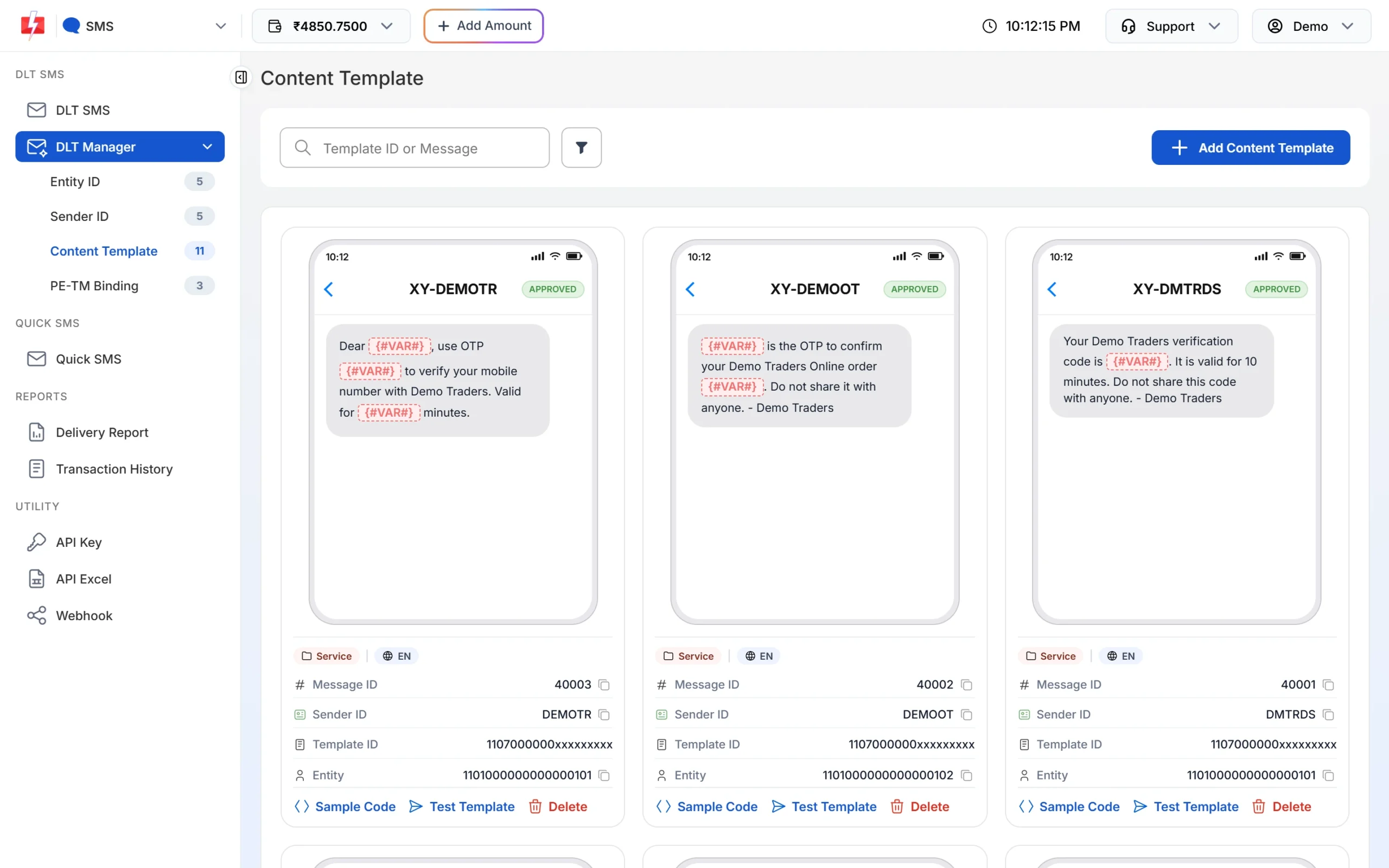
The badge under each card shows the template type in Fast2SMS. -
Add the template again with the right Template Type
If the type in Fast2SMS is wrong, delete the template and click Add Content Template. Pick the entity and Sender ID, paste the Template ID, choose Service Implicit or Service Explicit or Promotional to match your DLT portal, paste the approved text, upload the DLT screenshot and click Submit. If you pick a 6-digit numeric sender, Fast2SMS sets the template as promotional automatically.
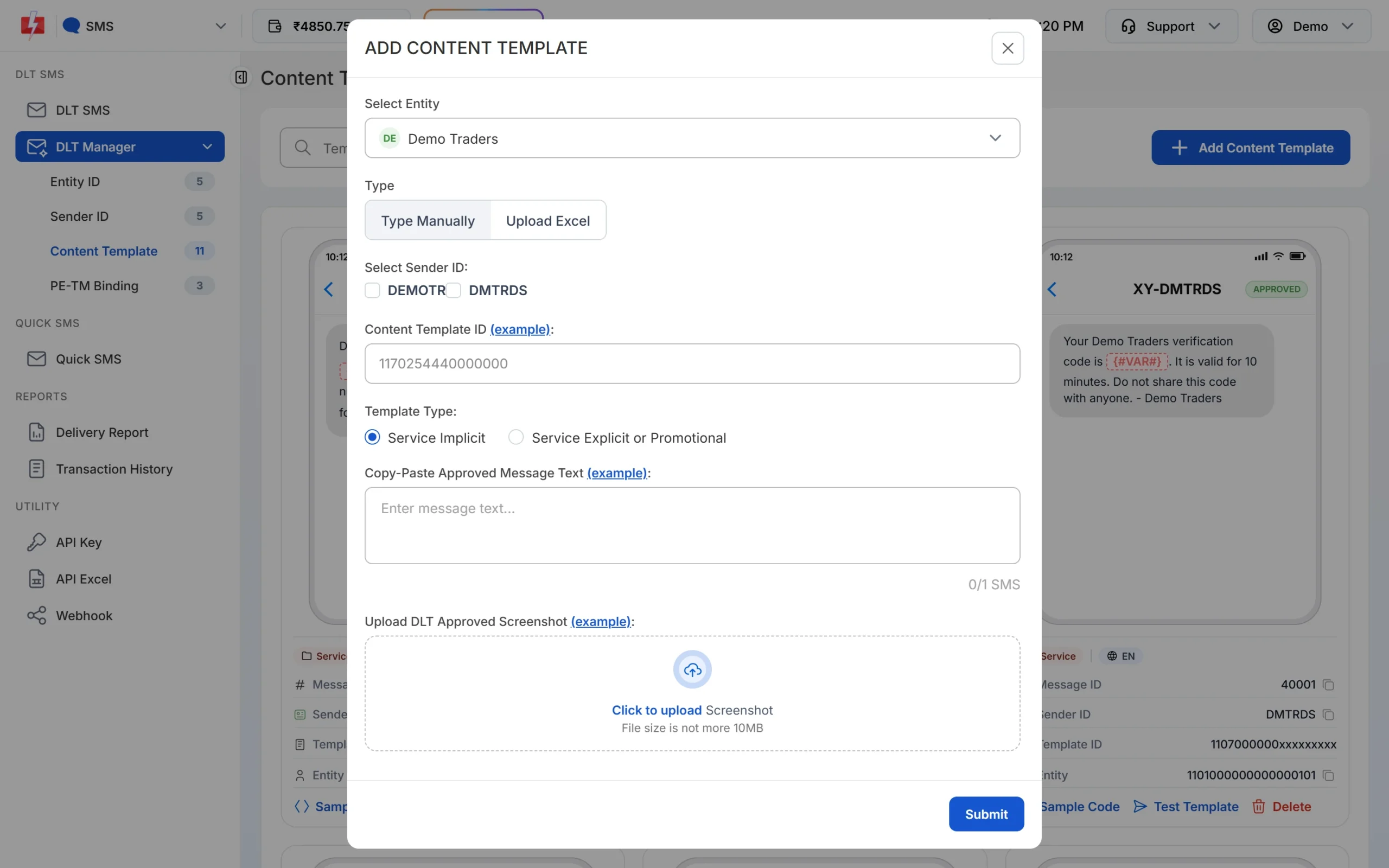
Choose the Template Type that matches your DLT portal. -
Send from the right header
Send offers from your numeric promotional header and service messages from your alphabetic header. If the category on your DLT portal is itself wrong, register a new template with the right category there, then add it in Fast2SMS.
SmartPing 642: CTA error
A CTA (call to action) is a link, phone number or email inside your SMS. Under DLT rules, these must be whitelisted on your DLT portal before you send them. At SmartPing, 642 means a CTA in your SMS failed this check. To fix it:
- whitelist every link, phone number and email you send on your DLT portal,
- send the link exactly as whitelisted, without changing the domain,
- put links only where your template has a variable for them.
The error 701 guide covers link (URL) errors in more detail.
Frequently asked questions
What does DLT error code 642 mean?
At Jio it means the template type does not match the type of SMS sent. At SmartPing it means a link, phone number or email in the SMS failed the CTA check.
What is TEMPLATETYPE_AND_ACCOUNTTYPE_MISMATCH?
It is Jio’s name for error 642. The template’s category (promotional or service) does not match the kind of SMS it was sent as.
Can I send an offer on a transactional template?
No. Offers must go on promotional or Service Explicit templates. Putting offers in a service template can get the template or header blocked.
How do I change a template’s type?
If the category is wrong on your DLT portal, register a new template there with the right category. If it is only wrong in Fast2SMS, delete the template in DLT Manager and add it again with the right Template Type.
Are SMS that fail with 642 refunded?
No. DLT SMS are charged when the campaign is created, and numbers that fail at the operator are not refunded automatically.