
Skip to content
Fast2SMS Help Center
API Docs Contact Us Sign up free

How to download your Fast2SMS GST invoice

To download your Fast2SMS GST invoice, open Transaction History, click Invoices and press the Invoice button next to the recharge. The invoice downloads as a PDF. You can also download it from the payment success page right after a recharge, and it is emailed to you if your email is verified.

GST invoice for every recharge

Every wallet recharge in Fast2SMS comes with a downloadable GST invoice.

Sign up free →Book a free meeting

How to download an invoice

  1. Open the Invoices tab

    On the dashboard, click Transaction History, then Invoices in the left menu. The list opens on the last 3 months and shows each recharge with its Trans. ID, amount and date.
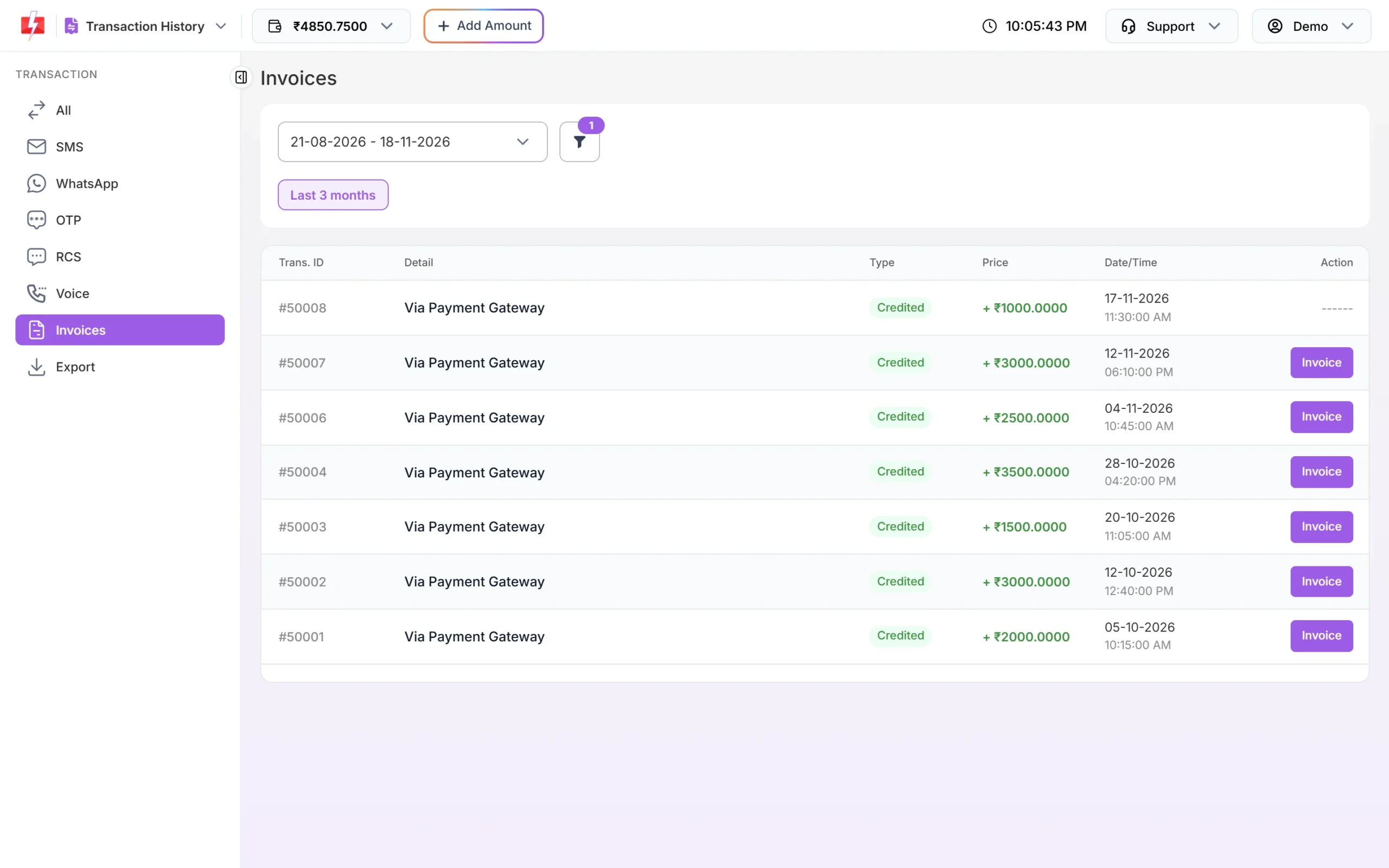
    Transaction History Invoices tab for the last 3 months listing Via Payment Gateway recharges with purple Invoice buttons, and one recent recharge showing ------
    Click Invoice on the recharge you need.
  2. Change the dates for older invoices

    Click the date box and pick a range, or Custom Date. The filter also has an Invoice Status tab: Approved invoices can be downloaded, Pending ones are still being prepared.
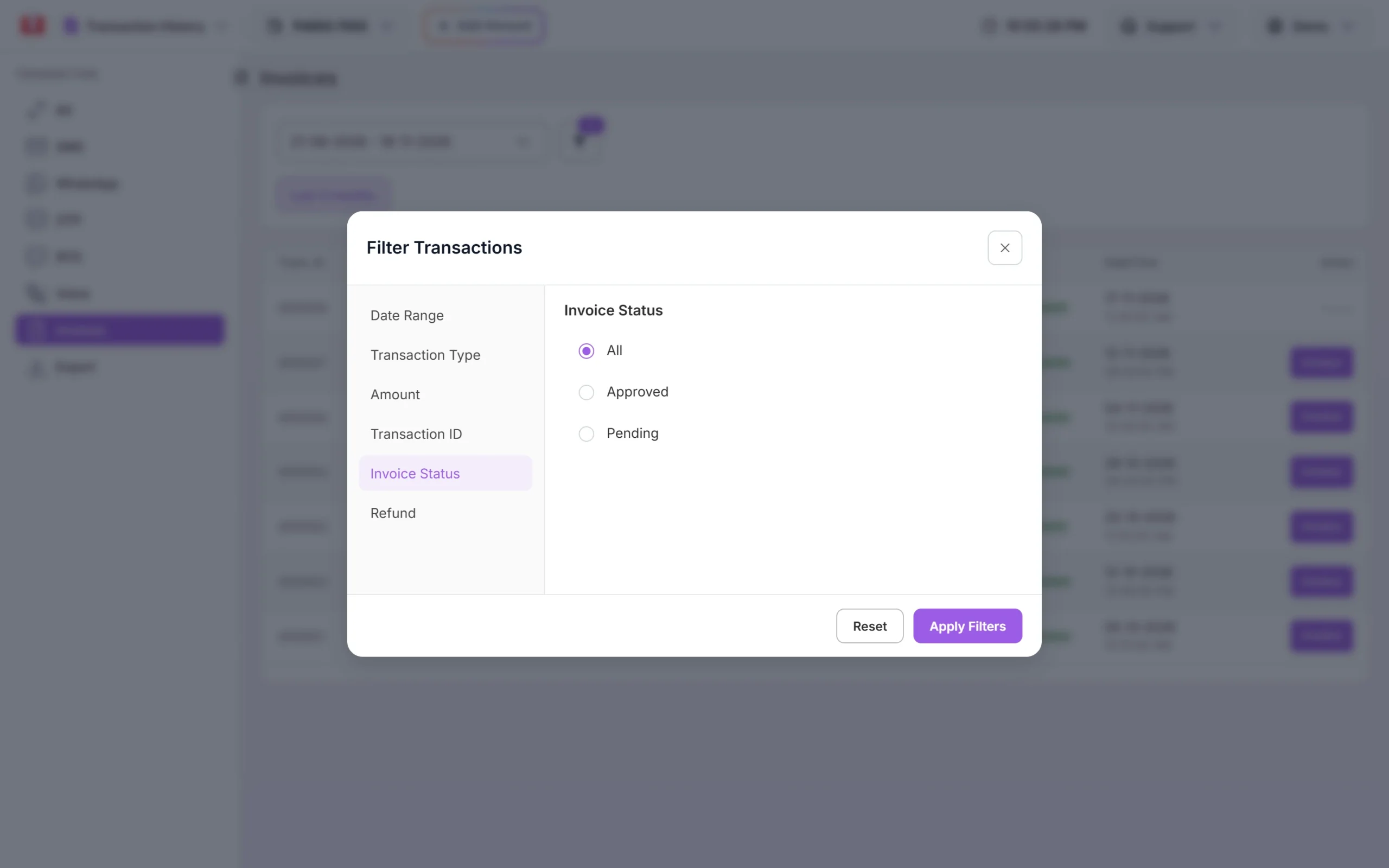
    Filter Transactions popup on the Invoice Status tab with options All, Approved and Pending
    Filter by Invoice Status to find pending invoices.
  3. Click Invoice

    The PDF downloads with a name like “Fast2SMS Invoice – <invoice number>.pdf”.

Download right after paying

After a successful recharge, the Payment successful page has a Download Invoice button.
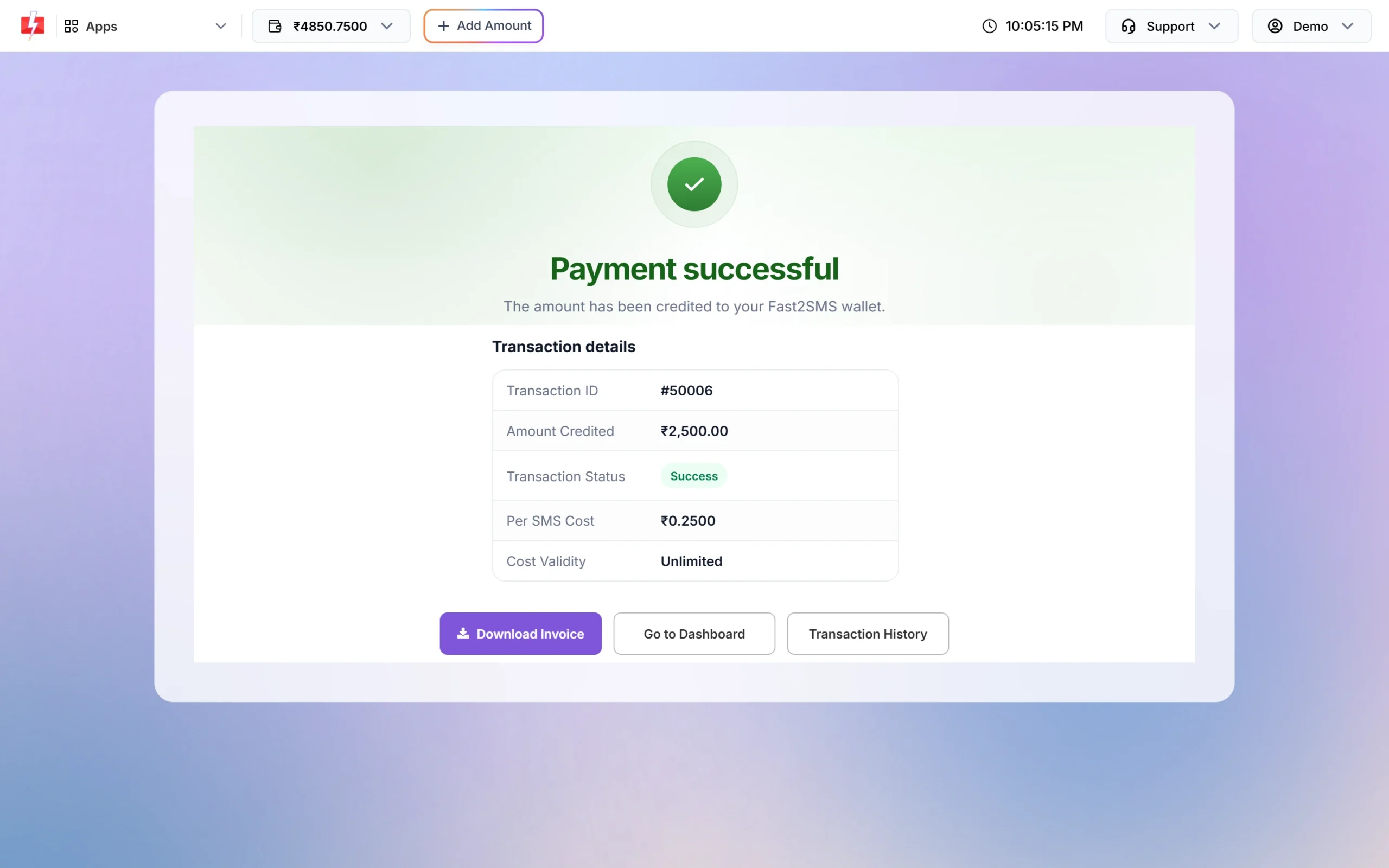
Payment successful page with transaction details and buttons Download Invoice, Go to Dashboard and Transaction History
Download Invoice on the payment success page.

What the invoice shows

  • Invoice number and date.
  • Your name or company, email, mobile, GSTIN (if saved) and billing address.
  • Line item “Prepaid Bulk SMS” with HSN 998413, and the recharge amount as the taxable value.
  • GST: CGST 9% + SGST 9% if your billing state is Madhya Pradesh, otherwise IGST 18%.
  • For invoices with a GSTIN: the IRN and e-invoice QR code.

Invoice shows “——” instead of a button

For a recharge with a GST number, an e-invoice is created first. Until it is ready, the Action column shows “——” and the Invoice Status is Pending. Check again later. Recharges without a GST number can be downloaded straight away.

Add your GST number

Save your GSTIN in Billing Address so your next invoice carries it.

Sign up free →Book a free meeting

Frequently asked questions

Why does my invoice show IGST and not CGST and SGST?

CGST and SGST apply only when your billing state is Madhya Pradesh. Every other state gets IGST 18%.

Is the invoice emailed to me?

Yes, if your email is verified. Check that it shows Verified in Personal Detail.

Can team members download invoices?

No. Transaction History opens only for the account owner.

Can I get one invoice for a whole month?

Each recharge has its own invoice. For a monthly view, export your transactions from Transaction History > Export.

How do I change the GST number on my invoice?

Change it in Billing Address. It applies to future recharges; old invoices keep their details.

Recharge your wallet

Add money to Fast2SMS and download your GST invoice in one click.

Sign up free →Book a free meeting

Related guides

  • How to add money to your Fast2SMS wallet (recharge, GST and invoice)
  • How to add or change your GST number and company name in Fast2SMS
  • Transaction history in Fast2SMS: recharges, charges and exports
  • How long does a refund take in Fast2SMS?

Related articles

  • Why was I logged out of Fast2SMS?
  • WhatsApp Business API login: where the owner and team log in
  • Is Fast2SMS safe and legit? Company details, DLT registration and security
  • Fast2SMS free SMS: what is free and what needs a recharge

    New to Fast2SMS?

    Get ₹50 free credit when you sign up.

    Sign up free or book a free meeting

    Topics

    • Bulk SMS
    • WhatsApp
    • OTP
    • RCS
    • Voice Call
    • DLT
    • Delivery Report
    • Transaction
    • Address Book
    • Webhooks

    On this page

    1. How to download an invoice
    2. Download right after paying
    3. What the invoice shows
    4. Invoice shows “——” instead of a button
    5. Frequently asked questions
    6. Related guides
    Sign up free

    Products

    • Bulk SMS Service
    • WhatsApp Business API
    • OTP SMS
    • RCS Messaging
    • Voice Call (OBD)
    • Cloud Telephony
    • Quick SMS without DLT
    • Campaign Flow Builder
    • Integrations

    Pricing

    • Bulk SMS Pricing
    • WhatsApp Pricing
    • RCS Pricing
    • Voice Call Pricing
    • Cloud Telephony Pricing

    Guides

    • How to send bulk SMS in India
    • Send bulk WhatsApp messages
    • Official WhatsApp Business API
    • WhatsApp OTP API
    • RCS business messaging
    • Bulk voice call service
    • WooCommerce SMS & WhatsApp plugin
    • Shopify SMS & WhatsApp app
    • DLT Registration

    Bulk SMS for

    • Bulk SMS API
    • OTP SMS provider in India
    • Bulk SMS for marketing
    • Bulk SMS for E-commerce
    • Bulk SMS for Schools
    • Bulk SMS for Hospitals
    • Bulk SMS for Real Estate
    • Bulk SMS in Delhi
    • Bulk SMS in Mumbai

    Company

    • About Us
    • Why Fast2SMS
    • Certificates
    • SMS Reseller
    • Contact Us
    • API Docs
    • Sitemap
    Fast2SMS [email protected] +91 6262778822

    Social links

    Meta Business Partner
    © 2026 Fast2SMS. All rights reserved. Privacy Policy · Terms · Article sitemap · Page sitemap