
On the WhatsApp Business API, limits start at the tier Meta gives your business: often 250 unique customers in any 24 hours for a new, unverified business and 2,000 (2K) once the business is verified (at the time of writing). Meta raises that to 10,000, 100,000 and then Unlimited as you send good-quality messages. Replies to customers who wrote to you in the last 24 hours do not count. On the normal WhatsApp or WhatsApp Business app there is no published daily number, but the app is not meant for bulk sending, and a broadcast list holds only 256 contacts.
WhatsApp Business API: daily messaging limit
| Messaging limit | Unique customers per 24 hours |
|---|---|
| New, unverified business (often the starting tier) | 250 |
| Verified business | 2,000 (2K) |
| Next step | 10,000 |
| Next step | 100,000 |
| Top tier | Unlimited |
Tiers are set by Meta and can change, so treat them as correct at the time of writing. Three things to know about how the limit is counted:
- It counts people, not messages. Two templates to the same customer in a day use one slot.
- It is a moving 24 hours, not a calendar day.
- It counts only conversations you start. When a customer writes to you, your replies in the next 24 hours do not use the limit.
Meta moves you up one step when your quality is good and you have used a good part of your current limit in recent days. Regular campaigns to people who want your messages are the fastest way up. Meta also stops too many messages to the same person in a short time, so do not send one customer message after message.
Where to see your limit in Fast2SMS
Open Bulk WhatsApp and click Select Sender Number. Each connected number shows its limit and how many messages it has sent today, for example “Limit: 2k/24 hr | Used Limit: 26”. The same details, with the quality rating, are in WhatsApp Manager > Numbers.
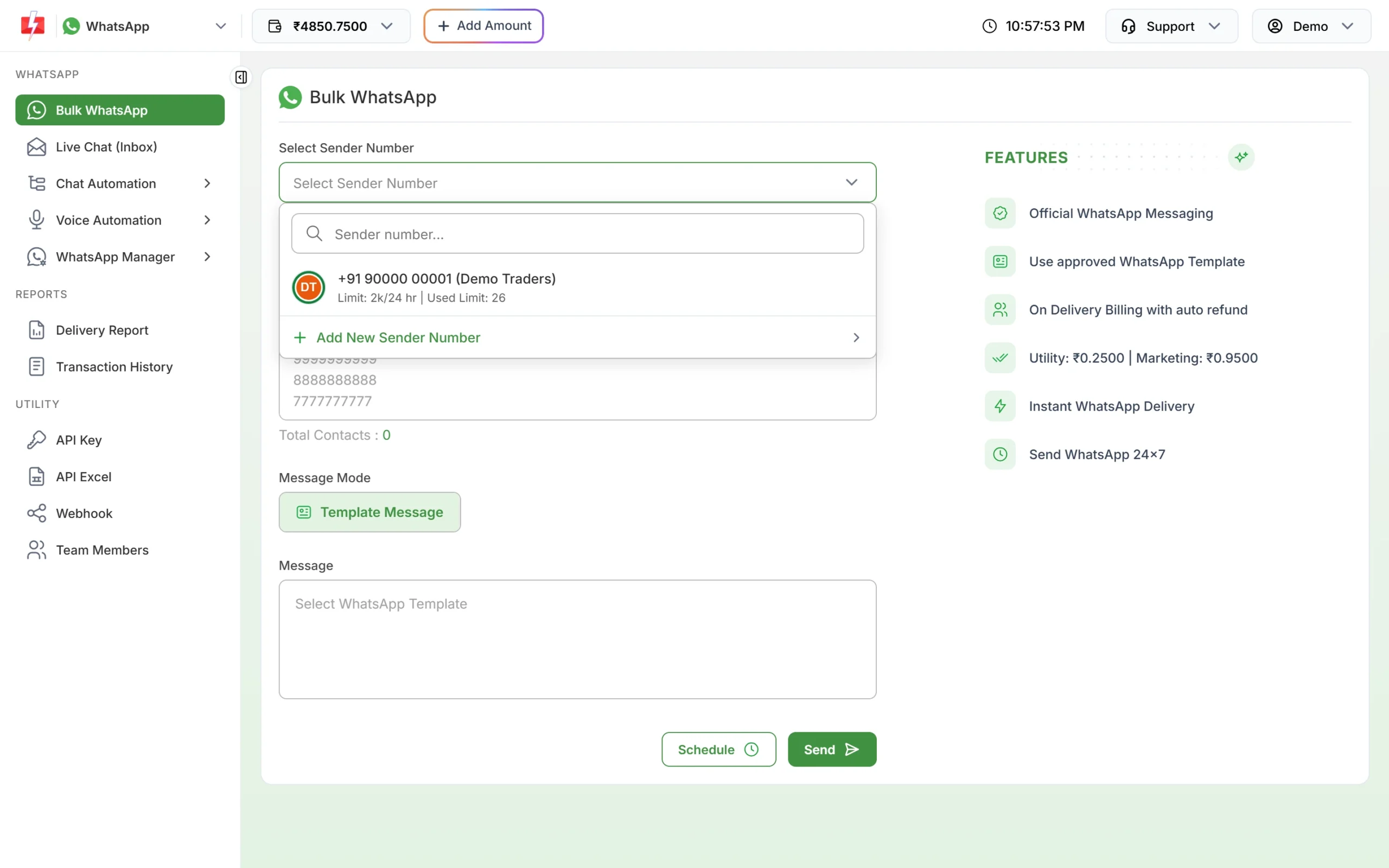
“Used Limit” counts messages sent from that number today, while Meta counts unique customers over a moving 24 hours, so the two can differ slightly.
WhatsApp and WhatsApp Business app: what limits apply
- Broadcast lists: up to 256 contacts per list, and only people who saved your number receive the message.
- Forwarding: a message can be forwarded to a few chats at a time, and frequently forwarded messages to one chat at a time.
- No safe daily number: WhatsApp’s terms do not allow bulk or automated messaging from the app. Sending hundreds of messages a day to people who do not know you is how numbers get banned.
Frequently asked questions
Can I send 1,000 WhatsApp messages a day?
Yes, on the WhatsApp Business API once your limit is 2K or higher. A verified business starts at 2,000 (2K) unique customers in 24 hours; a new, unverified business often starts at 250 (at the time of writing).
How do I increase my WhatsApp messaging limit?
Send good-quality messages to opted-in customers regularly. Meta raises the limit one step at a time when quality is high and you use a good part of your current limit.
What happens if I send more than my limit?
Messages to new customers beyond the limit may not be delivered. Split large lists across days, or wait until your limit grows.
Do replies to customers count towards the limit?
No. Replies within 24 hours of the customer’s last message do not count.