
Multi-channel OTP means one OTP request can reach the user on more than one channel. In Fast2SMS Smart OTP, each OTP template has a primary channel (SMS or WhatsApp) and an optional fallback on the other channel. If the first attempt fails, the same code goes out on the fallback, with no second API call from you. This page explains the fallback order, the exact rules, how it is charged and how to see it in reports.
The fallback order
You choose the order per template. There are two options:
| Order | First attempt | If it fails | Good for |
|---|---|---|---|
| SMS first | SMS with your DLT template | WhatsApp with your Authentication or Utility template | Login, payment, password reset, users without WhatsApp |
| WhatsApp first | WhatsApp template | SMS with your DLT template | Users who already chat with you on WhatsApp, delivery OTPs |
The OTP ID decides the order. Your Send OTP call is the same either way, and the user verifies with one Verify OTP call whichever channel delivered the code.
The rules, exactly
- Only on failure. The fallback is sent when the first attempt is reported as failed. A message still showing Sent or Pending does not trigger it.
- Only within 120 seconds. The failure must come in within 120 seconds of the original send. Fast2SMS checks for failed OTPs every minute.
- Once. Each OTP gets at most one fallback.
- Same code. The fallback carries the same OTP, so either message works.
- Connected number. A WhatsApp fallback needs the WhatsApp number to be connected.
- Charged. The fallback is charged at its channel’s rate. If the wallet is too low, it is skipped.
Set up multi-channel OTP
-
Add the fallback when you create the template
In Add OTP Template, after choosing the primary template and its OTP variable, tick SET FALLBACK TEMPLATE. For an SMS template, pick the fallback WhatsApp number and template. For a WhatsApp template, pick the fallback entity, sender and DLT template. Choose the OTP variable for the fallback too.
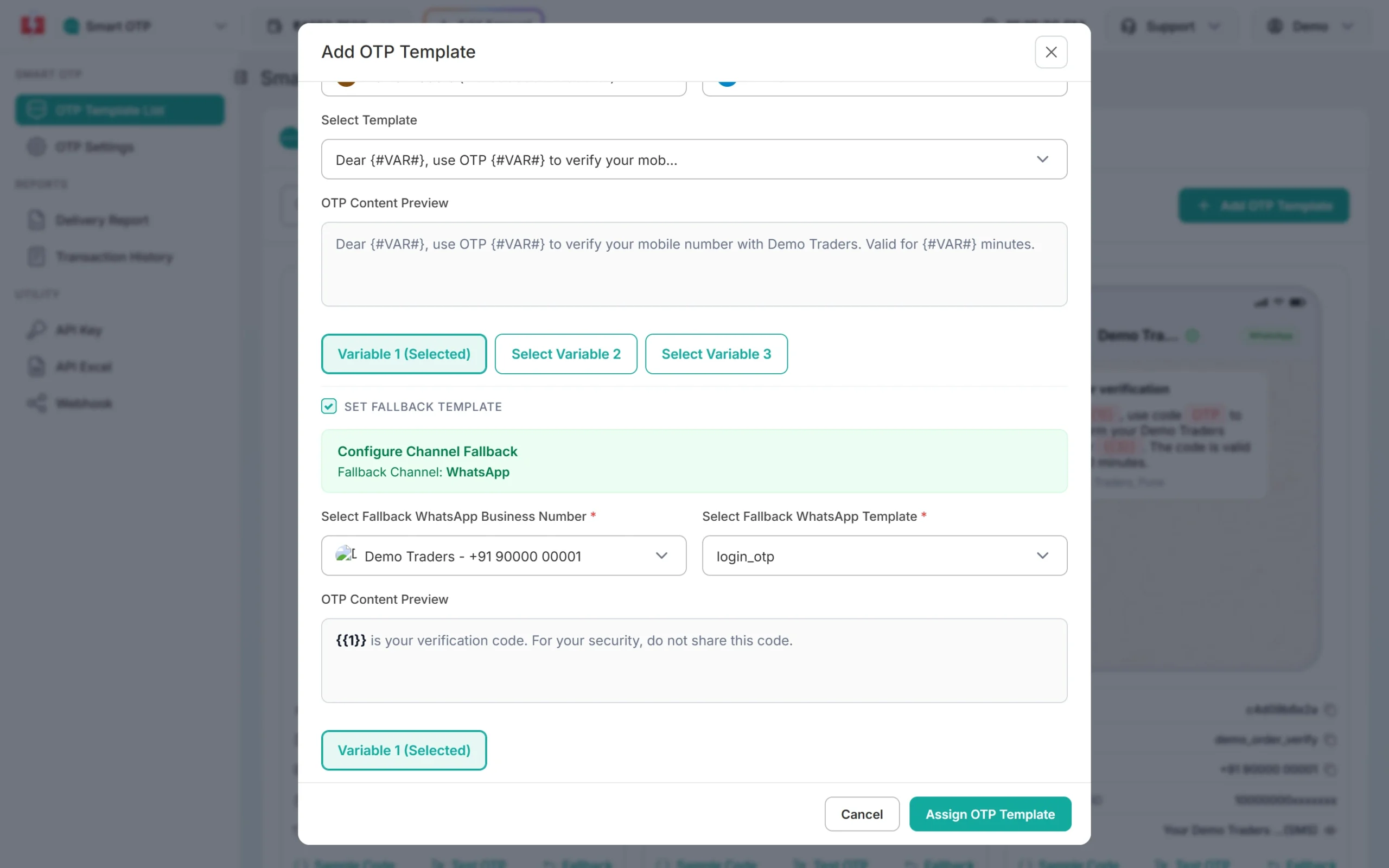
An SMS OTP with a WhatsApp fallback. -
Or add it later with the Fallback button
On any template card, click Fallback. The Configure Channel Fallback window shows the current OTP ID. Tick SET FALLBACK TEMPLATE, choose the fallback template and save. To remove a fallback, untick the box and save.
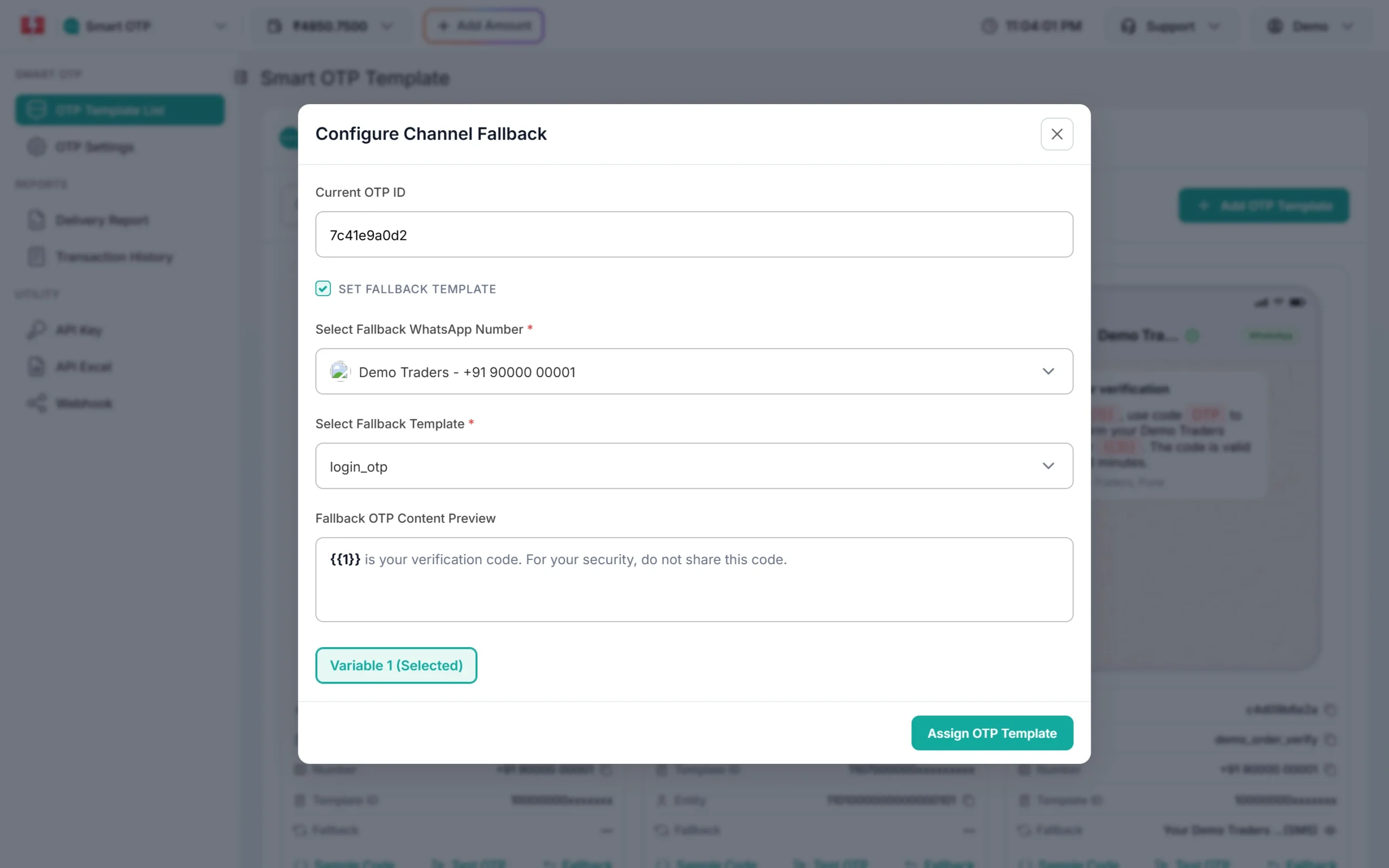
Change or remove the fallback at any time. -
See the fallback in the OTP report
Open Delivery Report and click the request. A fallback shows as a second receiver row under the same request ID, with its own channel badge.
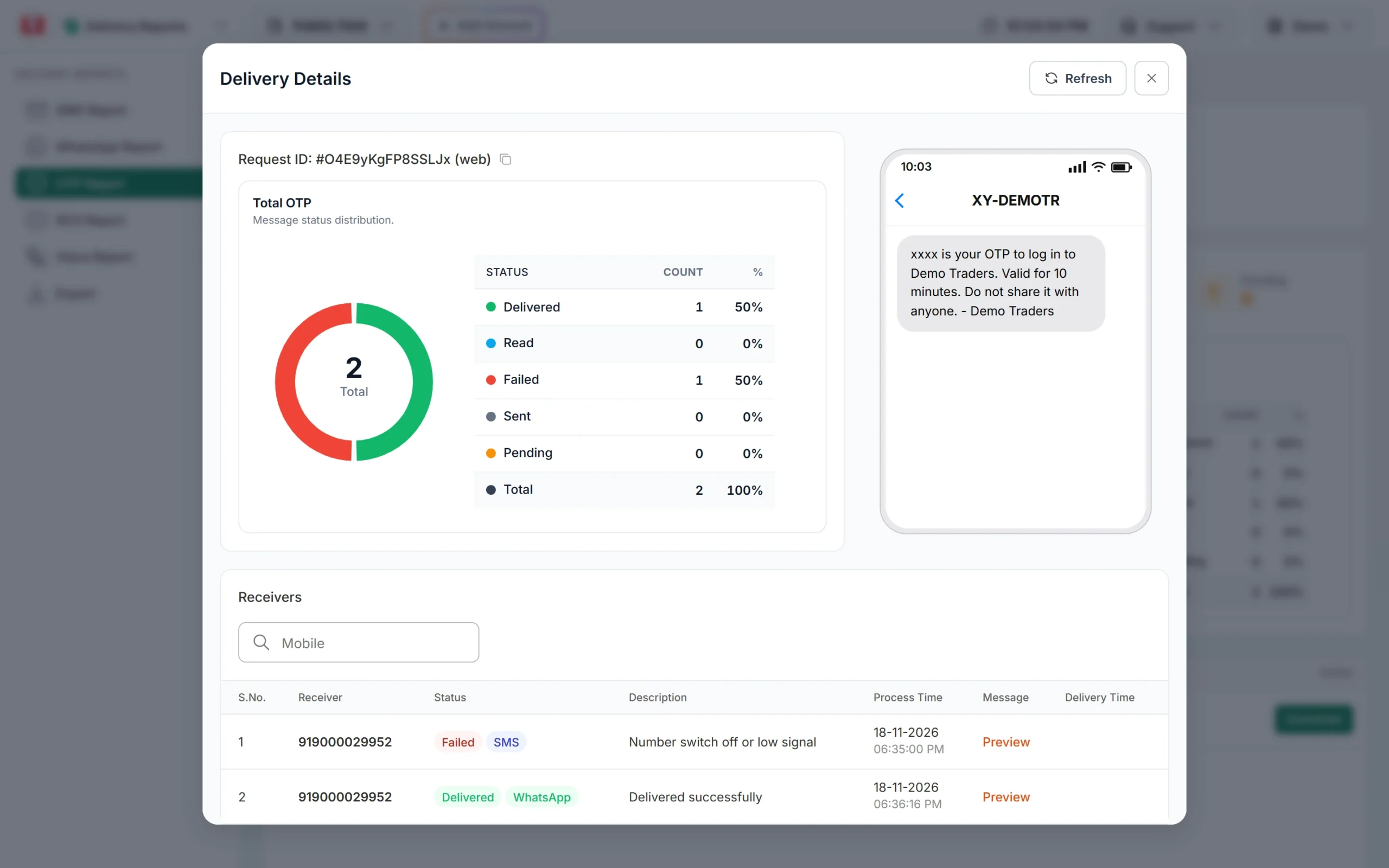
Two rows, one request ID: SMS failed, WhatsApp delivered.
How fallback is charged
Each attempt is charged at the rate of the channel that carried it, and each one is its own line in Transaction History. A fallback line reads like “Smart OTP (SMS-Fallback: …)”. At the time of writing, SMS is ₹0.25 down to ₹0.11 per SMS by recharge slab, and WhatsApp authentication is ₹0.25. Failed WhatsApp messages are refunded to your wallet. See the OTP SMS page for current rates.
Sending in bulk? For high OTP volumes our team offers discounted rates. Talk to our team or see OTP pricing.
What fallback does not cover
- An SMS that stays in Sent because the operator never returns a report. Give users a “Resend OTP” button for this case.
- Failures reported after 120 seconds.
- OTPs refused by the API before sending, such as an invalid OTP ID or a resend wait. Those never reach either channel. Check API Logs.
Frequently asked questions
What is multi-channel OTP?
An OTP service that can deliver the code on more than one channel. In Smart OTP, SMS and WhatsApp, with automatic fallback from one to the other.
Do I need to call the API twice for fallback?
No. You call Send OTP once. Fast2SMS sends the fallback on its own.
Does the user get two different codes?
No. The fallback has the same code. The user can type it from either message.
Can I send on both channels at the same time?
Smart OTP sends the fallback only after a failure. It does not send on both channels together.
Can voice or email be a fallback?
Smart OTP fallback works between SMS and WhatsApp.
Why did my fallback not send?
The first attempt must be reported as failed within 120 seconds, the template must have a fallback, a WhatsApp fallback number must be connected, and the wallet must have balance.