
This guide adds OTP verification to a site hosted on Vercel or Netlify, using a serverless function as the backend. One kit folder deploys on either platform and serves POST /api/f2s-otp. The function keeps your Fast2SMS API key in the platform’s environment variables and calls Smart OTP; your pages load the widget and call the function. Visitors verify by SMS or WhatsApp.
Download the Vercel and Netlify OTP widget kit (zip)Download .zip
Before you start
- A Fast2SMS account with wallet balance, and an approved DLT OTP template (SMS) or WhatsApp Authentication/Utility template.
- A Vercel or Netlify account.
- Recommended: an Upstash Redis database (or Vercel KV), so the send limits are shared across function instances.
Set up the function and the widget
-
Create a Smart OTP template and copy its OTP ID
In the panel, open Smart OTP > OTP Template List and click Add OTP Template. On the SMS Channel tab, pick your DLT entity, sender and approved OTP template, then click the variable that should carry the code. For WhatsApp, use the WhatsApp Channel tab with an approved Authentication or Utility template. Tick SET FALLBACK TEMPLATE if you want the other channel as a backup, then click Assign OTP Template.
Copy the 10-character OTP ID from the new card. It decides the channel, the template and the fallback for every code the widget sends.
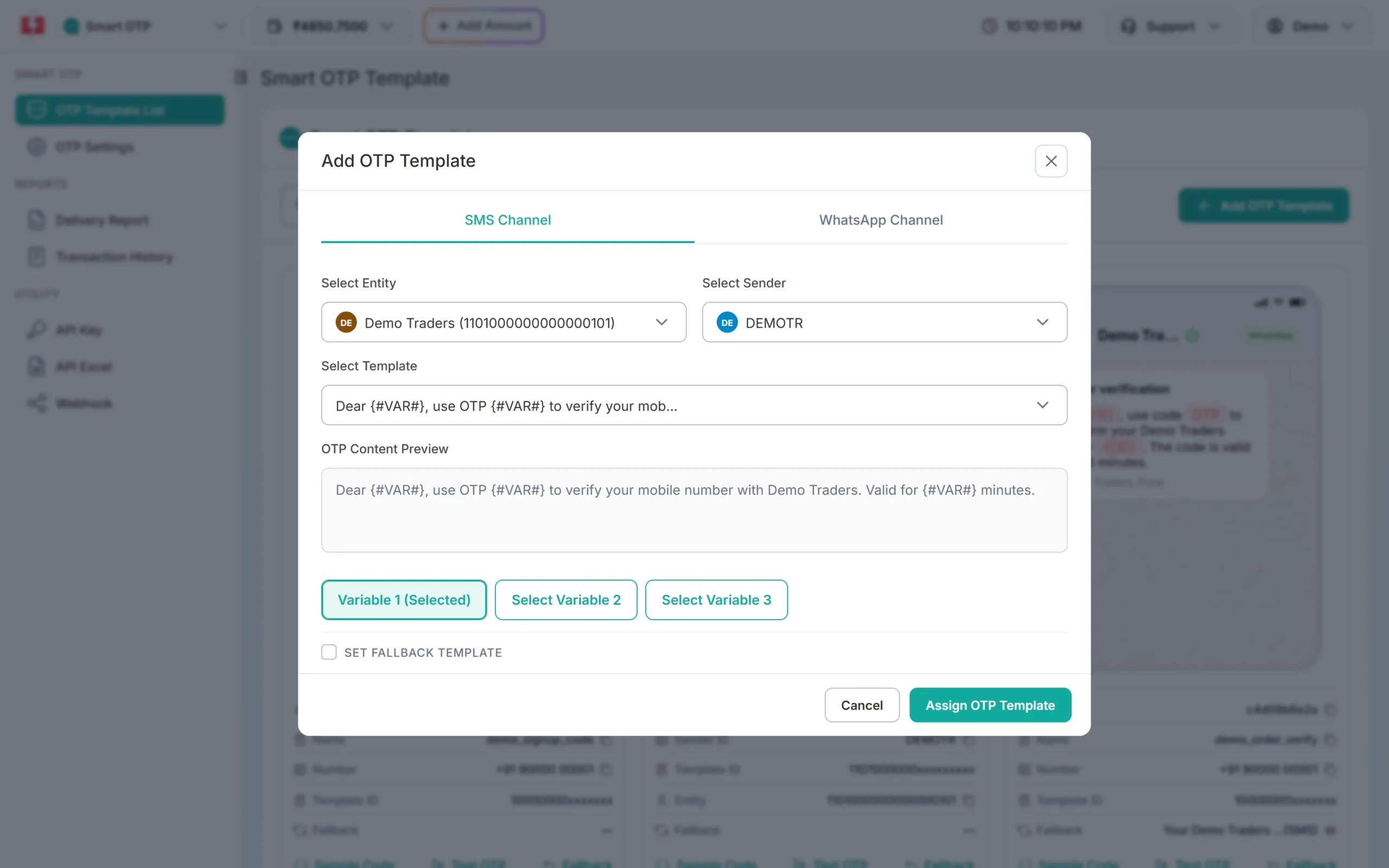
Pick the entity, sender and DLT template, then the variable that carries the OTP. -
Copy your API key
Under Utility in the left menu, click API Key. Click View (the panel first asks for an OTP sent to your registered mobile) and copy the Authorization Key. Check that API Access is switched on. This key will live only in your backend’s settings, never in a page or an app.
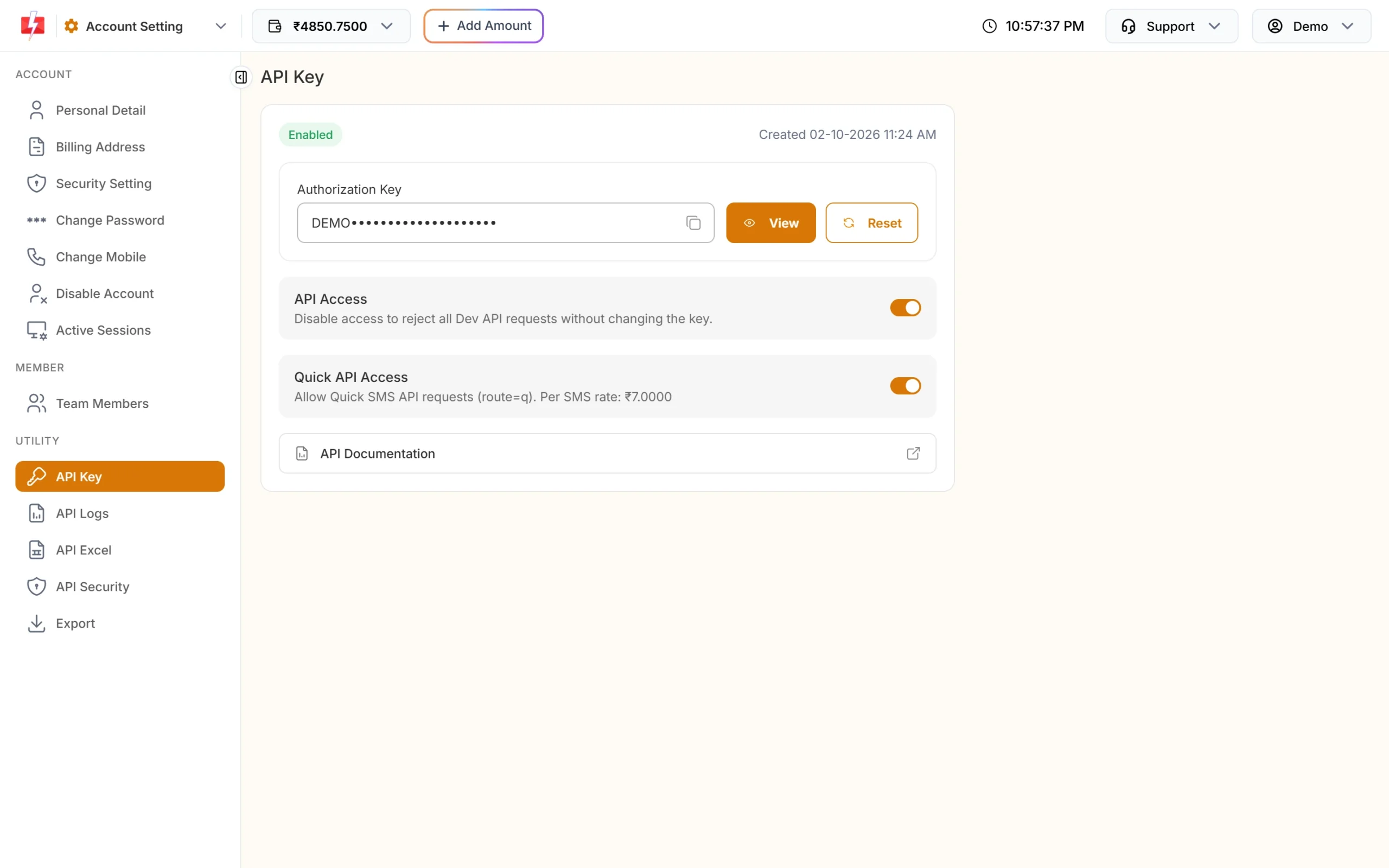
Copy the Authorization Key. API Access must be on. -
Add the environment variables
In the Vercel or Netlify dashboard, open your project’s Settings > Environment Variables and add:
FAST2SMS_API_KEY=YOUR_API_KEY
F2S_OTP_ID=YOUR_OTP_ID
F2S_TOKEN_SECRET=at-least-32-random-characters
# recommended, so limits are shared across function instances
UPSTASH_REDIS_REST_URL=
UPSTASH_REDIS_REST_TOKEN=
Never use a
NEXT_PUBLIC_orVITE_name for these: such variables are copied into the browser bundle. For local tests only, copy.env.exampleto.envand keep it out of git. -
Deploy
Vercel: import the folder, or run
vercel deploy. The function isapi/f2s-otp.mjs.Netlify: import the folder, or run
netlify deploy. The function isnetlify/functions/f2s-otp.mjs, andnetlify.tomlpublishes thepublicfolder with the widget and a demo page. -
Add the widget to your pages
<script src="/f2s-otp-widget.min.js" defer></script>
<div data-f2s-otp data-endpoint="/api/f2s-otp"></div>
If the pages are on another domain than the function, use the full URL in
data-endpointand add that site toF2S_ALLOWED_ORIGINS. -
Check the token in your own function
Add
data-f2s-protect data-endpoint="/api/f2s-otp"to a form and the widget adds a hiddenf2s_tokenafter verification. Post the form to a function of yours that checks it, like the kit’sdemo-signup. This is the Vercel style:import { getEndpoint } from '../lib/endpoint.mjs'; export async function POST(request) { const form = await request.formData(); const v = await getEndpoint().verifyToken(form.get('f2s_token'), { mobile: form.get('phone') }); if (v === null) return new Response('Mobile number not verified.', { status: 403 }); // v.mobile is the verified 10-digit number. A token works only once. return new Response('Saved.'); }On Netlify, export a default function and a
configpath instead, as innetlify/functions/demo-signup.mjs.
Good to know
- Without Upstash, limits live in each instance’s memory, so they are best-effort: a new instance starts with fresh counters. Verify and resend still work without shared memory, because each send returns a signed ticket.
- Visitor IP: on Vercel it comes from
x-real-ip, on Netlify fromcontext.ip. LeaveF2S_TRUST_PROXYoff. - Next.js: the all-in-one kit has a Next.js App Router example whose route handler uses the same code as this kit. That example has not been run yet.
- API Security: serverless functions usually do not have one fixed outgoing IP address. If IP whitelisting is on in API Security, Fast2SMS may refuse the calls; check API Logs if sends fail.
Settings
| Setting | Required | Default | What it does |
|---|---|---|---|
FAST2SMS_API_KEY |
Yes | Your API key, the bare key (no Bearer) |
|
F2S_OTP_ID |
Yes | The 10-character OTP ID from the template card | |
F2S_TOKEN_SECRET |
Yes | 32 or more random characters; signs tickets and tokens | |
F2S_OTP_IDS |
No | More OTP IDs a page may pick with data-otp-id, comma separated |
|
F2S_ALLOWED_ORIGINS |
No | same site only | Other sites whose pages may call this backend |
F2S_RESEND_WAIT |
No | 30 | Seconds between sends to one number |
F2S_LIMIT_PER_NUMBER |
No | 5 | Sends per number per hour |
F2S_LIMIT_PER_IP |
No | 20 | Sends per IP address per hour |
F2S_MAX_VERIFY |
No | 5 | Wrong codes allowed per code |
F2S_TOKEN_TTL |
No | 600 | Seconds a verified token stays valid |
F2S_OTP_EXPIRY / F2S_OTP_LENGTH |
No | 15 min / 6 digits | Code expiry (1 to 10080 minutes) and length (4 to 10) |
F2S_CAPTCHA / F2S_CAPTCHA_SECRET |
No | off | turnstile or recaptcha, plus its secret key |
Sending, resending and cost
The function checks the page’s origin, the X-F2S-Widget header, the resend wait and the limits before every paid call, and it never retries a send that may have reached Fast2SMS. A new code for a number cancels the older one.
Resend sends the same code again, it does not make a new one. Fast2SMS allows it within 10 minutes of the first send, and up to 5 sends to one number in that time, counting the first.
Every send and every resend is charged at your Smart OTP rate, and a fallback message on the second channel is charged too. Verify is free. The Test OTP button on a template card is also a real, charged send. See the current rates on the OTP SMS page.
Sending in bulk? For high OTP volumes our team offers discounted rates. Talk to our team or see OTP pricing.
Common problems and fixes
| What you see | Why | Fix |
|---|---|---|
| Every request fails, the log lists settings | An environment variable is missing, or was added after the last deploy | Add FAST2SMS_API_KEY, F2S_OTP_ID and F2S_TOKEN_SECRET, then redeploy. |
“Could not reach the server.” or 404 on /api/f2s-otp |
The function did not deploy, or the path is different | Open the function URL and check the deploy log. |
| “We could not send the code right now.” | An account or setup problem. Your server log names it: failed reason=... |
invalid_otp_id: copy the OTP ID again, from the same account as the key. insufficient_balance: recharge with Add Amount. template_inactive: create a new OTP template. Auth error: check the key, switch on API Access, or whitelist the server IP in API Security. |
| “This page is not allowed to use this OTP service.” | The page is on another domain | Add its origin (https:// plus the domain, no path) to F2S_ALLOWED_ORIGINS. |
| “Please wait N seconds…” | The resend wait: the widget’s own, or Fast2SMS’s | Wait. Change F2S_RESEND_WAIT, or SMS Resend / Time Limit in OTP Settings. |
| “Too many requests” | The per-number or per-IP limit was hit | Wait an hour, or raise F2S_LIMIT_PER_NUMBER / F2S_LIMIT_PER_IP. |
| Your form handler says “not verified” | The token is missing, was used already, is older than 10 minutes, or is for another number | Verify again. Check the token once, when the form is submitted. |
Frequently asked questions
Does the same folder work on both Vercel and Netlify?
Yes. It has a Vercel function in api/ and a Netlify function in netlify/functions/. Both serve /api/f2s-otp with the same logic.
Do I need Upstash Redis?
It is optional but recommended. Without it, each function instance keeps its own counters, so the per-number and per-IP limits are only approximate.
Can I use the widget in a Next.js app on Vercel?
Yes. Use this kit’s function, or the Next.js example in the all-in-one kit, which has a route handler and a client component. The Next.js example has not been run yet.
Where does the API key go?
Only in the platform’s environment variables. Never in a NEXT_PUBLIC_ or VITE_ variable, a page or a committed file.
Where do I see if the OTP was delivered?
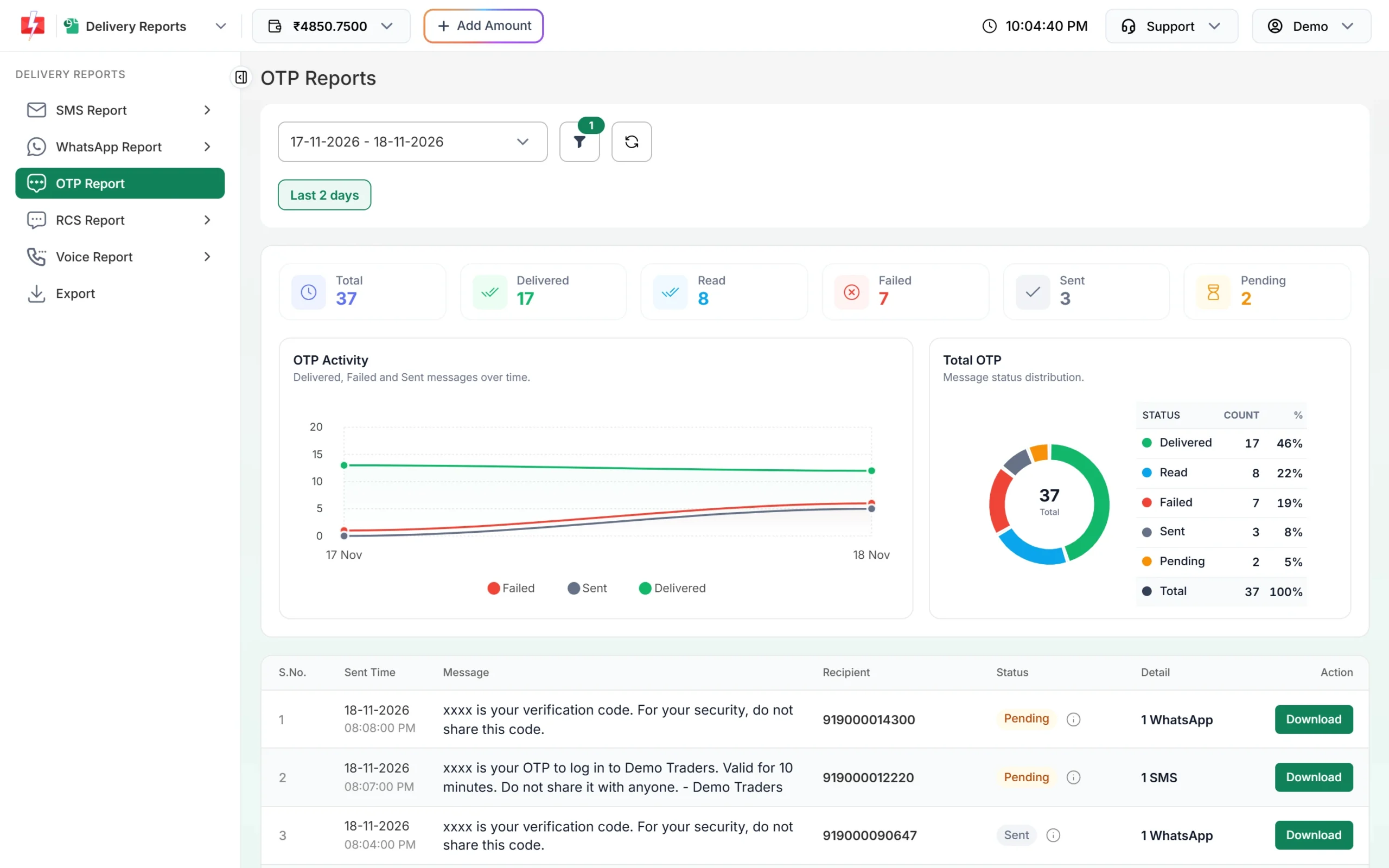
In Smart OTP > Delivery Report. The function only knows that Fast2SMS accepted the send.
Is verify charged?
No. Each send and each resend is charged; verify is free.