
If your website has no server of its own (plain HTML on static hosting, Webflow or Wix), you can still add OTP verification. A small Cloudflare Worker becomes your OTP backend: it holds your Fast2SMS API key and calls Smart OTP, and your pages only load the widget and talk to the Worker. Visitors verify their mobile number by SMS or WhatsApp.
Download the Cloudflare Worker OTP widget kit (zip)Download .zip
Before you start
- A Fast2SMS account with wallet balance, and an approved DLT OTP template (SMS) or WhatsApp Authentication/Utility template.
- A Cloudflare account and Node.js on your computer (for the
wranglertool). - A way to add custom code to your site: an HTML file, Webflow’s custom code, or Wix’s Embed HTML.
Set up the Worker and the widget
-
Create a Smart OTP template and copy its OTP ID
In the panel, open Smart OTP > OTP Template List and click Add OTP Template. On the SMS Channel tab, pick your DLT entity, sender and approved OTP template, then click the variable that should carry the code. For WhatsApp, use the WhatsApp Channel tab with an approved Authentication or Utility template. Tick SET FALLBACK TEMPLATE if you want the other channel as a backup, then click Assign OTP Template.
Copy the 10-character OTP ID from the new card. It decides the channel, the template and the fallback for every code the widget sends.
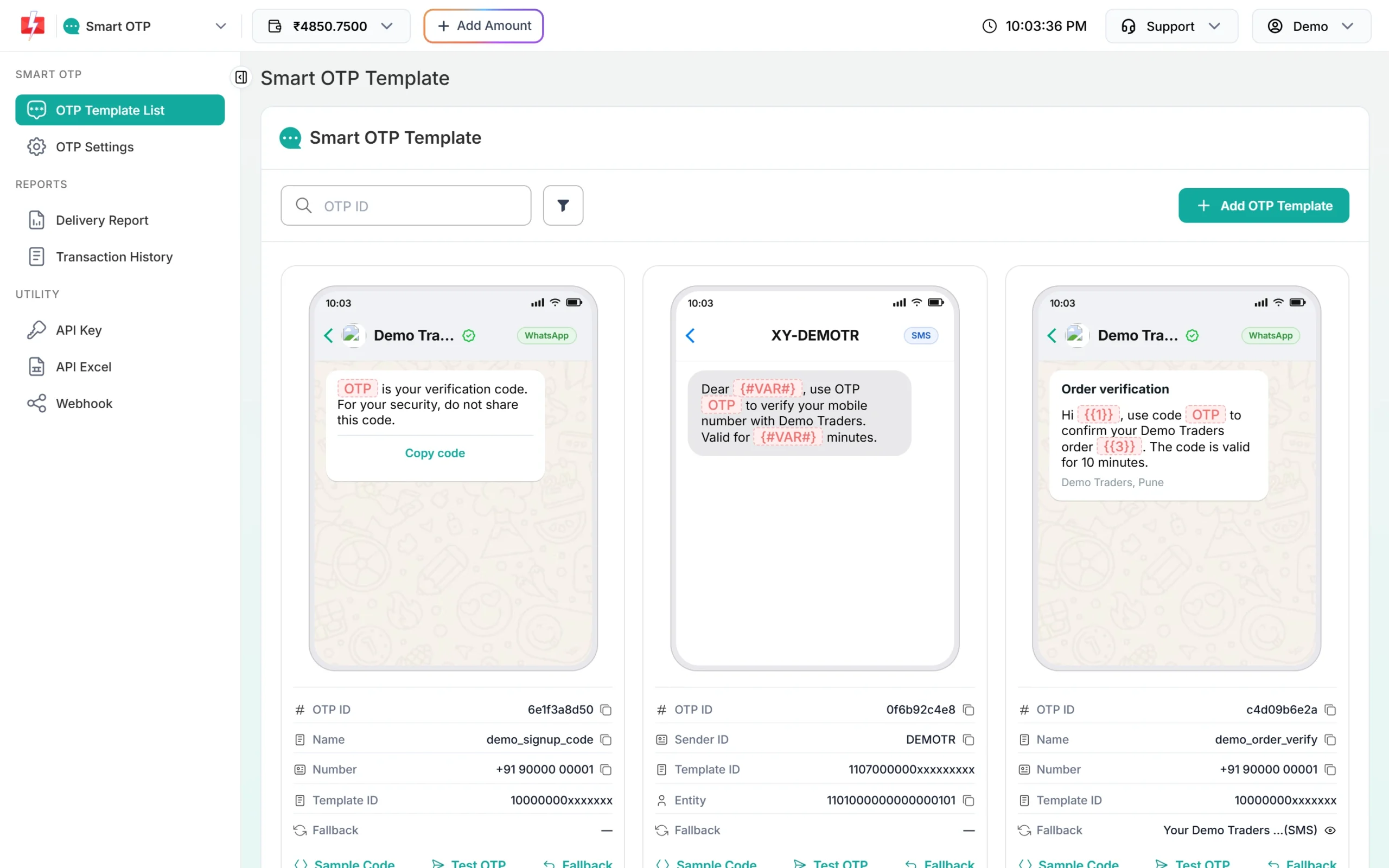
Each template card shows its 10-character OTP ID with a copy icon. -
Copy your API key
Under Utility in the left menu, click API Key. Click View (the panel first asks for an OTP sent to your registered mobile) and copy the Authorization Key. Check that API Access is switched on. This key will live only in your backend’s settings, never in a page or an app.
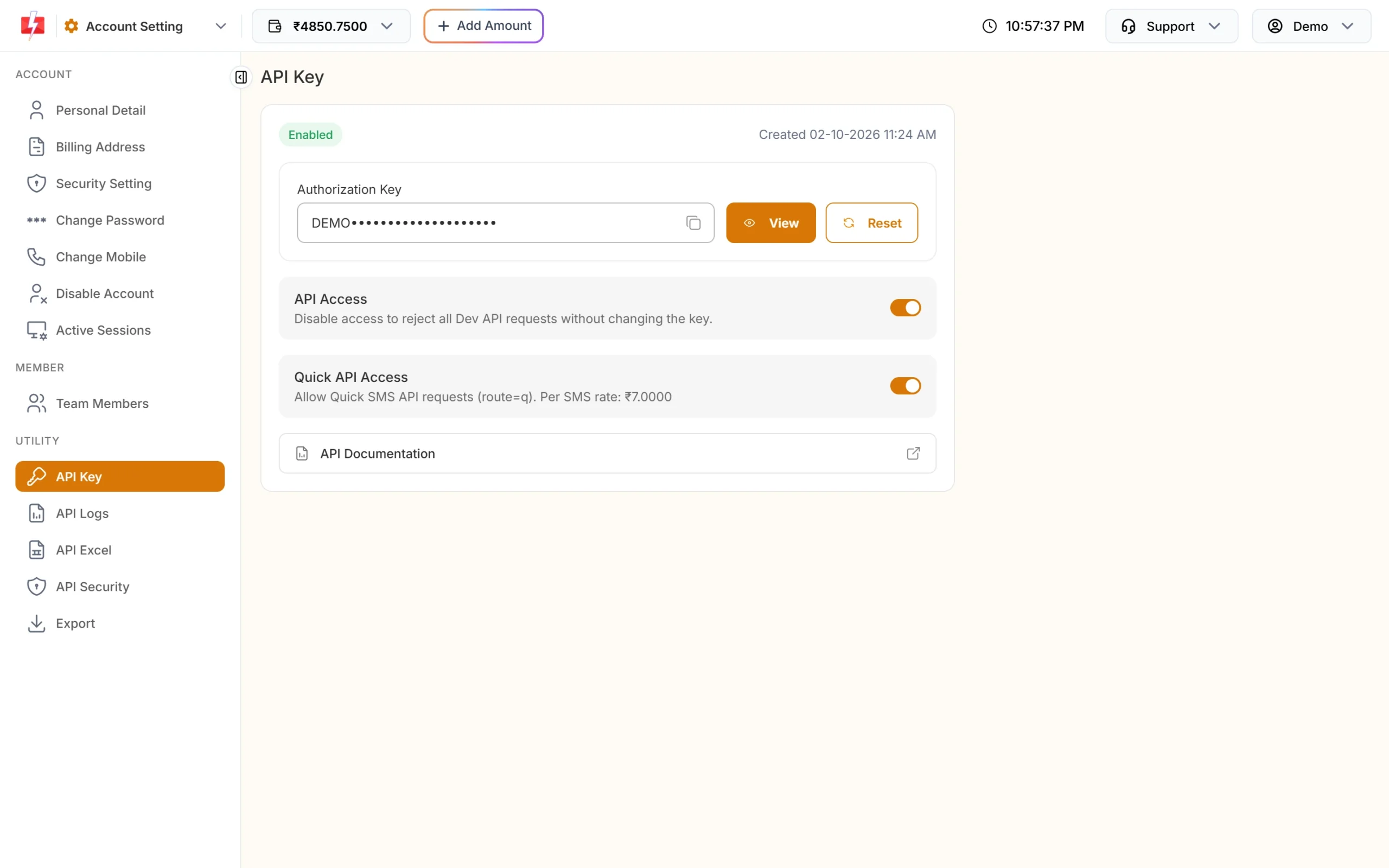
Copy the Authorization Key. API Access must be on. -
Install wrangler and set the settings
Unzip the kit and run
npm install(it installs wrangler), thennpx wrangler login. Inwrangler.toml, set the OTP ID and every origin your widget will run on:[vars] F2S_OTP_ID = "YOUR_OTP_ID" F2S_ALLOWED_ORIGINS = "https://www.example.com,https://example.webflow.io" F2S_RESEND_WAIT = "30" F2S_LIMIT_PER_NUMBER = "5" F2S_LIMIT_PER_IP = "20" F2S_MAX_VERIFY = "5"Then add the two secrets. Wrangler asks you to paste each value. Never put them in
wrangler.toml, which is not secret.npx wrangler secret put FAST2SMS_API_KEY npx wrangler secret put F2S_TOKEN_SECRET -
Deploy
Run
npx wrangler deploy. You get a URL likehttps://f2s-otp.YOUR-SUBDOMAIN.workers.dev, or you can attach your own domain in Cloudflare. The Worker also serves the widget script and a demo page from itspublicfolder. -
Add the widget to your site
Use the full Worker URL in both lines:
<script src="https://f2s-otp.YOUR-SUBDOMAIN.workers.dev/f2s-otp-widget.min.js" defer></script>
<div data-f2s-otp data-endpoint="https://f2s-otp.YOUR-SUBDOMAIN.workers.dev/f2s-otp"></div>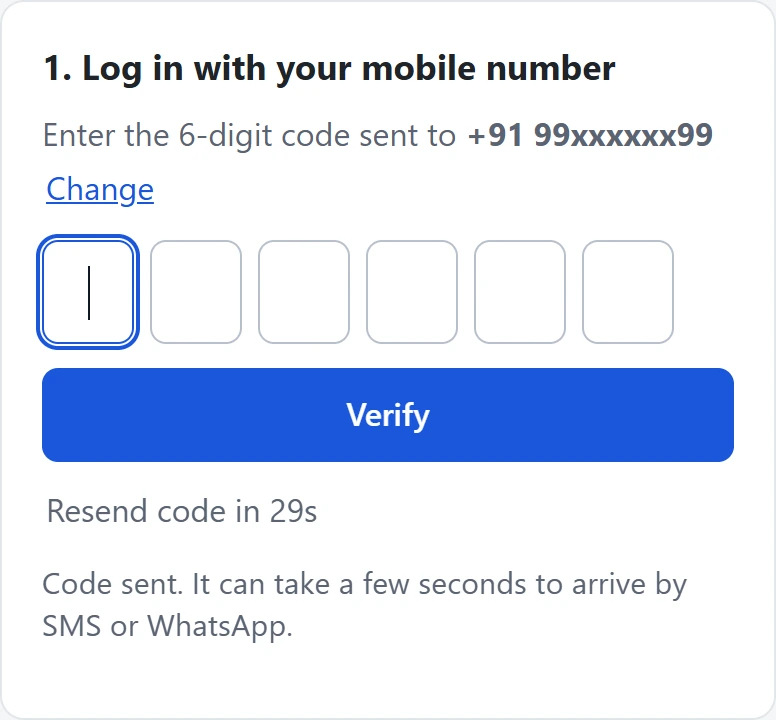
The same box on any site: six code boxes and a resend timer.
Where to paste the code
| Site builder | Where |
|---|---|
| Plain HTML | Anywhere in the page. |
| Webflow | Page settings > Custom code (before </body>) for the script, and an Embed element for the <div>. |
| Wix | Wix runs embeds in an iframe, so put the script and the <div> together in one Embed HTML element, with the full https:// Worker URL. |
| Shopify | The all-in-one kit has a theme section that uses this Worker. It has not been run on a real Shopify store yet. |
Every page origin must be in F2S_ALLOWED_ORIGINS, written as https:// plus the domain, with no path. If a site is missing, the widget shows “This page is not allowed to use this OTP service.”
Checking the token on a site with no server
After a correct code, the widget gives your page a signed token. The token only protects you when a server checks it. On a static site, your form usually posts to a form service that cannot check it, so a bot could skip the widget and post the form directly. The widget then only stops normal visitors.
To enforce verification, post the form to a route in the same Worker (the kit has an example route, /demo-signup), check the token there, then save or forward the data:
const v = await ep.verifyToken(form.get('f2s_token'), { mobile: form.get('phone') });
if (v === null) return new Response('Mobile number not verified.', { status: 403 });
// v.mobile is the verified 10-digit number: save the lead or forward it here
Limits on Cloudflare
- Without KV, limits live in each Worker instance’s memory, so they are best-effort. For firmer limits, create a KV namespace (
npx wrangler kv namespace create F2S_KV) and add its binding inwrangler.toml. - KV counters are not exact under parallel load. For a hard limit, add a Cloudflare WAF rate-limiting rule for the path
/f2s-otp, for example 10 requests per minute per IP. - Visitor IP: the Worker reads it from
CF-Connecting-IP, which Cloudflare sets. LeaveF2S_TRUST_PROXYoff. - API Security: Workers usually do not have one fixed outgoing IP address, so if you switch on IP whitelisting in API Security, Fast2SMS may refuse the Worker’s calls. Check API Logs if sends fail.
Sending, resending and cost
The Worker checks the page’s origin, the X-F2S-Widget header, the resend wait and the limits before every paid call. A new code for a number cancels the older one. “Code sent” means Fast2SMS accepted the request; delivery shows in Smart OTP > Delivery Report.
Resend sends the same code again, it does not make a new one. Fast2SMS allows it within 10 minutes of the first send, and up to 5 sends to one number in that time, counting the first.
Every send and every resend is charged at your Smart OTP rate, and a fallback message on the second channel is charged too. Verify is free. The Test OTP button on a template card is also a real, charged send. See the current rates on the OTP SMS page.
Sending in bulk? For high OTP volumes our team offers discounted rates. Talk to our team or see OTP pricing.
Common problems and fixes
| What you see | Why | Fix |
|---|---|---|
| “This page is not allowed to use this OTP service.” | The page is on another domain | Add its origin (https:// plus the domain, no path) to F2S_ALLOWED_ORIGINS. |
| “We could not send the code right now.” | An account or setup problem. Your server log names it: failed reason=... |
invalid_otp_id: copy the OTP ID again, from the same account as the key. insufficient_balance: recharge with Add Amount. template_inactive: create a new OTP template. Auth error: check the key, switch on API Access, or whitelist the server IP in API Security. |
| “Could not reach the server.” | Wrong Worker URL in data-endpoint, or the Worker is not deployed |
Open the Worker URL in a browser and check the browser console. |
| Every request fails, the log lists settings | A secret or the OTP ID is missing | Set F2S_OTP_ID in wrangler.toml and both secrets with wrangler secret put, then deploy again. |
| “Please wait N seconds…” | The resend wait: the widget’s own, or Fast2SMS’s | Wait. Change F2S_RESEND_WAIT, or SMS Resend / Time Limit in OTP Settings. |
| “Too many requests” | The per-number or per-IP limit was hit | Wait an hour, or raise F2S_LIMIT_PER_NUMBER / F2S_LIMIT_PER_IP. |
| The code never arrives | Sent is not the same as delivered | Check Smart OTP > Delivery Report, and use Test OTP on the template card. |
The Worker’s log lines (masked numbers, never the OTP or the key) appear in Cloudflare’s Worker logs, or live with npx wrangler tail.
Frequently asked questions
Can I add OTP verification to Webflow or Wix without my own server?
Yes. The Cloudflare Worker is the server: it holds the API key and talks to Fast2SMS. Your Webflow or Wix page only loads the widget and calls the Worker.
Is it safe to put the Worker URL in my page?
Yes. The URL is public, but the API key is a Worker secret. The Worker only accepts calls from origins in F2S_ALLOWED_ORIGINS, and its limits run before any paid call.
Can I put the API key in wrangler.toml?
No. wrangler.toml is a normal file that often ends up in git. Use npx wrangler secret put FAST2SMS_API_KEY.
Does the Worker need a paid Cloudflare plan?
The kit does not need any paid Cloudflare feature, and KV is optional. Check Cloudflare’s current plan limits for your traffic.
I use Vercel or Netlify instead. Is there a kit?
Yes. The Vercel / Netlify function kit uses the same core code and the same widget.
Is verify charged?
No. Each send and each resend is charged; verify is free.