
This guide adds WordPress OTP verification with a small plugin, “OTP Widget for Fast2SMS”. It puts an OTP box on any page with the shortcode [f2s_otp], and it can make an existing form wait until the visitor’s mobile number is verified by SMS or WhatsApp. The plugin is its own backend: your API key stays in wp-config.php on the server and never reaches the page.
Download the WordPress OTP widget kit (zip)Download .zip
Before you start
- A Fast2SMS account with wallet balance, and an approved DLT OTP template (SMS) or WhatsApp Authentication/Utility template.
- WordPress 6.0 or newer on PHP 8.1 or newer.
- Access to
wp-config.php(through your host’s File Manager or FTP).
Set up WordPress OTP verification
-
Create a Smart OTP template and copy its OTP ID
In the panel, open Smart OTP > OTP Template List and click Add OTP Template. On the SMS Channel tab, pick your DLT entity, sender and approved OTP template, then click the variable that should carry the code. For WhatsApp, use the WhatsApp Channel tab with an approved Authentication or Utility template. Tick SET FALLBACK TEMPLATE if you want the other channel as a backup, then click Assign OTP Template.
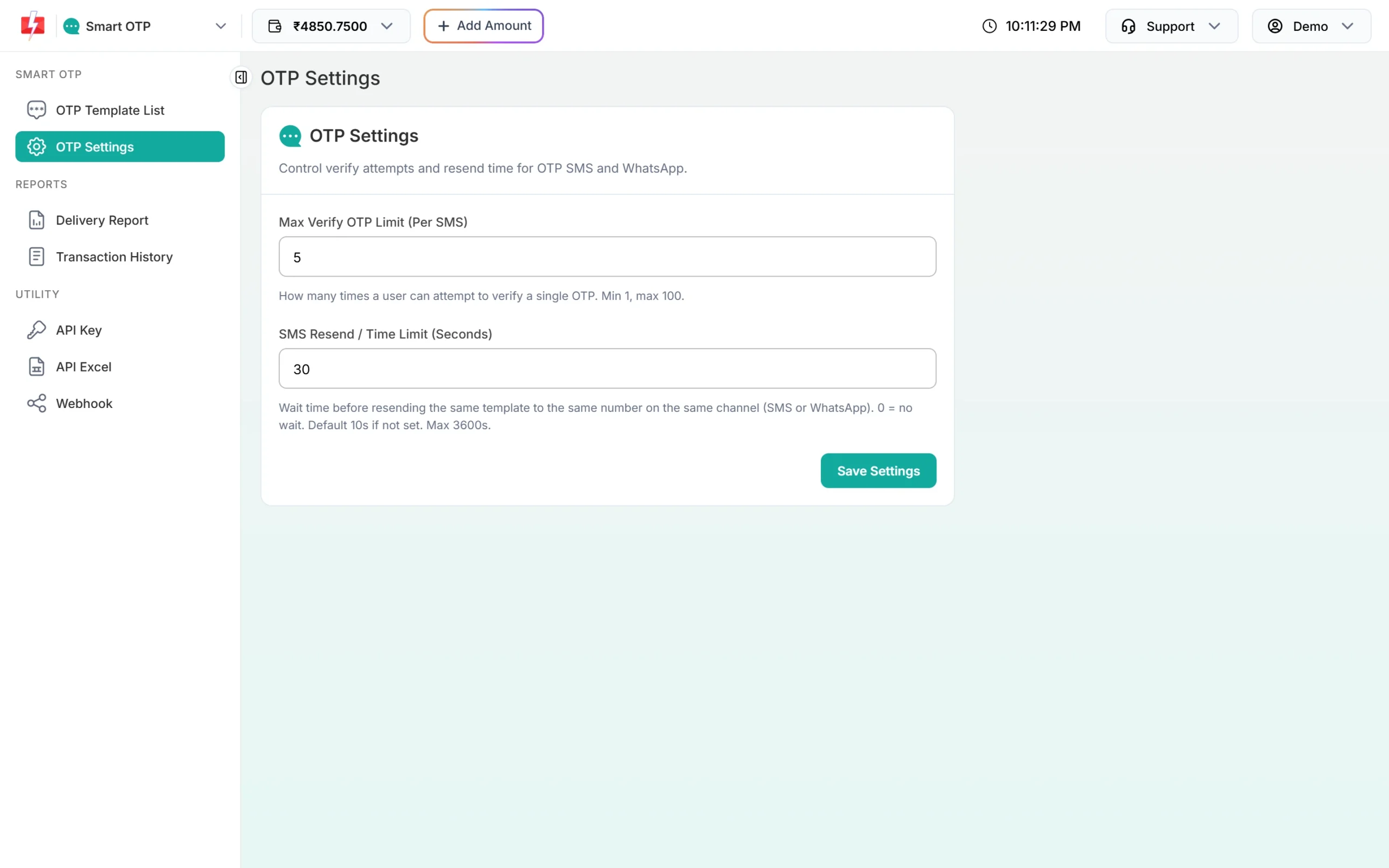
Copy the 10-character OTP ID from the new card. It decides the channel, the template and the fallback for every code the widget sends.
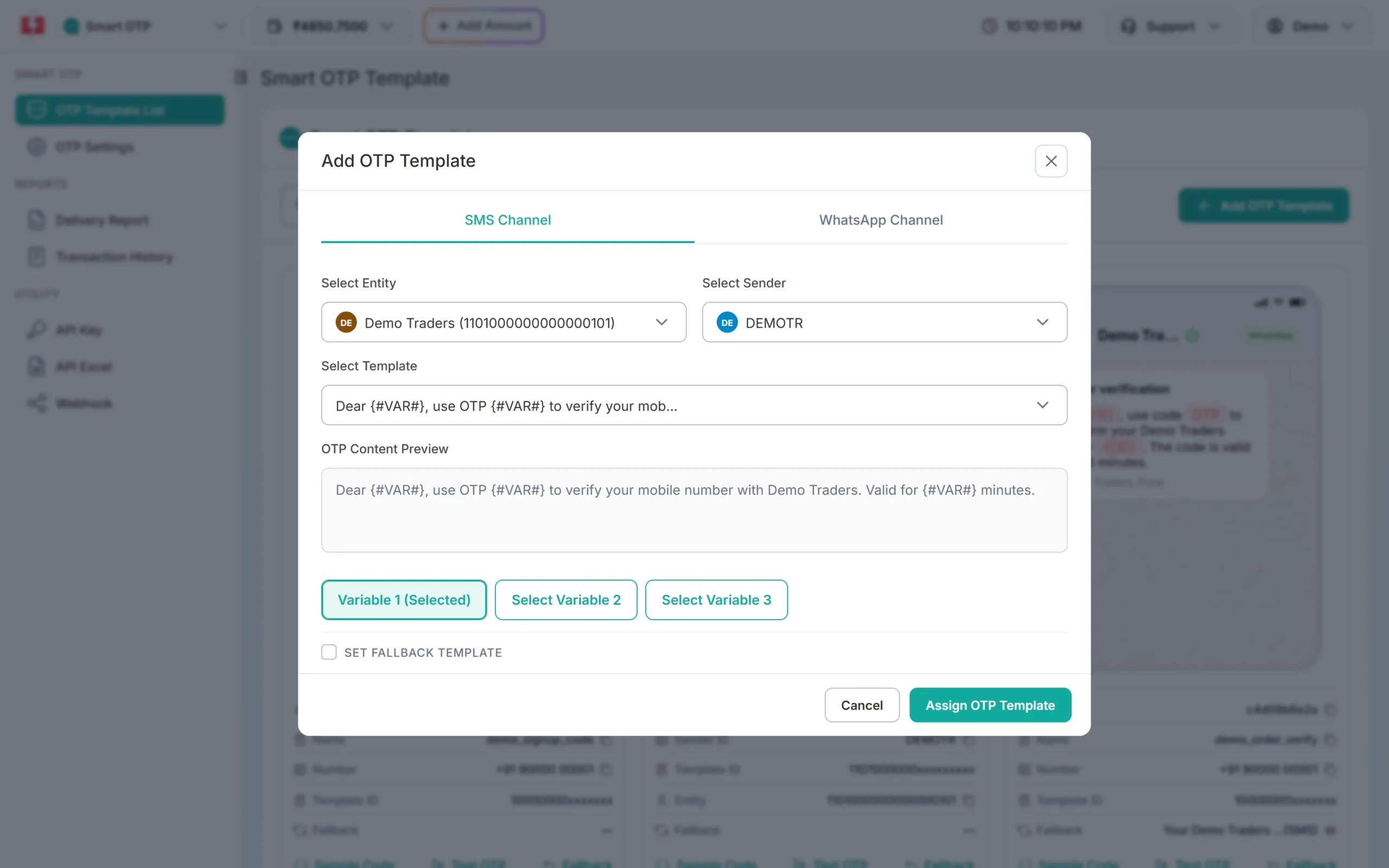
Pick the entity, sender and DLT template, then the variable that carries the OTP. -
Copy your API key
Under Utility in the left menu, click API Key. Click View (the panel first asks for an OTP sent to your registered mobile) and copy the Authorization Key. Check that API Access is switched on. This key will live only in your backend’s settings, never in a page or an app.
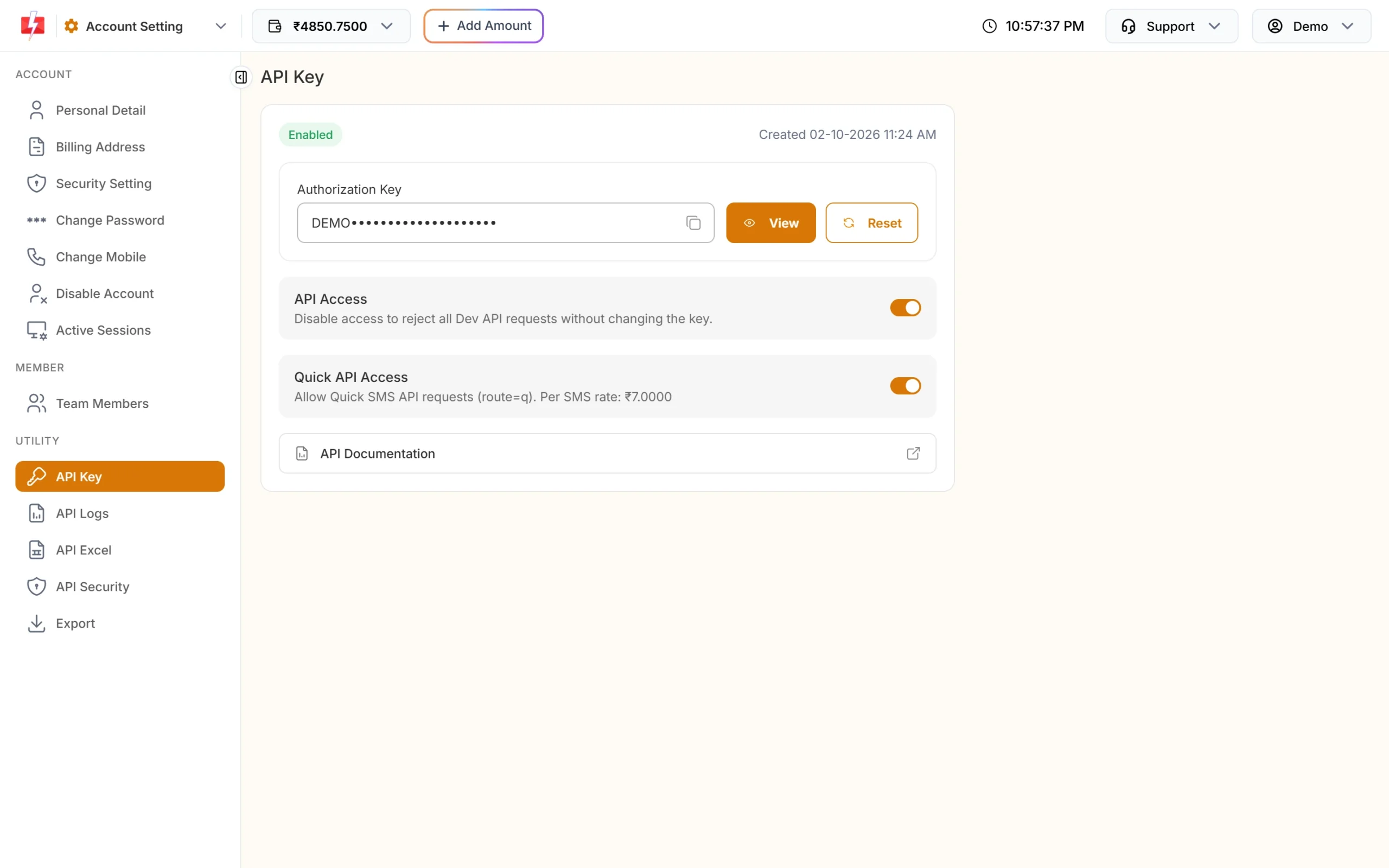
Copy the Authorization Key. API Access must be on. -
Add the settings to wp-config.php
Open
wp-config.phpand add these lines above the line that says “That’s all, stop editing”:define( 'FAST2SMS_API_KEY', 'YOUR_API_KEY' ); // Fast2SMS > Settings > API Key define( 'F2S_OTP_ID', 'YOUR_OTP_ID' ); // Smart OTP > OTP Template List define( 'F2S_TOKEN_SECRET', 'paste 64 random characters here' );The plugin reads its settings only from
wp-config.php, never from the database, so the key cannot leak through a settings page or an export. If a setting is missing, admins see a notice that names it and visitors see nothing. -
Install the plugin
Unzip the kit. Inside it is the plugin folder
f2s-otp-widget. Upload that folder towp-content/plugins/, or zip just that folder and upload it in Plugins > Add New > Upload Plugin. Then click Activate. -
Put the shortcode on a page
Add a Shortcode block, or type the shortcode in the editor:
Shortcode What it does [f2s_otp]A box that verifies a mobile number. [f2s_otp protect="#my-form" mobile_field="phone"]Makes the form #my-formwait for OTP, using the form’s ownphonefield.[f2s_otp otp_id="YOUR_SECOND_OTP_ID" title="Verify your number"]Uses a second OTP template, for example WhatsApp-only. The ID must also be in F2S_OTP_IDS. -
Check the token where the form is handled
After a correct code, the widget adds a hidden
f2s_tokenfield to the protected form. Check it on the server in the code that handles the form:$v = f2sow_verify_token( $_POST['f2s_token'] ?? '', $_POST['phone'] ?? null ); if ( null === $v ) { wp_die( 'Mobile number not verified.', 403 ); } // $v['mobile'] is the verified 10-digit number. A token works only once.
Example: Contact Form 7
The kit’s README shows this for a Contact Form 7 form with a field [tel* your-phone]. Put the shortcode [f2s_otp protect=".wpcf7-form" mobile_field="your-phone"] on the same page, and add this to your theme’s functions.php or a small plugin:
add_filter( 'wpcf7_validate', function ( $result, $tags ) {
	$v = f2sow_verify_token( $_POST['f2s_token'] ?? '', $_POST['your-phone'] ?? null );
	if ( null === $v ) {
		foreach ( $tags as $tag ) {
			if ( 'your-phone' === $tag->name ) {
				$result->invalidate( $tag, 'Please verify your mobile number.' );
			}
		}
	}
	return $result;
}, 20, 2 );
The form then refuses to send until the number is verified, even if someone posts it without the widget. This example has not been tested with Contact Form 7 yet.
Good to know
- Backend URL: the plugin adds the REST route
/wp-json/f2s-otp/v1/otp. The shortcode points the widget at it for you. - Caching plugins: the route sends
Cache-Control: no-store, but exclude/wp-json/f2s-otp/from your page cache to be safe. - Cloudflare in front of the site: set
F2S_TRUST_PROXYto1so the per-IP limit sees the visitor’s IP. - Limits are kept in WordPress transients. Transients are not atomic, so under heavy parallel traffic the counts are approximate. With a persistent object cache such as Redis, they are shared across servers.
- Logging users in by phone number is not included. It needs a decision on how numbers map to WordPress accounts, so the plugin only verifies the number and gives you the token.
- API Security: if it is on in your account, whitelist your hosting server’s outgoing IP. See IP whitelisting.
Optional settings
These also go in wp-config.php. The full list is in the kit’s CONTRACT.md.
// optional, defaults shown
define( 'F2S_RESEND_WAIT', 30 );
define( 'F2S_LIMIT_PER_NUMBER', 5 );
define( 'F2S_LIMIT_PER_IP', 20 );
define( 'F2S_MAX_VERIFY', 5 );
// define( 'F2S_TRUST_PROXY', '1' );   // only if Cloudflare or another proxy is in front of the site
Sending, resending and cost
Before every paid call, the plugin checks the page’s origin, the widget header, the resend wait and the limits. A new code for a number cancels the older one. “Code sent” means Fast2SMS accepted it; delivery shows in Smart OTP > Delivery Report.
Resend sends the same code again, it does not make a new one. Fast2SMS allows it within 10 minutes of the first send, and up to 5 sends to one number in that time, counting the first.
Every send and every resend is charged at your Smart OTP rate, and a fallback message on the second channel is charged too. Verify is free. The Test OTP button on a template card is also a real, charged send. See the current rates on the OTP SMS page.
Sending in bulk? For high OTP volumes our team offers discounted rates. Talk to our team or see OTP pricing.
Common problems and fixes
| What you see | Why | Fix |
|---|---|---|
| Admins see a notice about a missing setting | A constant is missing or wrong in wp-config.php |
Add FAST2SMS_API_KEY, F2S_OTP_ID (10 characters) and F2S_TOKEN_SECRET (32 or more). |
| The shortcode shows as plain text | The plugin is not active | Activate OTP Widget for Fast2SMS in Plugins. |
| “Could not reach the server.” | The REST route is blocked or cached, for example by a security or cache plugin | Open /wp-json/f2s-otp/v1/otp on your site, exclude /wp-json/f2s-otp/ from caching, and allow it in any plugin that limits the REST API. |
| “We could not send the code right now.” | An account or setup problem. Your server log names it: failed reason=... |
invalid_otp_id: copy the OTP ID again, from the same account as the key. insufficient_balance: recharge with Add Amount. template_inactive: create a new OTP template. Auth error: check the key, switch on API Access, or whitelist the server IP in API Security. |
| “Please wait N seconds…” | The resend wait: the widget’s own, or Fast2SMS’s | Wait. Change F2S_RESEND_WAIT, or SMS Resend / Time Limit in OTP Settings. |
| “Too many requests” | The per-number or per-IP limit was hit | Wait an hour, or raise F2S_LIMIT_PER_NUMBER / F2S_LIMIT_PER_IP. |
| Your form handler says “not verified” | The token is missing, was used already, is older than 10 minutes, or is for another number | Verify again. Check the token once, when the form is submitted. |
Frequently asked questions
Is this the official Fast2SMS WordPress plugin?
No. It is a separate, small plugin from our OTP widget kits, with its own names, so both can be installed. The official plugin is covered in the Fast2SMS WordPress plugin guide.
Where do I enter the API key?
Only in wp-config.php. The plugin has no settings page, on purpose, so the key is never stored in the database.
Can I protect a WooCommerce or other plugin’s form?
You can make any form on the page wait with protect="...". For real protection, that form’s server code must also check f2s_token with f2sow_verify_token().
Does it log users into WordPress with OTP?
No. It verifies the number and gives you a token. Logging users in by phone needs your own code that maps numbers to accounts.
Does it work with page builders?
Any builder that can show a shortcode should work, since the plugin only needs the shortcode on the page. This has not been tested with specific builders yet.
Is verify charged?
No. Each send and each resend is charged; verify is free.