
The Fast2SMS OTP widget gives your page a one-time token called f2s_token after a visitor verifies their number. Your server checks that token with one API call and gets back the full verified mobile number. If you have no server code for forms, use the OTP widget webhook instead: Fast2SMS posts each verified number to your https URL, signed with a secret so you can trust it. This page shows both, with curl, PHP, Node.js and Python examples.
Why check the token on your server
Anything that happens in the browser can be faked. A visitor can post your form without using the widget, fire a fake f2s:verified event or type any number into your own fields. The token is different: it is issued by Fast2SMS only after a correct code, it is tied to your widget, and only your API key can read it. Your page never sees the full number, only a masked one such as 98xxxxxx10. The full number comes to your server through the check below or through the webhook.
If you are still setting up the widget, start with the free OTP widget guide. The widget is free. Only the OTPs it sends are charged, at your Smart OTP rate.
Sending in bulk? For high OTP volumes our team offers discounted rates. Talk to our team or see OTP pricing.
Where your server gets f2s_token
| Install mode | How the token reaches you |
|---|---|
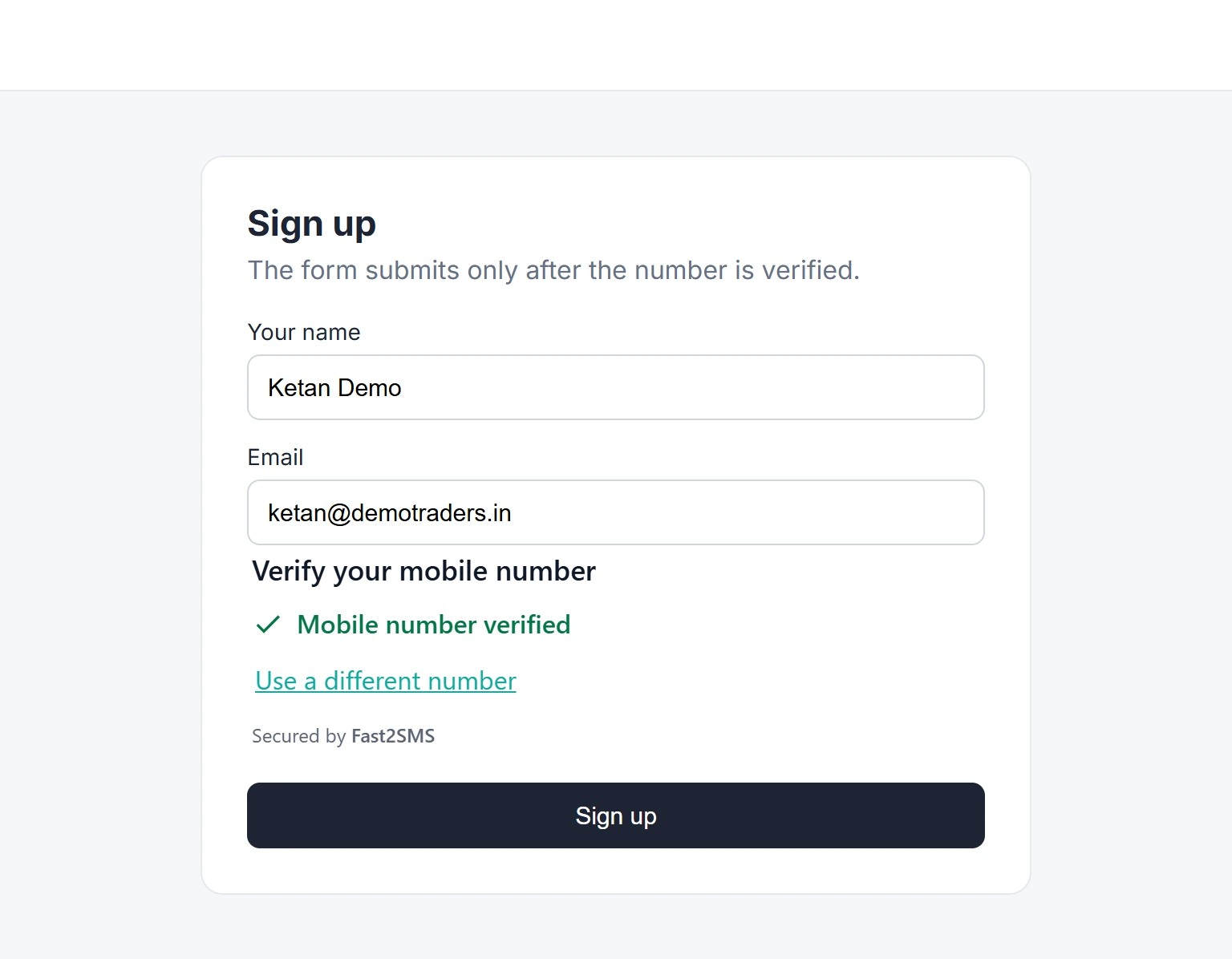
| Form, or Mobile field inside a form | A hidden form field named f2s_token, posted with your form |
| Widget or Popup with “After verify, open a page” | Added to your page address as ?f2s_token=... |
| Widget or Popup with your own script | event.detail.token of the f2s:verified event; send it to your server yourself |
| Any mode with the webhook on | No token needed: the webhook already carries the verified number |
The four install modes are explained in OTP popup on button click, mobile field and form protect.
Verify f2s_token with the verify-token API
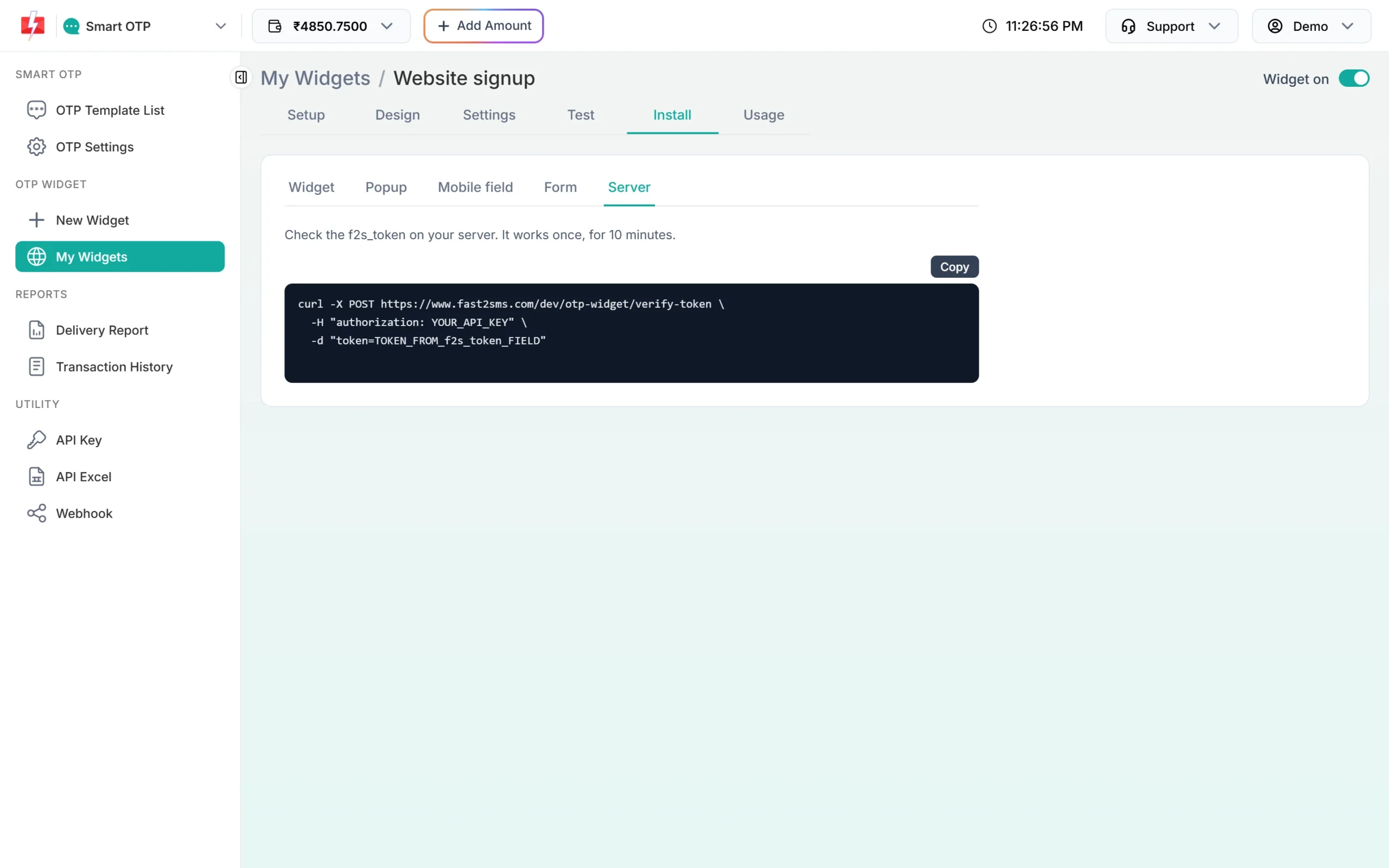
The Server sub-tab under Install sums it up: check the f2s_token on your server, it works once, for 10 minutes.
| Part | Value |
|---|---|
| URL | https://www.fast2sms.com/dev/otp-widget/verify-token |
| Method | POST |
| Header | authorization: your API key (the account that owns the widget) |
| token | The value of f2s_token |
| mobile (optional) | The number you expect; the answer is mobile_mismatch if it is a different one |
curl -X POST https://www.fast2sms.com/dev/otp-widget/verify-token \
  -H "authorization: YOUR_API_KEY" \
  -d "token=TOKEN_FROM_f2s_token_FIELD" \
  -d "mobile=9876543210"
A good token answers:
{"valid":true,"mobile":"9876543210","verified_at":1763540000,"verified_at_iso":"...","origin":"https://shop.example.com","widget_key":"..."}Anything else answers "valid":false with a reason:
{"valid":false,"reason":"expired"}| reason | Meaning | What to do |
|---|---|---|
invalid |
Not a real token, or it belongs to a widget of another account | Refuse the request |
expired |
More than 10 minutes since verification | Ask the visitor to verify again |
used |
The token was already checked once | Refuse; never check the same token twice |
mobile_mismatch |
Verified, but not the number you sent in mobile |
Refuse; the token is used up by this check too |
Three rules to remember. A token is single use, so check it once and save the result. It is valid for 10 minutes, so check it as soon as the form arrives. And the API key must belong to the account that owns the widget. Find your key under API Key in the panel (see find or reset your API key) and keep it in your server settings, never in a web page.
PHP
<?php
function check_f2s_token(string $token, string $expectedMobile = ''): ?array
{
    $fields = ['token' => $token];
    if (strlen($expectedMobile) > 0) {
        $fields['mobile'] = $expectedMobile;
    }
    $ch = curl_init('https://www.fast2sms.com/dev/otp-widget/verify-token');
    curl_setopt_array($ch, [
        CURLOPT_POST           => true,
        CURLOPT_POSTFIELDS     => http_build_query($fields),
        CURLOPT_HTTPHEADER     => ['authorization: ' . getenv('FAST2SMS_API_KEY')],
        CURLOPT_RETURNTRANSFER => true,
        CURLOPT_TIMEOUT        => 10,
    ]);
    $result = json_decode((string) curl_exec($ch), true);
    curl_close($ch);
    return (is_array($result) && ($result['valid'] ?? false) === true) ? $result : null;
}

// in your form handler
$check = check_f2s_token($_POST['f2s_token'] ?? '');
if ($check === null) {
    http_response_code(400);
    exit('Please verify your mobile number.');
}
$mobile = $check['mobile']; // full 10-digit number, safe to save
Node.js
// Node.js 18 or newer (built-in fetch)
async function checkF2sToken(token, expectedMobile) {
  const body = new URLSearchParams({ token });
  if (expectedMobile) body.append('mobile', expectedMobile);
  const r = await fetch('https://www.fast2sms.com/dev/otp-widget/verify-token', {
    method: 'POST',
    headers: { authorization: process.env.FAST2SMS_API_KEY },
    body,
  });
  const result = await r.json();
  return result.valid === true ? result : null;
}

// Express: const app = express(); app.use(express.urlencoded({ extended: false }));
app.post('/your-signup', async (req, res) => {
  const check = await checkF2sToken(req.body.f2s_token || '');
  if (check === null) return res.status(400).send('Please verify your mobile number.');
  // check.mobile is the verified 10-digit number
  res.send('Thanks, your number is verified.');
});
Python
import os
import requests

def check_f2s_token(token, expected_mobile=None):
    data = {"token": token}
    if expected_mobile:
        data["mobile"] = expected_mobile
    r = requests.post(
        "https://www.fast2sms.com/dev/otp-widget/verify-token",
        headers={"authorization": os.environ["FAST2SMS_API_KEY"]},
        data=data,
        timeout=10,
    )
    result = r.json()
    return result if result.get("valid") is True else None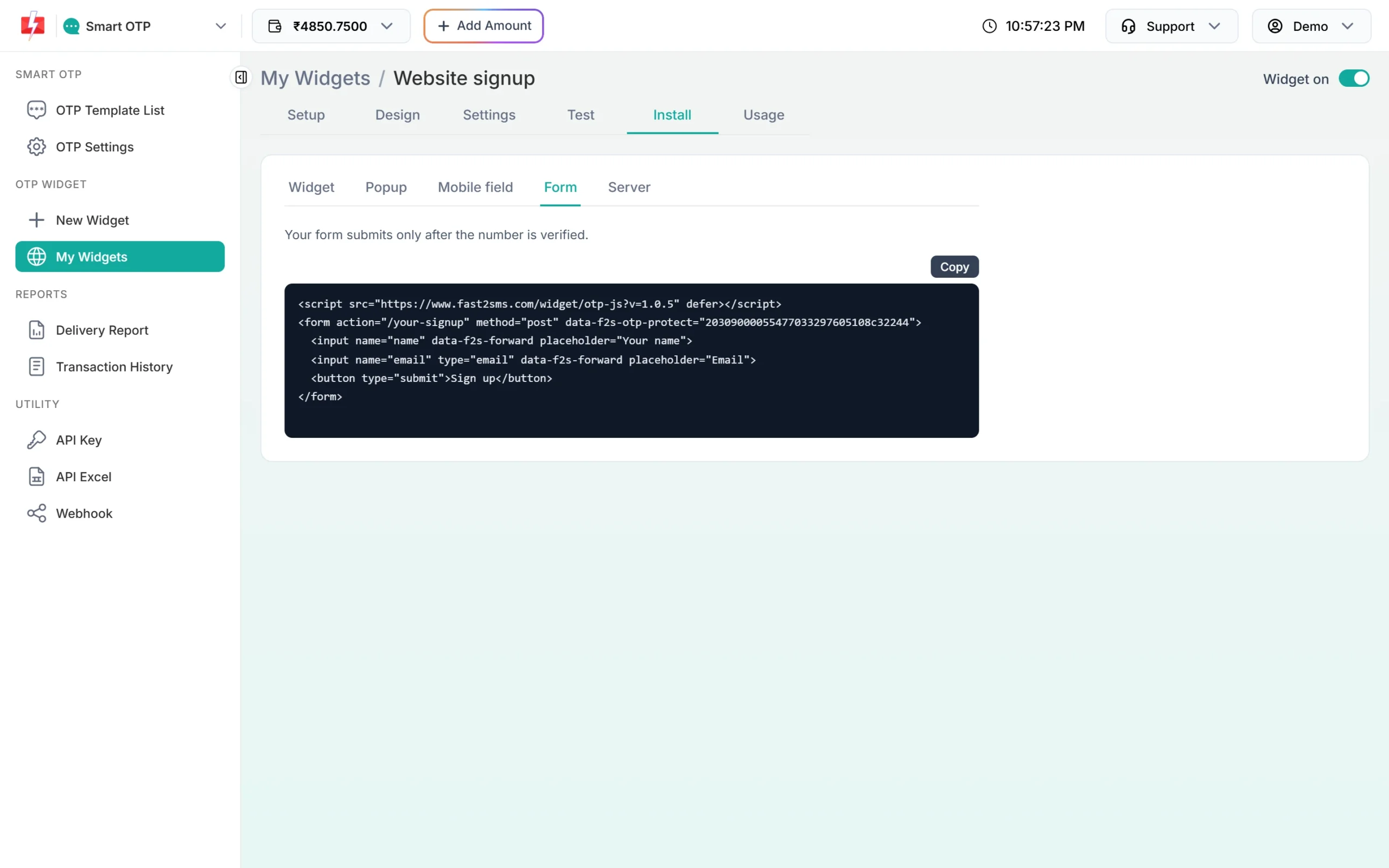
After verify, open a page
For the Widget and Popup modes you can send the visitor to a page of your own once the number is verified. In the widget’s Settings, turn on After verify, open a page and type the Page URL, for example https://www.demotraders.in/thank-you. As the panel says, the page gets f2s_token, so your server can confirm the number. It arrives in the address, like /thank-you?f2s_token=....
Check that token on the server side of the page before you show anything personal or save a lead. A visitor could open the thank-you page by hand, without a token or with an old one.
<?php
// https://www.demotraders.in/thank-you?f2s_token=...
// check_f2s_token() is the PHP function shown above
$check = check_f2s_token($_GET['f2s_token'] ?? '');
if ($check === null) {
    exit('This link has expired. Please verify your number again.');
}
echo 'Thank you. We will call you on ' . htmlspecialchars($check['mobile']) . '.';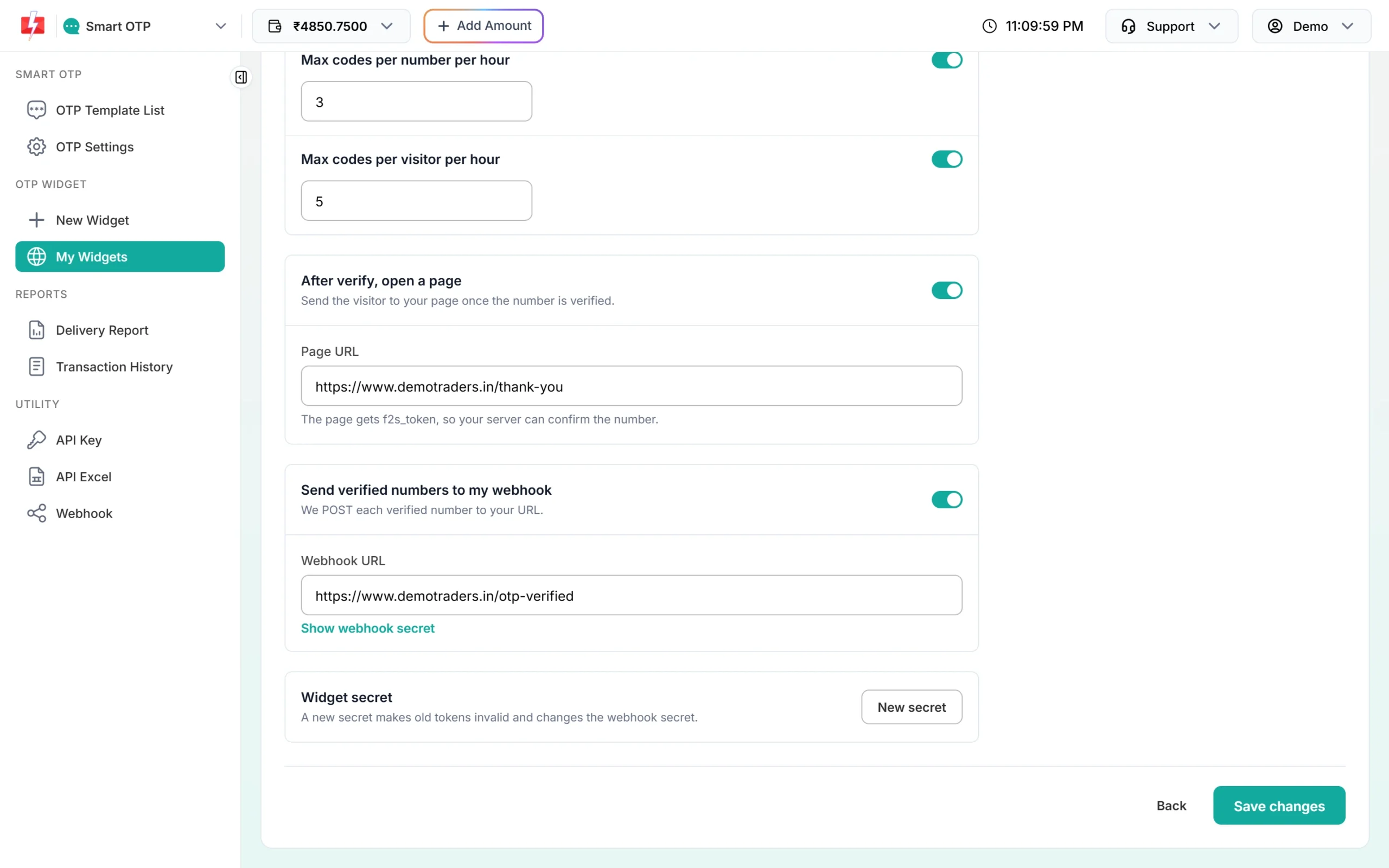
OTP widget webhook: get each verified number
Turn on Send verified numbers to my webhook in Settings and type your Webhook URL. It must start with https. Click Show webhook secret and copy the secret (it starts with whsec_) into your server settings. After every successful verification, Fast2SMS sends a POST with a JSON body:
{
  "event": "otp.verified",
  "widget_key": "YOUR_WIDGET_KEY",
  "mobile": "9876543210",
  "origin": "https://www.demotraders.in",
  "verified_at": 1763540000,
  "fields": {"name": "Ketan Demo", "email": "[email protected]"}
}
mobile is the full verified number, origin is the website it was verified on, and verified_at is a Unix time. fields holds the values of form fields marked data-f2s-forward, so a site with no server code can still receive the name and email with the number. Two headers come with it:
X-F2S-Event: otp.verified
X-F2S-Signature: t=1763540000,v1=5f0c...e91a
Fast2SMS waits up to 4 seconds for your answer and does not follow redirects, so answer with a 200 quickly and do slow work later. Treat the webhook as a notice. Where you must have the number, such as a sign-up, check f2s_token as well.
Verify the X-F2S-Signature header
- Read the raw request body, exactly as received. Do not parse and re-encode the JSON before checking.
- Split the header into
t(Unix time) andv1(the signature). - Refuse the request if
tis more than 5 minutes away from your server time. This stops someone replaying an old webhook. - Work out HMAC-SHA256 of the text
<t>.<raw body>with your webhook secret, as lowercase hex. - Compare it with
v1using a constant-time compare, such ashash_equalsin PHP orcrypto.timingSafeEqualin Node.js.
PHP webhook receiver
<?php
$secret = getenv('F2S_WEBHOOK_SECRET');           // whsec_... from Show webhook secret
$raw    = file_get_contents('php://input');        // the body exactly as received
$header = $_SERVER['HTTP_X_F2S_SIGNATURE'] ?? '';

$t = '';
$v1 = '';
foreach (explode(',', $header) as $part) {
    $kv = explode('=', trim($part), 2);
    if (count($kv) === 2 && $kv[0] === 't')  { $t = $kv[1]; }
    if (count($kv) === 2 && $kv[0] === 'v1') { $v1 = $kv[1]; }
}

// refuse old or missing timestamps (5-minute window)
if (ctype_digit($t) === false || abs(time() - (int) $t) > 300) {
    http_response_code(400);
    exit;
}

$expected = hash_hmac('sha256', $t . '.' . $raw, $secret);
if (hash_equals($expected, $v1) === false) {       // constant-time compare
    http_response_code(401);
    exit;
}

$event = json_decode($raw, true);
// $event['mobile'], $event['origin'], $event['fields']['email'] ...
http_response_code(200);
Node.js (Express) webhook receiver
const express = require('express');
const crypto = require('crypto');
const app = express();
const SECRET = process.env.F2S_WEBHOOK_SECRET; // whsec_... from Show webhook secret

// express.raw keeps the body as bytes, exactly as Fast2SMS sent it
app.post('/otp-verified', express.raw({ type: 'application/json' }), (req, res) => {
  const parts = {};
  for (const p of (req.get('X-F2S-Signature') || '').split(',')) {
    const i = p.indexOf('=');
    if (i > 0) parts[p.slice(0, i).trim()] = p.slice(i + 1).trim();
  }
  const t = Number(parts.t);
  const fresh = Number.isInteger(t) && Math.abs(Date.now() / 1000 - t) <= 300;

  const expected = crypto.createHmac('sha256', SECRET)
    .update(parts.t + '.')
    .update(req.body)
    .digest('hex');
  const a = Buffer.from(expected);
  const b = Buffer.from(parts.v1 || '');
  const signed = a.length === b.length && crypto.timingSafeEqual(a, b);

  if (fresh && signed) {
    const event = JSON.parse(req.body.toString('utf8'));
    // event.mobile, event.origin, event.fields
    return res.sendStatus(200);
  }
  res.sendStatus(401);
});
New secret: when tokens or the webhook secret leak
Under Widget secret in Settings, the New secret button makes a fresh secret. As the panel says, a new secret makes old tokens invalid and changes the webhook secret. Use it if you think your webhook secret was exposed. Then copy the new webhook secret from Show webhook secret into your server at once, or your receiver will refuse the next webhooks. Visitors who verified just before the change must verify again.
Common problems and fixes
| Problem | Fix |
|---|---|
Every check answers used |
Your code checks the token twice, for example on a page reload or a retry. Check once and keep the result. |
Every check answers invalid |
Use the API key of the account that owns the widget, and send the token exactly as received. |
| The signature never matches | Sign the raw body, not re-encoded JSON, and use the current webhook secret, not your API key. |
| No webhook arrives | The URL must be https and reachable from the internet without a redirect. Check your server logs for the POST. |
Frequently asked questions
What is f2s_token?
A one-time token the OTP widget gives your page after a correct code. Your server sends it to the verify-token API to get the verified number.
How long is f2s_token valid?
10 minutes, and it works only once.
Do I need a server to use the OTP widget?
No. Without a server, turn on the webhook to receive each verified number. For accounts and orders, a server check of f2s_token is safer.
What does mobile_mismatch mean?
The token is real, but it was issued for a different number than the one you sent in mobile. Refuse the request.
How do I verify the OTP widget webhook signature?
Work out HMAC-SHA256 of t + "." + raw body with your whsec_ secret, compare it with v1 in constant time and refuse timestamps older than 5 minutes.
Can I use the same API key as for the Smart OTP API?
Yes, it is your account’s normal API key. It must be the account that owns the widget.