
If you see a CORS error when you call the SMS API from JavaScript in a web page, the fix is not a browser setting. Move the call to your server. Any API key you put in browser code can be read by every visitor, who can then send SMS from your wallet. Your page should call your own server, and your server calls the Fast2SMS API with the key kept secret.
This guide explains what the CORS error means, why calling the API from the browser is unsafe even when it seems to work, and how to set up a small server endpoint.
What a CORS error means
CORS (cross-origin resource sharing) is a browser rule. When a page on one domain calls an API on another domain, the browser checks the API’s reply headers before it lets your JavaScript read the reply. If the check fails, the console shows a CORS error. Before some requests, for example a POST with an authorization header or a JSON body, the browser first sends a check request (a preflight). If that check gets a redirect or an error, the real request is never sent.
A CORS error does not always mean nothing was sent. A simple GET request, such as a URL with the key and message in the query string, can reach the server and send the SMS. The browser then only blocks your code from reading the reply. If your code retries because it saw an error, the customer can get the SMS twice.
Why the API key must not be in the browser
- Anyone can open the page source or the browser’s network tab and copy the key.
- With the key, they can send SMS to any number at your cost, and read your reports.
- Bots look for keys in public pages and code. An OTP form that calls the API directly is also open to SMS pumping, where bots trigger thousands of OTPs.
- API Security (IP whitelisting) cannot help, because browser calls come from each visitor’s own IP.
So even if a browser call works, do not ship it. If a key was ever in a public page or app, reset it. See how to find and reset your API key.
The right setup: page, then your server, then Fast2SMS
-
Keep the key on the server
Copy your key from Account Setting > API Key and store it as an environment variable or secret on your server or serverless platform. Never commit it to code that ships to browsers or mobile apps.
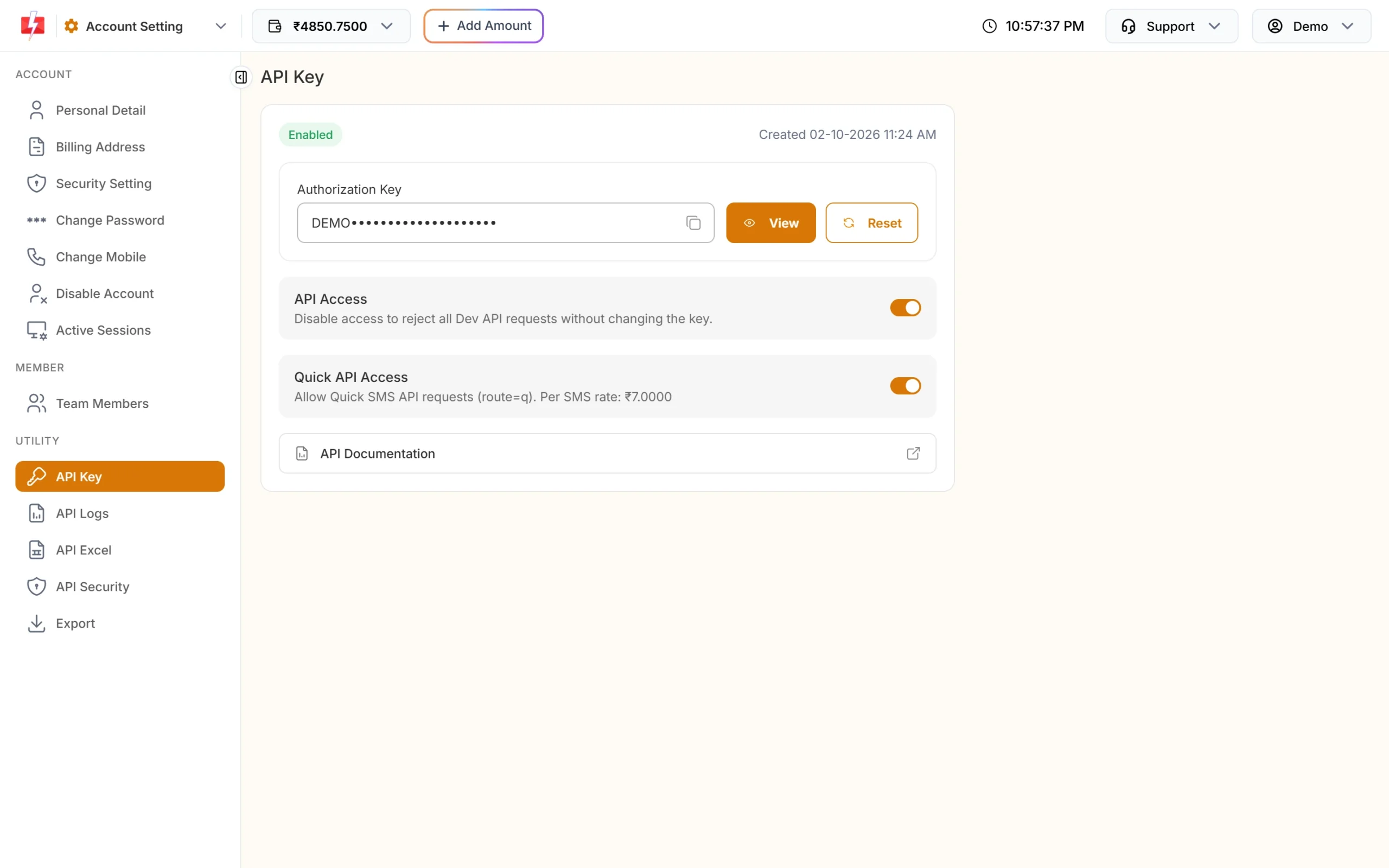
The key belongs in your server’s settings, not in page code. -
Create one endpoint on your server
Your endpoint accepts only what the page needs (for example an order ID or a phone number), decides which template and values to use, and calls Fast2SMS. A Node.js (Express) example:
app.post("/api/send-order-sms", async (req, res) => {
  // Check the user is logged in and the order belongs to them first
  const order = await getOrder(req.body.orderId, req.user);
  const r = await fetch("https://www.fast2sms.com/dev/bulkV2", {
    method: "POST",
    headers: {
      "authorization": process.env.FAST2SMS_API_KEY,
      "Content-Type": "application/json"
    },
    body: JSON.stringify({
      route: "dlt",
      sender_id: "DEMOTR",
      message: "10001",
      variables_values: [order.name, order.id, order.amount, order.date].join("|"),
      numbers: order.mobile
    })
  });
  const data = await r.json();
  res.json({ ok: data.return === true });
});
Do not let the page send the message text, template or number list freely. Otherwise anyone can use your endpoint to send their own SMS.
-
Call your endpoint from the page
await fetch("/api/send-order-sms", {
  method: "POST",
  headers: { "Content-Type": "application/json" },
  body: JSON.stringify({ orderId: "DT10458" })
});
The page and the endpoint are on the same domain, so there is no CORS check. If your front end and backend are on different domains, add CORS headers on your own backend for your front-end domain only.
-
Check the calls
Open Account Setting > API Logs. Every call should now come from your server’s IP. Once that is true, you can turn on API Security and whitelist that IP.
Other causes of a CORS error
| Cause | Fix |
|---|---|
| The URL has no www, or uses http | Fast2SMS redirects those to https://www.fast2sms.com, and a browser preflight fails on a redirect. Use the full address https://www.fast2sms.com, from your server. |
| Your own backend does not send CORS headers | If your front end is on a different domain from your backend, allow that front-end domain in your backend’s CORS settings. |
| A hosting or security layer in front of your backend blocks OPTIONS requests | Allow OPTIONS for your endpoint, or serve the page and endpoint from the same domain. |
Adding OTP to a website?
The Fast2SMS OTP widget follows the same pattern: the widget runs in your page and talks only to a small backend kit, which holds the API key and calls Fast2SMS. See OTP verification widget. For mobile apps, the same rule applies as for web pages: keep the key on your server, as shown in Flutter OTP verification with Fast2SMS.
Frequently asked questions
Why do I get a CORS error when calling the SMS API from JavaScript?
The browser blocked the cross-domain call or its check request. Do not work around it in the browser. Call the API from your server instead.
Can I call the Fast2SMS API directly from React, Vue or plain JavaScript?
Not safely. Your API key would be visible to every visitor. Call your own backend endpoint, which calls Fast2SMS.
Was my SMS sent even though I saw a CORS error?
Possibly. A simple GET request can reach the server even when the browser blocks the reply. Check API Logs and the delivery report before you retry.
Can I use a public CORS proxy?
No. Your API key would pass through someone else’s server. Use your own backend or serverless function.
My key was in my website code. What now?
Reset the key on the API Key page, update it on your server, and check API Logs and API Security for IPs you do not know.
Does a serverless function count as a server?
Yes. A function on your hosting platform can keep the key as a secret and call the API. If you want to use API Security, the function needs a fixed outgoing IP.