
Serverless platforms such as Vercel, AWS Lambda, Netlify, Google Cloud Run and Cloudflare Workers do not give your functions a fixed outgoing IP by default, so IP whitelisting for an API breaks every time the IP changes. To use Fast2SMS API Security from these platforms, you need a fixed (static) outbound IP: each platform offers one through a paid add-on or a network setup, and you whitelist those addresses in Fast2SMS. If that is not possible, send your API calls through one small server that has a fixed IP.
This guide is for developers who see error 414 from a cloud function, or who want to turn on API Security without breaking their app. Platform details are from each provider’s official documentation at the time of writing and can change, so check their current docs before you build.
Why cloud functions and IP whitelisting clash
With API Security on, Fast2SMS accepts an API call only if it comes from an IP on your whitelist. Every other call gets error 414, “IP is blacklisted from Dev API section”. Serverless functions usually send requests from a shared pool of addresses that change as the platform scales. A whitelist built from today’s IP can fail tomorrow.
Fixed outbound IP options by platform
| Platform | Default outgoing IP | How to get a fixed IP |
|---|---|---|
| Vercel Functions | Dynamic, with no published range to whitelist | The Static IPs add-on (Pro and Enterprise plans) gives two IPs per region for your functions. Secure Compute (Enterprise) gives dedicated IPs. |
| AWS Lambda | AWS does not document a fixed outgoing IP | Attach the function to private subnets in your VPC and route traffic through a NAT gateway with an Elastic IP. AWS notes that a public subnet alone does not give a Lambda function internet access or a public IP. A setup with NAT gateways in two zones gives two IPs to whitelist. |
| Google Cloud Run (and Cloud Run functions) | A regional pool of dynamic IPs shared with other workloads | Send all traffic through a VPC (Direct VPC egress or a connector) and use Cloud NAT with a reserved static IP. |
| Azure Functions | On Consumption and Premium plans the outbound IP can change at any time | Use a virtual network NAT gateway with a static public IP (Premium or Dedicated plans). |
| Netlify Functions | Changes as Netlify scales | Private Connectivity, an Enterprise add-on in selected regions, gives a static set of IPs. All of them must be whitelisted. |
| Cloudflare Workers | Cloudflare does not publish a fixed outgoing IP for Workers on standard plans | Dedicated egress IPs, which Workers requests can use, are an Enterprise option arranged with Cloudflare. |
Most of these options give you more than one IP. Whitelist every address the platform lists, not just one.
If your platform cannot give you a fixed IP
- Use a small relay server. Run one small server or VPS whose public IP stays the same (ask your host to confirm), and let your functions call it. Only that server calls Fast2SMS, and only its IP goes on the whitelist. Protect the relay itself with its own secret so nobody else can use it.
- Keep API Security off, and protect the key. If neither is possible, leave API Security off, keep the key only in your platform’s secret settings, watch Latest hits by other IP on the API Security page, and reset the key if an unknown IP appears.
How to whitelist your cloud IPs in Fast2SMS
-
Find the IP your function really uses
Make one harmless call from the deployed function, for example a wallet balance check, while API Security is still off. Then open Account Setting > API Logs. Each call shows the IP it came from. Compare it with the IPs your platform lists.
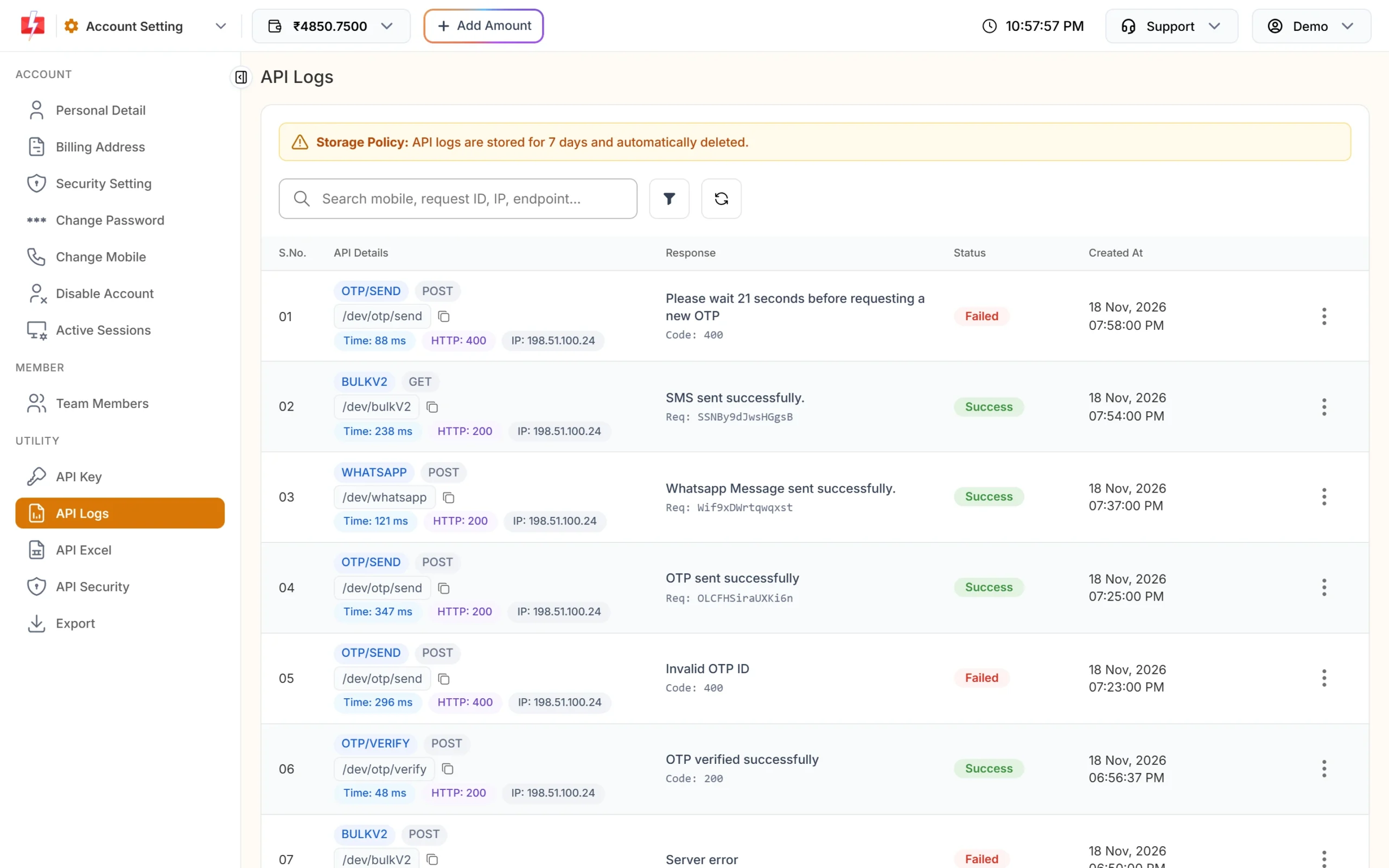
API Logs show the IP of every API call. -
Add every fixed IP
Open API Security under UTILITY. Type each IP in the Add IP box and click Add IP, or click Add next to the IP in Latest hits by other IP. Enter single addresses. Ranges such as 203.0.113.0/24 are not accepted, so add each address on its own.
-
Check for IPv6
Fast2SMS can be reached over IPv6 as well as IPv4. If your server has IPv6, its calls may arrive from an IPv6 address. Check API Logs or Latest hits by other IP, and whitelist the IPv6 address too if it appears.
-
Turn on API Security and test
Only after all IPs are on the list, switch API Security on and confirm with the OTP. Send a test call from each region or function you use. Calls that still get 414 come from an IP you have not added yet.
Common problems
414 errors only some of the time. Your platform uses more than one outgoing IP (for example one per region or zone), and only some are whitelisted. Add all of them, or pin your function to one region.
414 after a redeploy or plan change. The fixed IP add-on may not apply to every part of your project, such as build steps or edge functions. Check which traffic your platform routes through the static IPs.
The IP in API Logs does not match the platform’s list. The call may not be going through the fixed-IP route yet, or it is going over IPv6. Fix the network setting first, then whitelist.
Shared hosting. Ask your host whether the outgoing IP of your plan is fixed, and re-check API Logs after any server move or plan change.
Frequently asked questions
Do Vercel functions have a static IP?
Not by default. Vercel’s Static IPs add-on, on Pro and Enterprise plans, gives fixed IPs per region at the time of writing.
How do I get a fixed IP for AWS Lambda?
Run the function in private subnets of your VPC and send its traffic through a NAT gateway with an Elastic IP. Whitelist each Elastic IP.
Can I whitelist an IP range in Fast2SMS?
No. Add single IPv4 or IPv6 addresses. You can paste several at once.
What happens if my function’s IP is not whitelisted?
The API replies with HTTP 401 and status code 414, “IP is blacklisted from Dev API section”. Nothing is sent.
Is IP whitelisting required to use the Fast2SMS API?
No. API Security is optional. It is strongly recommended when you can call from fixed IPs, because a leaked key then cannot be used from anywhere else.
Can I whitelist my office IP to test from my laptop?
Yes, if your office has a fixed public IP. Remove it when you no longer need it.