
The Fast2SMS Verify OTP API checks if the code your user typed matches the OTP you sent with Smart OTP. You send the mobile number and the code. Fast2SMS answers “OTP verified successfully” or tells you why it failed: wrong code, expired, too many tries, or no OTP waiting. This page explains how verification works, with code in cURL, PHP, Python, Node.js, Java, C# and Go, and a fix for every error.
How Verify OTP works
- No OTP ID needed. You send only
mobileandotp. - Only the newest OTP counts. Fast2SMS checks the latest unverified OTP sent to that number from your account, whatever OTP ID it was sent with. Every new Send OTP to that number cancels the older codes.
- One success only. Once a code is verified it cannot be verified again. A second call gets “OTP not found or already verified”.
- Expiry is checked first. If the OTP is older than the
otp_expiryyou set on send (15 minutes by default), the answer is “OTP expired” and the code is cancelled. - Wrong tries are counted. The limit is Max Verify OTP Limit (Per SMS) in OTP Settings, 10 if you never saved that page. When the limit is reached, the OTP is cancelled and the user needs a new one.
otp as a string in quotes, for example "otp":"048213". A number without quotes is refused by the API, and it would also lose a leading zero.Endpoint and parameters
| URL | https://www.fast2sms.com/dev/otp/verify |
| Method | POST with a JSON body (GET also works) |
| Header | authorization: YOUR_API_KEY, without “Bearer” |
mobile |
Required. The same 10-digit number you sent the OTP to. +91 or 91 in front is removed. |
otp |
Required. The code the user typed, as text, up to 10 characters. |
Code examples
Each example returns whether the code is right, plus the message from Fast2SMS. Log the user in only when the HTTP status is 200 and return is true.
cURL
curl -X POST "https://www.fast2sms.com/dev/otp/verify" \
  -H "authorization: YOUR_API_KEY" \
  -H "Content-Type: application/json" \
  -d '{"mobile":"9999999999","otp":"482913"}'
PHP
<?php
function verifyOtp(string $mobile, string $otp): array
{
    $ch = curl_init('https://www.fast2sms.com/dev/otp/verify');
    curl_setopt_array($ch, [
        CURLOPT_POST           => true,
        CURLOPT_RETURNTRANSFER => true,
        CURLOPT_TIMEOUT        => 15,
        CURLOPT_HTTPHEADER     => [
            'authorization: YOUR_API_KEY',
            'Content-Type: application/json',
        ],
        CURLOPT_POSTFIELDS     => json_encode(['mobile' => $mobile, 'otp' => $otp]),
    ]);
    $body = curl_exec($ch);
    $http = curl_getinfo($ch, CURLINFO_HTTP_CODE);
    curl_close($ch);

    $res = json_decode((string) $body, true) ?: [];
    return [
        'ok'      => $http === 200 && ($res['return'] ?? false) === true,
        'message' => $res['message'] ?? 'No response',
    ];
}

$result = verifyOtp('9999999999', (string) ($_POST['otp'] ?? ''));
if ($result['ok']) {
    // Mark the number as verified and log the user in
} else {
    echo htmlspecialchars($result['message']);
}
Python
import requests

API_KEY = "YOUR_API_KEY"

def verify_otp(mobile, otp):
    r = requests.post(
        "https://www.fast2sms.com/dev/otp/verify",
        headers={"authorization": API_KEY},
        json={"mobile": mobile, "otp": str(otp)},
        timeout=15,
    )
    data = r.json()
    ok = r.status_code == 200 and data.get("return") is True
    return ok, data.get("message")

ok, message = verify_otp("9999999999", "482913")
print(ok, message)
Node.js
const API_KEY = "YOUR_API_KEY";

async function verifyOtp(mobile, otp) {
  const res = await fetch("https://www.fast2sms.com/dev/otp/verify", {
    method: "POST",
    headers: { authorization: API_KEY, "Content-Type": "application/json" },
    body: JSON.stringify({ mobile, otp: String(otp) }),
  });
  const data = await res.json();
  return { ok: res.status === 200 && data.return === true, message: data.message };
}

verifyOtp("9999999999", "482913").then(console.log);
Java
import java.net.URI;
import java.net.http.HttpClient;
import java.net.http.HttpRequest;
import java.net.http.HttpResponse;

public class VerifyOtp {
    public static void main(String[] args) throws Exception {
        String json = "{\"mobile\":\"9999999999\",\"otp\":\"482913\"}";

        HttpRequest request = HttpRequest.newBuilder()
                .uri(URI.create("https://www.fast2sms.com/dev/otp/verify"))
                .header("authorization", "YOUR_API_KEY")
                .header("Content-Type", "application/json")
                .POST(HttpRequest.BodyPublishers.ofString(json))
                .build();

        HttpResponse<String> response = HttpClient.newHttpClient()
                .send(request, HttpResponse.BodyHandlers.ofString());

        boolean verified = response.statusCode() == 200;
        System.out.println(verified + " " + response.body());
    }
}
C# (.NET)
using System;
using System.Net.Http;
using System.Text;

var client = new HttpClient();
var json = "{\"mobile\":\"9999999999\",\"otp\":\"482913\"}";

var request = new HttpRequestMessage(HttpMethod.Post, "https://www.fast2sms.com/dev/otp/verify");
request.Headers.TryAddWithoutValidation("authorization", "YOUR_API_KEY");
request.Content = new StringContent(json, Encoding.UTF8, "application/json");

var response = await client.SendAsync(request);
var body = await response.Content.ReadAsStringAsync();
var verified = (int)response.StatusCode == 200;
Console.WriteLine($"{verified} {body}");
Go
package main

import (
	"bytes"
	"encoding/json"
	"fmt"
	"io"
	"net/http"
	"time"
)

func main() {
	payload, _ := json.Marshal(map[string]string{
		"mobile": "9999999999",
		"otp":    "482913",
	})

	req, _ := http.NewRequest("POST", "https://www.fast2sms.com/dev/otp/verify", bytes.NewReader(payload))
	req.Header.Set("authorization", "YOUR_API_KEY")
	req.Header.Set("Content-Type", "application/json")

	client := &http.Client{Timeout: 15 * time.Second}
	resp, err := client.Do(req)
	if err != nil {
		panic(err)
	}
	defer resp.Body.Close()

	body, _ := io.ReadAll(resp.Body)
	verified := resp.StatusCode == 200
	fmt.Println(verified, string(body))
}
Responses
A correct code:
{"return":true,"status_code":200,"message":"OTP verified successfully"}A wrong code:
{"return":false,"status_code":400,"message":"Invalid OTP"}| HTTP | message | What it means | What your app should do |
|---|---|---|---|
| 200 | OTP verified successfully | The code is right. It is now used up. | Log the user in or mark the number as verified. |
| 400 | Invalid OTP | Wrong code. One try is used. | Show “Wrong code, try again”. |
| 400 | Maximum verification attempts reached. OTP is no longer valid. | The wrong tries reached your limit. The code is cancelled. | Ask the user to request a new code, then call Send OTP. |
| 400 | OTP expired | The code is older than otp_expiry. It is cancelled. |
Offer a new code. |
| 404 | OTP not found or already verified | No unverified OTP is waiting for this number. It was already verified, never sent, or was cancelled. | Offer a new code. See the next section. |
| 400 | The otp field is required. (or another field message) | A field is missing or in the wrong format. | Fix the request. |
| 400 | Mobile number format is invalid | mobile was sent as a list. |
Send one number as text. |
| 401 | Authorization key required / Invalid authorization key | Key missing or wrong. | Check the authorization header. |
The last wrong try inside your limit already returns “Maximum verification attempts reached”. For example, with a limit of 5, the fifth wrong code gets that answer.
Set the number of verify attempts
Open Smart OTP, then OTP Settings. Enter a number from 1 to 100 in Max Verify OTP Limit (Per SMS) and click Save Settings. The limit counts per OTP, so a new OTP starts with a fresh count. The same page has SMS Resend / Time Limit (Seconds), the wait before another OTP can be sent to the same number.
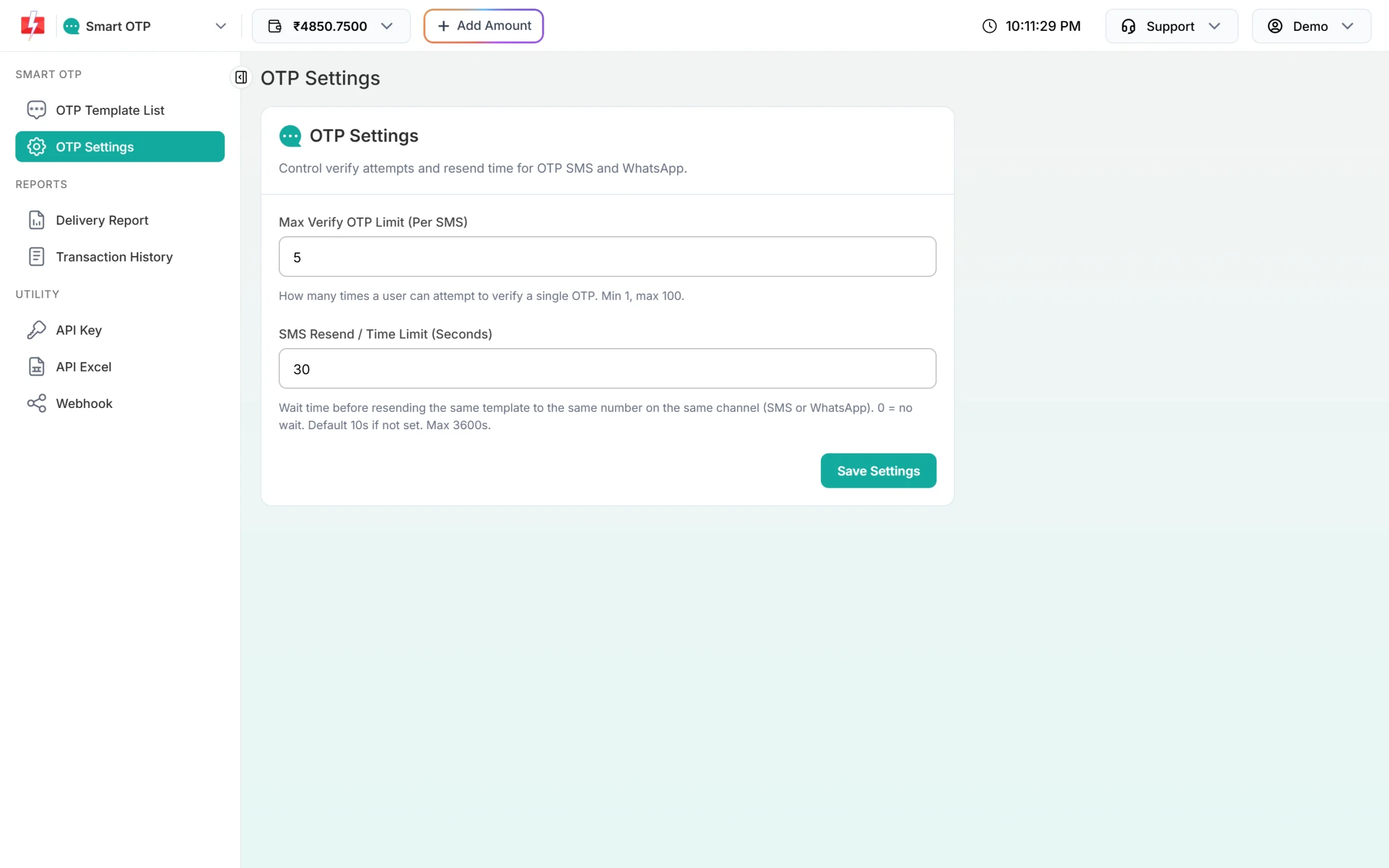
For login OTPs, a small number such as 3 to 5 is a sensible choice. It gives users room for a typo and makes guessing hard.
Why verify says “OTP not found or already verified”
This is the most common verify question. The usual causes:
- The user asked for a second OTP. Each Send OTP cancels older codes for that number. If the user types the code from the first SMS, it no longer counts. Use the Resend OTP API for “Resend code” buttons. It sends the same code again.
- The code was already verified. A double click or a page refresh can call verify twice. The first call succeeds, the second gets 404. Treat the first success as final.
- The OTP was cancelled earlier. After “OTP expired” or “Maximum verification attempts reached”, the code is gone and later calls get 404.
- Different account or number. The OTP was sent with a key from another Fast2SMS account, or the number in verify is not the same as in send.
See which users verified
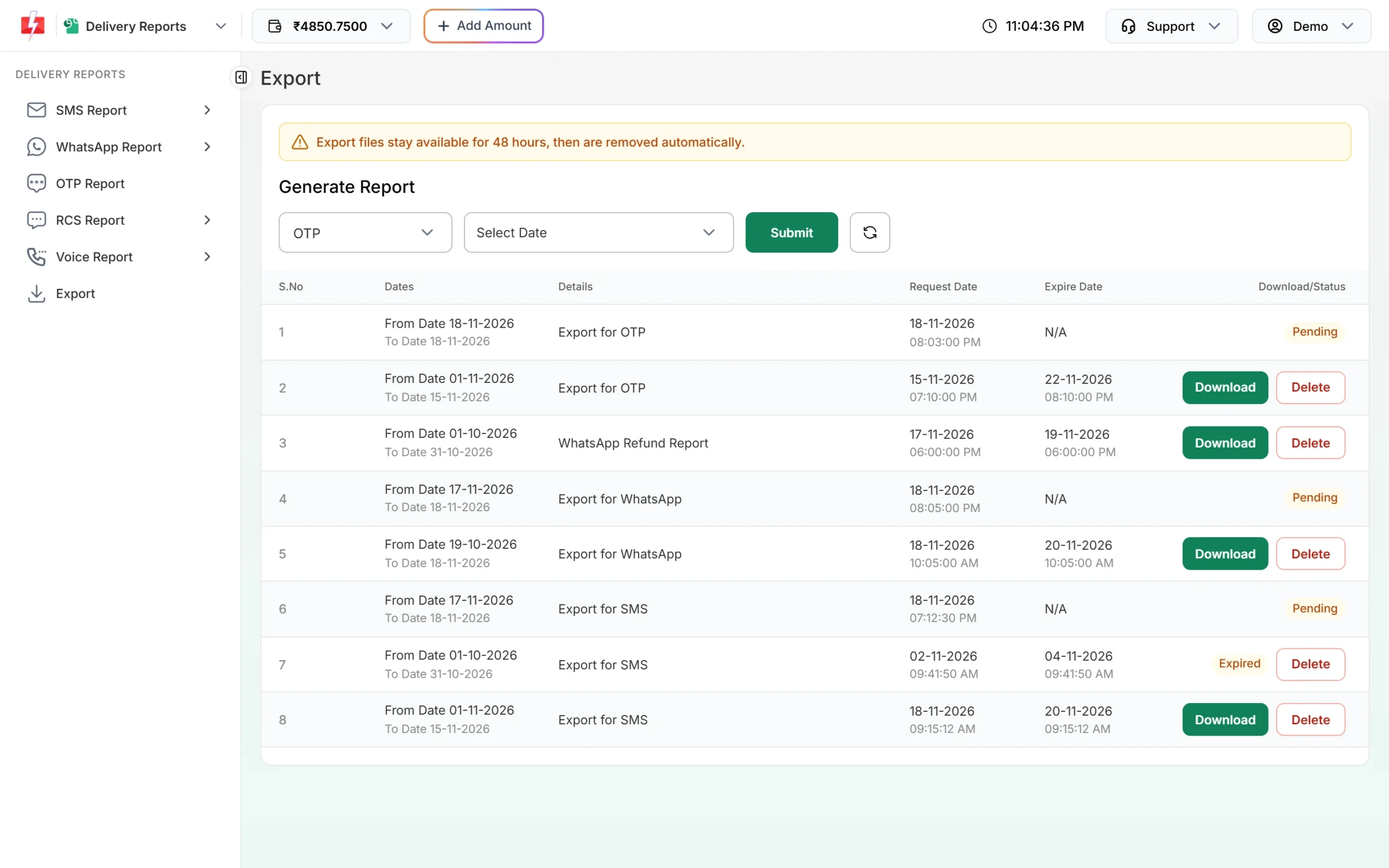
Verification results do not show on the report pages. To see them, go to Delivery Reports, then Export, choose OTP and a date range, and click Submit. When the file is ready, click Download. The file has a Verified column (Yes, No or Expired) and a Verified At column. “Expired” also covers codes that used up their tries or were replaced by a newer OTP. Export files stay for 48 hours.
Security tips for your verify step
- Call verify from your server only. Never decide “verified” in the browser or app.
- Do not send the OTP back to the browser. Fast2SMS keeps it, so your page never needs it.
- Limit verify calls per user and per IP in your own app as well.
- After “Maximum verification attempts reached”, start again with a new Send OTP call, so the user gets a fresh code.
Frequently asked questions
Do I need to pass the OTP ID to verify?
No. Verify needs only mobile and otp. It checks the newest unverified OTP for that number.
Can I verify an OTP that I created myself?
Yes, if you sent it through Smart OTP with the otp field. Fast2SMS stores the value you passed and checks it the same way.
Can I verify the same OTP twice?
No. After “OTP verified successfully” the code is used up and the next call returns “OTP not found or already verified”.
Is Verify OTP charged?
Charges apply to messages you send, such as Send and Resend. The verify call does not send a message.
Does a WhatsApp OTP verify the same way as an SMS OTP?
Yes. The verify call is the same for both channels and for fallback messages, because they carry the same code.
How long can a user wait before typing the code?
Up to the otp_expiry you set when sending, from 1 to 10080 minutes. The default is 15 minutes.