
To send bulk voice calls in Fast2SMS, open Bulk Voice Call, give the campaign a name, choose Simple, add your mobile numbers, pick an approved voice file and click Send. Calls start within a minute, and you pay only for calls that are answered. At the time of writing the rate is ₹0.25 per 15-second pulse.
यह गाइड हिंदी में पढ़ें: Bulk voice call कैसे करें: रिकॉर्डेड मैसेज से हज़ारों लोगों को call
Sending in bulk? For high voice call volumes our team offers discounted rates. Talk to our team or see voice call pricing.
This step-by-step guide is for shops, schools, clinics and any business that wants to play a recorded message to many customers at once, for example an offer, a reminder or an announcement. It also covers costs, scheduling and the errors you may see.
Before you start
- One paid transaction of ₹100 or more on your account. Until then you see “You need to complete one transaction of ₹100.00 or more before sending voice calls.”
- Wallet balance for the whole campaign. The amount is held when you send and the unused part comes back after the calls.
- An approved voice file. Every account gets free sample files that are already approved, so you can test right away. Your own recording must be uploaded under Voice Files and approved by the operator first.
- Indian mobile numbers that are not on DND. Calls go out only between 10:00 AM and 9:00 PM IST.
How to send a bulk voice call
-
Open Bulk Voice Call
Switch to Voice from the app menu at the top left and click Bulk Voice Call under VOICE CALL (OBD). The FEATURES box on the right shows the main rules: “Pay only for Answered Calls”, “Per Call cost ₹0.25 / 15 sec” and “Non DND numbers only, 10 AM – 9 PM”.
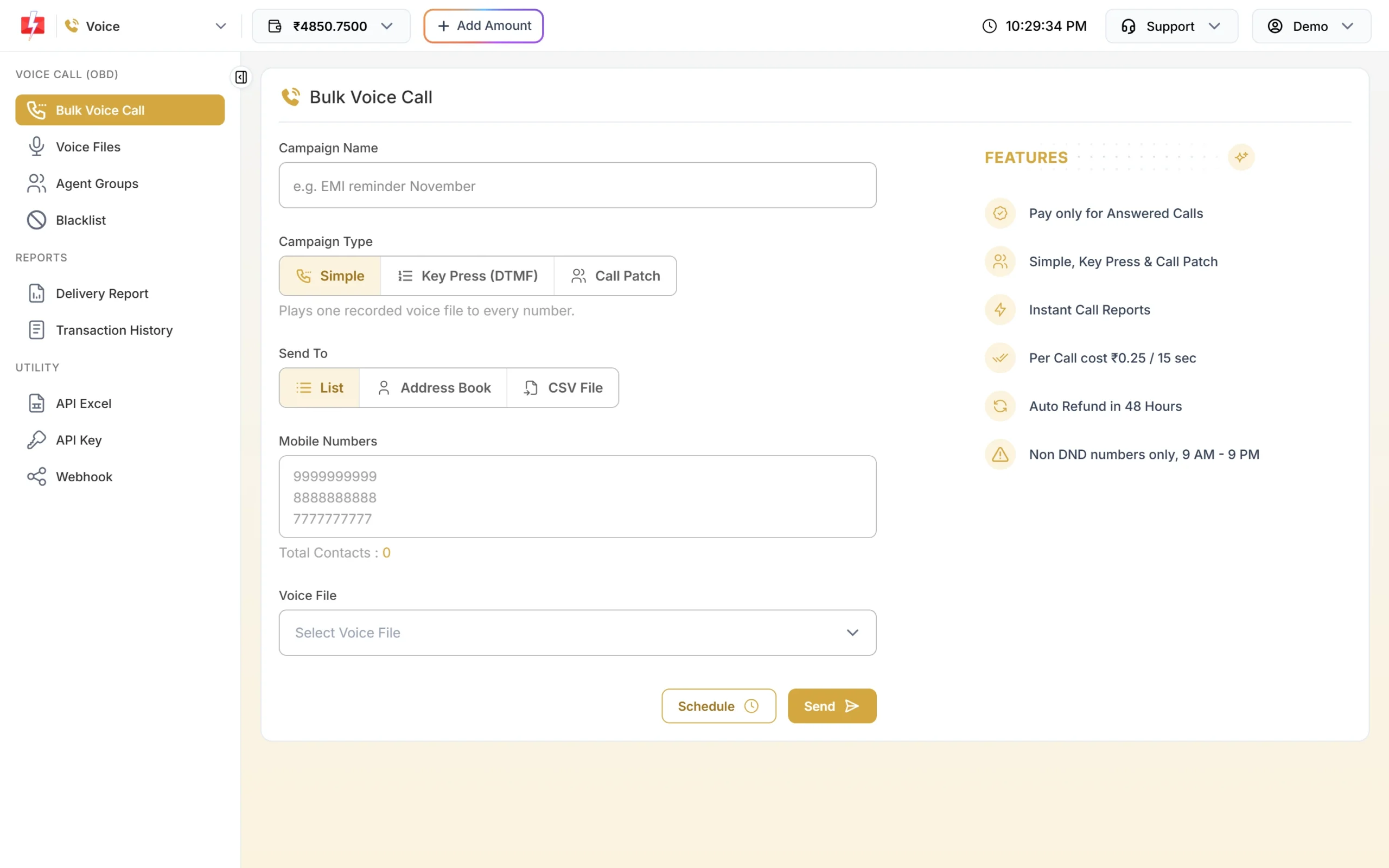
The Bulk Voice Call form with Simple selected. -
Name the campaign and pick Simple
Type a Campaign Name you will recognise in reports, such as “EMI reminder November” (up to 100 characters). Under Campaign Type, keep Simple. It plays one recorded voice file to every number. Use Key Press (DTMF) if you want the caller to press a key, or Call Patch to connect callers to your team.
-
Add the mobile numbers
Under Send To, choose how to add numbers:
- List: type or paste numbers, one per line.
- Address Book: choose saved contacts or groups.
- CSV File: upload a CSV, TXT or Excel file up to 10 MB and choose the column with the numbers. A header row is skipped. Use Sample CSV for the format.
Only 10-digit Indian mobile numbers starting with 6 to 9 are called. Numbers with 91 or 0 in front are trimmed for you. Duplicates and invalid numbers are removed. One campaign can have up to 1,00,000 numbers.
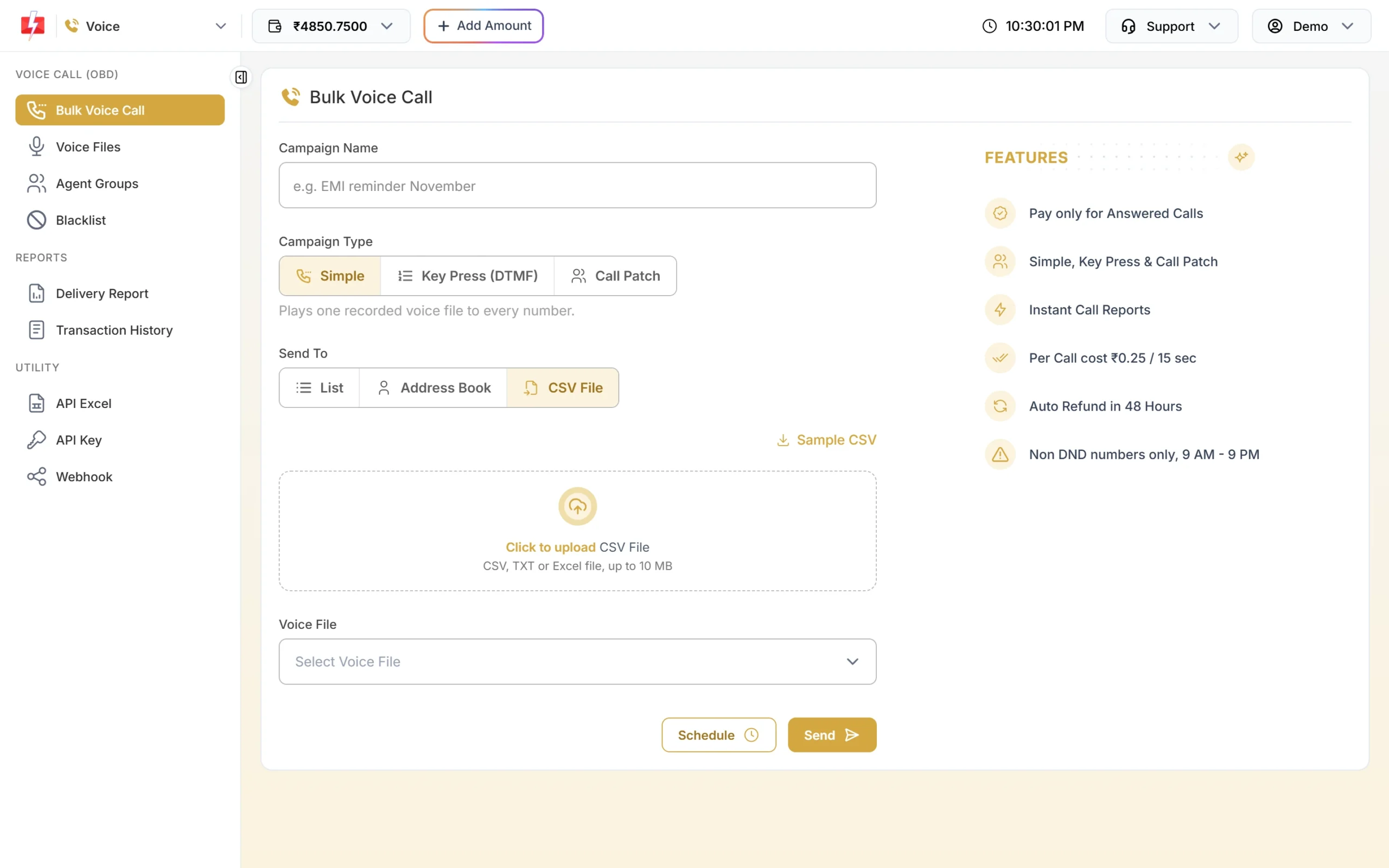
Upload a file for long lists. -
Choose the voice file
Click Voice File. A window opens with your files as phone cards, each showing its name, type and length. Use Sample Files to try the free samples or My Files for your own approved recordings. Tap to listen, then pick one. The form shows the file name and its length.
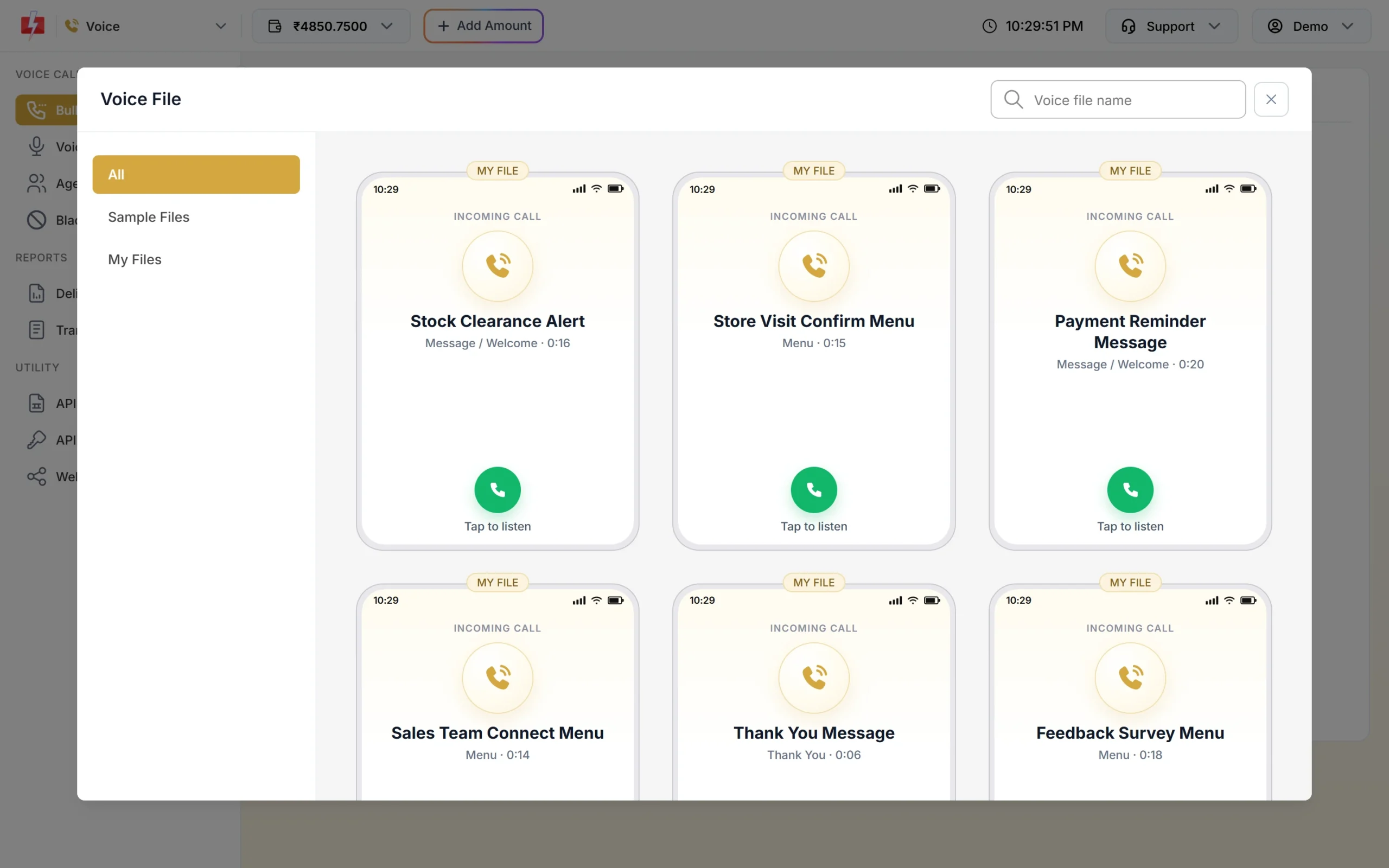
Only approved files can be chosen. -
Schedule it (optional)
To call later, click Schedule, pick a date and time at least 1 minute ahead inside calling hours, and click Schedule in the drawer. Scheduled campaigns appear under Delivery Report > Voice Report > Schedule, where you can cancel them for a full refund.
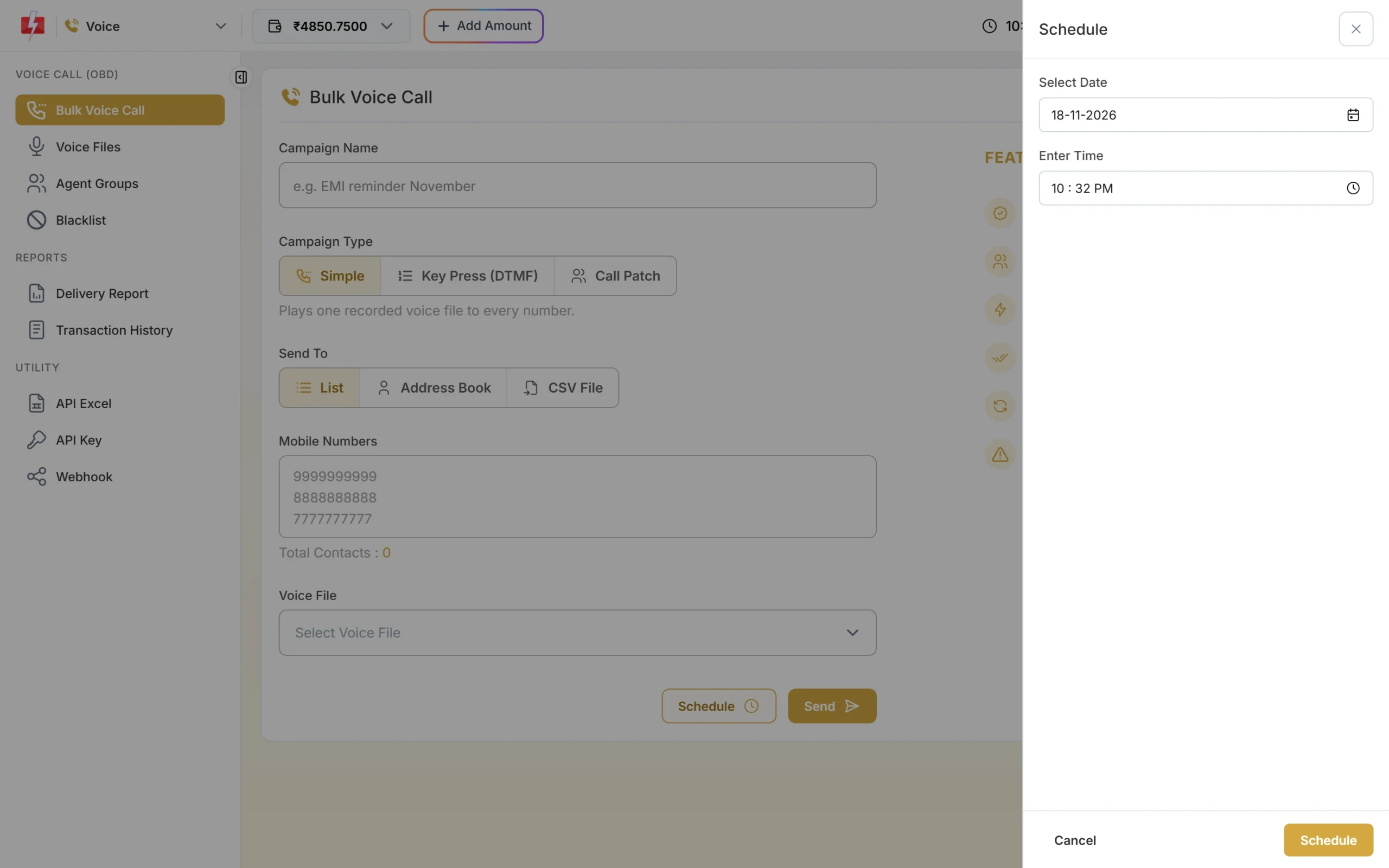
Pick a date and time inside 10 AM to 9 PM. -
Check the cost and confirm
Click Send. The Campaign Preview & Confirmation popup shows Total Numbers, Duplicate Numbers, Invalid Numbers, Blacklisted Numbers, Valid Numbers, Cost per Pulse, Pulses per Call (estimate) and the cost. Nothing is sent yet. Click Confirm & Send (or Confirm & Schedule).
You will see “Campaign submitted. Calls start within a minute.” The held amount appears in Transaction History as “Voice Call (N Calls)”.
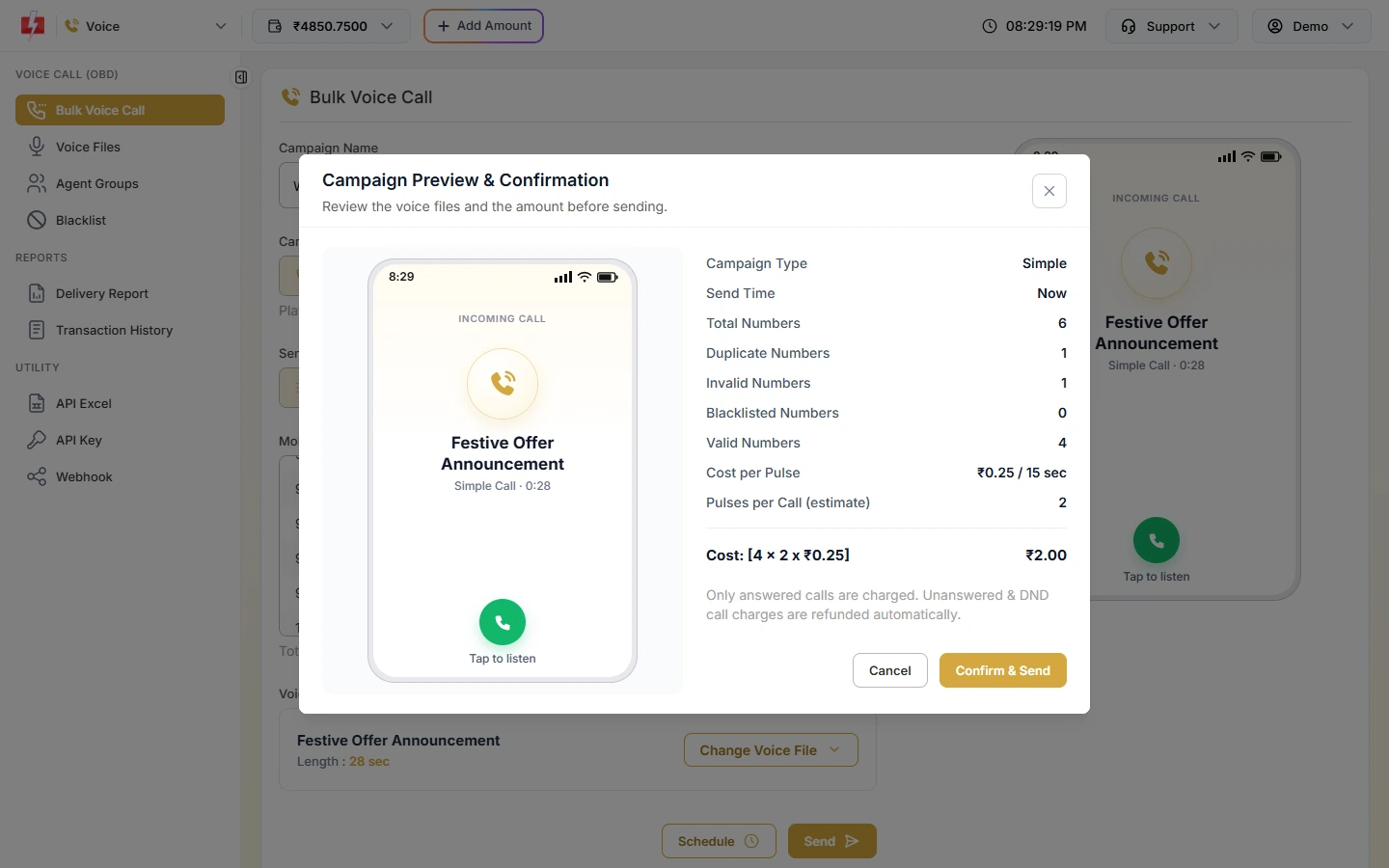
The cost is an estimate held from your wallet. Unanswered calls are refunded. -
See the results
Open Delivery Report > Voice Report. Each campaign shows a status and a Download button. Click a campaign to see every number with Answered, No Answer, Busy, Failed or DND, the call duration, pulses and charge.
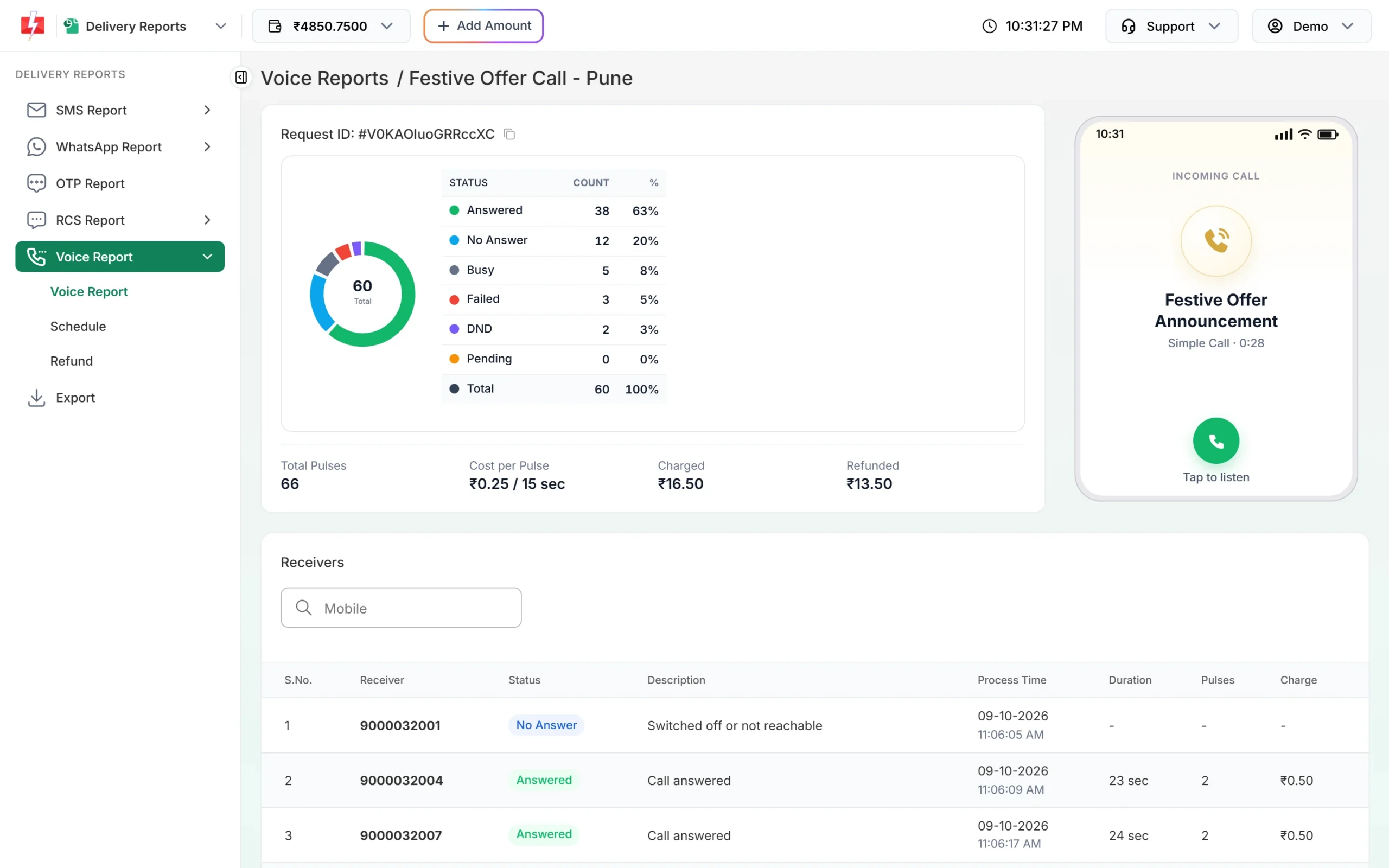
Results for each number in the campaign.
How much does a bulk voice call cost?
You pay per pulse of 15 seconds, and only for answered calls. At the time of writing the rate is ₹0.25 per pulse. See the voice call page for the current rate.
| Answered call length | Pulses | Charge at ₹0.25 per pulse |
|---|---|---|
| 1 to 15 seconds | 1 | ₹0.25 |
| 16 to 30 seconds | 2 | ₹0.50 |
| 31 to 45 seconds | 3 | ₹0.75 |
| No answer, busy, failed, DND, blacklisted | 0 | ₹0 |
When you send, Fast2SMS holds an estimate for every valid number based on the voice file length. After the campaign’s results are in, only answered calls are charged and the rest is refunded automatically as “Unanswered Voice Call Refund (N Calls)”. The refund reaches your wallet automatically about 1 hour after the campaign finishes.
Tip: Keep the recording short. A 25-second message costs 2 pulses per answered call, while a 35-second one costs 3. Say your brand name in the first few seconds so people do not hang up.
Common problems and fixes
| Message you see | What to do |
|---|---|
| You need to complete one transaction of ₹100.00 or more before sending voice calls. | Recharge ₹100 or more once with Add Amount. |
| Insufficient wallet balance. This campaign needs Rs X. | Recharge at least that amount and send again. |
| Choose a voice file. | Pick an approved file in Voice File. |
| A chosen voice file was not found or is not approved yet. Please choose it again. | Wait for approval under Voice Files, or use a sample file. |
| Voice calls can only be sent between 10:00 AM and 9:00 PM (TRAI). | Schedule the campaign inside calling hours. |
| Calling hours are over for today, so your campaign is scheduled for … | Nothing to do. It will start the next morning, or cancel it from Voice Schedule. |
| All numbers are in your voice blacklist. | Remove numbers from Blacklist if you added them by mistake. |
| Maximum 1,00,000 numbers per campaign. | Split the list into two campaigns. |
| You already have 50 voice campaigns scheduled or running. | Wait for some to finish, or cancel scheduled ones you do not need. |
Frequently asked questions
How fast do bulk voice calls start?
Calls start within a minute after you confirm, as long as it is between 10 AM and 9 PM IST.
Do I pay for calls that are not answered?
No. Only answered calls are charged. No answer, busy, failed and DND calls are refunded automatically.
Can I use my own voice recording?
Yes. Upload an MP3 or WAV file up to 5 MB, or record in the browser, under Voice Files. You can use it once the operator approves it, usually within a few hours.
Can I call DND numbers?
No. The operator does not dial DND numbers. They show as DND in the report and cost nothing.
How many numbers can I call in one campaign?
Up to 1,00,000 numbers per campaign.
Can I schedule calls for several days?
Yes. If you choose a date range in Schedule, Fast2SMS creates one campaign per day, up to 31 days, each with its own held amount.
Are unanswered calls retried?
No. Automatic retry is not available because the operator does not allow retries. Send a new campaign to those numbers later if needed.
Can I send voice calls by API?
Yes. The voice API is described under API Excel in the Voice menu. You need the File ID of an approved voice file.