
There is no single “normal” SMS delivery rate in India that fits every sender. Your rate depends mostly on two things you control: how clean your number list is, and which type of message you send. Service and transactional SMS to customers who recently gave you their number usually do far better than promotional SMS to an old list full of DND and closed numbers.
So instead of comparing yourself with a number from the internet, measure your own SMS delivery rate in Fast2SMS, see what lowers it, and fix those causes. This page shows how.
How to calculate your SMS delivery rate
Delivery rate = numbers delivered ÷ numbers sent × 100. Count numbers, not campaigns.
-
Pick a period that has settled
Open Delivery Report in the SMS menu and choose a date range, for example Last 1 week. Leave out the last few hours: numbers still in Sent or Pending will change to Delivered or Failed, and they pull the rate down until they do.
-
Read the Total SMS donut
The Total SMS box shows Delivered, Failed, Sent and Pending with a count and a percentage of the total. The Delivered percentage is your delivery rate for that period. In the example below, 37 of 60 numbers are delivered (62%), while 9 numbers are still in Sent.
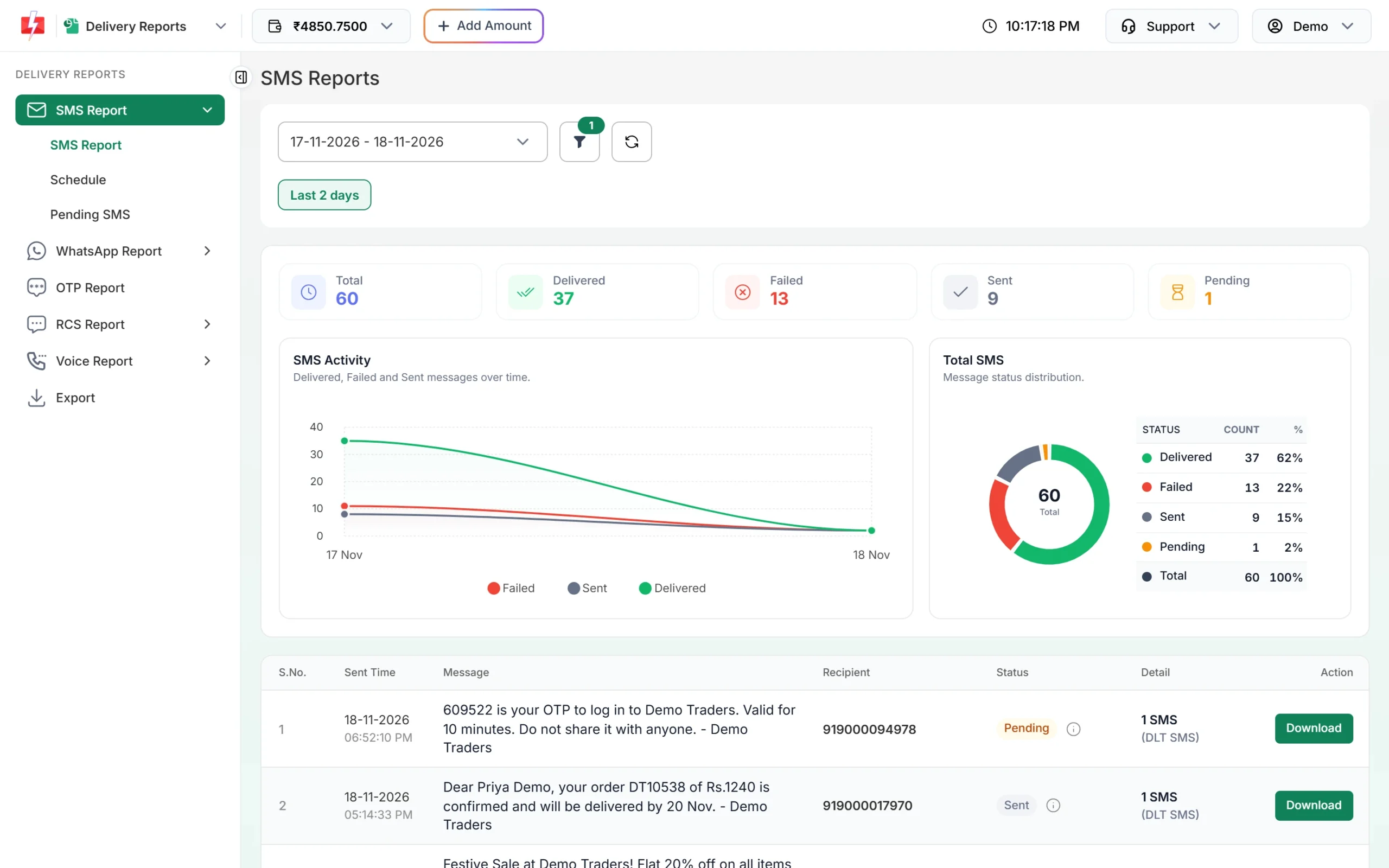
Delivered percentage for the chosen dates. -
Compare by sender ID, entity or route
Click the filter button and use Sender ID, Entity ID or Route / Source to see the rate for one header or one kind of traffic. This shows quickly whether one template, one header or your promotional sends are pulling the total down.
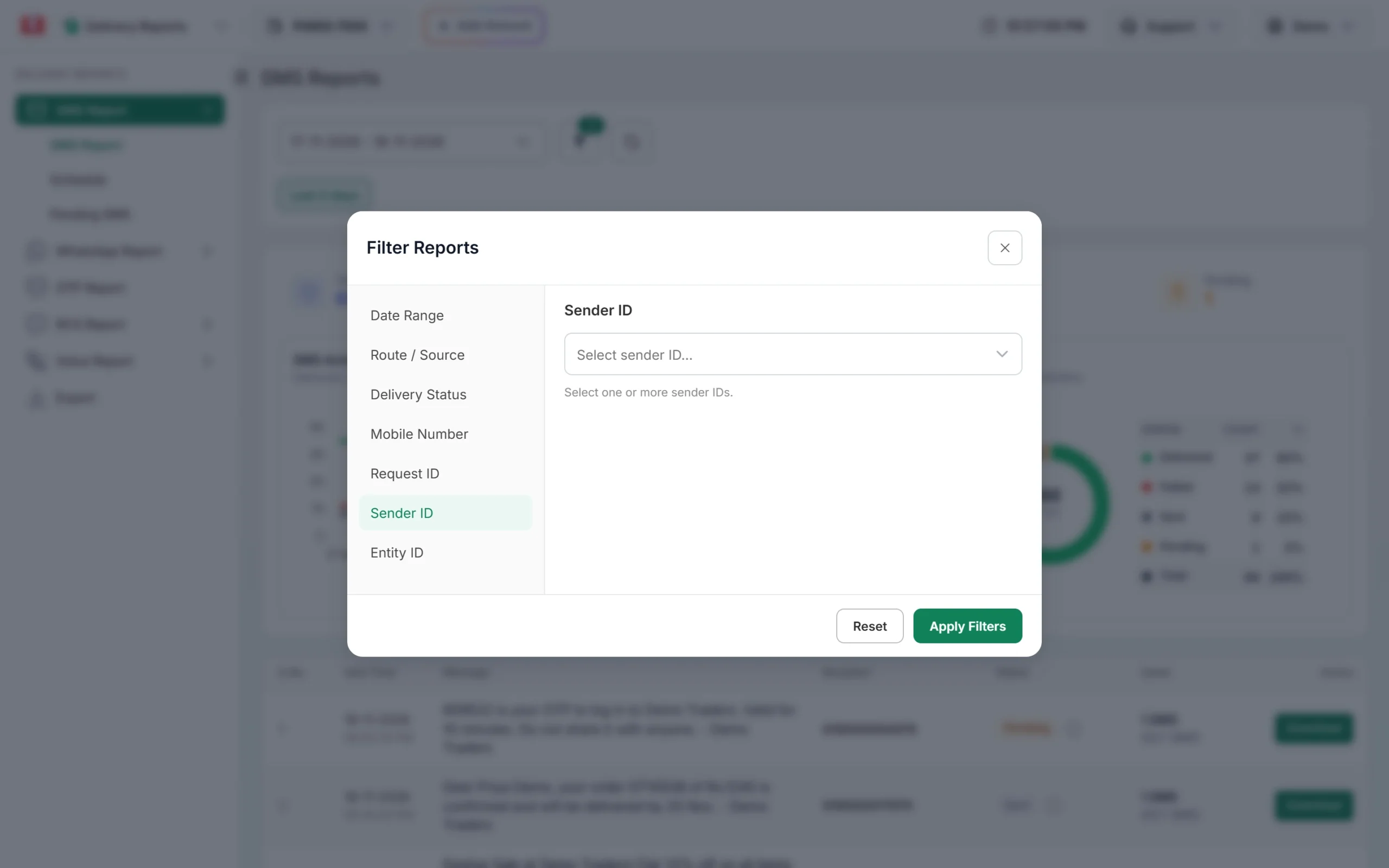
Filter the report by sender ID to compare headers.
Do not read the status label of a campaign row as its delivery rate. A campaign row shows Delivered when at least 30% of its numbers are delivered. Hover over the info icon, or open Delivery Details, to see the real counts.
What lowers SMS delivery rates
| Cause | What you see in the report | Fix |
|---|---|---|
| Promotional SMS to DND numbers | Status DND, “DND activated” | Expect this on promotional sends. Send genuine service messages on Service Implicit templates. |
| Wrong, closed or old numbers | “Number not exist”, “Unknown subscriber”, “Number invalid” | Remove them from your list after each campaign. |
| Phone off or out of network | “Number switch off or low signal”, “Number not reachable” | Nothing to fix in your setup. Try again at another time. |
| Blocked numbers | Status Blocked, “Number blocked” | Remove them from future lists. |
| Message does not match the DLT template | Template error reasons, for example “TEMPLATE_NOT_MATCHED” | Send the exact approved text and fill variables within the template. |
| PE-TM chain, header or template problem at DLT | Reasons about the entity, header, telemarketer or chain | Check DLT Manager and your DLT portal. |
| Link not whitelisted, consent missing or expired | Reasons such as “CTA_URL_BLACKLISTED”, “CONSENT_EXPIRED” | Use whitelisted links, keep consent records current. |
The first three are about your list and your audience. The last three are about your DLT setup, and they usually fail many numbers at once, so fix them first. Every reason is explained in Why did my SMS fail?
How to improve your SMS delivery rate
- Clean the list before you upload. Use 10-digit Indian mobile numbers. Fast2SMS removes duplicate and invalid numbers before sending, but it cannot know which valid-looking numbers are closed.
- Remove failed numbers after every campaign. Download the campaign report and delete numbers marked “Number not exist”, “Unknown subscriber”, Blocked or Invalid.
- Use the right template type. Order updates, reminders and alerts go on Service Implicit templates. Offers go on promotional templates and will not reach DND numbers.
- Match the template exactly. Most template failures are small differences in text, spaces or variables. See DLT template not matched: 10 small mismatches.
- Keep your PE-TM binding approved. In DLT Manager > PE-TM Binding, both TM Approval and Final PE Confirmation should be Approved.
- Send promotions between 10 AM and 9 PM, so they are not held until the next morning.
- Send a test SMS first to your own phone with Test Template, before a large send.
Why a better delivery rate also saves money
DLT SMS are charged for every valid number when the campaign is sent. Numbers that fail at the operator are not refunded automatically, while duplicate and invalid numbers are never charged. So every closed or blocked number you remove is money you stop spending. See Am I charged for failed SMS? and the current rates on the bulk SMS pricing page.
Sending in bulk? For high SMS volumes our team offers discounted rates. Talk to our team or see SMS pricing.
Frequently asked questions
What is a good SMS delivery rate in India?
There is no single official figure. Compare your own campaigns over time and by template type. Service messages to recent customers should do better than promotions to old lists.
Why is my promotional SMS delivery rate lower than transactional?
Promotional SMS do not reach numbers on the DND list, and promotional lists are often older. Transactional and service templates are not blocked by DND.
Does the Failed card include DND and blocked numbers?
Yes. The Failed card adds up failed, blocked, DND and invalid numbers. Use the Delivery Status filter to see each one separately.
Why did my delivery rate go up after a few hours?
Numbers that were in Sent got their operator reports and changed to Delivered. Measure after the reports have settled.
Does a Delivered row mean the whole campaign was delivered?
No. A campaign row shows Delivered when at least 30% of its numbers are delivered. Check the counts in Delivery Details.
Can a different sender ID improve delivery?
Only if the old header has a problem at DLT, such as being inactive or blacklisted. A healthy header does not change delivery by itself.