
The SMS marketing KPIs that matter are delivery rate, failure reasons, click-through rate, conversion rate and cost per conversion. Delivery numbers come straight from your delivery report. Clicks and sales need a little setup on your side, such as a tracked link or a campaign coupon code. This guide explains each KPI in plain words, gives the formula, shows where to find the numbers in Fast2SMS, and covers the same measures for WhatsApp, RCS and voice campaigns.
Why measure SMS campaigns at all?
Sending is the easy part. Without numbers you cannot tell if a campaign failed because the list was old, because the offer was weak, or because the link did not open. A few simple KPIs answer three questions:
- Did the message reach people? Delivery rate and failure reasons.
- Did people act on it? Click-through rate, replies, calls, store visits.
- Was it worth the money? Conversion rate, cost per conversion and return on spend.
Compare each campaign with your own past campaigns, not with numbers you read online. Your list, your industry and your offer matter more than any average.
The main SMS marketing KPIs at a glance
| KPI | Formula | Where to get the numbers |
|---|---|---|
| Delivery rate | Delivered ÷ Total numbers sent x 100 | Delivery Report cards and donut |
| Failure rate | Failed ÷ Total x 100 | Delivery Report (Failed includes blocked, DND and invalid) |
| DND share | DND ÷ Total x 100 | Status filter or the info icon on each campaign |
| List quality | (Duplicate + Invalid) ÷ Numbers you uploaded x 100 | The confirmation popup before you send |
| Click-through rate (CTR) | Unique clicks ÷ Delivered x 100 | Your website analytics or link tracker |
| Conversion rate | Orders, bookings or leads ÷ Delivered x 100 | Your billing, CRM or coupon code usage |
| Cost per conversion | Campaign cost ÷ Conversions | Transaction History + your sales data |
| Return on spend | (Revenue from campaign – Campaign cost) ÷ Campaign cost | Transaction History + your sales data |
| Opt-out rate | Opt-out requests ÷ Delivered x 100 | Your own opt-out records |
1. Delivery rate: did the SMS reach the phone?
Delivery rate is the share of numbers whose phone confirmed receipt. Open Delivery Reports and pick a date range. The cards at the top show Total, Delivered, Failed, Sent and Pending, and the Total SMS donut shows each status as a percentage. These counts are per number, not per campaign.
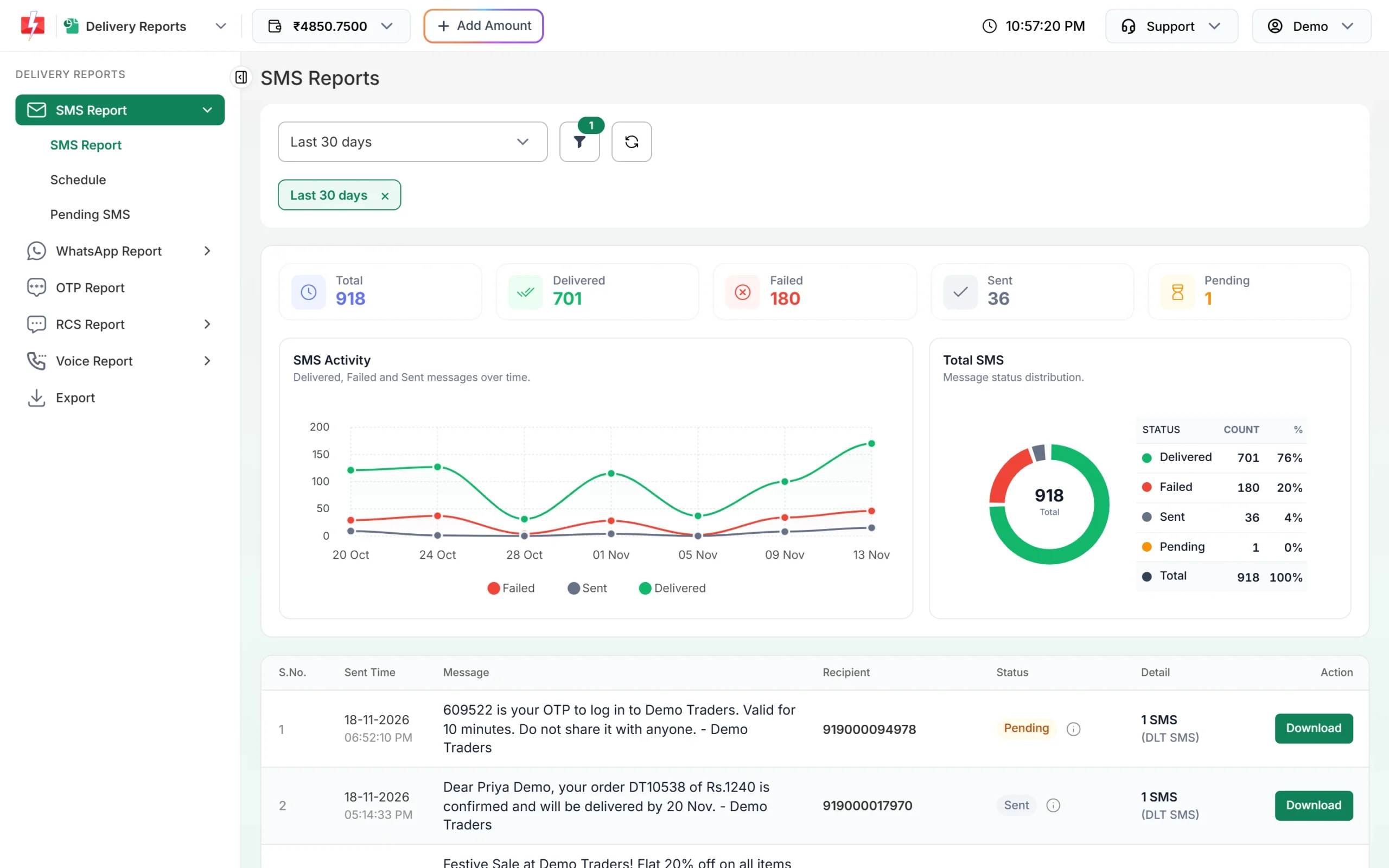
Worked example (sample account above): 701 delivered out of 918 numbers gives a 76% delivery rate. But 36 numbers still show Sent, which means the operator has not returned its report yet, and 1 is Pending. If you leave those out until they settle, the rate is 701 ÷ 881 = about 80%. Check again the next day before you write the final number.
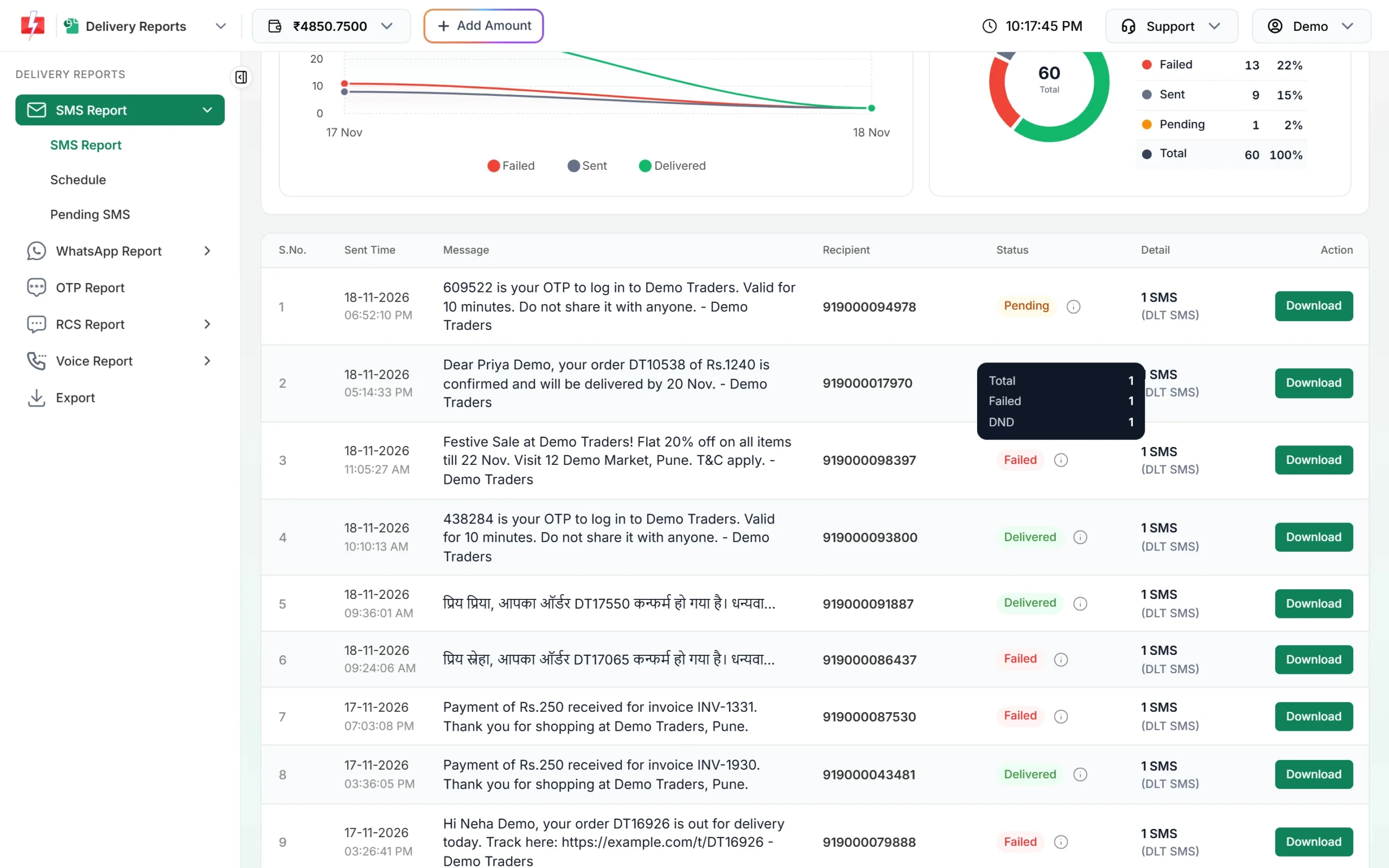
Do not judge by the campaign label alone. In the report list, a campaign row shows “Delivered” once at least 30% of its numbers are delivered. Hover over the info icon next to the status to see the real split: Total, Delivered, Failed, Sent, Pending, Blocked, DND and Invalid.
2. Failure rate and failure reasons
The Failed card adds up failed, blocked, DND and invalid numbers. A single failure number is not useful on its own. Click any message in the list to open Delivery Details. The Receivers table shows each number with its status and a Description, such as “DND activated”, “Number switch off or low signal”, “Number not exist” or “Operator rejected”.
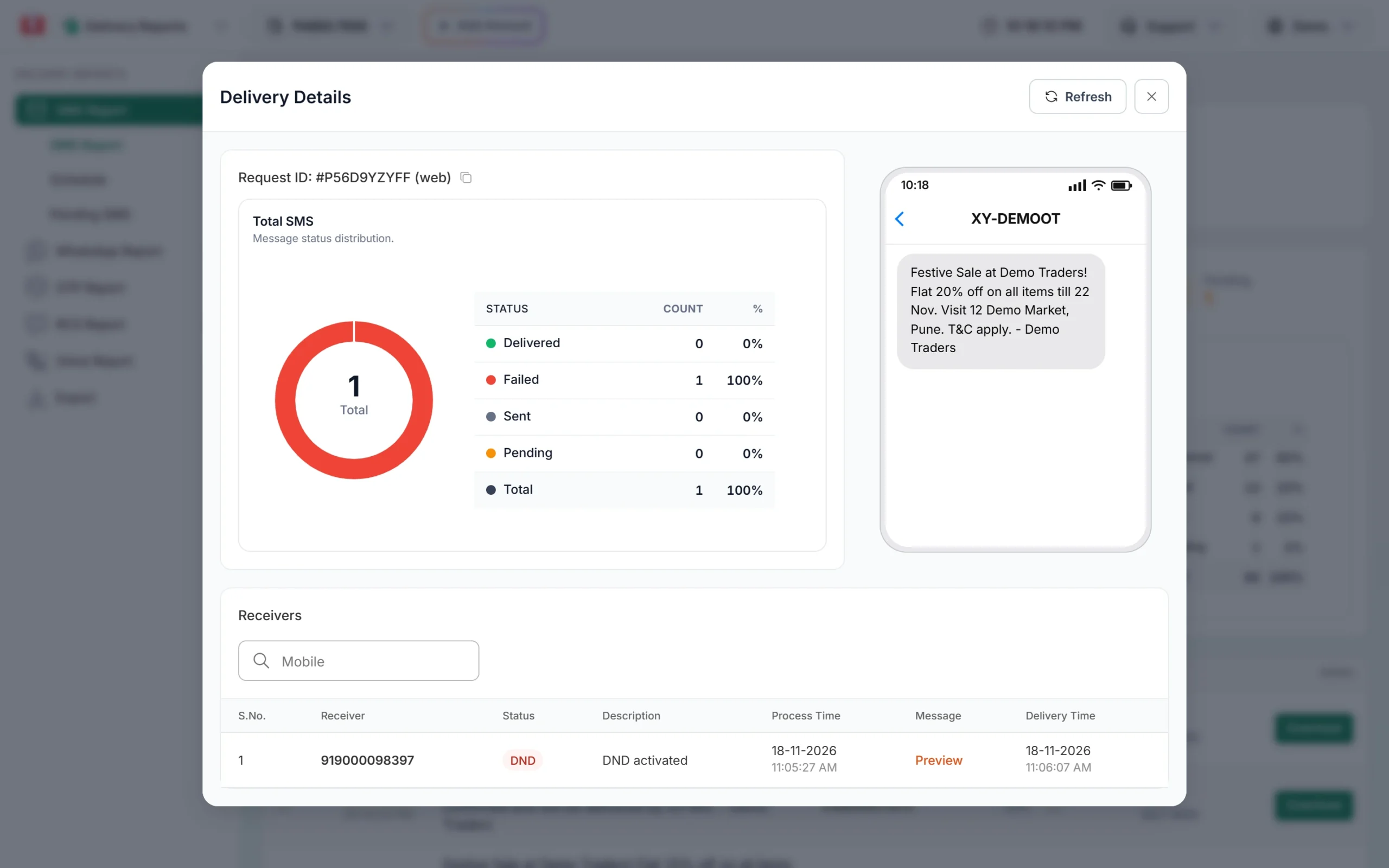
What the common reasons tell you:
| Reason you see | What it says about the campaign | What to do |
|---|---|---|
| DND activated | A promotional SMS went to people who blocked promotional messages | Send promotions only to people who gave consent, and use service templates for existing customers where the content allows it |
| Number not exist, Unknown subscriber, Number invalid | Old or badly typed numbers in your list | Remove them before the next campaign |
| Number switch off or low signal, Not reachable | The phone was off or out of coverage | Usually temporary. Do not count these as bad numbers after one try. |
| Operator rejected | The operator refused the message, often for a DLT reason | Check the template, header and PE-TM chain |
3. List quality: duplicates and invalid numbers
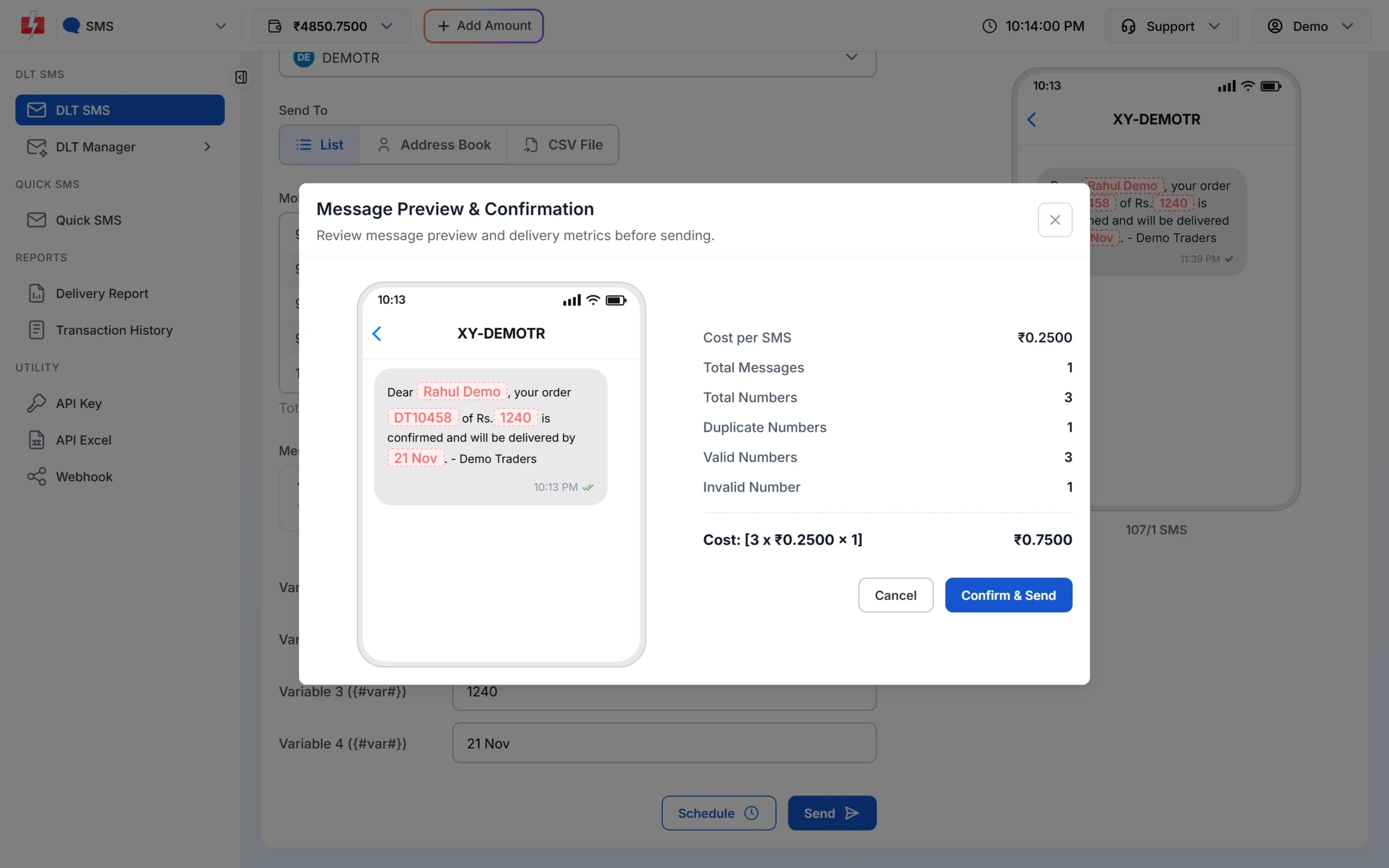
When you click Send, the Message Preview & Confirmation popup shows Total Numbers, Duplicate Numbers, Valid Numbers and Invalid Number, plus the cost. Fast2SMS does not charge for duplicates and invalid numbers, but a high count is a sign your list needs cleaning. Write these numbers down for each campaign. If invalid numbers keep growing, fix the way you collect numbers (for example, a 10-digit check on your website form).
4. Click-through rate (CTR): did people open the link?
The Fast2SMS delivery report tells you what was delivered, not who clicked. To measure clicks, track the link itself. The simplest way is to add UTM tags to the link and read the visits in your website analytics (for example Google Analytics):
https://yourshop.in/diwali?utm_source=sms&utm_campaign=diwali26Then: CTR = unique visits from that link ÷ delivered SMS x 100.
- Use your own domain. Every link in a DLT SMS must be whitelisted on your DLT portal. A public short-link domain that is not whitelisted under your entity gets the SMS blocked.
- Keep the link short. Long tracking links push the SMS into a second part, which doubles the cost per number. Watch the “x/y SMS” counter under the preview.
- Use one link per campaign. Change the campaign name in the link for each send, so the visits do not mix.
- Test the full link. Use Test Template in DLT Manager with the real link before a big send.
5. Conversion rate: did people buy, book or call?
A conversion is whatever the campaign was for: an order, a booking, a store visit, a form fill, a call. Three simple ways to count them:
- A campaign coupon code. Put a code such as SMS20 in the message and count how many bills used it. This works even for walk-in shops.
- The tracked link. If the link goes to a product or booking page, your analytics or store software can count orders from that visit.
- A dedicated phone number or keyword. Ask people to call a number or reply with a word that only this campaign uses.
Conversion rate = conversions ÷ delivered x 100. Use delivered, not sent, so a bad list does not hide a good offer.
6. Cost per conversion and return on spend
Open Transaction History and find the debit row for the campaign, for example “DLT SMS (250 SMS)”. View Details shows the cost per SMS, the characters, the valid numbers it was charged for and the formula used. Divide that cost by your conversions to get cost per conversion. If a ₹200 campaign brings 8 orders, each order cost ₹25 in messaging. Compare it with what an order earns you.
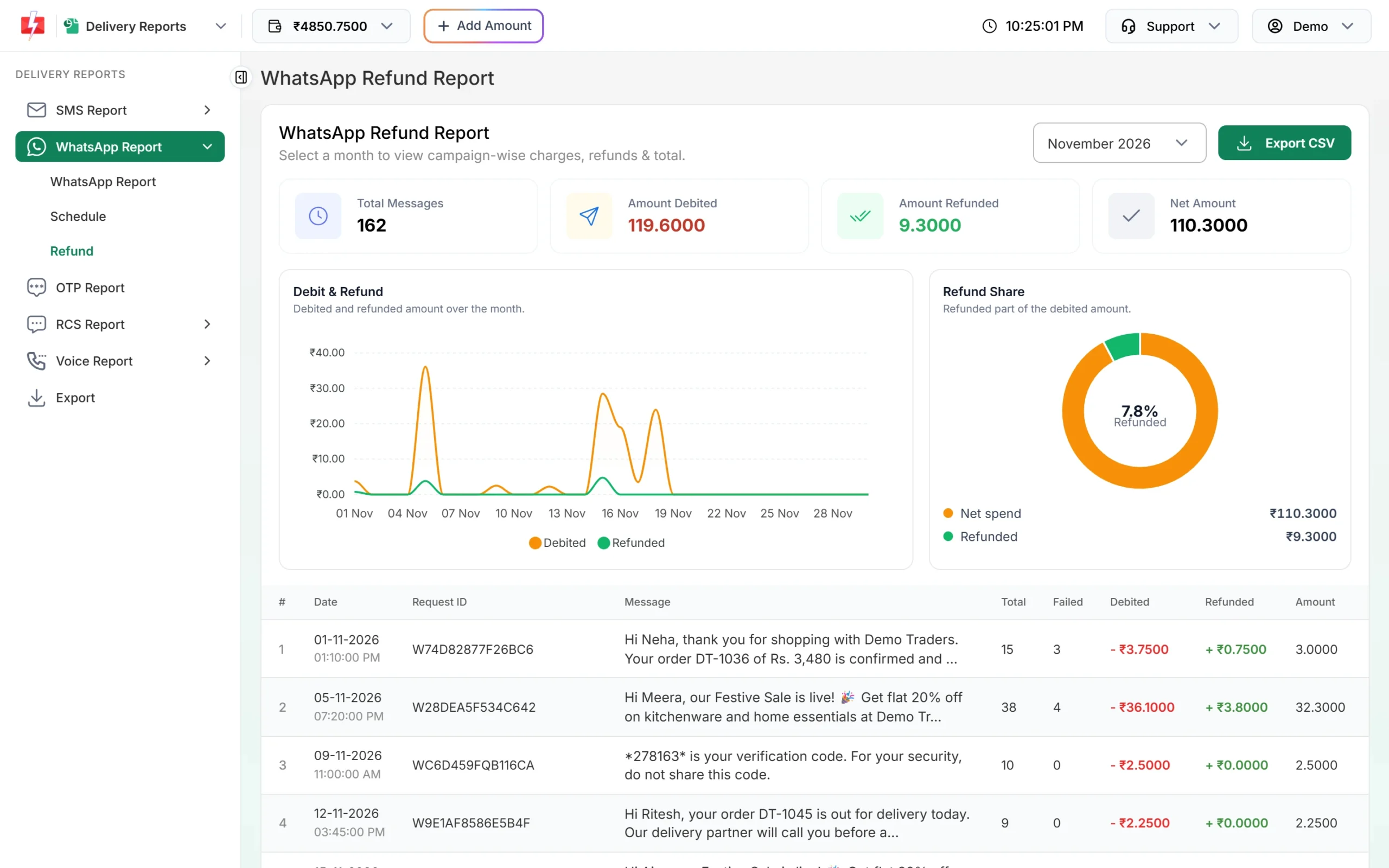
DLT SMS is charged for each valid number when the campaign is created. For WhatsApp and RCS, failed messages are refunded automatically, so use the Refund tab in Delivery Reports. It shows Amount Debited, Amount Refunded and Net Amount per campaign for the month. Use the net amount as the real cost.
At the time of writing, DLT SMS starts at ₹0.25 per SMS part on small recharges and gets cheaper on larger ones. See the bulk SMS pricing page for the current slabs.
Sending in bulk? For high SMS volumes our team offers discounted rates. Talk to our team or see SMS pricing.
7. Opt-outs and complaints
Promotional SMS must carry a way to opt out. Keep a record of everyone who opts out, remove them from the next list, and count them per campaign. A sudden jump in opt-outs after a campaign means the message was too frequent, not relevant, or sent to people who never asked for it. Complaints about unwanted commercial messages can also lead to action against the sender’s DLT header, so a rising opt-out rate is a warning to slow down.
KPIs for WhatsApp, RCS and voice campaigns
The same thinking works for other channels, with a few extra measures:
| Channel | Extra KPI | How to read it in Fast2SMS |
|---|---|---|
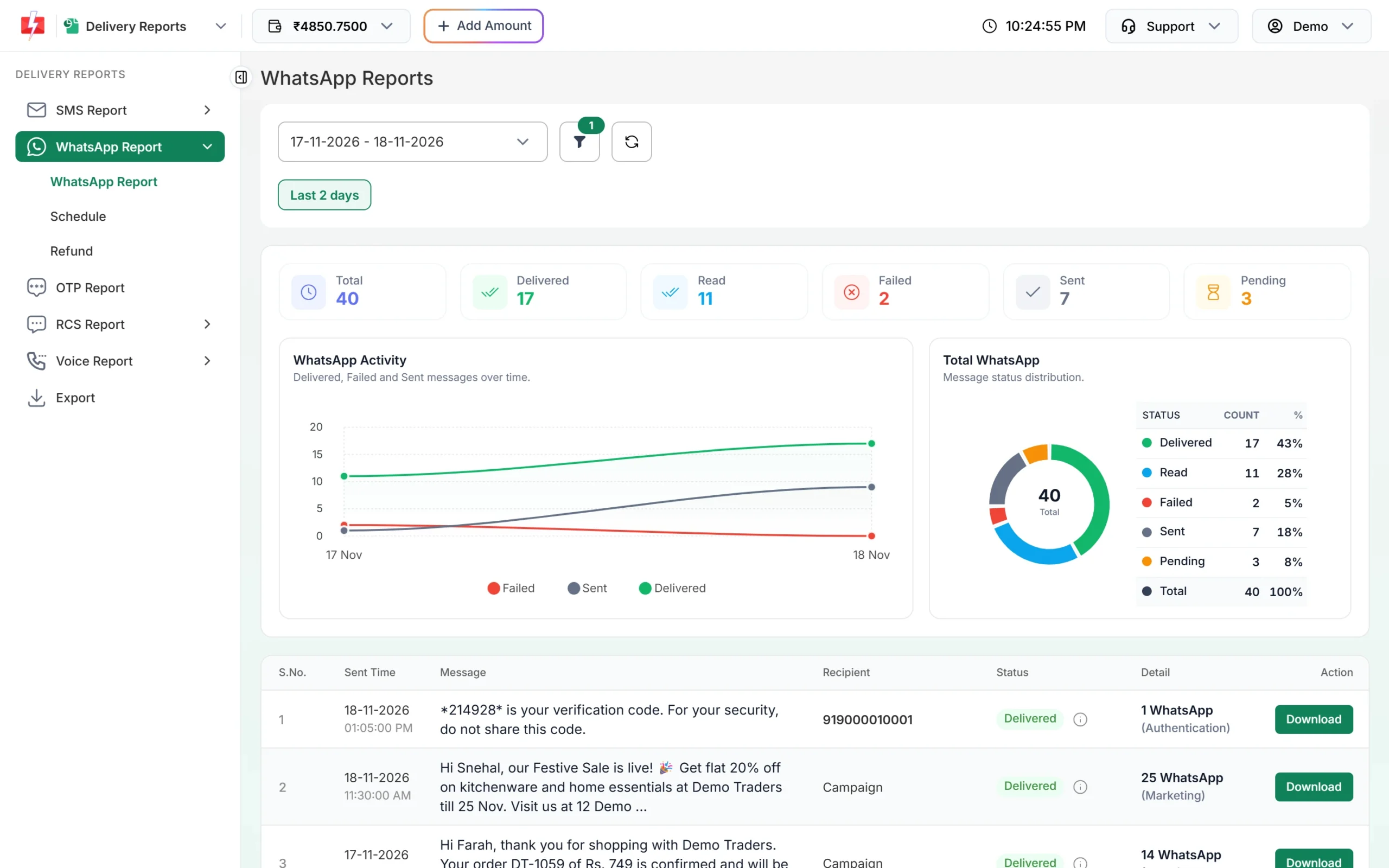
| Read rate = Read ÷ (Delivered + Read) x 100 | The WhatsApp report has separate Delivered and Read cards. Delivered does not include Read, so add them for the delivered total. | |
| RCS | Non-RCS share = Non-RCS ÷ Total x 100 | The RCS Delivery Details donut shows Non-RCS numbers (phones that cannot get RCS). Send those numbers an SMS instead. |
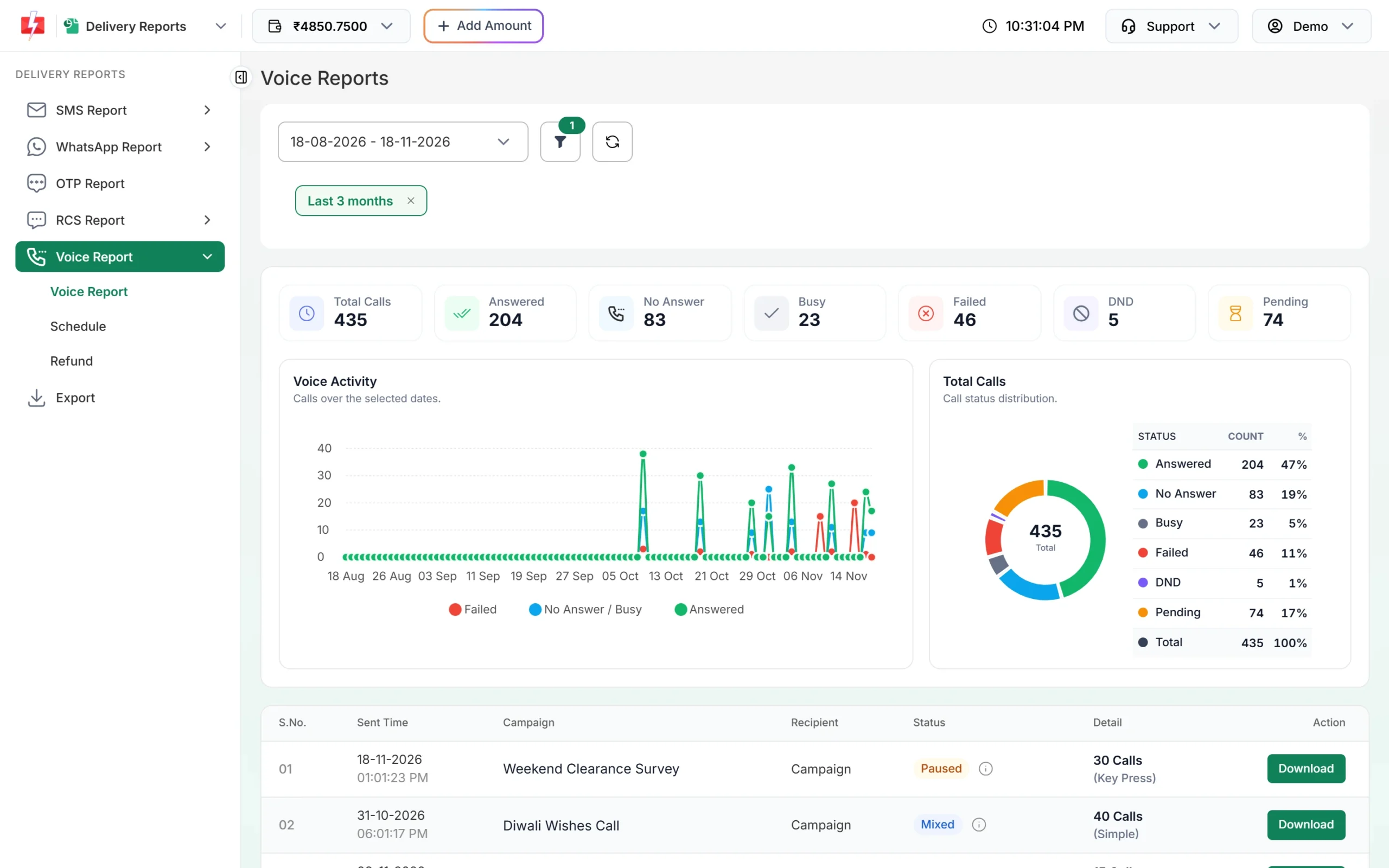
| Voice | Answer rate = Answered ÷ Total Calls x 100 | The Voice Report cards show Answered, No Answer, Busy, Failed, DND and Pending. For Key Press campaigns, the Key column shows what each person pressed. |
| Smart OTP | Verification rate = Verified ÷ OTPs sent x 100 | Export the OTP report. The export includes a verified column. |
How to build a simple campaign scorecard
-
Record the plan before you send
Write down the campaign name, date, template, list or group, the coupon code or tracked link, and what counts as a conversion.
-
Note the list numbers from the confirmation popup
Copy Total, Duplicate, Invalid and Valid numbers and the cost from Message Preview & Confirmation.
-
Read the delivery report the next day
Open Delivery Reports, find the campaign and use the info icon or Delivery Details for Delivered, Failed, DND and the main failure reasons. For a full list, click Download on the row or use Export for a date range. Export files stay available for 48 hours.
-
Add clicks and conversions
Take visits from your analytics and orders or coupon uses from your billing. Count them over the same number of days for every campaign, for example 3 days after sending.
-
Work out cost per conversion
Take the campaign cost from Transaction History (or the net amount from the Refund tab for WhatsApp and RCS) and divide by conversions.
If you send by API, add a webhook so every delivery status reaches your own system automatically. Then your CRM can join delivery status, clicks and orders without any manual export.
How to improve weak numbers
- Low delivery rate: clean the list, remove repeated “Number not exist” numbers, and check that promotional sends are not going to DND numbers.
- Good delivery, low clicks: make the offer clear in the first line, put the link early, and send when customers can act. Promotional SMS can only be delivered in the daytime window anyway.
- Good clicks, low conversions: the landing page is the problem. Check that it opens fast on a phone and shows the same offer as the SMS.
- High cost per conversion: shorten the text to one SMS part, send to a smaller group of past buyers, or move the campaign to WhatsApp or RCS where images and buttons may do better.
- Test one change at a time. Split your list into two CSV files, send two versions with different coupon codes, and keep the one that wins.
Frequently asked questions
What is a good SMS delivery rate?
It depends on your list and message type. Track your own rate per campaign and look for drops. A sudden fall usually means a list problem or a DLT issue, and the failure reasons in Delivery Details show which.
Does Fast2SMS show link clicks in the SMS report?
No. The SMS report shows delivery status per number. Track clicks with UTM tags or your own link tracker on a domain whitelisted on DLT.
Why does my report show “Sent” and not “Delivered”?
“Sent” means the operator has not returned its delivery report yet. Check again later before you calculate the delivery rate.
Should I calculate CTR on sent or delivered messages?
Use delivered. A message that never reached the phone could not be clicked, so counting it hides how good the message really was.
How do I measure conversions from an SMS without a website?
Put a campaign coupon code in the SMS and count how many bills use it, or ask customers to call a number used only for that campaign.
Can I get delivery reports into my own CRM?
Yes. Add a webhook URL for SMS, WhatsApp, RCS, OTP or voice under Webhook, and each status is sent to your system.
How far back can I see my reports?
The report has ranges from Today up to Last 3 months, plus a custom date range starting from the day your account was created.