
To check who owns an SMS header (sender ID), use TRAI’s Header Information Portal at smsheader.trai.gov.in. It shows header details along with the principal entity, meaning the registered business, behind each header, using data the telecom operators supply. The letters before and after the header also tell you the operator, the telecom circle and the type of message.
This page shows how to read a header, how to look up its owner on the TRAI portal, and how a business can check its own headers and spot look-alikes.
First, read the sender ID
A business SMS in India shows a sender like VM-DEMOTR-S. It has three parts:
| Part | Example | What it tells you |
|---|---|---|
| Prefix, first letter | V | The operator that sent the SMS: A Airtel, B BSNL, J Jio, M MTNL, T Tata Teleservices, V Vodafone Idea |
| Prefix, second letter | M | The telecom circle, for example D Delhi, M Mumbai, Z Maharashtra, X Karnataka, K Kolkata, T Tamil Nadu |
| Header | DEMOTR | The sender ID the business registered on DLT. This is the part that identifies the sender. |
| Suffix | S | The message type: P promotional, S service, T transactional, G government |
The operator and circle letters come from TRAI’s list of header prefixes. The prefix depends on the route the message took, so the same business can appear with different prefixes. For the full list of letters, see the meaning of the prefix in a sender ID.
How to check the owner of an SMS header on the TRAI portal
-
Note the core header
Leave out the two-letter prefix and the suffix. For VM-DEMOTR-S, the header is DEMOTR. That is the name registered on DLT.
-
Open the Header Information Portal
Go to smsheader.trai.gov.in. Stay on the Header/1600 Series tab. The other tab, Stakeholder Login, is not needed to look up a header.
-
Enter your email and name
Type your email ID and name, fill in the captcha and click Continue. Then complete the verification step the portal shows.
-
Look up the header
The portal then gives you header details with the principal entity each header is registered to. Search for the core header you noted and check whether the business matches the one the message claims to be from.
The same portal has a separate link with information about principal entities that use the 1600 and 1601 number series for calls. TRAI has designated the 1600 series for service and transactional calls.
How a business can check its own headers
- On your DLT portal. The header section of your Principal Entity login lists every header registered to your entity and its status.
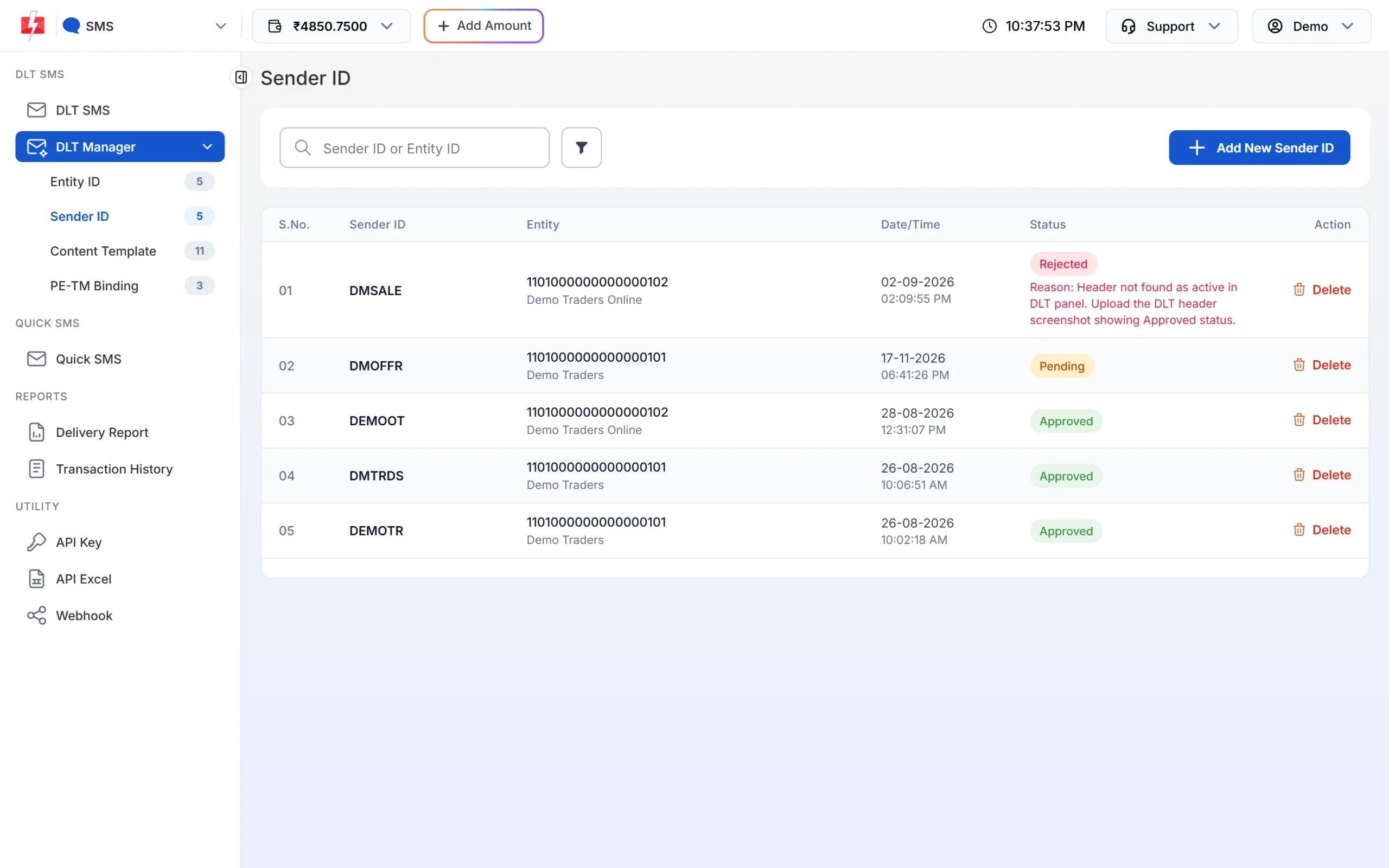
- In Fast2SMS. Open DLT Manager > Sender ID. Each row shows the Sender ID, the Entity ID and name it belongs to, and its status: Approved, Pending or Rejected with a reason. Use the search box to find a header or entity. Only approved headers can be used to send.
- Look for look-alikes. Use the TRAI portal to check whether a header that looks like yours is registered to another entity. TRAI has directed operators to deal with resembling and look-alike headers. If you find one, raise it with your DLT portal.
Protect your DLT and Fast2SMS logins. Under TRAI’s August 2024 direction, when a sender’s headers or templates are misused, operators suspend that sender’s traffic until the sender files a complaint or FIR and reviews all its headers and templates.
If a message looks like a scam
- Check the header owner on the TRAI portal before you click any link or call any number in the message.
- Never share an OTP, PIN or password, whatever the sender ID or suffix says.
- Report spam to your operator by calling or texting 1909 or through the operator’s app. Under TRAI’s 2025 rules you can complain within 7 days of getting the message. A complaint with your number, the sender, the date and a short description of the message is treated as valid.
Frequently asked questions
How can I find out which company sent an SMS?
Take the middle part of the sender ID, the header, and look it up on TRAI’s Header Information Portal at smsheader.trai.gov.in. It shows the principal entity the header is registered to.
Why does the same company’s SMS show different prefixes?
The two-letter prefix shows the operator and circle the message went through, so it can change between messages. The header in the middle stays the same.
What does the letter after the header mean?
It shows the message type: -P promotional, -S service, -T transactional and -G government.
Can I find a phone number behind a sender ID?
No. A header is a registered name, not a phone number. That is also why you cannot reply to bulk SMS.
Is the information on the TRAI header portal always correct?
It comes from the telecom operators, and TRAI’s disclaimer says it is provided “as is”. Use it as a strong check, not as a guarantee.
How do I check the status of my own header?
Look at the header list on your DLT portal, or open DLT Manager > Sender ID in Fast2SMS. See how to check your DLT registration, header and template status.
Can someone else register a header like mine?
Operators check headers against business names and reserved lists, and TRAI has asked them to resolve look-alike headers. Check the TRAI portal from time to time and report any look-alike to your DLT portal.