
A UCC complaint is a complaint a mobile user files against unwanted commercial calls or SMS. UCC stands for Unsolicited Commercial Communication. If customers complain about SMS from your header, the operator can investigate, suspend your headers and templates, and in serious or repeated cases disconnect and blacklist the sender. The best protection is simple: send only what customers expect, on the right template category, with a clear way to opt out.
This guide explains how UCC complaints work, what the DLT penalties are at the time of writing, and what to do if a complaint or block hits your account.
What is a UCC complaint?
Under TRAI’s Telecom Commercial Communications Customer Preference Regulations (TCCCPR), a person who gets a commercial SMS or call they did not want can report it to their operator. They can do this by calling or sending an SMS to 1909, through the operator’s app or website, or through the TRAI DND app. The complaint carries the sender’s header or number, the date and a short description.
After the 2025 amendments, at the time of writing:
- A customer can complain up to 7 days after receiving the message (it was 3 days before).
- Complaints against unregistered senders can be made even if the customer has not registered on DND.
- Operators have to investigate faster, and action against a sender can start after fewer complaints than before (reports describe 5 complaints within 10 days).
What happens when someone complains about your SMS?
The operator checks the complaint against DLT records: your header, the template used, its category, and whether the customer had a DND preference or had given consent. What happens next depends on what they find:
| Finding | Possible action |
|---|---|
| The message matched its template and the customer had agreed or it was transactional | Usually no action. |
| Promotional content sent on a transactional or service template | The template can be blacklisted. TRAI’s 2024 direction allows a one-month suspension of the sender’s services for repeat cases. |
| Misuse of a header or template (for example fraud-like content) | Traffic from all of the sender’s headers and templates can be suspended while the operator verifies. |
| Unregistered sender using a normal 10-digit number for telemarketing | First violation: outgoing services barred for 15 days. Repeat: disconnection for one year and blacklisting with all operators. |
Operators themselves also face financial penalties if they do not act on UCC properly, which is why operators enforce these rules strictly.
Why are DLT penalties so strict now?
Spam and fraud SMS grew fast in India. TRAI’s answer was a series of rules from 2024 onward: link whitelisting from 1 October 2024, PE-TM chain traceability, header suffixes that show the message category, and the 2025 TCCCPR amendment with shorter complaint and action timelines. Each rule makes it easier to trace a bad message back to the business that sent it.
How to respond to a UCC complaint or a blocked header
-
Find out which header and template are affected
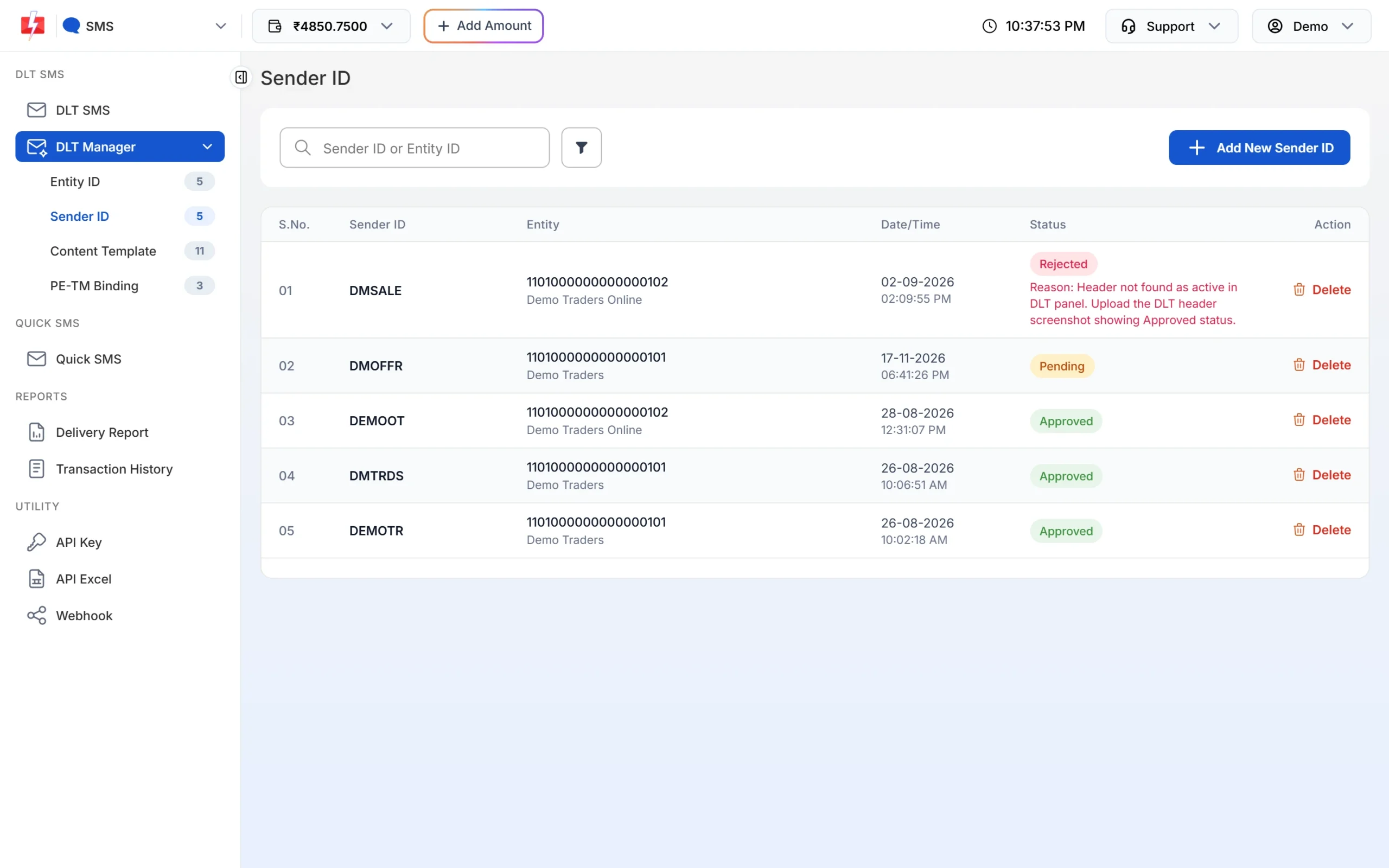
Read the notice from your operator or DLT portal. Note the header, template ID and dates. In Fast2SMS, go to DLT Manager > Sender ID and Content Template and check the status of each. A blocked or rejected record shows its reason.
Sender ID list. A rejected or blocked header shows the reason under its status. -
Stop the messages that caused the problem
Pause campaigns on that header. Cancel any scheduled campaign from Delivery Report > Schedule. If you cancel before it starts, the amount goes back to your wallet.
-
Collect your proof
Gather proof that the complainant was your customer or had agreed to receive the message: order details, the consent record, and the delivery report. In Fast2SMS, search the number in Delivery Report > SMS Report with the Mobile Number filter, and download the campaign report with Download.
-
Reply to the operator and fix the cause
Reply to the operator or DLT portal within the time they give you. If a template was in the wrong category, register a new one in the right category. Remove the complainant and anyone who opted out from your lists.
-
Tell Fast2SMS support if your header was blocked
If Fast2SMS shows “Sender ID blocked, contact Fast2SMS support.” or a blacklist reason, and your header is active again on your DLT portal, contact support with the header name and the proof from your portal.
How to avoid UCC complaints
- Send promotional messages only to people who know your business and have agreed to hear from you.
- Never put offers inside OTP, order or payment templates.
- Add an opt-out line to promotional messages and honour every opt-out.
- Send promotional SMS only between 10 AM and 9 PM.
- Do not buy number lists. Strangers complain the most.
- Keep your brand name in every message so customers know who is writing.
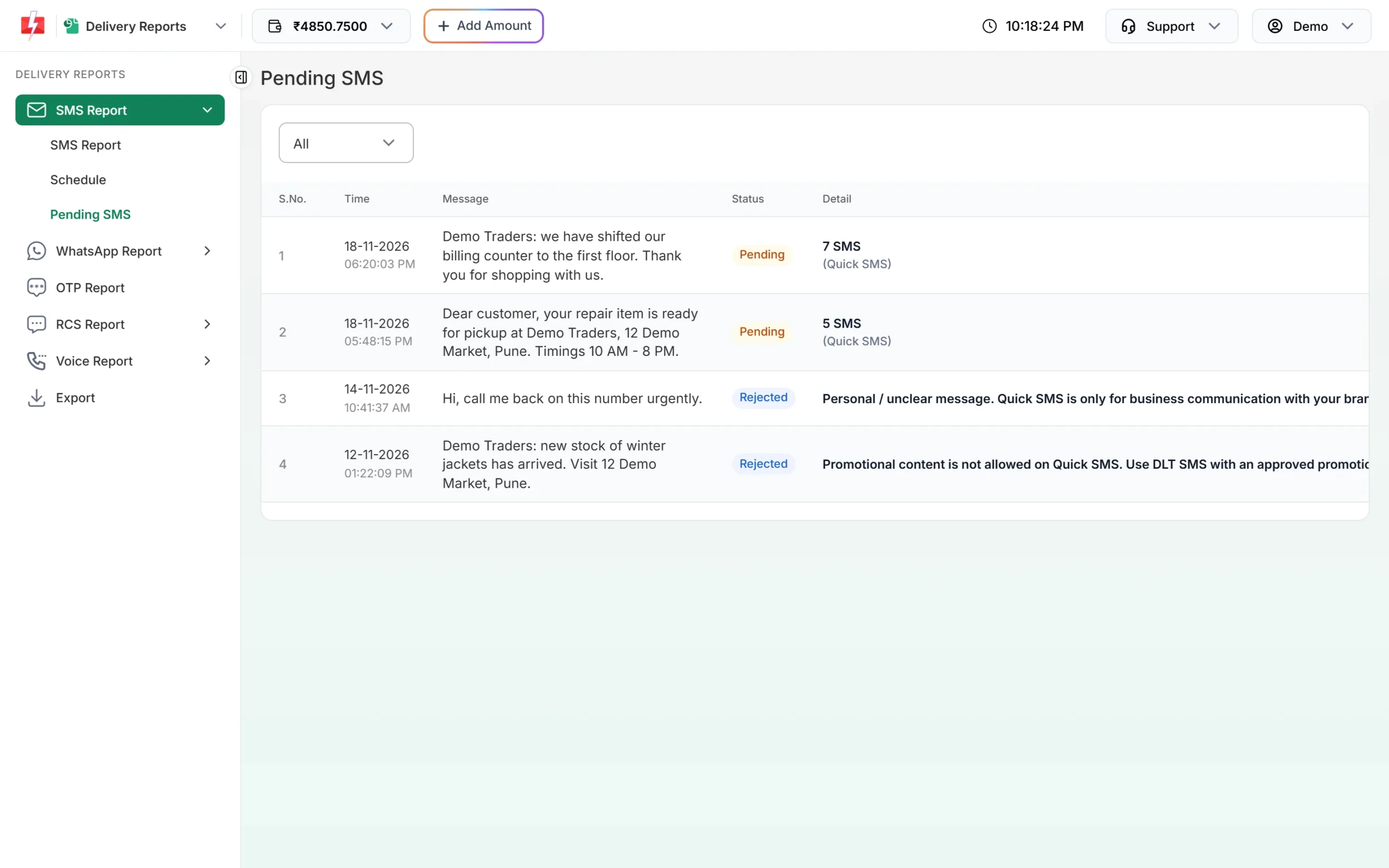
Quick SMS in Fast2SMS has its own check. Messages may be reviewed before delivery, and rejected ones show the reason under Delivery Report > Pending SMS. If 5 of your last 6 Quick SMS were rejected, Quick SMS is paused for your account for 15 days.
Frequently asked questions
What is UCC in SMS?
UCC means Unsolicited Commercial Communication: commercial SMS or calls the receiver did not ask for. TRAI rules let customers complain about it.
How do customers file a UCC complaint?
They can call or SMS 1909, use their operator’s app or website, or use the TRAI DND app.
How many days does a customer have to complain?
Up to 7 days after receiving the message, under the rules in force at the time of writing.
Can my header be blocked because of complaints?
Yes. If the operator finds misuse, it can suspend the header and templates, and for repeated cases suspend or blacklist the sender.
Can a transactional SMS get a UCC complaint?
A customer can complain about any message, but a genuine transactional message sent to your own customer is not unsolicited. Problems start when offers are sent on transactional templates.
Does Fast2SMS block senders?
Fast2SMS can block an entity, header or template that is blacklisted or misused, and you then see a “blocked” message when you send. Contact support if you think a block is wrong.