
You can add UTM tracking to SMS links without failing the DLT template match, as long as the tracking part is never pasted into the fixed text of an approved template. Either register the template with the full tracked link already in it, put the link in a {#url#} variable, or (the easiest way) send a short link on your own domain that redirects to the tracked page. The SMS text then matches your template, and your analytics still sees the UTM tags.
This guide is for marketers and developers who send DLT SMS with links and want to see SMS visits in Google Analytics or another analytics tool.
What UTM tags are
UTM tags are extra values at the end of a link that tell your analytics tool where a visit came from. Google Analytics reads parameters such as utm_source, utm_medium and utm_campaign. A tracked SMS link looks like this:
https://yourshop.in/diwali?utm_source=fast2sms&utm_medium=sms&utm_campaign=diwali26Use the same lowercase values every time, for example utm_medium=sms, so all SMS visits group together in your reports.
Why UTM tags can break DLT delivery
- Template match. During DLT scrubbing, the operator compares your SMS with the approved template. If the link is part of the fixed text and you add
?utm_source=...to it, the text no longer matches and the SMS fails. - Link whitelisting. Every link must match the links whitelisted under your entity on DLT. If your portal whitelists exact URLs instead of a domain, a link with extra UTM values may be treated as a different link. Test before a campaign.
- Length. UTM tags make links long. A long link can be cut, and it adds characters, which can push the SMS into a second part.
Three safe ways to track SMS links
| Method | How it works | Good for | Watch out for |
|---|---|---|---|
| 1. Tracked link in the fixed template text | You register the template with the full UTM link inside it | A link that never changes, such as a store page in a reminder | A new campaign name needs a new template |
| 2. Link in a {#url#} variable | The template has a link variable and you fill the full tracked link at send time | Different links per campaign or per customer | Variable length limits (see below) and whitelisting |
| 3. Short redirect link on your own domain | The SMS carries yourshop.in/d26, and your server redirects it to the page with UTM tags | Most campaigns. Short SMS, one whitelisted domain | The redirect must be set up on your website |
Variable length: on DLT, link variables ({#url#}, {#urlott#}) allow up to 120 characters at the time of writing. When you send with the Fast2SMS DLT SMS API (route=dlt), each value in variables_values is cut to 40 characters. A full UTM link is usually longer than that, so with the API use method 1 or 3, or a very short link.
How to set up a short redirect link (method 3)
-
Whitelist your domain on DLT
On the DLT portal where your business is registered, whitelist your website domain in the CTA section, in exactly the form you will send (with or without www). Wait until it is approved.
-
Create the redirect on your website
Ask your web developer, or use your website’s redirect settings, to send a short path to the full tracked page with a normal server redirect (301 or 302). For example, yourshop.in/d26 goes to https://yourshop.in/diwali?utm_source=fast2sms&utm_medium=sms&utm_campaign=diwali26. The visitor lands on the tracked address, so your analytics records the UTM values.
-
Put the short link in your SMS
Use a template whose link variable or fixed text holds your own domain. On the DLT SMS page, pick the sender ID and template, type the short link in the variable and read the phone preview. The counter under the preview shows the characters and SMS parts.
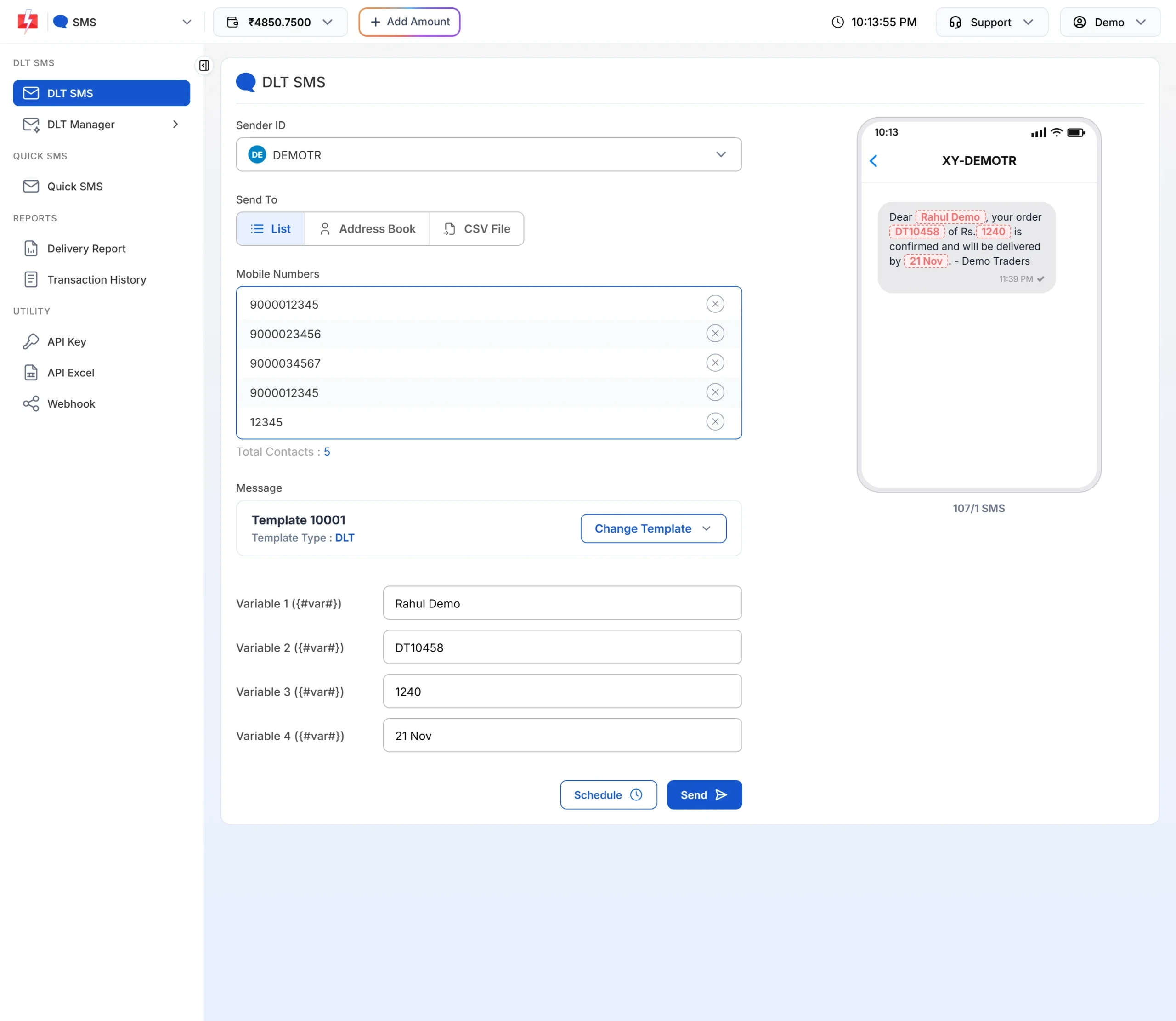
Check the preview and the SMS count after you add the link. -
Test the full path
In DLT Manager > Content Template, click Test Template, send the SMS to your own number, tap the link and check that your analytics shows the visit with the right source and campaign (most tools have a real-time view).
Sending tracked links through the API
- A UTM link contains
&and=. Send the request as POST with a JSON body, or URL-encode the value if you use GET, or the link is split into separate parameters. - Do not use the pipe sign
|inside a link. Invariables_valuesit separates one variable from the next. - Keep each value within 40 characters on route=dlt. If your code sends the full SMS text with the DLT Manual API instead, the text must still match your template and the link must still be whitelisted.
Longer links cost more
An English SMS fits 160 characters in one part, and 306 characters in two. Each part is charged, so a long tracking link can double the cost of every SMS. Short redirect links avoid that. See the current rates on the bulk SMS pricing page.
Sending in bulk? For high SMS volumes our team offers discounted rates. Talk to our team or see SMS pricing.
Frequently asked questions
Do UTM tags affect SMS delivery?
Not by themselves. Delivery fails only if the tagged link changes the fixed text of your template, or does not match the links whitelisted for your entity.
Can I add UTM tags to a link that is already in my approved template?
No. Any change to fixed template text causes a template mismatch. Register a new template with the tracked link, or use a link variable or a redirect.
Does the Fast2SMS delivery report show clicks?
The delivery report shows delivery, not clicks. Count clicks in your website analytics using the UTM tags.
Can each customer get a different tracked link?
Yes, with a {#url#} variable. Upload a CSV and map the link column to that variable. Keep each link short enough for the variable limit.
Can I use a public link shortener for tracking?
It usually fails on DLT, because the operator sees the shortener’s domain, which is not whitelisted under your entity. Use your own domain.
Which UTM values should I use for SMS?
A simple set is utm_source=fast2sms, utm_medium=sms and utm_campaign with a short campaign name. Keep them lowercase and consistent.