
A voice survey call asks your customers a short question and records their answer as a key press, for example “press 1 if you were happy with our service, press 2 if not”. In Fast2SMS you build it with the Key Press (DTMF) campaign type, and every number’s pressed key shows up in the Voice Report and the Excel download.
This guide is for clinics, restaurants, service centres, schools and any business that wants quick feedback, ratings or yes/no answers from many customers at once, without an agent on the line. It shows how to set up the survey, how to write the question, and how to count the answers.
Before you start
- A paid transaction of ₹100 or more on your account, and wallet balance for the campaign.
- An approved Menu (press a key) voice file with your question. Optional: a Thank You file, a No Key Pressed file and a Wrong Key Pressed file.
- Your customer list. Calls go out between 10 AM and 9 PM to non-DND numbers.
To try the flow before you record anything, use the free Sample – Key Press Call files (Hindi or English) that every account gets.
How to write a survey question for a key press call
A good survey call is short and asks one thing. Write the script before you record.
- Start with your name: “Namaste, this is Demo Clinic, Andheri.” Saying your brand name is a must-have rule for voice file approval.
- Ask one question: “How was your visit last week?”
- Give 2 to 4 answers, each with a key: “Press 1 for very good, press 2 for okay, press 3 for not good.”
- Repeat the keys once at the end. People often miss the first time.
Keep the question file under 20 seconds if you can. The customer still has to press a key after it, and the waiting time is part of the call length you pay for.
How to set up a voice survey with key press
-
Upload your question and thank-you files
In Voice Files, click Upload Voice File. Upload the question with Used As = Menu (press a key) and the closing line with Used As = Thank You. Wait until both show as approved.
-
Choose Key Press (DTMF)
Open Bulk Voice Call, type a Campaign Name such as “Customer feedback survey – November” and select Key Press (DTMF). The hint reads “Asks the caller to press a key (e.g. 1 for Yes) and records the key in the report.” Add your numbers with List, Address Book or CSV File.
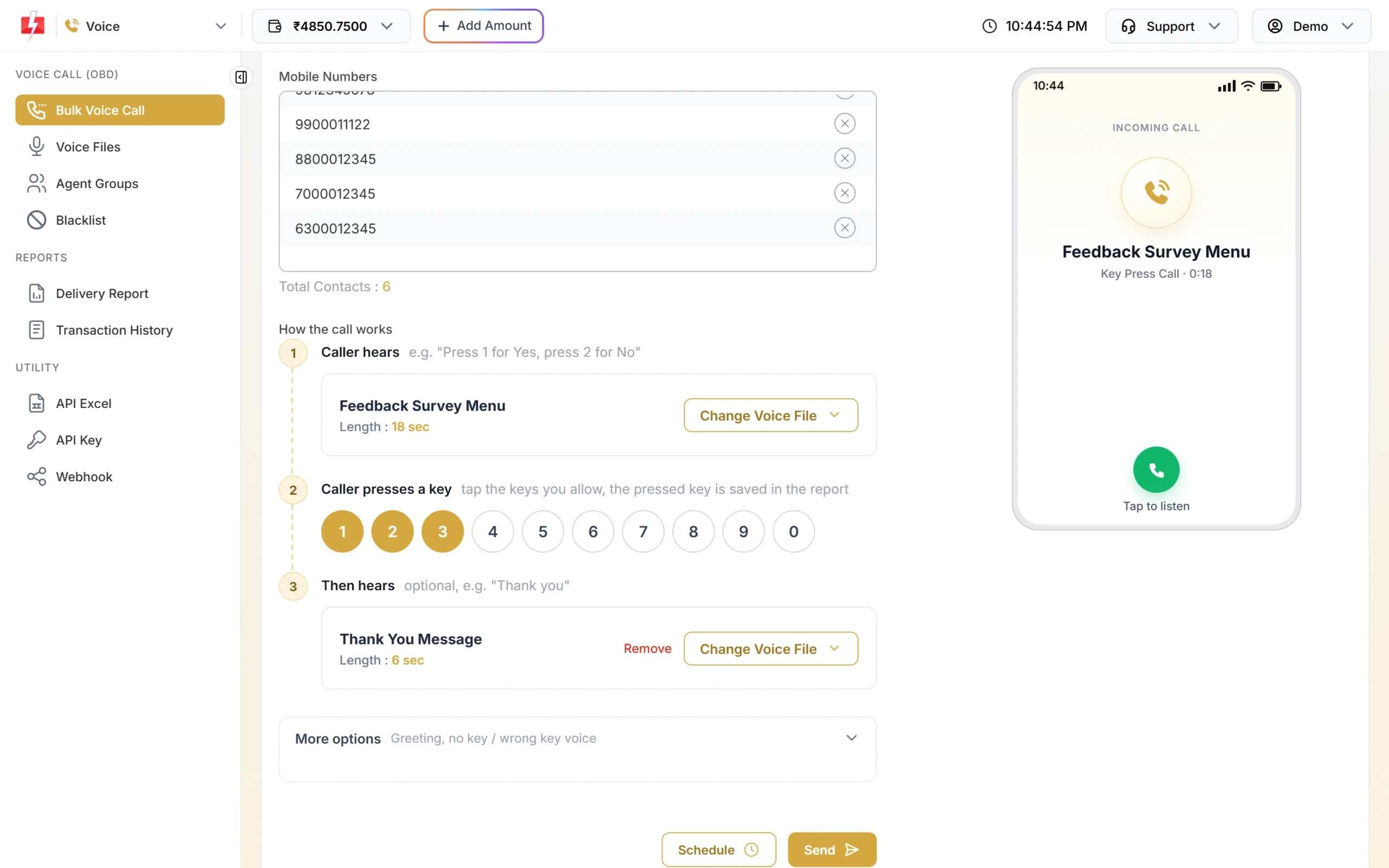
Name the survey so you can find it in reports later. -
Set how the call works
Under How the call works:
- 1. Caller hears: pick your question file.
- 2. Caller presses a key: tap the keys that count as answers, for example 1, 2 and 3. The pressed key is saved in the report.
- 3. Then hears: pick your thank-you file. If you leave it empty, the call ends after the key press.
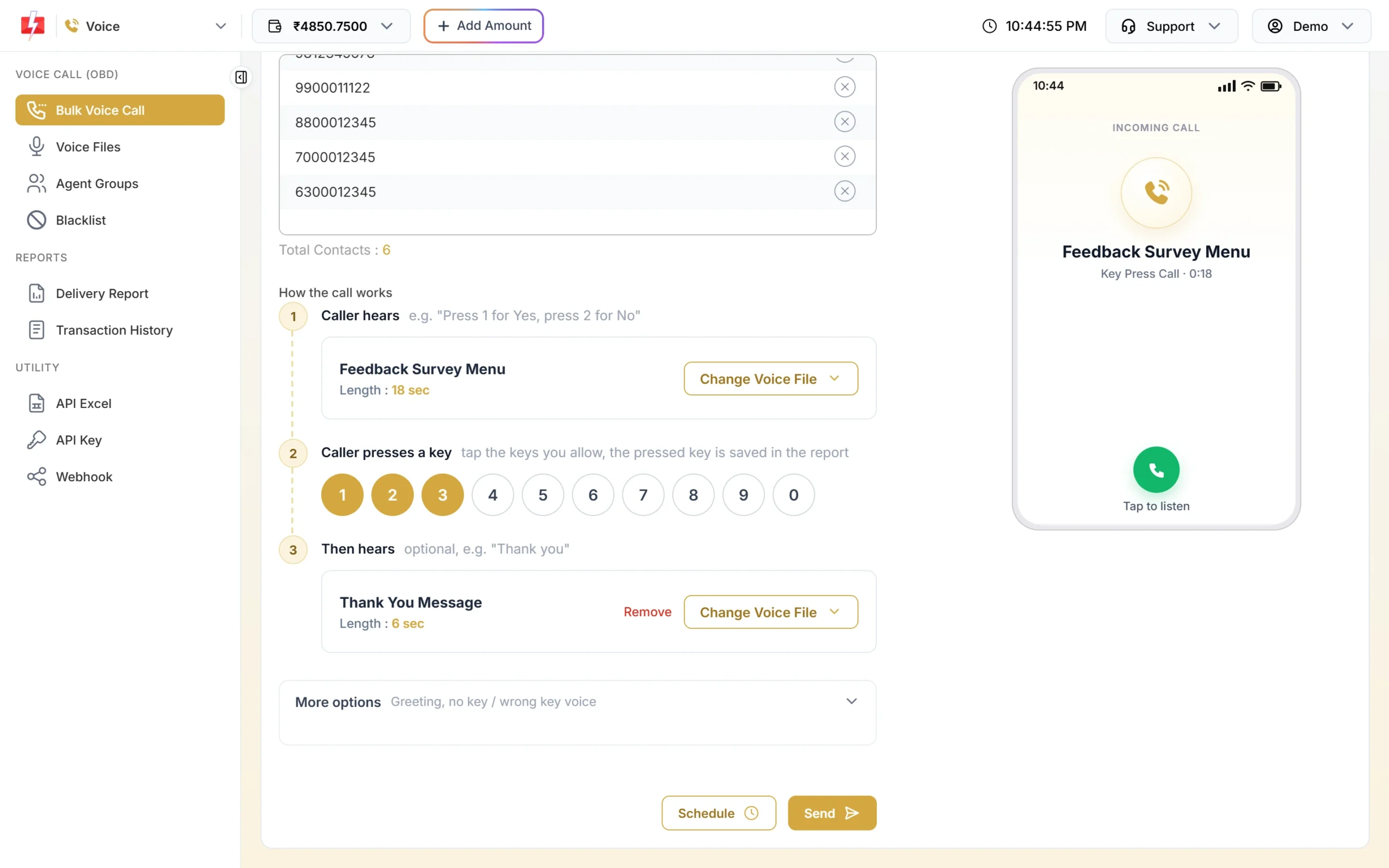
Keys 1, 2 and 3 are the allowed answers in this survey. -
Use More options for missed or wrong keys
Open More options to set what happens when people do not answer properly:
- If no key is pressed, play and If a wrong key is pressed, play: short files such as “Sorry, we did not get your answer”.
- Wait for a key (sec): 1 to 10 seconds, default 5.
- Repeat step 1 if no key: 0 to 3 times, default 1.
Each repeat makes the longest possible call longer, so the amount held at send time goes up a little. You are still charged only for the actual call time.
-
Send and confirm
Click Send (or Schedule). Check the numbers and cost in Campaign Preview & Confirmation, then click Confirm & Send.
-
Read the answers
Open Delivery Report > Voice Report and click the campaign. The Key column shows the key each person pressed. A dash means no key was pressed or the call was not answered.
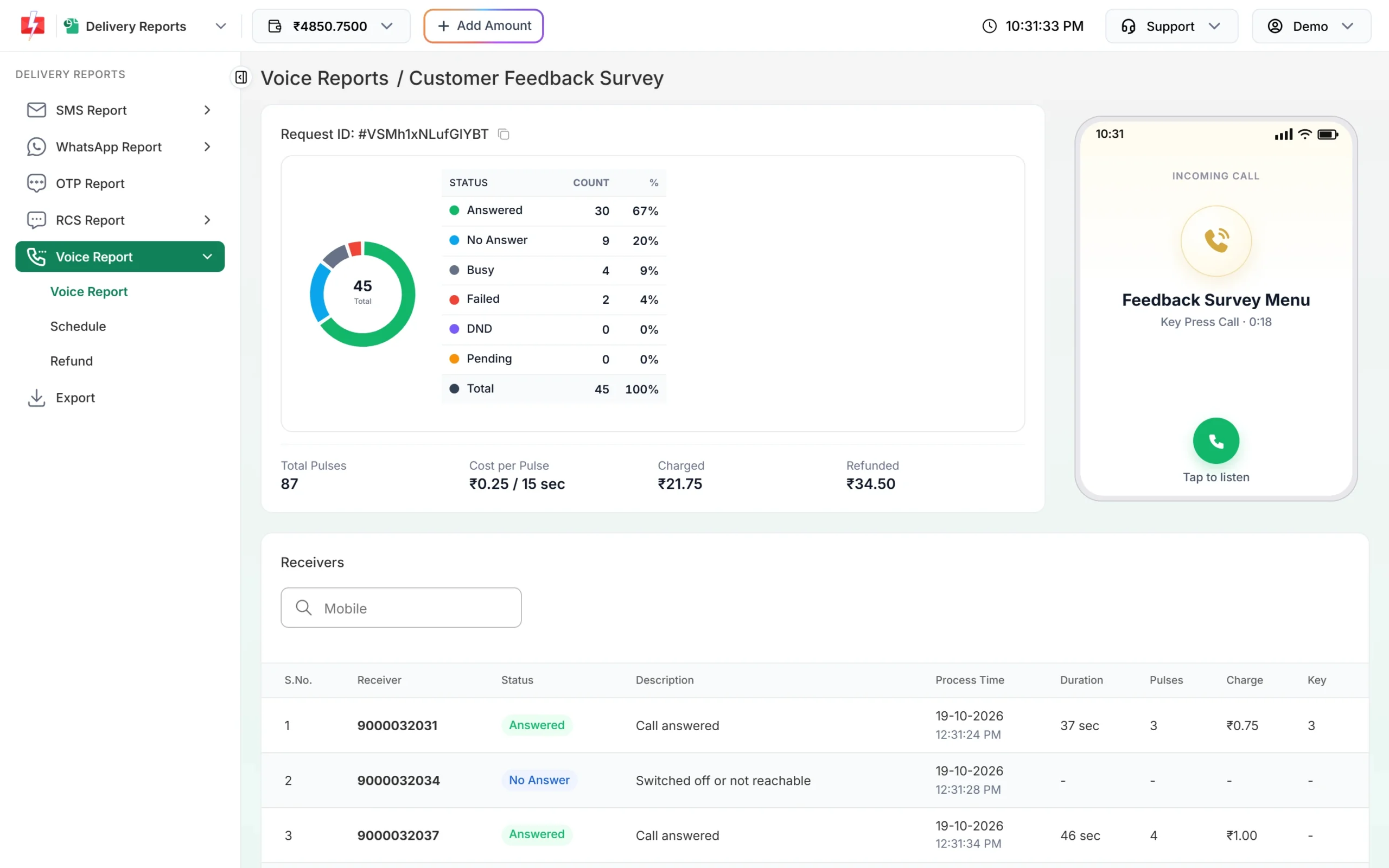
The Key column holds each customer’s answer.
How to count survey results
Click Download on the campaign row in Voice Report. The Excel file has Mobile, Status, Start Time, End Time, Duration (sec), Pulses, Charge (Rs), Key Pressed and Reason. To count answers:
- Filter the Status column to answered calls.
- Use a pivot table, or a formula like
=COUNTIF(H:H,"1")on the Key Pressed column, for each key. - Divide by the number of answered calls to get a percentage for each answer.
If you want answers in your own software as they come in, set up a voice webhook. After the campaign is settled, Fast2SMS sends one request per number with fields such as mobile, status and dtmf (the pressed key).
Survey ideas that work well by voice
| Use | Question idea | Keys |
|---|---|---|
| Service feedback | “How was your service visit? Press 1 for good, 2 for okay, 3 for poor.” | 1, 2, 3 |
| Delivery feedback | “Did you get your order in good condition? Press 1 for yes, 2 for no.” | 1, 2 |
| Event interest | “Will you attend our customer meet on Sunday? Press 1 for yes, 2 for no.” | 1, 2 |
| Rating | “Rate our new menu from 1 to 5. Press a key from 1 to 5.” | 1 to 5 |
| Preferred language | “For Hindi press 1, for English press 2.” | 1, 2 |
Tip: If you want unhappy customers to talk to someone right away, use a Call Patch campaign instead and connect “press 3 for not good” to your support agent group.
What a survey call costs
Key Press calls are charged by call time only, at the same rate as a Simple call: ₹0.25 per 15-second pulse at the time of writing. Pressing a key is not charged separately. A survey call of 25 seconds including the key press is 2 pulses. Unanswered, busy and DND calls cost nothing and the held amount for them is refunded automatically.
Sending in bulk? For high voice call volumes our team offers discounted rates. Talk to our team or see voice call pricing.
Frequently asked questions
What is a DTMF survey call?
DTMF is the tone your phone makes when you press a key. A DTMF survey call plays a question and records which key the person pressed as their answer.
How many answer options can I give?
You can allow any of the keys 0 to 9. Keep it to 2 to 4 options so people remember them.
What if the customer presses a key I did not allow?
If you set a Wrong Key Pressed file under More options, it plays. Only the keys you tapped on the keypad count as answers.
Can I see answers per customer?
Yes. The campaign detail and the Excel download show each mobile number with the key it pressed.
Can the question be in Hindi?
Yes. You record the audio yourself, so it can be in any language. Free sample Key Press files come in Hindi and English.
Are calls retried if nobody answers?
No. Automatic retry is not available. You can send a new campaign to the numbers marked No Answer later.