
Your WhatsApp display name is rejected when it breaks one of Meta’s naming rules: it is not clearly linked to your business, it is only a generic word or a person’s name, or it has wrong capital letters, symbols or emoji. Fix the name to match your real business name and submit it again. This guide lists the rules, the common rejection reasons, and how to change or appeal a display name.
What is a WhatsApp display name?
The display name is the business name customers see on your WhatsApp Business profile. You enter it when you connect your number with the Login with Facebook pop-up, and Meta reviews it against its display name guidelines. Before approval the name appears on your profile only. After approval it can also show at the top of chats and in the chat list.
In Fast2SMS you can see the name in WhatsApp Manager > Numbers and on the Edit Profile page of each number. If Meta has not approved the name yet, the number shows a red Unverified badge in the Numbers list.
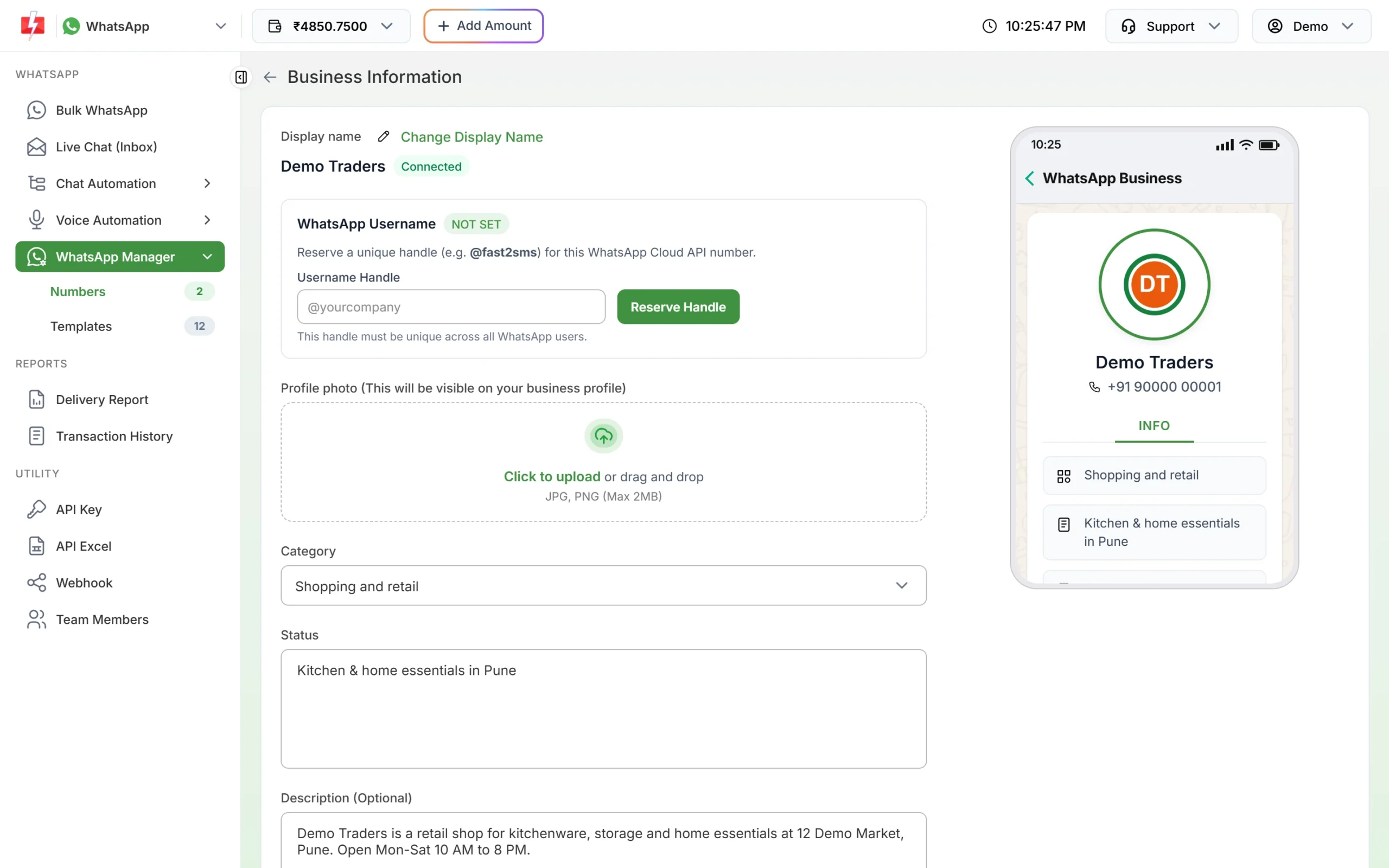
WhatsApp display name rules: what Meta approves
At the time of writing, these are Meta’s main rules. Meta can change them, and it makes the final decision.
The name must belong to your business
- Use the name your customers know you by, the same one on your website, shop board, invoices or social pages.
- Meta should be able to see a clear link between the name and your business. A name that appears nowhere else is hard to approve.
- The name and your business must follow WhatsApp’s Business and Commerce policies.
Formatting rules
| Rule | Accepted | Rejected |
|---|---|---|
| No all-capital names (acronyms are fine) | Sweet Treats | SWEET TREATS |
| Capitalise the first letter of each word, but not small joining words | Sharma Sweets and Snacks | Sharma Sweets And Snacks |
| Single spaces between words | Demo Traders | Demo Traders |
| No emoji | Pune Bakes | Pune Bakes followed by a cake emoji |
| No symbols such as ® or ™ | Demo Traders | Demo Traders® |
| No unnecessary punctuation or special characters (such as @, #, $, % or *) | Demo Traders | Demo Traders #1 |
| No two non-letter, non-number characters in a row | A-1 Electricals | A–1 Electricals |
If your brand is already styled in a special way everywhere else, for example a logo written in small letters, Meta allows the display name to match that external branding.
Names that are not allowed on their own
- A person’s full name only, such as “Rahul Sharma”. Use the business name, for example “Rahul Sharma Tutorials”.
- A generic word only, such as “Fashion” or “Electronics”.
- A place only, such as “Mumbai” or “Pune”.
- Three characters or fewer.
- Any form of the word “WhatsApp”, such as “WhatsApp Shop” or “Demo Traders WA Official”.
Why was my WhatsApp display name rejected?
| Reason | Fix |
|---|---|
| The name does not match your business or website | Use the name shown on your website and documents. Make sure your website and business profile show the same name. |
| Generic word, place or person’s name only | Add your brand word, for example “Sharma Electronics” instead of “Electronics”. |
| All capitals, emoji, symbols or extra punctuation | Rewrite it in normal title case without symbols. |
| Contains the word “WhatsApp” in any form | Remove it. |
| Uses another company’s brand | Use only a name that belongs to your business. Agencies must use the client’s own business name on the client’s number. |
| The business or product is not allowed under WhatsApp policies | Check WhatsApp’s Business and Commerce policies. A name change will not fix this. |
How to change your WhatsApp display name
The display name is managed in Meta’s WhatsApp Manager, not in the Fast2SMS panel.
-
Open your number in Meta’s WhatsApp Manager
In Fast2SMS, open WhatsApp Manager > Numbers, click the three-dot menu on the number and choose Meta Manager. It opens your WhatsApp account in Meta in a new tab. You can also log in to Meta Business Suite directly.
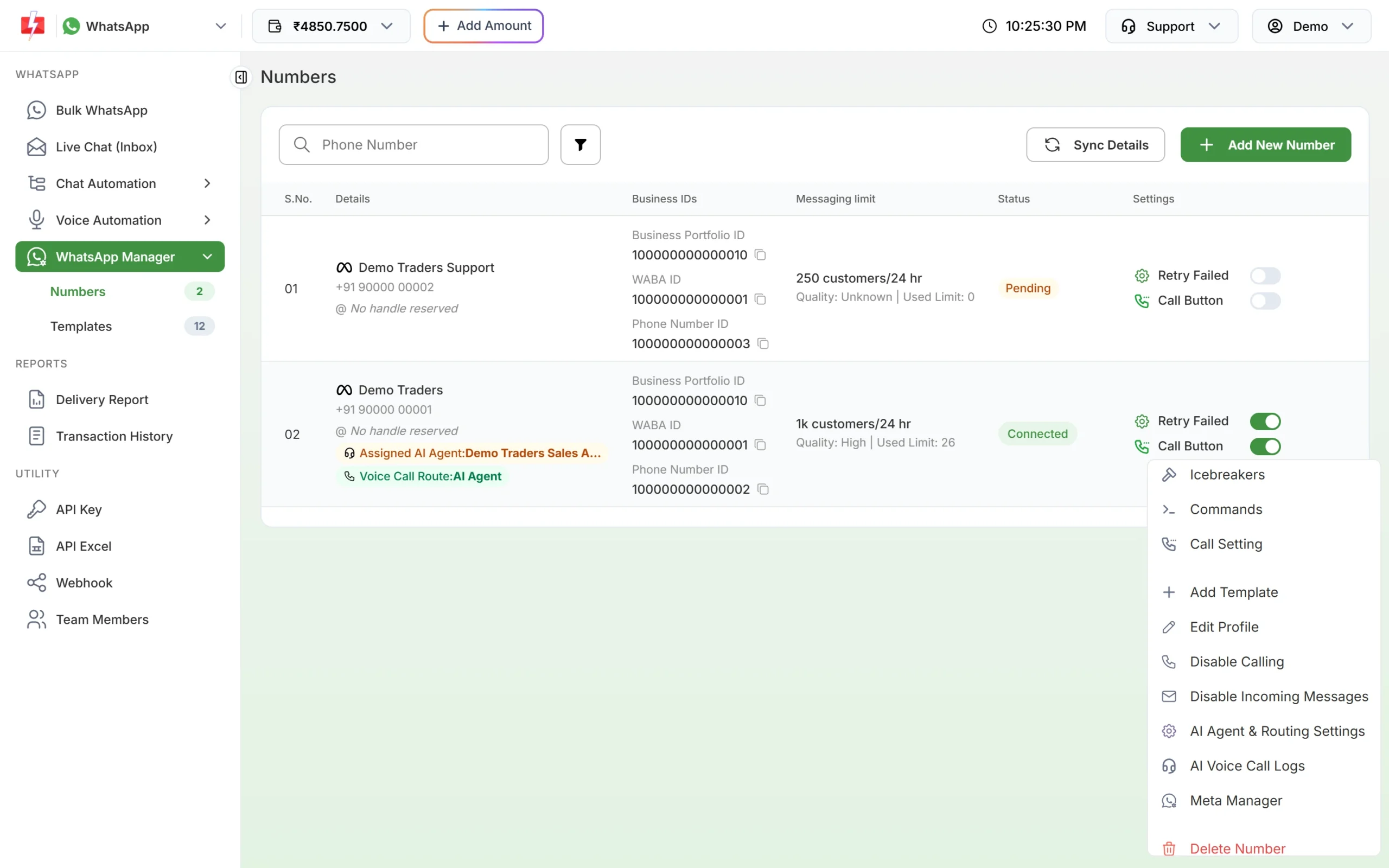
Meta Manager in the number menu takes you to Meta’s WhatsApp Manager. -
Edit the display name
In Meta’s WhatsApp Manager, go to Account tools > Phone numbers, select the number, open the Profile tab and click Edit next to Display name. Type the new name and submit it.
-
Wait for Meta’s review
Every new name is reviewed again. Meta sends a notification in Meta Business Suite with the result.
-
Make sure the new name goes live
Meta’s rule is that after a new name is approved, the number must be registered again within 14 days. If that window passes, the name has to be submitted again. If your new name does not show after approval, contact Fast2SMS support with the Phone Number ID from the Numbers tab.
-
Sync the panel
Back in Fast2SMS, click Sync Details on the Numbers tab to fetch the latest name and status from Meta.
Meta allows up to 10 display name changes in 30 days. If your number has the blue tick (Official Business Account), the name is changed through Meta support, and a name change can affect that status.
How to appeal a rejected display name
First read the rules above and edit the name if any rule is broken. That is the fastest fix. If you are sure the name follows the rules and matches your business, an appeal can be raised with Meta. Contact Fast2SMS support with your number, the Phone Number ID and proof of the name (website link or registration document), and we will help you raise it.
Frequently asked questions
Can I send messages before my display name is approved?
Meta can block messages from a number whose display name is not approved (error 131037, display name approval needed). Get the name approved before large campaigns.
Can I change my display name in Fast2SMS?
No. In Fast2SMS it is read-only. Use the Change Display Name link on Edit Profile or the Meta Manager option to change it in Meta.
How many times can I change my WhatsApp display name?
Up to 10 times in 30 days, according to Meta. Each change is reviewed again.
Can my display name be different from my legal company name?
Yes, a brand name is fine if it clearly belongs to your business, for example it is used on your website or shop.
Can I use my own name as the display name?
Not on its own. Add what the business does, for example “Anita Verma Yoga Classes”.
Does the display name need to be unique?
No. The username (handle) must be unique, but the display name does not.
Will changing my name affect my green tick?
It can. For numbers with the blue tick (Official Business Account), Meta handles name changes through its support team.