
WhatsApp error 131042 “Business eligibility payment issue” means Meta refused to send the message because of a billing problem on the WhatsApp Business Account (WABA). It has nothing to do with the customer’s number. Every message from that account fails until the billing problem is fixed. This page explains the causes and what to do if you use Fast2SMS.
What error 131042 means
Meta’s description, at the time of writing, is that there was an error related to your payment method. Meta lists these common causes:
- No payment account is attached to the WhatsApp Business Account.
- The credit line has gone over its limit, or is not active.
- The WhatsApp Business Account has been deleted or suspended.
- The account’s time zone or currency has not been set.
- A request to send messages on behalf of another business (“MessagingFor”) is pending or was declined.
131042 is not the same as low wallet balance
In Fast2SMS you pay for messages from your Fast2SMS wallet. If the wallet is too low, Fast2SMS stops the campaign before it reaches Meta and shows “Insufficient wallet balance, you need at least ₹X to send this Bulk SMS campaign.” That message is fixed by adding money with Add Amount.
Error 131042 comes from Meta, after the message was handed over. It points to the billing setup of the WhatsApp Business Account on Meta’s side, not to your Fast2SMS wallet.
How to fix error 131042
-
Confirm the error in the report
Open Delivery Report > WhatsApp Report, filter by Failed and open the campaign. If the Description column shows “(Error: 131042)” for every number, the problem is the account, not the list.
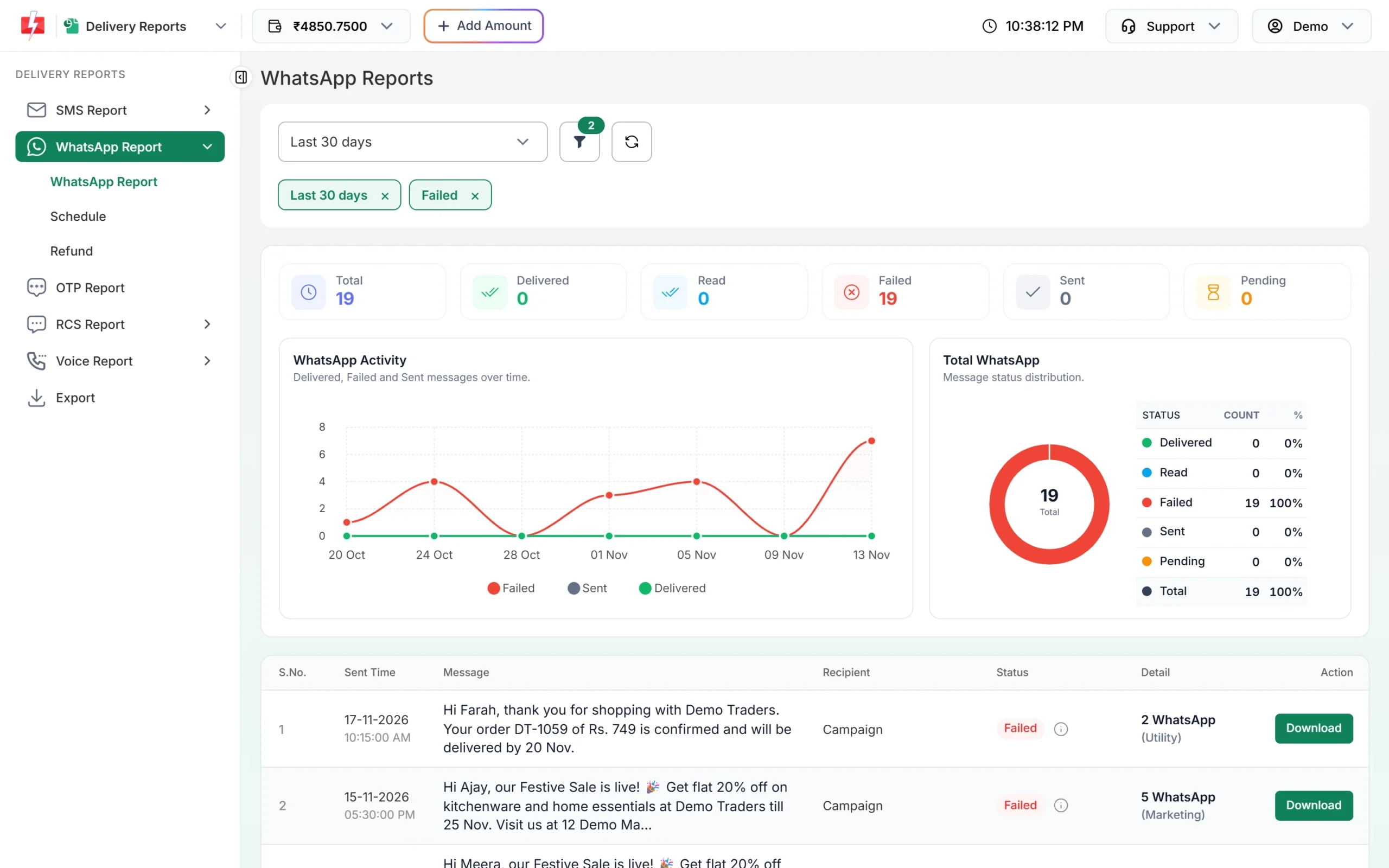
Check whether all messages in the campaign failed. -
Note your WABA ID and Request ID
In WhatsApp Manager > Numbers, copy the WABA ID and Phone Number ID of the sending number. In the Delivery Details window, copy the Request ID of the failed campaign.
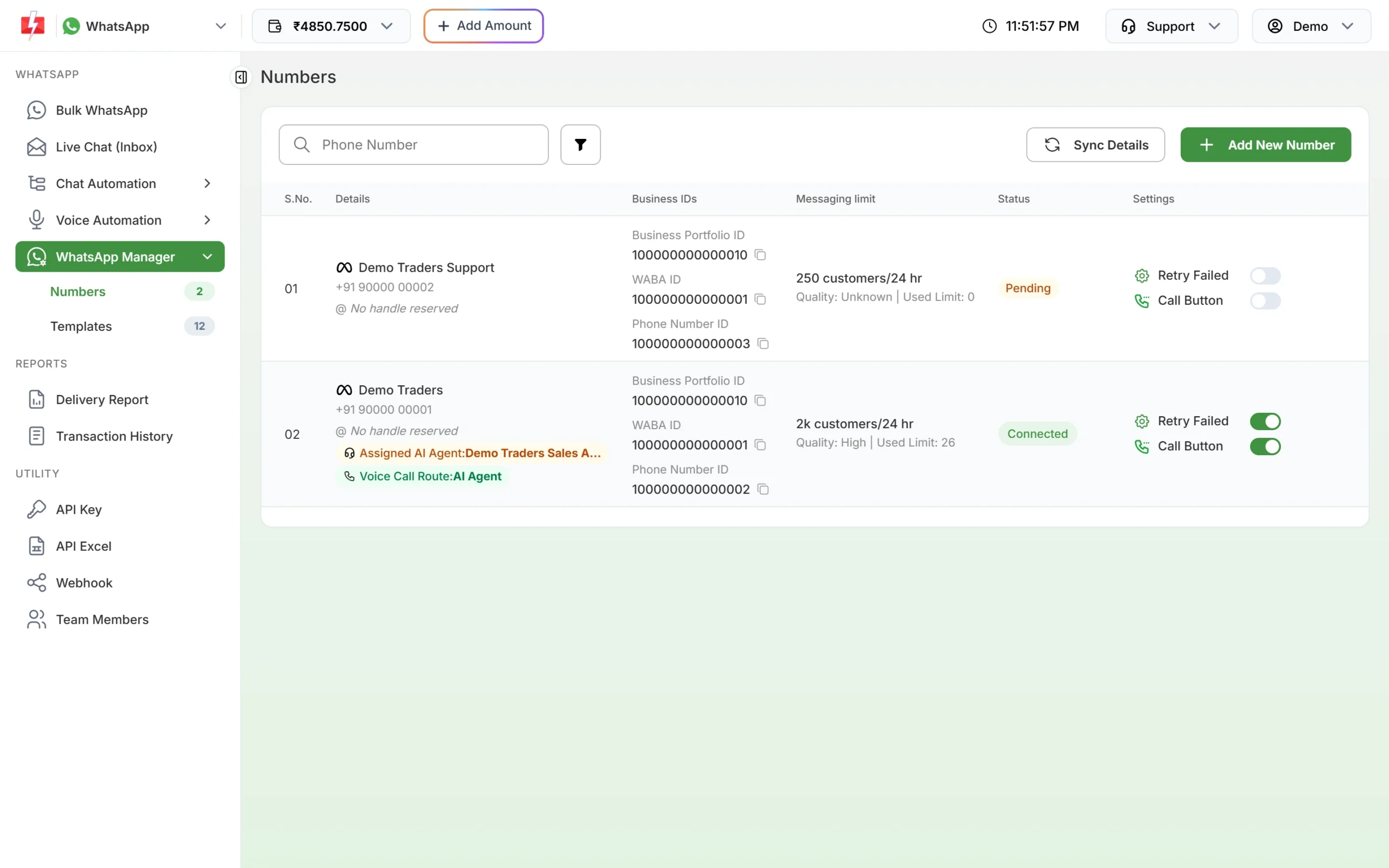
Business IDs for each number, with copy buttons. -
Contact Fast2SMS support
Send these IDs to Fast2SMS support from the Support menu at the top of the panel. The team can check the billing link of your WhatsApp Business Account on Meta’s side and tell you if anything is needed from you.
-
If you also manage billing in Meta yourself
If your WhatsApp Business Account is used with your own Meta app or another provider as well, open Meta Business Settings and check the payment method, the account’s time zone and currency, and whether the account is active. Fix whatever Meta shows as missing.
Are messages with 131042 charged?
No. Fast2SMS refunds every failed WhatsApp message to your wallet automatically, about two days after sending, whatever the error code. The refund shows in Transaction History as “Failed WhatsApp Refund”.
Frequently asked questions
My wallet has money. Why do I get 131042?
Because 131042 is about the billing setup of the WhatsApp Business Account at Meta, not your Fast2SMS wallet. Contact support with your WABA ID.
Do I need to add a card in Meta to use Fast2SMS?
You pay for Fast2SMS messages from your Fast2SMS wallet. If Meta asks for anything on the account, Fast2SMS support will tell you what is needed.
Does 131042 affect all my numbers?
It affects the numbers in the WhatsApp Business Account that has the billing problem. Numbers in a different account keep working.
Will my messages send again by themselves?
No. Once the billing problem is fixed, send the failed numbers again as a new campaign.
What is a MessagingFor request?
It is Meta’s way of letting one business send messages on behalf of another. If that request is pending or declined, Meta can return 131042.