
For customer messages, a WhatsApp group suits a small community where everyone talks to everyone, a broadcast list suits a few hundred regular customers who saved your number, and WhatsApp Business API campaigns suit a growing business that needs to reach any opted-in customer privately, with reports. This guide compares WhatsApp groups vs broadcast lists vs Business API campaigns side by side, explains Meta’s newer Groups API, and helps you pick the right one for your customers.
WhatsApp group vs broadcast list vs API campaign at a glance
The app limits below come from WhatsApp’s Help Center at the time of writing: groups can have up to 1,024 members (add and remove group members), and a broadcast list can include up to 256 contacts (how to use broadcast lists).
| WhatsApp group (app) | Broadcast list (app) | Business API campaign | |
|---|---|---|---|
| Size | Up to 1,024 members per group | Up to 256 contacts per list | Your Meta messaging limit: often 250 unique customers per 24 hours for a new, unverified business and 2K after business verification, then 10K, 100K and Unlimited |
| Who receives it | Everyone in the group | Only contacts who saved your number | Any opted-in customer on WhatsApp, saved or not |
| Privacy | Members see each other’s messages and who is in the group | Each person gets it as a private message | Each person gets it as a private message |
| Replies | Go to the whole group | Come to you as individual chats | Come to your team inbox as individual chats |
| Message content | Anything members type | Anything you type | A Meta-approved template, then free-form replies for 24 hours after the customer writes |
| Personalisation | None | None | Name, order number, amount and more from your Excel or CSV |
| Reports | Read ticks only | Read ticks only | Delivered, Read, Sent, Failed and Pending for every number, with the failure reason |
| Cost | Free app | Free app (some countries may see a monthly broadcast limit) | Pay per message, no setup or monthly fee |
| Best for | Residents’ associations, clubs, small classes, internal teams | A small shop with a few hundred loyal customers | Offers, order updates, reminders and OTPs to large or growing lists |
When a WhatsApp group works, and when it does not
A group is a conversation room. It works when the members know each other and want to talk together, such as a housing society, a parents’ group for one class, or a buyers’ club. For a business sending to customers, a group has problems:
- Every member can see the other members and their messages, which your customers may not have agreed to.
- One customer’s complaint or spam is seen by everyone.
- There is no way to send each customer their own order number, amount or due date.
- Members leave or mute the group, and you cannot tell who read your offer.
When a broadcast list is enough
A broadcast list sends one message to many people, and each person receives it as a normal private message. Replies come back to you one by one. WhatsApp’s rules for broadcast lists at the time of writing:
- Up to 256 contacts in each list.
- Only contacts who have saved your number in their address book receive it.
- Broadcast lists are not supported on Windows, Mac or Web, only on the phone app.
- People in some countries may see a monthly broadcast limit.
If most of your customers have not saved your number, your broadcast reaches only some of them. That is the most common reason businesses move to the API. Our guide on broadcast lists vs bulk WhatsApp API covers this in detail.
WhatsApp Business API campaigns
With the WhatsApp Business API, each customer gets their own private message from your verified business number, even if they never saved it. The first message is a template that Meta approved, and it can carry the customer’s name, order details, an image or PDF and buttons. When a customer replies, your team answers from a shared inbox.
-
Pick your sender number and your customers
Open Bulk WhatsApp and choose your number in Select Sender Number. Under Send To, choose List (type or paste numbers), Address Book (your saved contacts and groups) or CSV File.
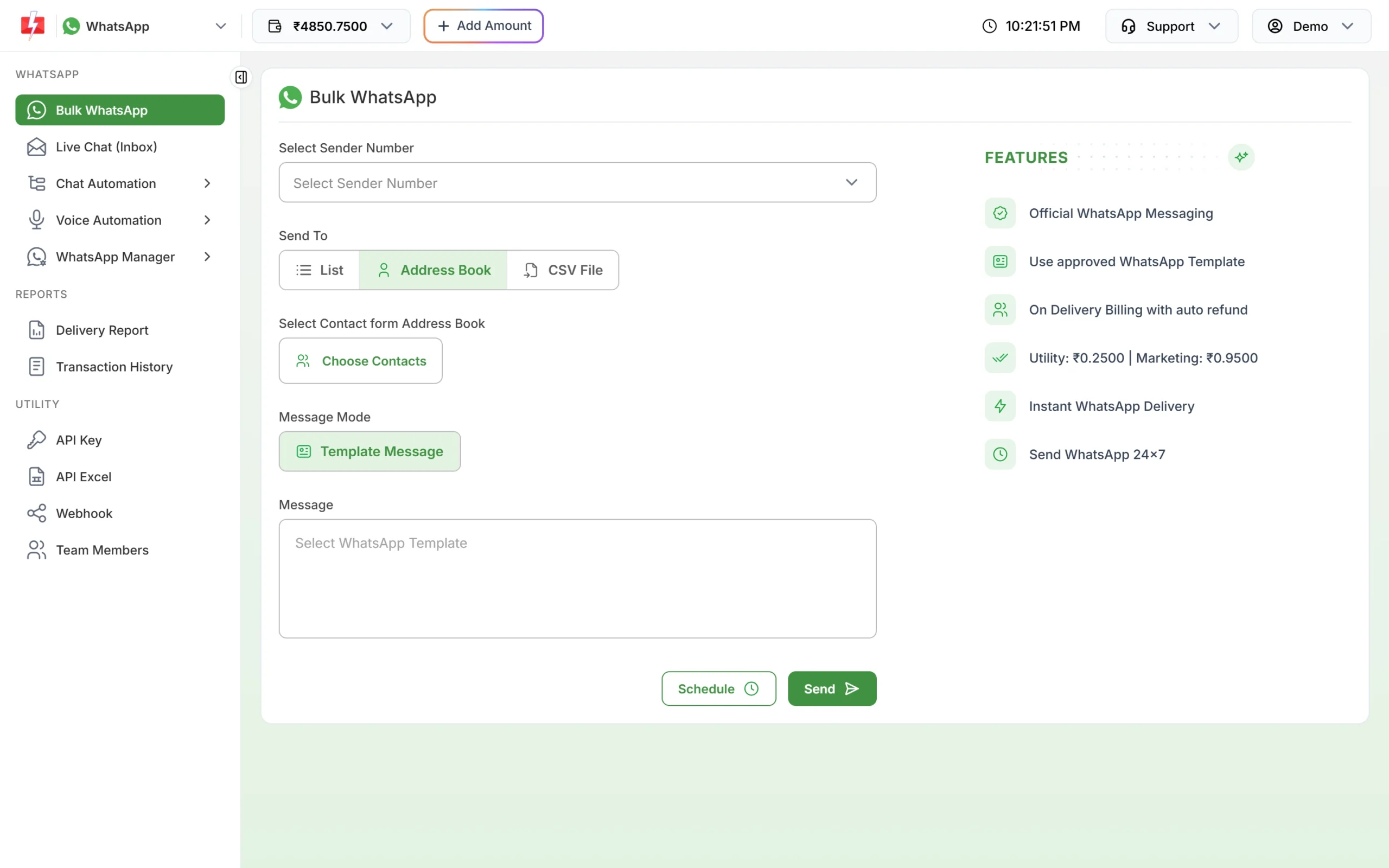
Choose contacts from your Address Book, or upload a CSV file. -
Choose an approved template
Click Select WhatsApp Template and pick an approved template. The phone preview shows exactly what each customer will see. Fill the variables or map them to columns in your file.
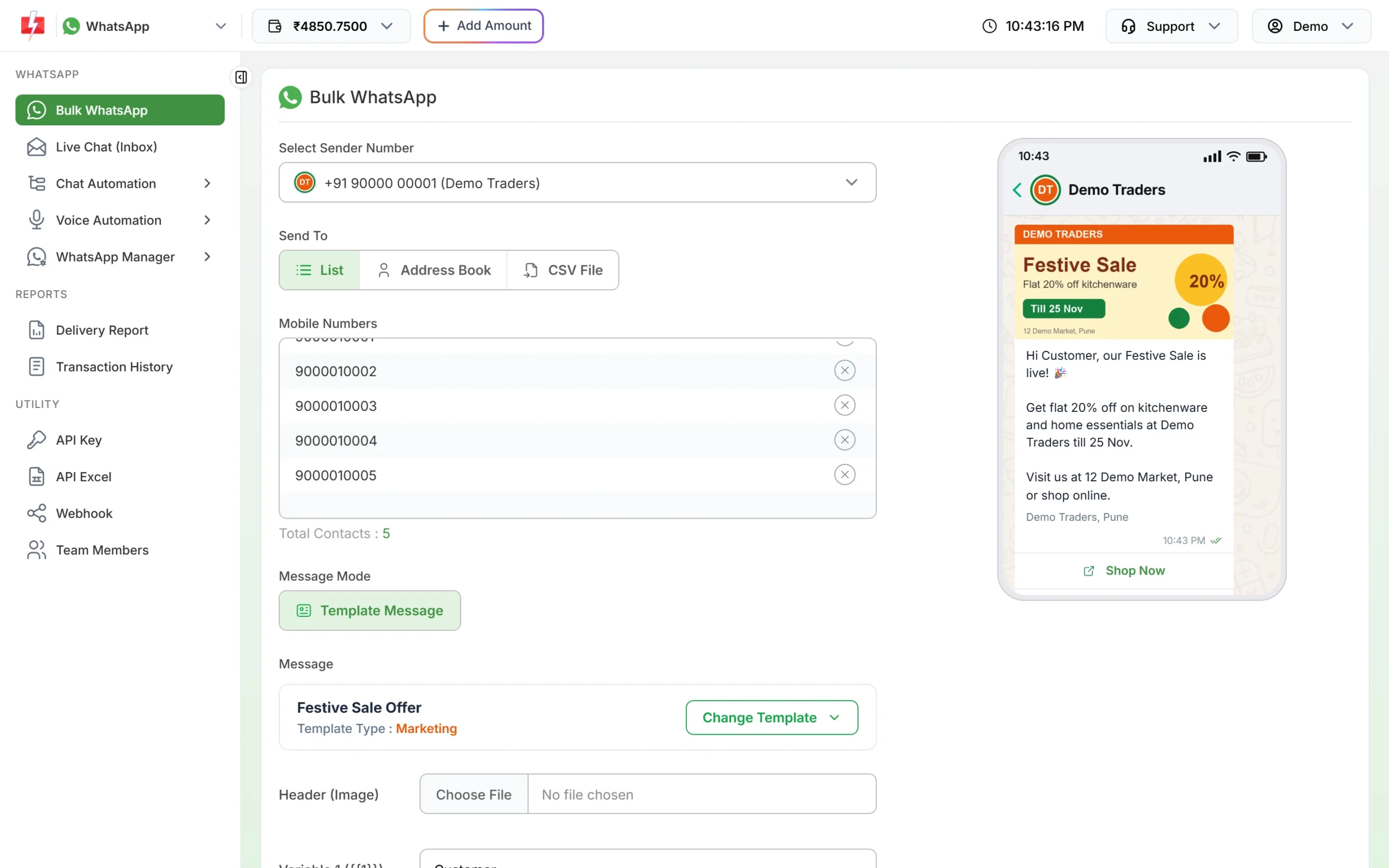
Each customer receives the template as a private message from your business. -
Check the cost and send
Click Send (or Schedule). Message Preview & Confirmation shows the valid numbers, duplicates and the total cost before you click Confirm & Send. After sending, the Delivery Report shows the status of every number.
At the time of writing a marketing template costs ₹0.95, a utility or authentication template ₹0.25 and a Live Chat reply within 24 hours ₹0.13 on Fast2SMS. Failed messages are refunded to your wallet automatically. See the WhatsApp pricing page for current rates.
Sending in bulk? For high WhatsApp volumes our team offers discounted rates. Talk to our team or see WhatsApp pricing.
What about Meta’s Groups API?
Meta also offers a Groups API that lets a business create WhatsApp groups on the Business Platform. It is a different tool from a broadcast, with tight limits at the time of writing:
- Only businesses with an Official Business Account (the blue badge) can use it.
- A group can have at most 8 participants.
- Groups are invite-only: people join through an invite link you send them.
- Interactive messages, authentication templates, commerce messages and calling are not supported in groups.
- Meta charges each time a billable message is delivered to someone in the group, so a marketing template to a group of 5 is charged as 5 messages.
That makes the Groups API useful for small shared conversations, such as a customer and two people from your team, not for reaching a large audience. For campaigns, one-to-one template messages remain the right tool.
Which should you use?
| Your situation | Use |
|---|---|
| Members want to talk to each other (society, club, class) | A WhatsApp group |
| A small shop with under 256 regular customers who all saved your number | A broadcast list from the WhatsApp Business app |
| Hundreds or thousands of customers, many who never saved your number | WhatsApp Business API campaigns |
| Order updates, payment reminders or OTPs from your website or software | WhatsApp Business API, through the panel or the API |
| Several team members answering customer replies | WhatsApp Business API with a shared inbox |
Frequently asked questions
What is the difference between a WhatsApp group and a broadcast list?
In a group, everyone sees every message and can reply to all. In a broadcast list, each contact gets your message privately and replies only to you.
How many people can be in a WhatsApp group?
Up to 1,024 members, according to WhatsApp’s Help Center at the time of writing.
How many contacts can a broadcast list have?
Up to 256 contacts per list, and only contacts who saved your number receive the message.
Can I send a message to a WhatsApp group through the Business API?
Only through Meta’s Groups API, which at the time of writing is open to Official Business Accounts and limits groups to 8 participants. Bulk WhatsApp in Fast2SMS sends private one-to-one messages, not group posts.
Do customers need to save my number to get API messages?
No. With the WhatsApp Business API, customers who agreed to hear from you receive your template messages whether or not they saved your number.
Is it legal to add customers to a WhatsApp group without asking?
It exposes their number and messages to other members, so ask first. Under India’s data protection law and WhatsApp’s own rules, you need the customer’s agreement to message them.