
If WhatsApp has banned your number or Meta has restricted your WhatsApp Business account, you can ask for the decision to be checked again with a review request. Where you send it depends on how the number is used: a number on the WhatsApp or WhatsApp Business app is reviewed from inside the app, and a WhatsApp Business API account is reviewed from Business Support Home in Meta Business Suite. This page shows both routes step by step and gives sample review request messages you can adapt.
First, find out which kind of block you have
| What you see | Where the number is used | Where to request a review |
|---|---|---|
| The WhatsApp app says the number cannot use WhatsApp | WhatsApp or WhatsApp Business app on a phone | Inside the app, with Request review |
| Messages fail with error 368 or 131031, a banner in WhatsApp Manager, or an email from Meta about a policy violation | WhatsApp Business API (for example, connected to Fast2SMS) | Business Support Home in Meta Business Suite |
| Only one template is rejected or paused | WhatsApp Business API | This is a template review, not an account review. See template rejected and how to appeal |
Request a review for a banned WhatsApp app number
WhatsApp’s help article About account bans explains the steps, at the time of writing:
-
Open WhatsApp on the banned number
Open the official WhatsApp or WhatsApp Business app on the phone with the banned number. Remove any bulk sender extension, desktop tool or modified app linked to it first.
-
Tap Request review
The ban notice offers a review. Tap Request review. If there is no Request review option, WhatsApp says the ban is final and cannot be appealed.
-
Wait for the decision
WhatsApp says most reviews are completed within 24 hours. You get a notification with the decision, and you can also check by opening WhatsApp. If the number is unbanned, you verify it again with your phone number.
WhatsApp also says that contacting it outside the review process, or from another person’s account, does not speed up the review or change the result. Each appeal covers only one phone number.
Request a review for a restricted WhatsApp Business API account
Meta’s policy enforcement guide describes the steps. You need admin access to the business portfolio in Meta Business Suite.
-
Check the error in Fast2SMS
Open Delivery Report, open the campaign and look at the Description column in Delivery Details. Errors such as 368 (account restricted for a policy violation) or 131031 (account locked) mean the problem is at Meta’s end, not in your list.
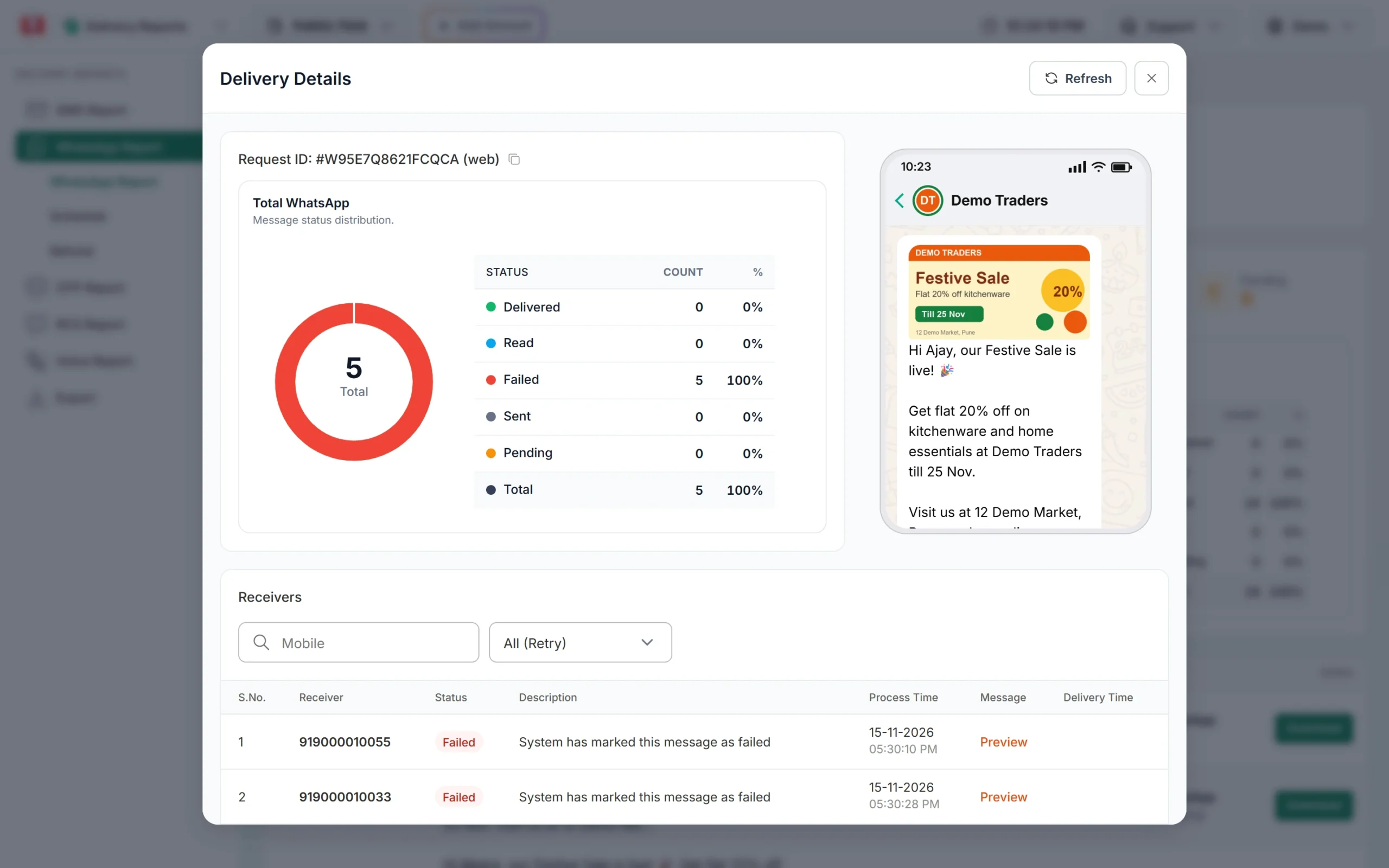
The Description column shows why each message failed. -
Open Business Support Home
Sign in to Meta Business Suite, click All tools and then Business Support Home. Click Account Overview (the speedometer icon) if needed. In Fast2SMS you can also reach your account from WhatsApp Manager > Numbers, using Meta Manager in the number’s menu.
-
Read the violation
Select the Messaging account. Meta lists each violation with the policy, examples of allowed and not allowed content, any active restriction and what happens if it happens again.
-
Click Request Review and submit your explanation
Choose the violation and click Request Review. A dialog opens. Enter your supporting details (see the samples below) and click Submit. The request moves to the In Review tab.
-
Wait for the decision
Meta says the decision is sent through Business Manager and typically takes 24 to 48 hours. The violation is either Unchanged or Reversed. If it is reversed, the account returns to its previous status.
What to write in a WhatsApp review request
A reviewer checks your request against the policy. A short, honest, specific message works better than a long or emotional one. Include:
- Who you are: your business name and what you sell.
- Who you message and why: your own customers, and how they gave you their number and agreed to messages.
- What the flagged messages were: order updates, appointment reminders, offers to past buyers.
- What you have changed: removed old or bought numbers, added a “Stop promotions” button, fixed a template category.
- Why you think the decision should be reversed, only if you believe you followed the policy.
Do not copy the same text into many requests, do not threaten or blame, and do not claim things you cannot show.
Sample 1: WhatsApp Business API account restricted for spam
We are Demo Traders, a kitchenware shop in Pune. We use WhatsApp to send
order confirmations, delivery updates and occasional offers to customers
who bought from us and ticked the WhatsApp consent box at checkout.

On 12 November we sent an offer to a list that included old contacts.
Some of them did not remember us and reported the message. We have since
removed every contact who has not bought from us in the last 12 months,
added a "Stop promotions" button to all marketing templates and set up an
automatic opt-out reply.

We request a review of this violation. We will send offers only to
recent, opted-in customers.
Sample 2: template category violation
We are Demo Traders. Our order confirmation template included a line
promoting a discount, which made it marketing while we had submitted it
as utility. We did not intend to misclassify it.

We have removed the promotional line from our utility templates and now
send offers only through a separate marketing template. Please review
the violation.
Sample 3: you believe the decision is wrong
We are Demo Traders, a kitchenware shop in Pune. The flagged messages
were delivery updates for orders our customers placed on our website,
where they agreed to receive updates on WhatsApp. The messages contain
no offers or links other than the order tracking link.

We believe these messages follow the WhatsApp Business Messaging Policy
and request a review.
Change the details so they match what really happened in your business. A reviewer can compare your words with the messages you sent.
After the review
- Reversed: fix the cause before your next campaign, so the same violation does not come back. Repeat violations lead to longer restrictions.
- Unchanged: wait for the restriction period shown in Business Support Home to end. An account lock has no end date and is removed only through an appeal.
- App number still banned: do not try to get around the ban with another number and the same tools. Move business messages to the WhatsApp Business API and send only to people who agreed to hear from you.
Messages that failed during a restriction are refunded to your Fast2SMS wallet automatically, like any failed WhatsApp message.
Frequently asked questions
How long does a WhatsApp ban review take?
For app numbers, WhatsApp says most reviews finish within 24 hours. For WhatsApp Business API accounts, Meta says a decision typically takes 24 to 48 hours.
Can I request a review more than once?
WhatsApp says contacting it outside the review process does not speed up or change the result. Send one clear request with the facts.
What if there is no Request review button?
For an app number, WhatsApp says the ban is then final and cannot be appealed. For an API account, some spam violations cannot be appealed and you must wait for the restriction to end.
Can Fast2SMS unban my WhatsApp number?
No. Only WhatsApp and Meta can lift a ban or reverse a restriction. Our support team can help you read the violation and prepare your request.
Will I lose my chats if my number is banned?
For app numbers, WhatsApp says you cannot access chat history or backups while the number is banned. A backup becomes available again only after the number is unbanned.
How do I avoid another restriction?
Send only to opted-in customers, use the right template category, give an easy way to stop, and watch your quality rating in WhatsApp Manager.