
Yes, WhatsApp Business API is secure in the ways that matter for most businesses: messages are encrypted between the customer’s phone and Meta’s Cloud API, and travel to your business over HTTPS. But it is not end-to-end encrypted in the same way as a chat between two friends. Cloud API decrypts each message on behalf of the business so your team can read and answer it. This page explains how WhatsApp Business API encryption works, where data is stored and for how long, who can read your chats, and what you should set up on your side.
How a WhatsApp Business API message is protected
Meta’s data privacy and security page describes the message flow:
- The customer’s message travels encrypted over WhatsApp, using the Signal protocol, from their phone to Cloud API. Cloud API is operated by Meta and acts on behalf of your business.
- Cloud API decrypts the message and forwards it to your business. Meta’s platform overview says the API and its webhooks use HTTPS protected by TLS.
- Your reply goes the other way: Cloud API encrypts it with the Signal protocol before it is delivered to the customer on WhatsApp.
Meta says Cloud API manages the encryption keys on behalf of the business, and that messages stored at rest are encrypted.
Who can read your WhatsApp Business chats
| Who | What they can see |
|---|---|
| The customer | Their own chat with your business |
| Meta’s Cloud API | Processes message content to deliver it. Meta says it acts as a data processor for the business, uses messages only on the business’s instructions, and does not automatically use WhatsApp messages to decide which ads a person sees. |
| Your messaging platform | Receives messages so it can show them in your inbox, run your chatbot and auto replies, and send your webhooks |
| Your team | The chats you give them access to. In Fast2SMS a Chat Agent sees only chats assigned to them, and an Admin sees all chats. |
Where WhatsApp Business API data is stored, and for how long
- Servers: Meta says Cloud API processes messages on servers in Meta data centers.
- Message content: kept by Cloud API for a maximum of 30 days, so features such as retransmission work.
- Customer identifiers: deleted by Cloud API within 30 days of the last status update (sent, delivered, read) of a message.
- Certifications: Meta says it has SOC 2 Type II and ISO 27001 reports for Cloud API, listed in its Business Messaging Compliance Center.
Can WhatsApp data be stored only in India?
Meta offers local storage for businesses in regulated sectors such as finance, government and healthcare. With it, message content at rest is kept only in data centers in the chosen country, and India (IN) is in Meta’s list of supported regions at the time of writing. Message content may still be processed in Meta data centers abroad for up to 60 minutes while it is in use.
Meta also offers a No Storage setting, where messages and media are kept for at most one hour and not stored at rest. It has trade-offs: failed messages and webhooks can be retried only within that hour.
Both settings are made per phone number, before the number is registered on Cloud API. If your business needs them, ask our team before you connect the number.
How access is controlled in Fast2SMS
Most real-world leaks come from too many people having access, not from broken encryption. These settings help you control who sees what:
-
Give each person their own login and the right role
Go to Account Setting > Team Members and click Add Agent. Pick the role (Chat Agent for assigned chats only, Admin for all chats) and the channels they can use. Turn the Status off as soon as someone leaves; deactivated agents are logged out.
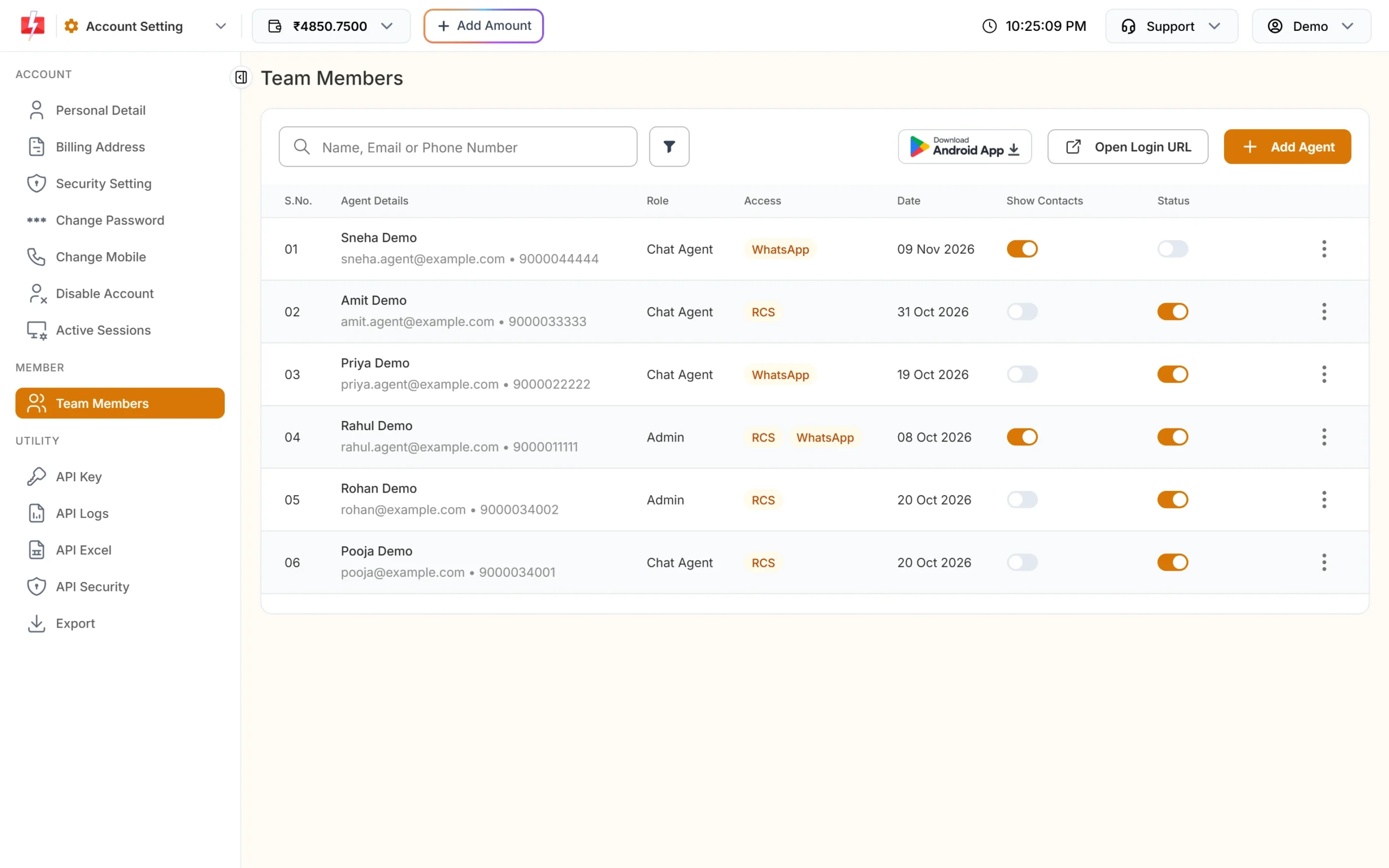
Role, channel access, Show Contacts and Status for each team member. -
Keep your Address Book private
Leave Show Contacts off for agents who do not need your customer list. It is off by default. Only the account owner can delete a chat.
-
Protect the owner login and API key
Turn on two-factor login and check Active Sessions for devices you do not recognise. Viewing the API key in the panel needs your password. If you call the API from your own server, limit it to your server’s IP addresses with API Security.
-
Secure your webhooks
If you receive WhatsApp messages on your own server, turn on the webhook signature so each request carries the
webhook_secret_keyheader, and check it before you trust the data. -
Decide what you keep
If you do not need incoming messages in the inbox for a number, Incoming Message Settings lets you stop showing them in Live Chat, or stop both Live Chat and webhooks. Live Chat media files are available for 30 days by default, and the panel blocks downloads of dangerous file types.
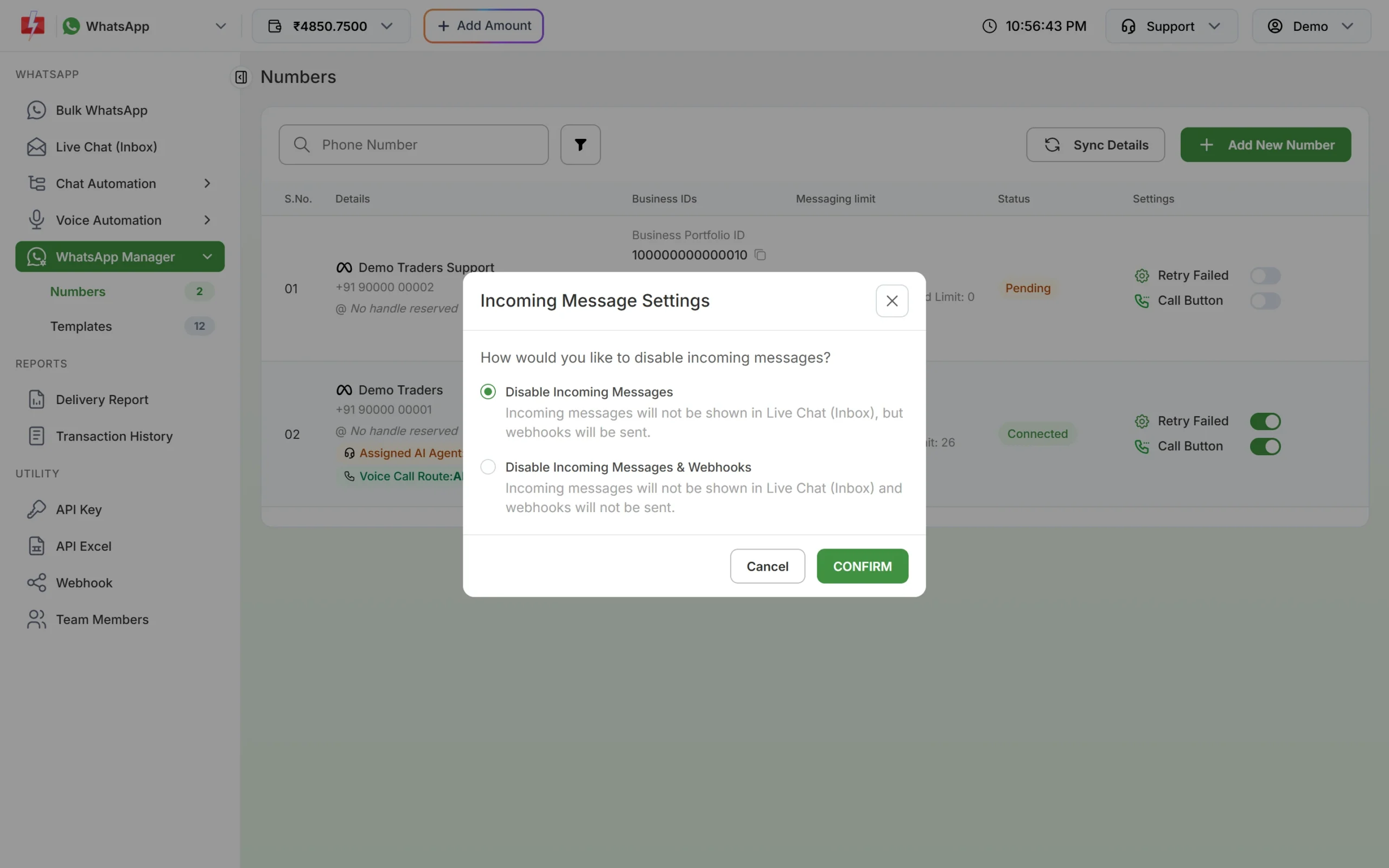
Choose whether incoming messages appear in Live Chat and webhooks.
What your business should not send or ask for on WhatsApp
Encryption protects the message in transit. It does not make it a good idea to collect sensitive data in a chat. Meta’s template review rejects templates that ask customers for full payment card numbers, financial account numbers, national identification numbers or documents containing them. Asking for the last 4 digits is fine. Never send passwords, and treat OTPs as one-time codes that expire.
Is the WhatsApp Business API safer than the WhatsApp Business app?
| WhatsApp Business app | WhatsApp Business API | |
|---|---|---|
| Encryption in transit | Signal protocol end to end, phone to phone | Signal protocol between the customer and Cloud API, then HTTPS to your business |
| Who holds the chats | The phone and its linked devices | Cloud API for up to 30 days, plus your messaging platform and your own systems |
| Team access | Anyone with the phone or a linked device | Separate logins with roles, and agents can be switched off |
| Lost or shared phone | The chats are on that phone, so it is a risk | Business chats are not tied to one phone |
For a team that handles many customers, the API usually gives better control, because access is per person and can be removed.
Frequently asked questions
Is WhatsApp Business API end-to-end encrypted?
Messages are encrypted with the Signal protocol between the customer and Meta’s Cloud API, which acts for the business. Cloud API then decrypts them for the business, so it is not end to end between two people like a personal chat.
Can Meta read WhatsApp Business API messages?
Cloud API processes message content to deliver it and keeps it for up to 30 days. Meta says it acts as a data processor for the business and does not automatically use WhatsApp messages to decide which ads people see.
Where are WhatsApp Business API messages stored?
In Meta data centers. With Meta’s local storage setting, message content at rest can be kept in a chosen country, and India is a supported region at the time of writing.
Is WhatsApp Business API safe for banks and hospitals?
Meta built local storage for regulated sectors such as finance, government and healthcare. Combine it with strict team access and no sensitive identifiers in chat, and check your own sector’s rules before you start.
Can my agents download customer data?
Agents see only what their role allows. A Chat Agent sees only assigned chats, and cannot browse your Address Book unless you turn on Show Contacts.
Does the DPDP Act apply to WhatsApp chats?
Yes. Customer numbers and chats are personal data, so the Act applies to how you collect, use, keep, protect and delete them. Its security rules ask for access control, logs and encryption or masking.