
Short answer: SMS OTP reaches every mobile number in India, and WhatsApp OTP gives a nicer experience with a Copy code button but only reaches people who use WhatsApp on that number. For most businesses the best choice is both: one channel first and the other as an automatic fallback. This page compares WhatsApp OTP vs SMS OTP on setup, cost, reach and speed, and shows how to use them together in Fast2SMS Smart OTP.
WhatsApp OTP vs SMS OTP at a glance
| SMS OTP | WhatsApp OTP | |
|---|---|---|
| What you need | DLT entity, sender ID and an approved Transactional OTP template | A connected WhatsApp Business number and an approved Authentication (or Utility) template |
| Who it reaches | Any Indian mobile number, with or without internet | Only numbers that use WhatsApp and are online |
| DND numbers | Reaches them (Transactional template) | DND does not apply |
| How the user enters the code | Reads and types it, or autofill on the phone | Taps Copy code. Android apps can use one-tap or zero-tap autofill. |
| Message text | Your own DLT-approved text | Fixed text set by WhatsApp for Authentication templates |
| Statuses you see | Sent, Delivered, Failed | Sent, Delivered, Read, Failed |
| Price (at the time of writing) | Your bulk SMS slab rate, ₹0.25 down to ₹0.11 per SMS | ₹0.25 per authentication message |
Each attempt is charged at the rate of the channel that carried it. Failed WhatsApp messages are refunded to your wallet. See the current rates on the SMS pricing and WhatsApp pricing pages.
Sending in bulk? For high OTP volumes our team offers discounted rates. Talk to our team or see OTP pricing.
When to put SMS first
- Your users include people on basic phones or without mobile data.
- Banking, payment and other flows where you want an SMS record from your DLT sender ID.
- Password reset and login, where you cannot be sure the user has WhatsApp.
When to put WhatsApp first
- Your users already talk to you on WhatsApp, for example after a click-to-WhatsApp ad.
- Delivery OTPs and order confirmations, where the code sits in the same chat as the order updates.
- You do not have DLT approval yet. WhatsApp OTP does not need DLT.
Set up both channels in Smart OTP
-
Create the WhatsApp OTP template
In Smart OTP, open OTP Template List and click Add OTP Template. On the WhatsApp Channel tab, pick your number and an approved template in Select WhatsApp Template (Authentication/Utility), then click the variable that holds the code.
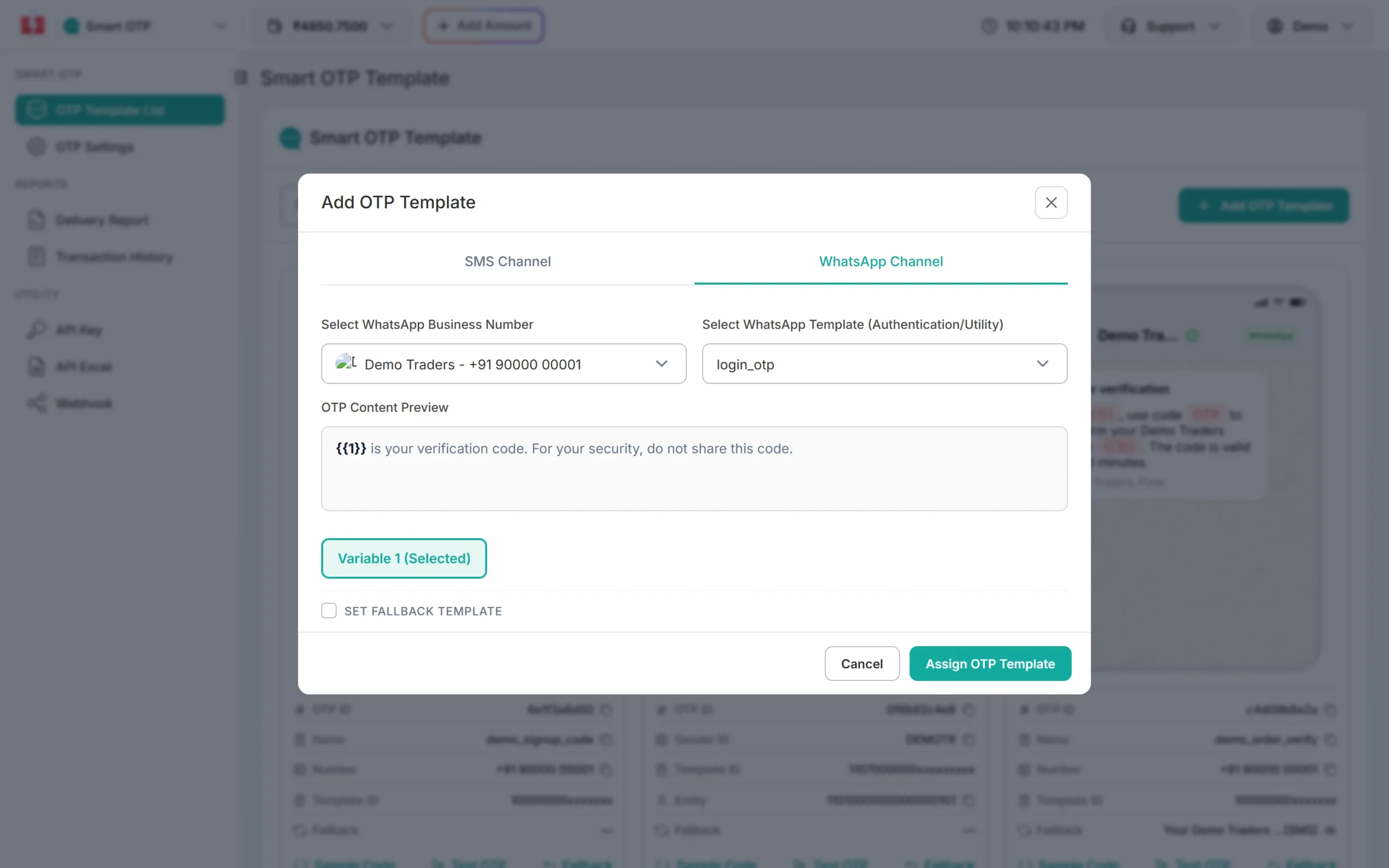
A WhatsApp OTP template. Marketing templates are never listed. -
Add SMS as the fallback
Tick SET FALLBACK TEMPLATE. The fallback channel is SMS. Choose the entity, sender and your DLT OTP template, pick the OTP variable, then click Assign OTP Template. You get one OTP ID for both channels.
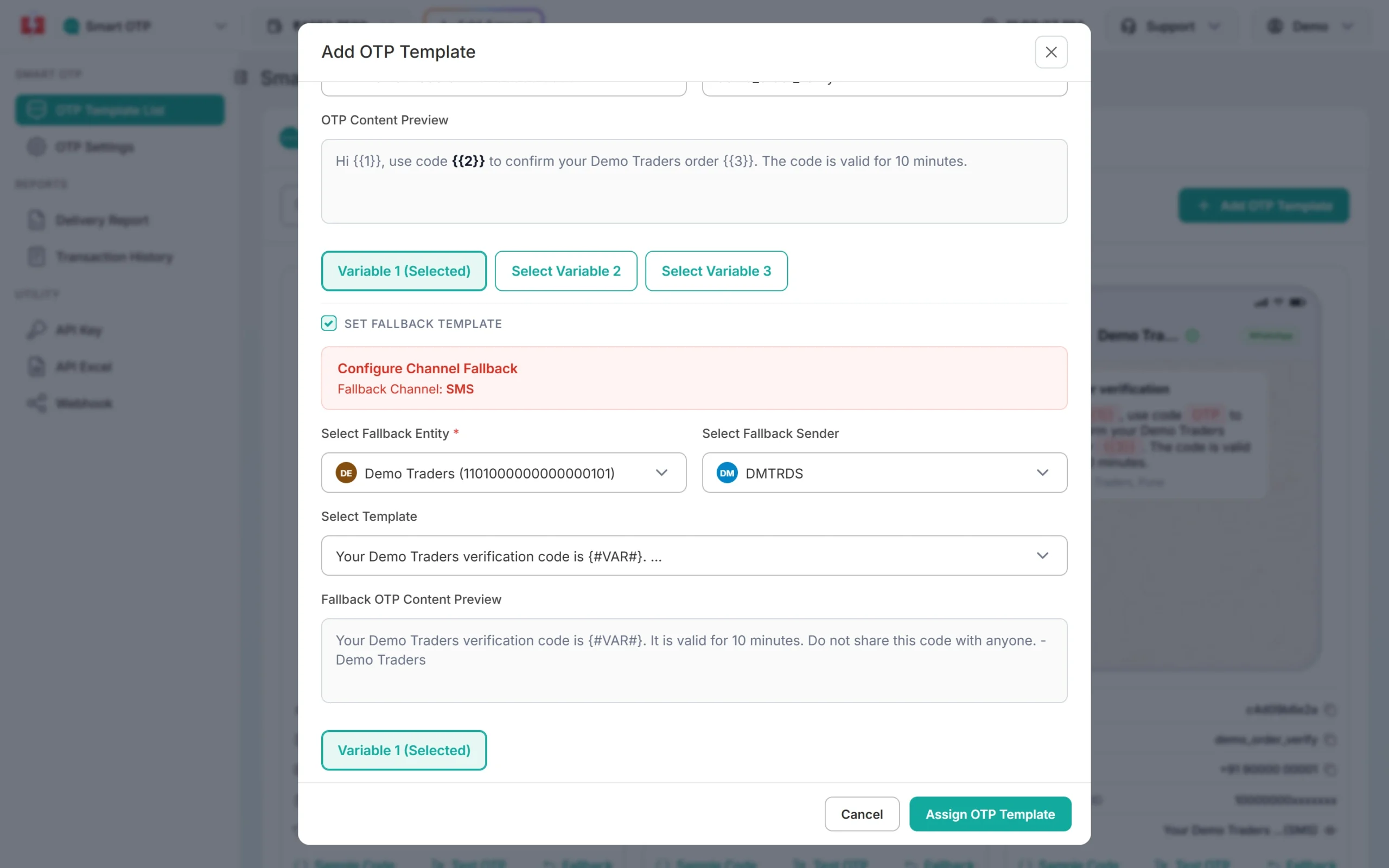
WhatsApp first, SMS if WhatsApp fails. -
Check which channel delivered
In the OTP report every attempt has a channel badge. WhatsApp OTPs can also show Read, so you know the user opened the message.
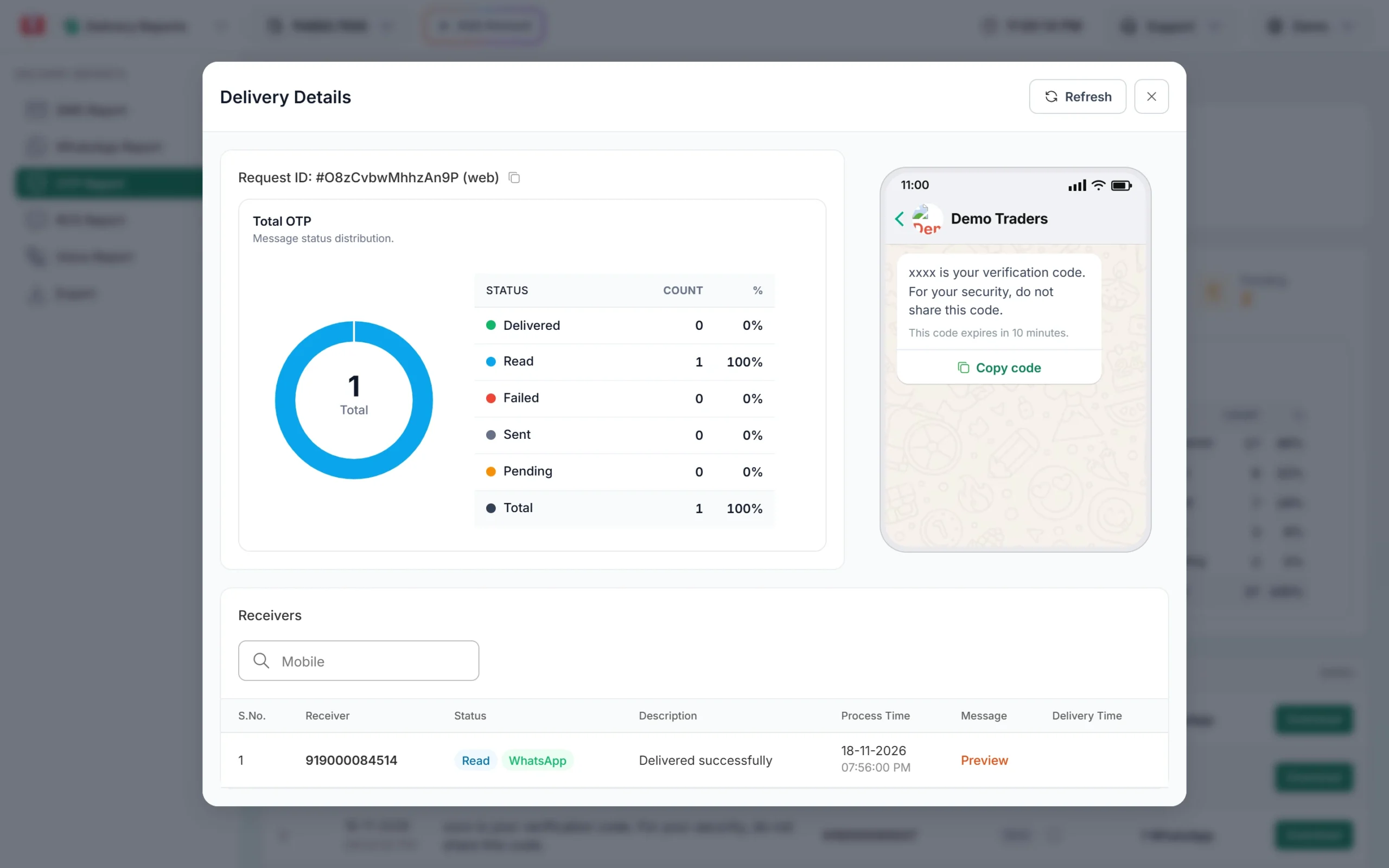
A WhatsApp OTP that the user has read.
You can do it the other way round too: create the template on the SMS Channel tab and add WhatsApp as the fallback. Your API call does not change. The OTP ID decides the channels.
How the fallback works
If the first attempt is reported as failed within 120 seconds of sending, Smart OTP sends the same code once on the other channel. The user can type the code from either message. For a WhatsApp fallback, the number must be connected, and your wallet must have balance for the second message.
Frequently asked questions
Is WhatsApp OTP cheaper than SMS OTP?
Not always. At the time of writing WhatsApp OTP is ₹0.25, and SMS OTP is ₹0.25 down to ₹0.11 depending on your recharge slab. A long SMS that splits into 2 parts costs 2 SMS.
Is WhatsApp OTP faster than SMS?
Both are fast. OTP SMS normally reaches the handset in 1 to 2 seconds on priority routes. A WhatsApp OTP arrives as soon as the phone is online.
Does WhatsApp OTP need DLT registration?
No. DLT is for SMS. WhatsApp OTP needs an approved WhatsApp template instead.
What if the user does not have WhatsApp?
The WhatsApp message fails. With an SMS fallback, the same code is then sent by SMS.
Can I write my own text for a WhatsApp OTP?
Not with an Authentication template. WhatsApp fixes the text, and you can add a security line and an expiry line. Smart OTP also accepts approved Utility templates.
Which is more secure?
In Smart OTP both get the same protection: the same expiry, verify attempt limit and resend wait. The code is checked by the same Verify OTP call whichever channel delivered it.