
A WhatsApp template body can have up to 1,024 characters, the text header and the footer up to 60 characters each, and each button label up to 25 characters. Variables like {{1}} must be numbered in order, cannot start or end the message, and need a sample value. This page lists every WhatsApp template character limit and variable rule in one place, so your template passes Meta’s review the first time.
WhatsApp template character limits
These are the limits at the time of writing. The Fast2SMS form checks most of them for you, but Meta’s limit is the one that counts.
| Part | Limit | Notes |
|---|---|---|
| Template name | Small letters, numbers and underscores. Keep it under 255 characters. | The form turns capitals to small letters and spaces to underscores. Names starting with “auto_generated” are reserved. |
| Header: text | 60 characters | Only one variable allowed. No Markdown formatting characters. |
| Header: image | JPG, JPEG or PNG, up to 5MB | The file is a sample for review. You upload the real one for each campaign. |
| Header: video | MP4 or M4V, up to 16MB | |
| Header: document | PDF, up to 100MB | |
| Body | 1,024 characters (required) | The counter under the box shows, for example, 102/1024. |
| Footer | 60 characters | Plain text, such as your shop name and city. |
| Button label | 25 characters (Meta’s limit) | The Fast2SMS box accepts up to 40, but Meta allows 25. Each label must be different. |
| Website button URL | 2,000 characters | A dynamic URL can have one variable, only at the end. |
| Copy offer code | 20 characters | The coupon code customers copy. |
| Phone number button | 20 characters | Enter the number with +91. |
WhatsApp template variable rules
Variables are the parts that change for each customer, such as a name, order number or amount. In Fast2SMS you add them with + Add Variable, which inserts {{1}}, then {{2}} and so on.
-
Do not start or end with a variable
Meta rejects a body that begins or ends with a variable. Write “Hi {{1}}, your order is packed. Thank you.” and not “{{1}}, your order is packed” or “Your order number is {{1}}”.
-
Number variables in order
Use {{1}}, {{2}}, {{3}} in that order. A template with {{1}}, {{2}}, {{5}} is rejected. Use the button instead of typing braces yourself, so the numbering stays correct.
-
Use the right brackets
Each variable needs two curly brackets on each side, like {{1}}. A missing or extra bracket gets the template rejected.
-
No special characters inside a variable
Characters such as #, $ or % inside the variable are not allowed. Write “Pay ₹{{1}} by {{2}}” with the symbol outside the brackets.
-
Keep enough fixed text
If a short message has many variables, Meta rejects it for having too many variables compared with the text. Add more fixed words or remove a variable.
-
Give a realistic sample for each variable
For every variable a box appears under “Samples for body content”. Each one is required. Enter a real-looking value such as “Priya” or “ORD10234”, not “test” or “abc”. Meta uses the samples to understand the message.
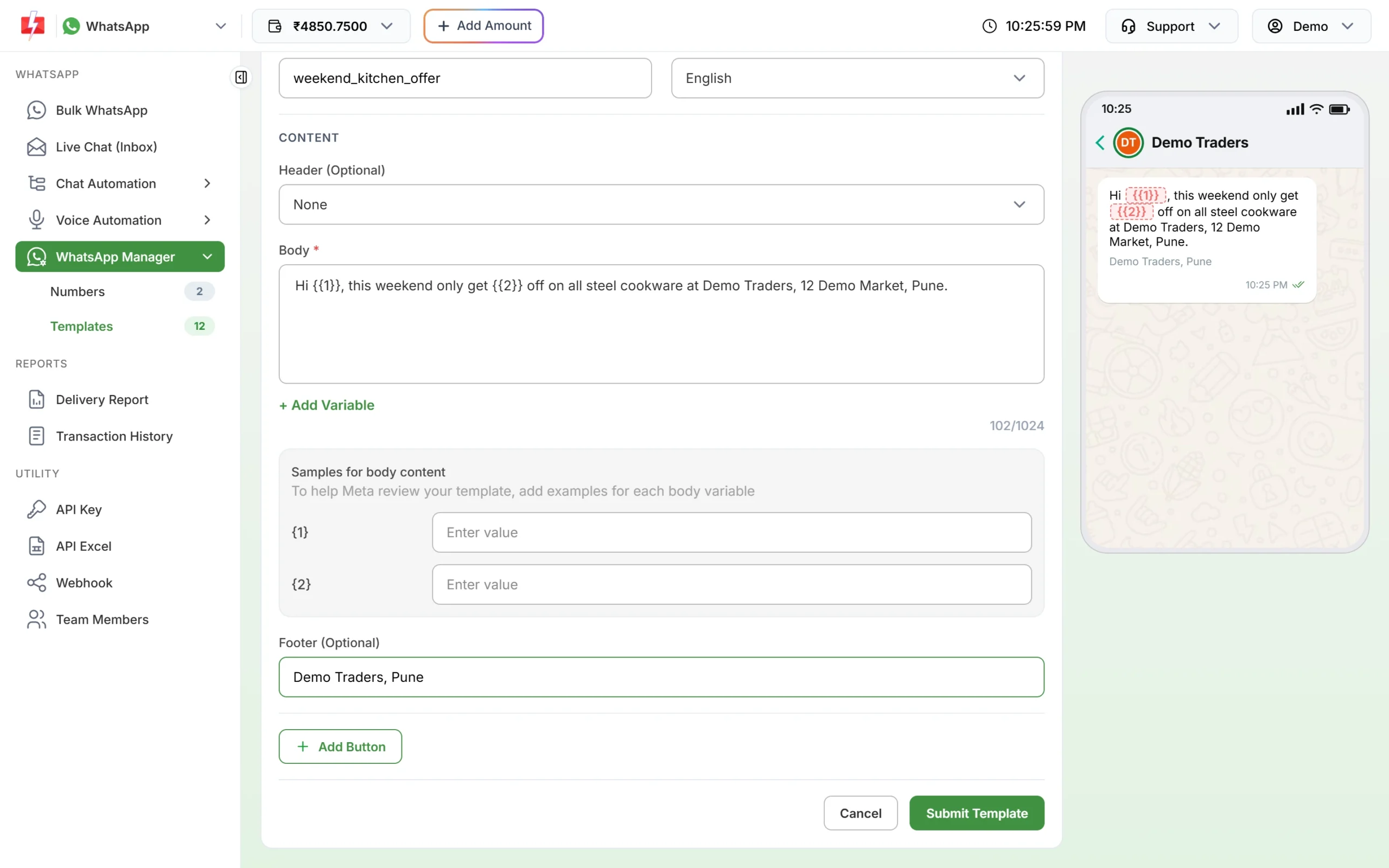
Two variables, each with its own sample box. The counter shows 102/1024.
Button limits per template
Click Add Button in the form and choose a type. The Fast2SMS form allows:
| Button type in Fast2SMS | Max per template | Rule to remember |
|---|---|---|
| Custom (quick reply) | 3 | Short replies such as “Yes”, “Call me”, “Stop offers” |
| Visit website | 2 | Static URL, or Dynamic with one variable at the end of the URL, for example https://example.com/track/{{1}} |
| Call Phone Number | 1 | Use an Indian number with +91. The panel adds +91 if you leave it out. |
| Copy offer code | 1 | Code up to 20 characters |
On WhatsApp, when a template has more than three buttons, customers see two and the rest under “See all options”.
Other format rules
- Language: the form offers English, Hindi and Gujarati. You cannot change the language after the template is created, so create a separate template for each language.
- No duplicates: Meta rejects a template whose body and footer exactly copy another template in your account.
- Sensitive data: do not ask customers for full card numbers, bank account numbers or ID numbers in a template.
- Authentication templates: the text is fixed by Meta (“is your verification code”), with an optional security line and expiry line. You cannot add links, media or emoji.
- Message validity period: for Utility templates you can pick 30 seconds to 15 minutes. If you leave it, the standard 10 minutes applies.
How many templates can I create?
At the time of writing, Meta allows 250 templates per WhatsApp Business account if your business portfolio is not verified. After business verification, and once one of your numbers has an approved display name, the limit goes up to 6,000. Meta also allows at most 100 new templates per hour. If you hit the limit, delete templates you no longer use. Note that after you delete an approved template, you cannot reuse its name for 30 days.
Frequently asked questions
What is the character limit of a WhatsApp template?
The body allows 1,024 characters. The text header and the footer allow 60 characters each, and a button label 25 characters.
Can a WhatsApp template start with a variable?
No. Meta rejects templates that start or end with a variable. Put at least one word before and after it.
How many variables can I use in a WhatsApp template?
Meta does not give a fixed number, but it rejects templates with too many variables for the length of the text. Use only the variables you really need.
Can I use emoji in a WhatsApp template?
Emoji are allowed in marketing and utility bodies, but Meta may limit how many you use. They are not allowed in authentication templates.
Can I add a variable in the header?
Yes, one variable in a text header. The form shows “You can only add one variable to the header text.” if you try a second.
Can I change the language of a template later?
No. The name and language are locked after creation. Create a new template for another language.
Why is my button text cut or rejected?
Meta allows 25 characters per button label. Shorten the label even though the box accepts more.