
Meta business verification is how Meta confirms that your business portfolio belongs to a real, registered business. For the WhatsApp Business API in India you do it in Meta Business Suite with an official document such as your GST certificate, and Meta usually decides within 14 business days. This guide explains when you need it, which documents work, the steps, and how to fix a rejection.
Do you need Meta business verification for the WhatsApp API?
Not to get started. You can connect your number to Fast2SMS, get templates approved and send messages without it. Verification matters when you want to grow. At the time of writing, Meta’s rules are:
| What | Without verification | After verification |
|---|---|---|
| Messaging limit (unique customers you can start chats with in 24 hours) | A new number on Fast2SMS starts at 2,000 (2K) | Meta raises the limit step by step (10K, 100K, Unlimited) if your quality stays good and you use your limit. |
| Phone numbers in one business portfolio | Starts at 2 | Up to 20 |
| Message templates per WhatsApp account | 250 | Up to 6,000, once a number also has an approved display name |
| Official Business Account (blue tick) | Cannot apply | Can apply. Verification is one of the conditions. |
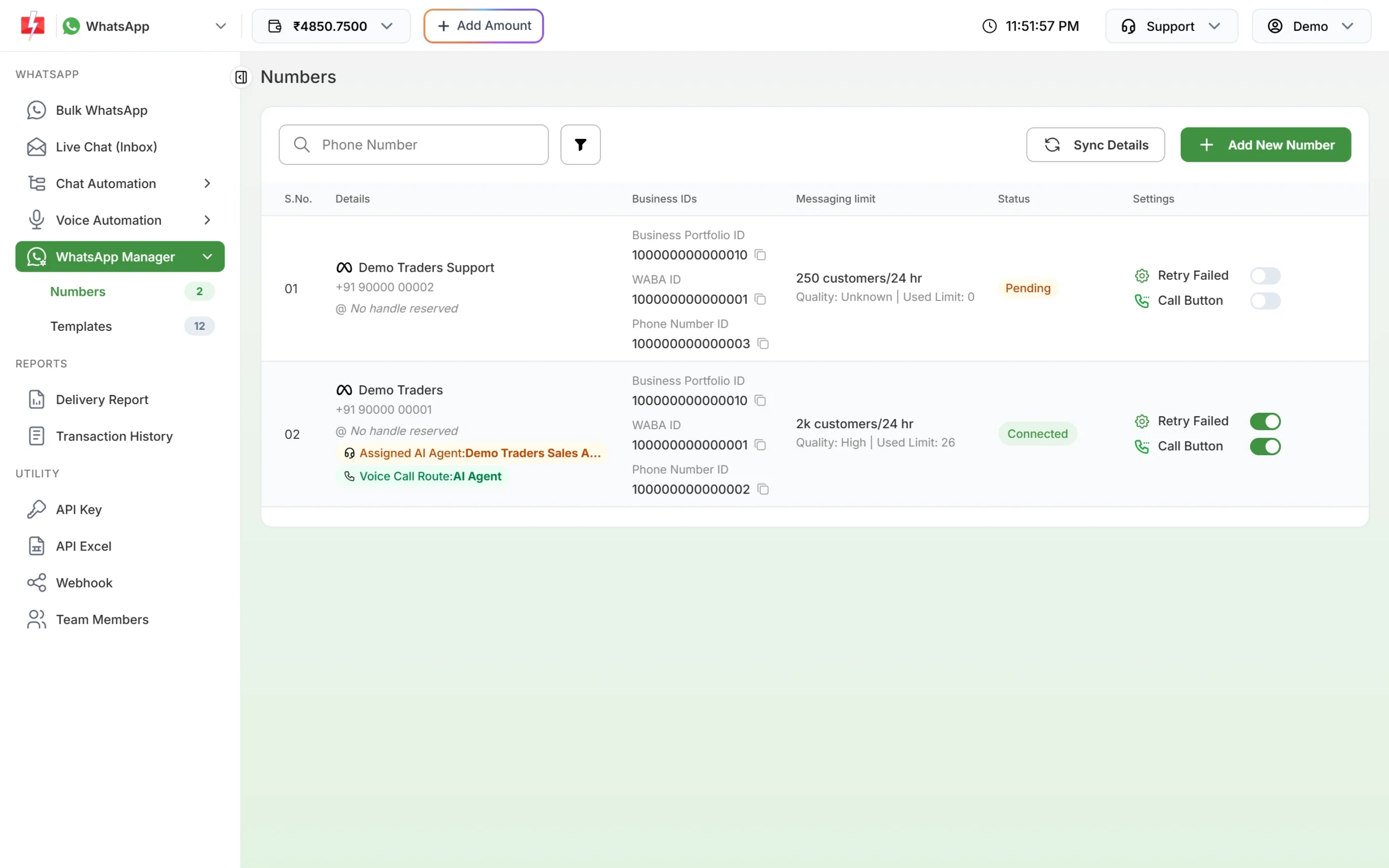
You can see your current limit in the Fast2SMS panel under WhatsApp Manager > Numbers, in the Messaging limit column. The same row shows your Business Portfolio ID, which is the portfolio you verify in Meta.
Before you start
- Full control of the business portfolio. Only someone with full control (the highest permission in Meta Business Suite) can open Security Center and start verification.
- Your exact legal details. The legal business name, full address and phone number exactly as they appear on your registration documents.
- A working website. Meta asks for a website and checks that it opens over HTTPS. It should show the same business name.
- One official document in the legal name of the business (see the next section).
- Access to the business email, phone or website, because Meta sends a code or asks for domain confirmation.
Which documents work for business verification in India?
Meta needs a document issued by the government or another official body that shows your legal business name and address. For India, Meta lists documents such as:
- GST registration certificate
- Certificate of incorporation (for companies and LLPs)
- PAN card in the name of the business
A utility bill or a bank statement in the business name can support your application, but Meta treats these as extra proof, not as the main document. If you choose phone confirmation, the document must also show the business phone number. A utility bill that shows a phone number but not the business name is not enough.
How to verify your business in Meta Business Suite
Verification happens on Meta’s side, not inside Fast2SMS. Meta changes its screens from time to time, so the labels below may look slightly different.
-
Open Security Center
Log in to Meta Business Suite with the Facebook account that has full control of the portfolio. Open Settings (business settings) and go to Security Center. Check that the portfolio is the same one shown as Business Portfolio ID in Fast2SMS.
-
Click Start verification
Click Start verification. If the page says “Ineligible for verification”, you do not need to do it there right now. Meta may ask you later from another product if a feature needs it.
-
Enter your business details
Fill in the legal name, address, phone number and website. Use the details from your registration document, not a short brand name.
-
Select your business or upload a document
Meta may show businesses that match your details. If yours is listed, select it. If it is not, choose My business isn’t listed and upload your document. Use a clear, full-page scan or PDF that is not expired.
-
Confirm the connection
Choose how Meta should confirm that you belong to the business: email, phone call, text message, WhatsApp, or domain verification (adding a meta tag or DNS record to your website). For email, use an address on your business domain, for example [email protected]. Enter the code Meta sends.
-
Wait for the decision
Meta says a decision can take up to 14 business days. You get a notification in Meta Business Suite. If you edit the business details afterwards, you have to verify again.
Business verification rejected: reasons and fixes
When Meta rejects or asks for more information, it shows the reason in Security Center. These are the usual causes and what to do.
| Reason | What to do |
|---|---|
| Legal name does not match the document | Change the name in Meta Business Suite to match the document exactly, or upload a document that carries the name you entered. |
| Address or phone number missing, partial or different | Use the full address as written on the document. If you chose phone confirmation, upload a document that shows that number. |
| Document type not accepted | Upload an official registration document such as a GST certificate or certificate of incorporation, not a visiting card, letterhead or invoice. |
| Self-filled document without a seal or signature | Meta does not accept forms you filled yourself unless they carry an official signature or seal. |
| Blurry, cropped or damaged file | Scan the full page again in good light. All text must be readable. |
| Document expired | Upload a current document. |
| Document in an unsupported language | Add a translation stamped by the translating agency. |
| Website does not open or is not HTTPS | Fix the website so it loads over https:// and shows your business name. |
| More information requested and not sent in time | Meta gives about one week. After that you must start again. |
After you fix the problem, submit again. Meta also says you may be able to appeal a rejection from the same screen.
Can I verify without a website (only GST)?
Meta’s form asks for a website and checks that it loads over HTTPS, so a missing website is a common reason for delays. If you do not have one, make a simple one-page website on your own domain that shows your legal business name, address, phone number and what you sell. This also lets you use a domain email and domain verification, which are often the easiest ways to confirm the connection. Your GST certificate then works as the main document.
What happens in Fast2SMS after verification
Nothing changes in your Fast2SMS setup. Your number, templates and API stay the same. After Meta updates your account, click Sync Details in WhatsApp Manager > Numbers to fetch the latest messaging limit and status. A higher limit lets you send campaigns to more new customers each day, as long as your quality rating stays high.
Frequently asked questions
How long does Meta business verification take?
Meta says a decision can take up to 14 business days after you submit. You get a notification in Meta Business Suite when it is done.
Is business verification mandatory for the WhatsApp Business API?
No. You can connect a number and send messages without it. You need it to apply for the blue tick, to add more than 2 phone numbers to your business portfolio and to get the higher template limit.
Which document is best for business verification in India?
A GST registration certificate or a certificate of incorporation in the exact legal name of the business works well. Bills and bank statements are only supporting documents.
Can a sole proprietor get verified?
Yes, if there is an official document in the business name, such as a GST certificate, that shows the same name and address you enter in Meta.
Why does Meta say “Ineligible for verification”?
It means verification is not required for that portfolio in Security Center at the moment. Meta may ask for it later if a feature needs it.
Do I have to verify again if I change my business address?
Yes. Meta asks you to complete verification again if you edit your business details after verification.
Can Fast2SMS verify my business for me?
Our team guides you through it for free and helps you submit, but Meta reviews the documents and makes the decision.