
To add a content template in Jio DLT, log in to Jio TrueConnect, open Content Template Registration under the Template tab, pick the type of communication and an approved header, type your message with typed variable tags such as {#numeric#}, and submit. Once Jio approves it, you add the same template in Fast2SMS and start sending.
A content template is the exact SMS text your business registers on DLT before sending. TRAI rules say every commercial SMS must match an approved template. Only the variable parts can change from one customer to the next.

Before you start
- An approved Principal Entity on Jio TrueConnect. See DLT registration on Jio.
- At least one approved header (Sender ID). See how to add a header in Jio DLT.
- For promotional messages that need consent: an approved consent template. See how to add a consent template in Jio DLT.
- Any link or callback number in your SMS whitelisted as a CTA. See CTA whitelisting in Jio DLT.
Which template type to choose
| Type | Use it for | Example (Demo Traders) |
|---|---|---|
| Transactional | OTPs and alerts right after a transaction the customer started. Banks and other businesses, such as shops and apps, can use it for OTPs. | {#numeric#} is your OTP to log in to Demo Traders. Valid for 10 minutes. Do not share it with anyone. – Demo Traders |
| Service Implicit | Updates to existing customers: order, delivery, payment, appointment. | Hi {#alphanumeric#}, your Demo Traders order {#alphanumeric#} is out for delivery today. Track it here: {#url#} – Demo Traders |
| Promotional | Offers, sales and new launches. Service Explicit templates are now moved under Promotional. | Festive Sale at Demo Traders. Flat {#numeric#}% off on our latest collection till {#alphanumeric#}. T&C apply. – Demo Traders |
Promotional SMS reach only numbers that have not blocked that category on DND, or people who gave consent. They can be sent only between 10 AM and 9 PM. Promotional SMS have long used 6-digit numeric headers, and after the 2025 TRAI amendment, portals also allow brand-name headers for promotional templates. For the details, see DLT template types and Service Explicit migration to Promotional.
How to add a content template in Jio DLT
The screenshots below are from an earlier version of Jio TrueConnect, so some screens and options may look different today.
-
Log in to Jio TrueConnect
Open the Jio DLT portal and log in with your entity account.
-
Open Content Template Registration
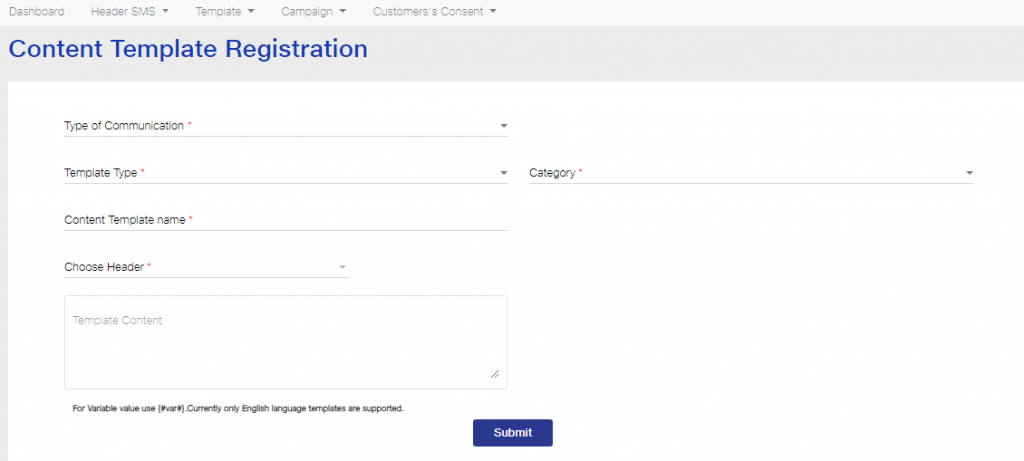
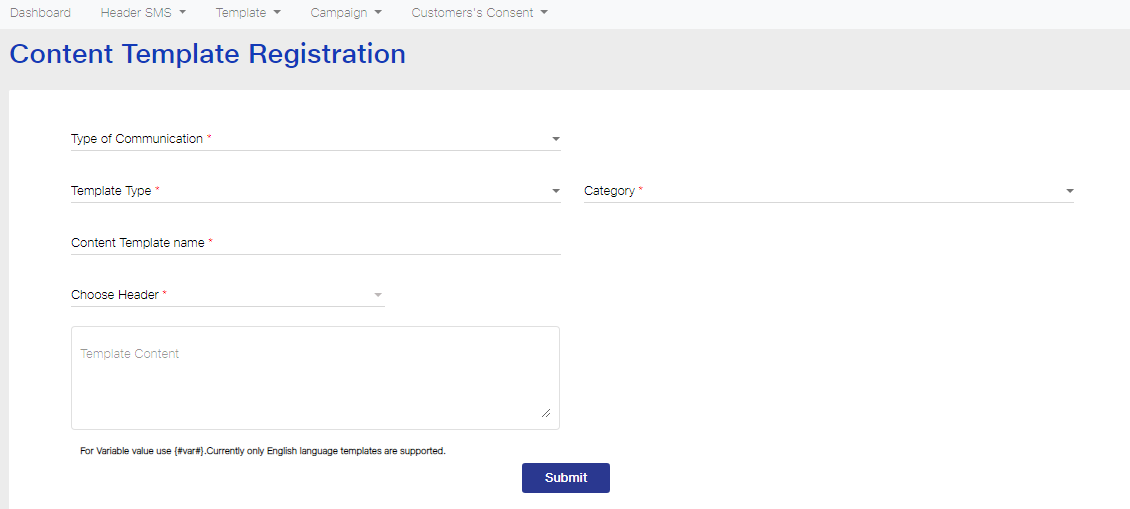
Select Content Template Registration from the Template tab. The registration screen opens.
-
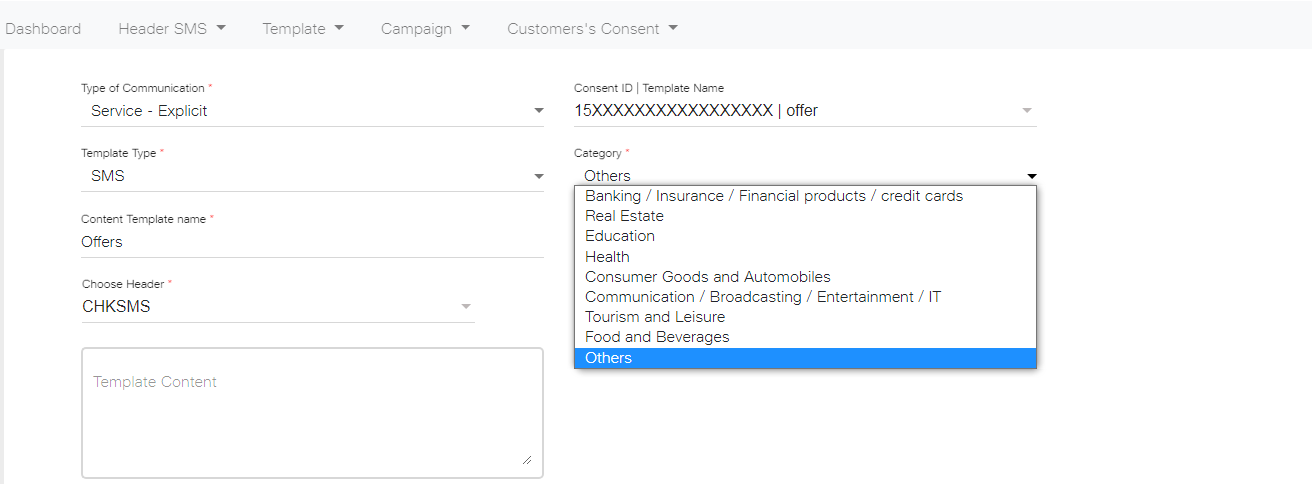
Choose the type of communication
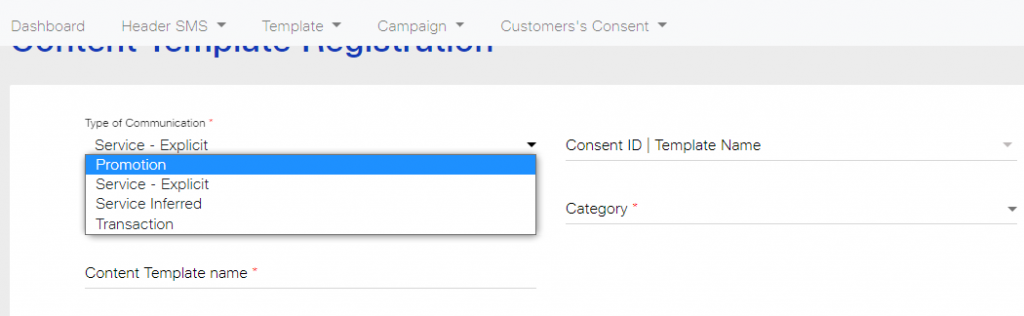
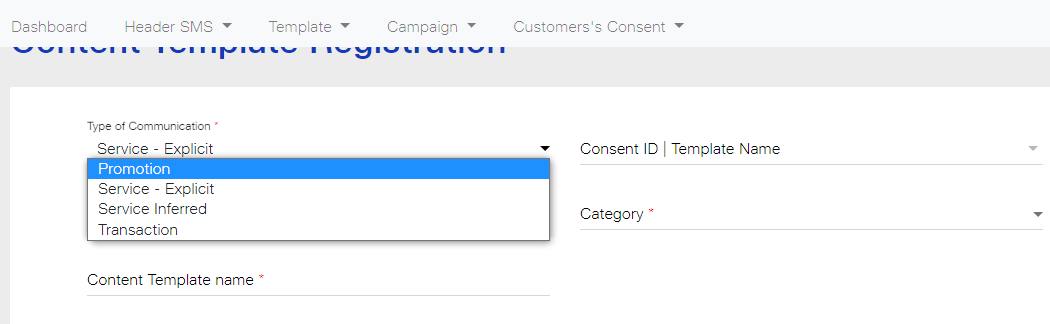
In the Type of Communication list, pick the type that matches your message. Use the table above to decide.
-
Fill in the template details
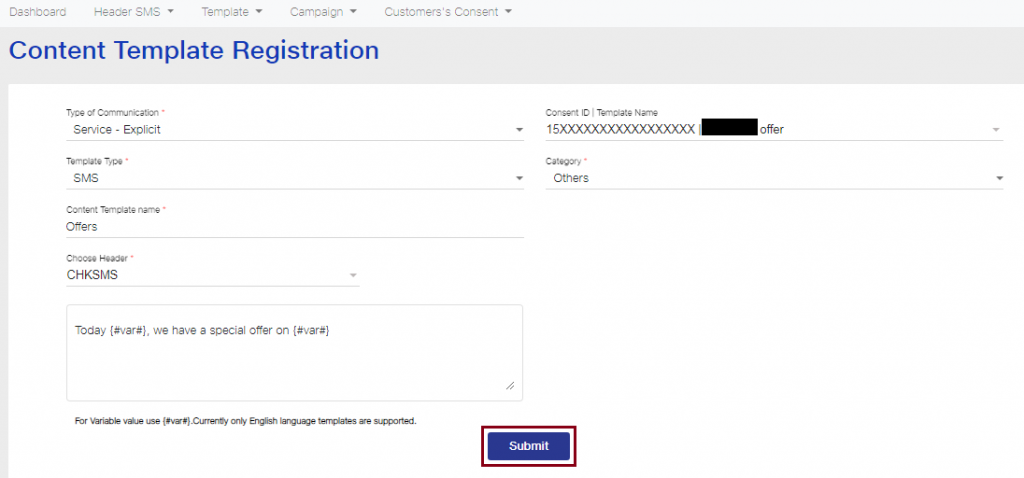
Select SMS as the Template Type and give the template a clear name. Choose the header from your approved headers. For a promotional template, select the approved Consent ID if your portal asks for it. Then pick your business category.
The example screenshot shows a Service Explicit template on the header CHKSMS. That category is now handled as Promotional, so pick the option your portal shows today.
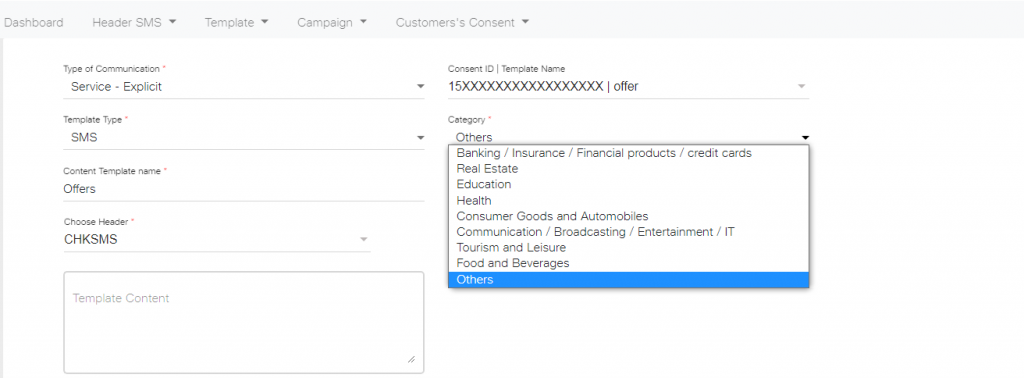
Each template is linked to the headers you choose here. You can send it only from those headers.
-
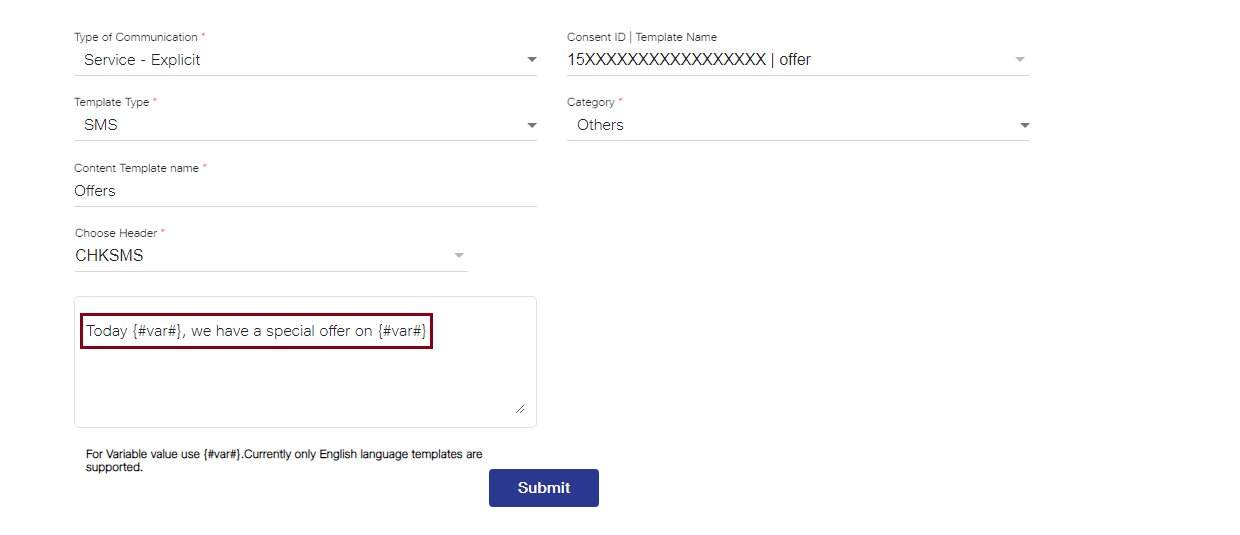
Type the template content
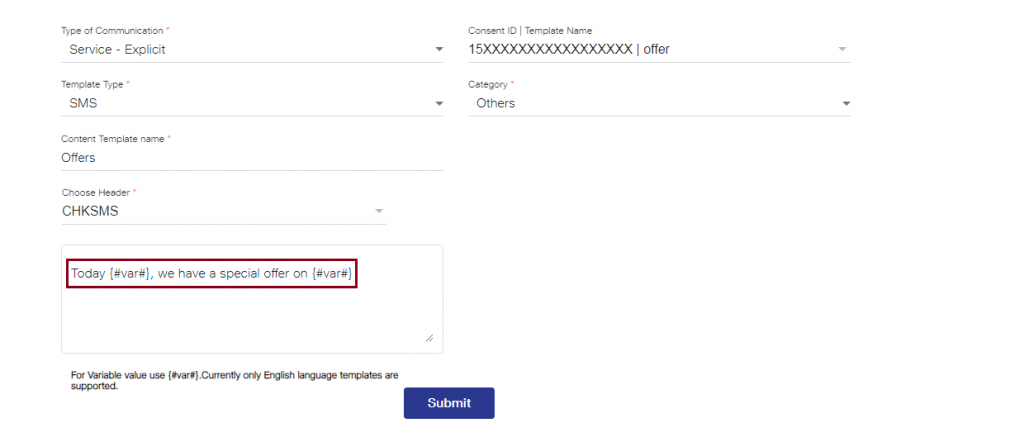
Enter the exact SMS you will send. Mark every part that changes with a typed variable tag. For example: Hi {#alphanumeric#}, we have a special offer on {#alphanumeric#} today at Demo Traders. – Demo Traders.
The old screenshot below uses {#var#}. New templates must use the typed tags instead.
-
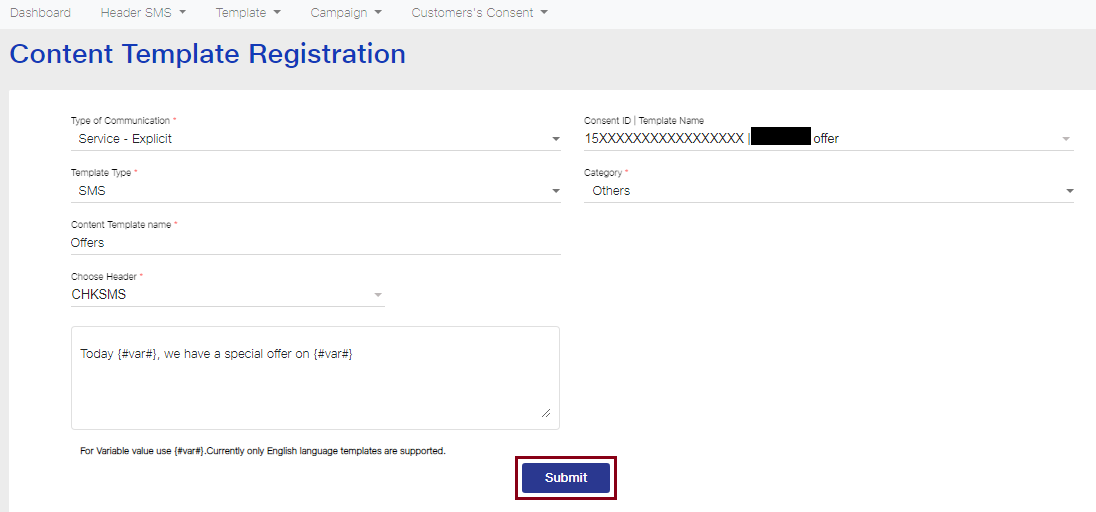
Submit the template
Check the fixed text once more and click Submit. After approval you cannot edit the text. Jio does not publish a fixed approval time, so watch the status on the portal.
-
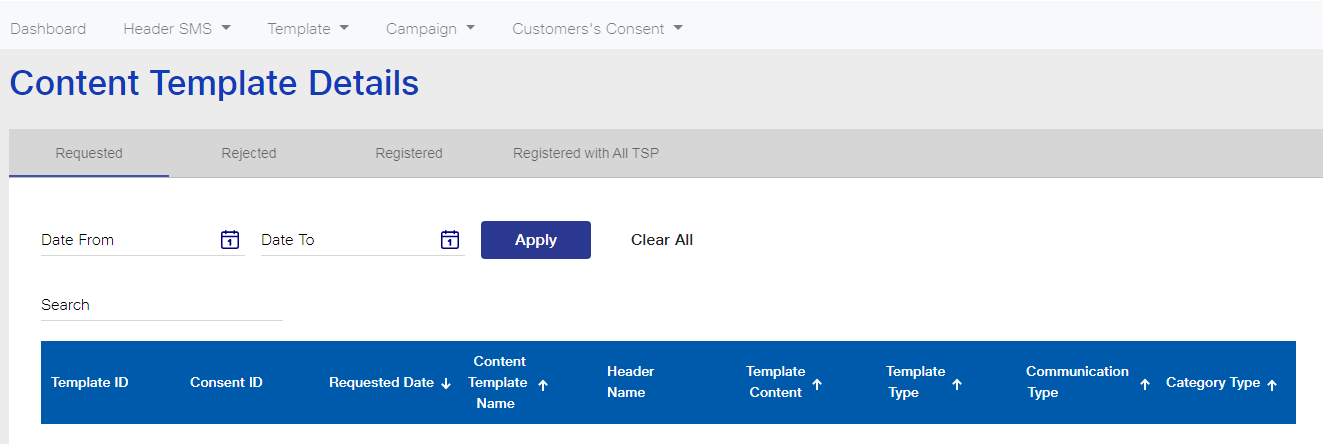
Track the status
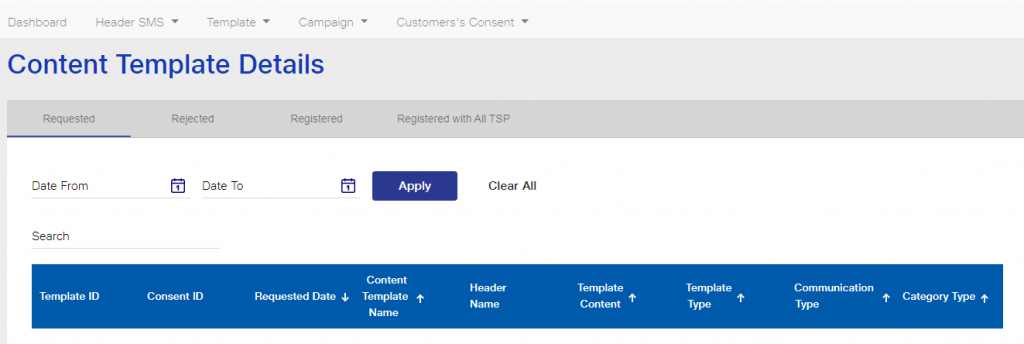
Open the Content Template Details tab to see requested, rejected and registered templates. You can search for a template or filter by date.
Variable tags to use
| Tag | Holds | Maximum length |
|---|---|---|
| {#numeric#} | Digits only: OTP, amount, quantity | 40 |
| {#alphanumeric#} | Letters and numbers: name, order ID, date | 40 |
| {#url#} | Web link that matches a whitelisted CTA | 120 |
| {#urlott#} | App or OTT link that matches a whitelisted CTA | 120 |
| {#cbn#} | Callback number that matches a whitelisted CTA | 3 to 14 |
| {#email#} | Email address | 40 |
- Use three variables or fewer. More need written reasons and a separate approval.
- Put fixed text between variables. Only two {#alphanumeric#} tags may sit side by side.
- Replace amounts, dates, OTPs, links, names and order numbers with variables. Keep your brand name as fixed text.
For every rule and more samples, see the DLT variable tagging guide.
Add the approved template in Fast2SMS
In Fast2SMS, go to DLT Manager > Content Template and click Add Content Template. Select your entity, tick the linked Sender IDs, enter the Content Template ID, choose the template type and paste the approved text exactly as registered. You can also use Upload Excel with the template export from TrueConnect. See DLT Manager in Fast2SMS.
Common reasons Jio rejects a template
| Problem | Fix |
|---|---|
| Offer text inside a service template | Register offers as Promotional. Keep order updates free of offers. |
| No brand name in the text | Add your business name as fixed text. |
| Old {#var#} placeholders | Use typed tags such as {#numeric#} and {#alphanumeric#}. |
| Link or number not whitelisted | Whitelist it as a CTA first, then register the template. |
| Too many variables or too little fixed text | Cut to three variables or fewer and keep most of the text fixed. |
Frequently asked questions
Can I edit a content template after Jio approves it?
No. Register a new template with the corrected text and use its new template ID.
Can I send one template from many headers?
Yes, if you link those headers to the template when you register it. You can send it only from linked headers.
Which type do I use for a login OTP from my website?
Transactional. OTPs from shops, apps and websites can use it, not only banks.
Do I need a consent template for every template?
No. Consent templates are needed only for messages that require recorded consent, such as promotional messages to people on DND.
Does my Jio template work on Airtel, Vi and BSNL numbers?
Yes. One DLT registration works for all operators, so a template approved on Jio can go to any Indian number.