
Bank, loan and EMI SMS templates fall into three DLT categories: OTPs and debit, credit, disbursal and EMI-paid alerts are Transactional; EMI due reminders, loan status updates and overdue notices are Service Implicit; loan offers are Promotional. This page gives banks, NBFCs, co-operative banks, credit societies and lending apps 15 ready-to-register templates with typed variables, sample messages, character counts and SMS parts, including Hindi, and then shows how to add them in Fast2SMS and send them.
Which DLT category for banking and loan SMS
| Message | DLT category | DND numbers and timing |
|---|---|---|
| Transaction OTP, debit and credit alerts, loan disbursed, EMI received | Transactional | Delivered to DND, any hour |
| Application received or approved, EMI due, EMI bounced, overdue, loan closed, renewal, KYC due | Service Implicit | Delivered to DND, any hour |
| Pre-approved loan offers, credit card or top-up offers | Promotional | Not to DND numbers, 10 AM to 9 PM only |
Under TRAI’s 2025 rules, a transactional message is sent to your own customer in response to a transaction the customer made, and must not contain anything promotional. Replace “Demo Finance” in the samples with your registered brand. Counts are for the sample shown.
OTP and account alert templates
1. Transaction OTP
DLT category: Transactional. Variables: {#numeric#}.
{#numeric#} is your OTP for the transaction of Rs {#numeric#} on your Demo Finance account. Demo Finance never asks for your OTP. Do not share it.Sample message (135 characters, English, 1 SMS): 482917 is your OTP for the transaction of Rs 25000 on your Demo Finance account. Demo Finance never asks for your OTP. Do not share it.
2. Debit alert
DLT category: Transactional. Variables: {#numeric#}, {#cbn#}.
Rs {#numeric#} debited from your Demo Finance account XX{#numeric#}. Not done by you? Call {#cbn#} immediately. - Demo FinanceSample message (115 characters, English, 1 SMS): Rs 5000 debited from your Demo Finance account XX4821. Not done by you? Call 9000000001 immediately. – Demo Finance
Show only the last 4 digits of an account. The XX is fixed text and the digits go in the {#numeric#} variable.
3. Credit alert
DLT category: Transactional. Variables: {#numeric#}, {#alphanumeric#}.
Rs {#numeric#} credited to your Demo Finance account XX{#numeric#} on {#alphanumeric#}. - Demo FinanceSample message (79 characters, English, 1 SMS): Rs 12000 credited to your Demo Finance account XX4821 on 18 Nov. – Demo Finance
Loan application and disbursal templates
4. Loan application received
DLT category: Service Implicit. Variables: {#alphanumeric#}.
Dear {#alphanumeric#}, we have received your loan application {#alphanumeric#}. We will update you within 2 working days. - Demo FinanceSample message (117 characters, English, 1 SMS): Dear Suresh, we have received your loan application LA77412. We will update you within 2 working days. – Demo Finance
5. Loan approved
DLT category: Service Implicit. Variables: {#alphanumeric#}, {#numeric#}.
Dear {#alphanumeric#}, your loan of Rs {#numeric#} against application {#alphanumeric#} is approved. Our team will call you for the next steps. - Demo FinanceSample message (134 characters, English, 1 SMS): Dear Suresh, your loan of Rs 200000 against application LA77412 is approved. Our team will call you for the next steps. – Demo Finance
6. Loan disbursed
DLT category: Transactional. Variables: {#alphanumeric#}, {#numeric#}.
Your Demo Finance loan {#alphanumeric#} of Rs {#numeric#} has been disbursed to your bank account. First EMI is due on {#alphanumeric#}. - Demo FinanceSample message (126 characters, English, 1 SMS): Your Demo Finance loan LN20419 of Rs 200000 has been disbursed to your bank account. First EMI is due on 5 Jan. – Demo Finance
EMI reminder and repayment templates
7. EMI due reminder
DLT category: Service Implicit. Variables: {#alphanumeric#}, {#numeric#}.
Dear {#alphanumeric#}, EMI of Rs {#numeric#} for your Demo Finance loan is due on {#alphanumeric#}. Please keep enough balance in your account. - Demo FinanceSample message (130 characters, English, 1 SMS): Dear Suresh, EMI of Rs 6850 for your Demo Finance loan is due on 5 Dec. Please keep enough balance in your account. – Demo Finance
8. EMI received
DLT category: Transactional. Variables: {#numeric#}, {#alphanumeric#}.
We have received your EMI of Rs {#numeric#} for Demo Finance loan {#alphanumeric#}. Thank you. - Demo FinanceSample message (93 characters, English, 1 SMS): We have received your EMI of Rs 6850 for Demo Finance loan LN20419. Thank you. – Demo Finance
9. EMI bounced
DLT category: Service Implicit. Variables: {#numeric#}, {#alphanumeric#}, {#cbn#}.
Your EMI of Rs {#numeric#} for Demo Finance loan {#alphanumeric#} could not be collected. Please pay to avoid charges. Help: {#cbn#} - Demo FinanceSample message (134 characters, English, 1 SMS): Your EMI of Rs 6850 for Demo Finance loan LN20419 could not be collected. Please pay to avoid charges. Help: 9000000001 – Demo Finance
10. Loan overdue
DLT category: Service Implicit. Variables: {#alphanumeric#}, {#numeric#}, {#cbn#}.
Dear {#alphanumeric#}, Rs {#numeric#} is overdue on your Demo Finance loan. Please pay at the earliest. For help, call {#cbn#}. - Demo FinanceSample message (129 characters, English, 1 SMS): Dear Suresh, Rs 13700 is overdue on your Demo Finance loan. Please pay at the earliest. For help, call 9000000001. – Demo Finance
11. Loan closed
DLT category: Service Implicit. Variables: {#alphanumeric#}.
Your Demo Finance loan {#alphanumeric#} is fully repaid and closed. Your NOC will be sent within 15 days. Thank you. - Demo FinanceSample message (122 characters, English, 1 SMS): Your Demo Finance loan LN20419 is fully repaid and closed. Your NOC will be sent within 15 days. Thank you. – Demo Finance
Renewal and KYC templates
12. Gold loan renewal due
DLT category: Service Implicit. Variables: {#alphanumeric#}.
Your Demo Finance gold loan {#alphanumeric#} is due for renewal on {#alphanumeric#}. Please visit your branch with the loan card. - Demo FinanceSample message (124 characters, English, 1 SMS): Your Demo Finance gold loan GL5530 is due for renewal on 12 Dec. Please visit your branch with the loan card. – Demo Finance
13. KYC update due
DLT category: Service Implicit. Variables: {#alphanumeric#}.
Dear {#alphanumeric#}, your KYC with Demo Finance is due for update. Please visit your branch with ID proof. We never ask for KYC details by SMS. - Demo FinanceSample message (150 characters, English, 1 SMS): Dear Suresh, your KYC with Demo Finance is due for update. Please visit your branch with ID proof. We never ask for KYC details by SMS. – Demo Finance
No link in this one on purpose. Fraudsters send fake KYC links, so a branch visit or your official app is the safer instruction.
Loan offer template (promotional)
14. Pre-approved loan offer
DLT category: Promotional. Variables: {#numeric#}, {#url#}, {#cbn#}.
Pre-approved personal loan up to Rs {#numeric#} from Demo Finance. Check eligibility: {#url#} T&C apply. To stop offers, call {#cbn#}.Sample message (150 characters, English, 1 SMS): Pre-approved personal loan up to Rs 300000 from Demo Finance. Check eligibility: https://demofinance.in/pl T&C apply. To stop offers, call 9000000001.
Hindi EMI reminder template
For customers in smaller towns, a Hindi or regional-language reminder is often read faster. Hindi SMS are Unicode, so 1 part holds 70 characters and this reminder uses 2 parts.
15. EMI due reminder (Hindi)
DLT category: Service Implicit. Variables: {#alphanumeric#}, {#numeric#}.
प्रिय {#alphanumeric#}, Demo Finance लोन की EMI Rs {#numeric#} की तारीख {#alphanumeric#} है। कृपया खाते में बैलेंस रखें।Sample message (92 characters, Unicode, 2 SMS parts): प्रिय Suresh, Demo Finance लोन की EMI Rs 6850 की तारीख 5 Dec है। कृपया खाते में बैलेंस रखें।
Tips for banking SMS that get approved and stay safe
- Never show full account, card or loan numbers. Mask them, for example XX4821.
- Add an anti-fraud line to OTPs and alerts. “We never ask for your OTP” or “Not done by you? Call …” helps customers spot fake messages.
- Links only to your own whitelisted domain. Every
{#url#}value must match a CTA on your DLT portal. Avoid links in KYC and security messages altogether. - Keep collection messages polite. State the amount, the due date and a number for help. Threats lead to complaints, and TRAI’s 2025 rules made action against senders faster.
- Keep offers out of alerts. A “you are eligible for a top-up loan” line in an EMI reminder makes the whole SMS promotional.
- Use the right tags. Amounts and last-4 digits in
{#numeric#}(digits only, no commas), loan IDs, names and dates in{#alphanumeric#}, helpline numbers in{#cbn#}. - Calls follow other rules. If you also call customers, TRAI’s rules use the 1600 number series for service and transactional calls and the 140 series for promotional calls.
How to add your banking templates in Fast2SMS and send them
Add each approved template to Fast2SMS once. Alerts and OTPs are usually sent from your core system through the API; EMI reminder campaigns can go from the panel with a CSV of customers, amounts and due dates.
-
Register the template on your DLT portal
Log in to the DLT portal where your business is registered and add a content template. Pick the category shown with the template, link it to one approved header, paste the text with its variable tags and add a sample message with realistic values. If the text has a
{#url#},{#urlott#}or{#cbn#}variable, whitelist that link or phone number as a CTA on the portal first. Once the portal approves it, note the Content Template ID and take a screenshot of the approved row. -
Add it in DLT Manager
In the Fast2SMS SMS app, open DLT Manager > Content Template and click Add Content Template. Select your entity, tick the Sender ID, enter the Content Template ID, choose the Template Type that matches the portal: Service Implicit for Transactional and Service Implicit templates, Service Explicit or Promotional for promotional ones, paste the approved text exactly as the portal shows it in Copy-Paste Approved Message Text, upload the screenshot and click Submit.
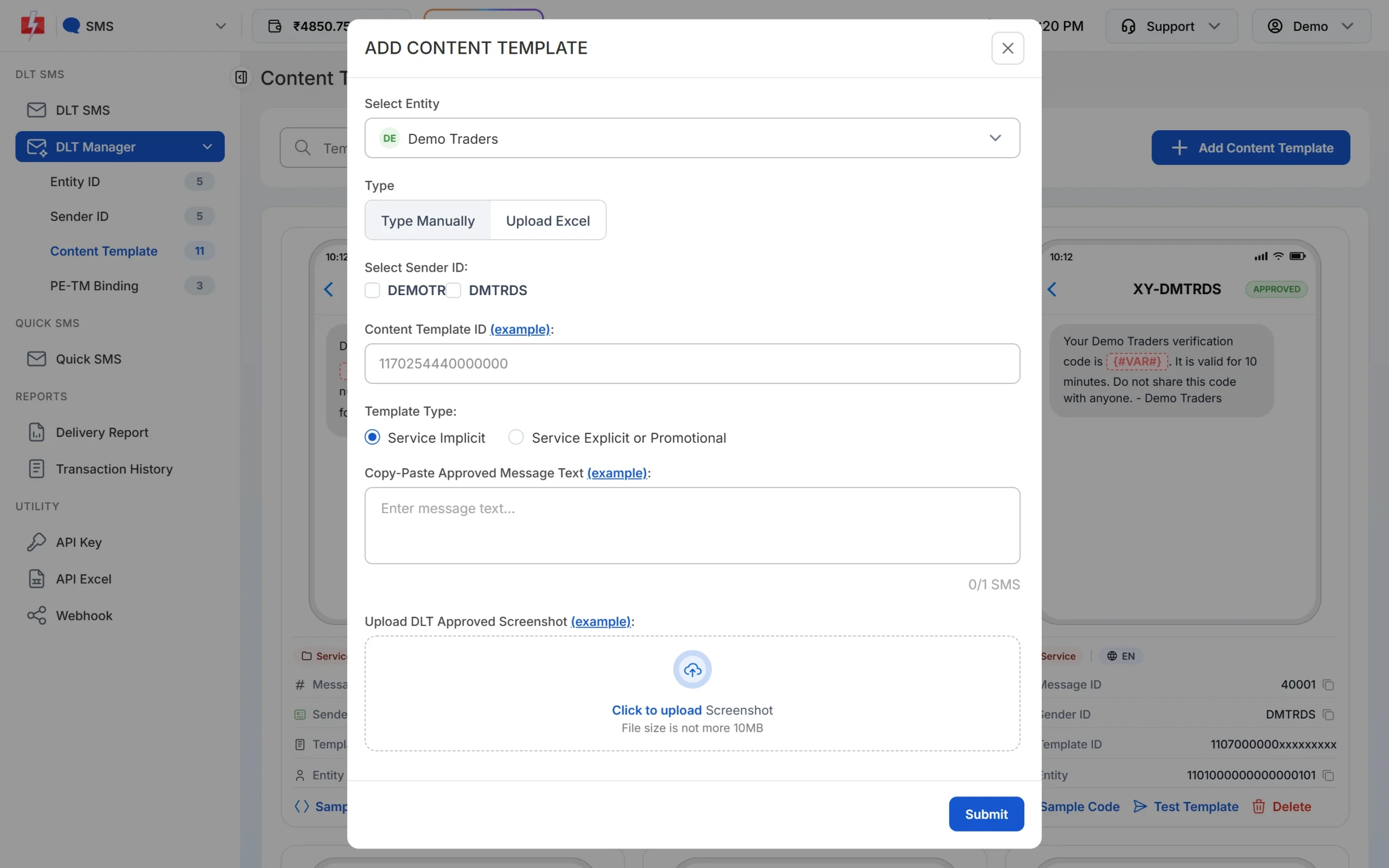
Paste the text exactly as it was approved, including spaces and full stops. -
Wait for Approved and note the Message ID
The template is saved as Pending while Fast2SMS checks it against your screenshot. When the card shows APPROVED, it also shows a Message ID. That short number is what you pass as
messagein the API. The card shows every variable as {#VAR#}, whatever tag you registered. Use Test Template to send one real SMS to your own number before a campaign.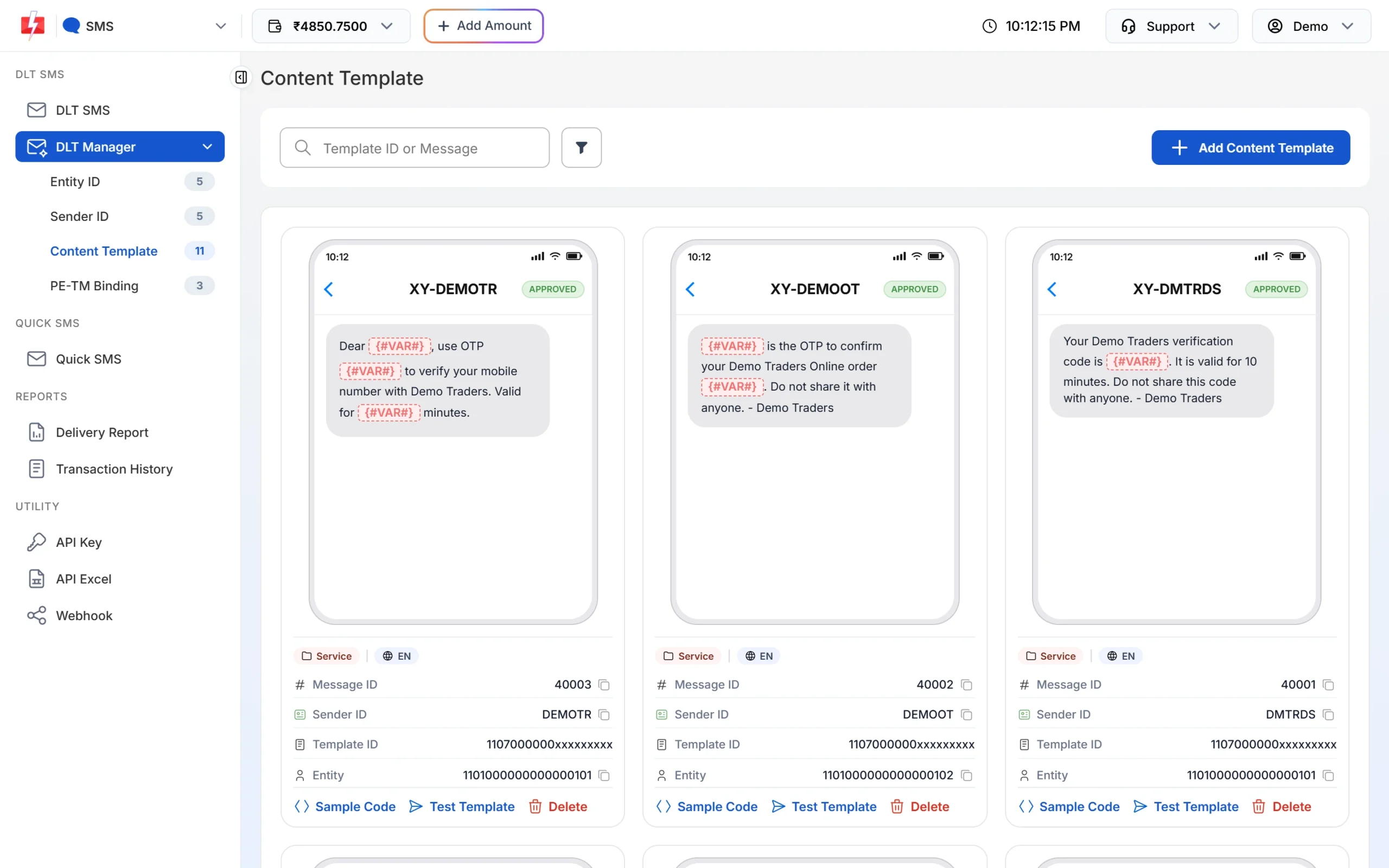
Each approved card shows its Message ID and the Test Template button. -
Pick the template on the DLT SMS page
Open DLT SMS, choose the Sender ID and add numbers under Send To: type them in List, pick contacts from Address Book or upload a CSV File. Then click Select DLT Template. The picker has All, Service Implicit and Service Explicit tabs.
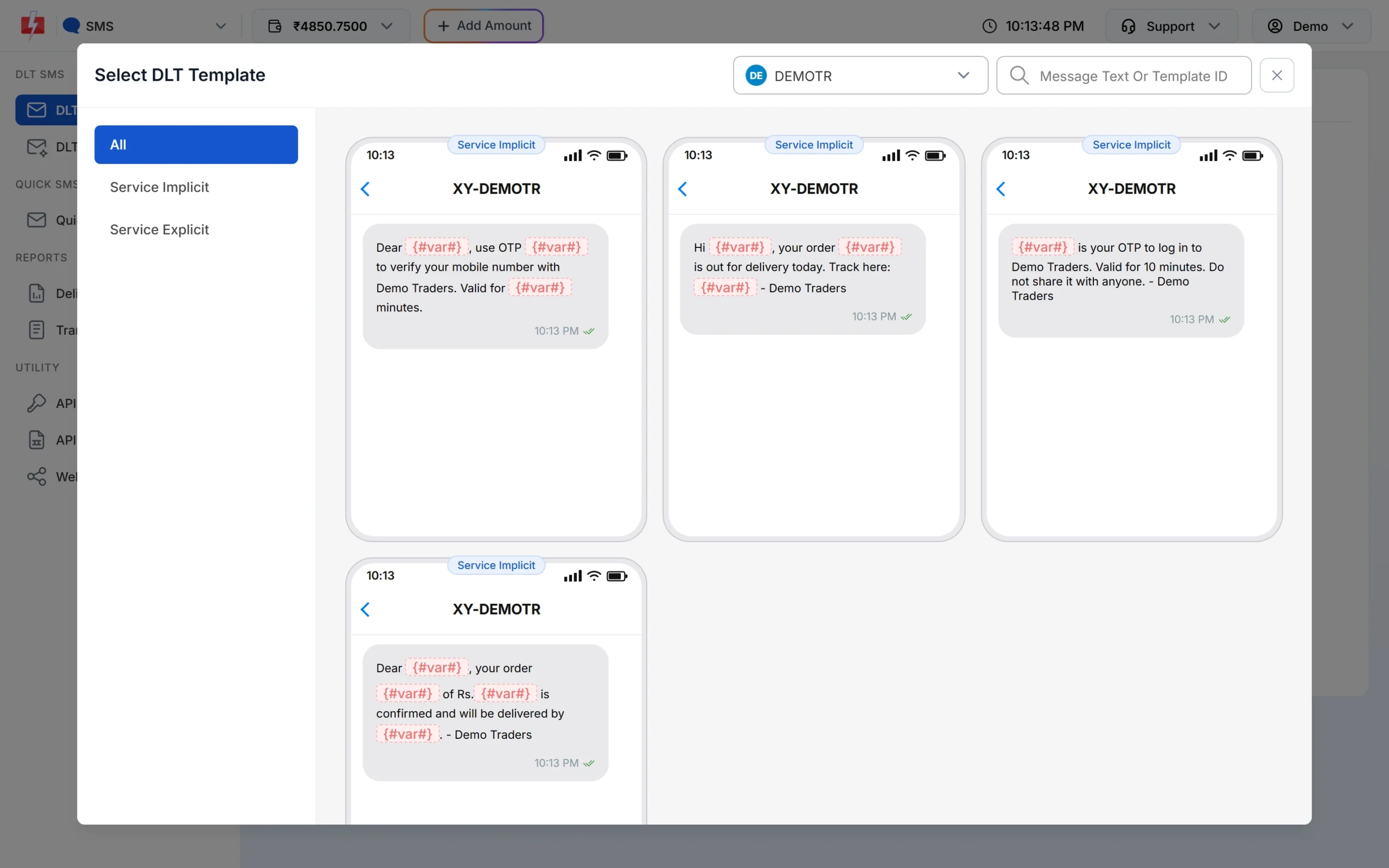
Only approved templates linked to the chosen sender are listed. -
Fill the variables and check the preview
The page shows one box for each variable. As you type, the phone preview shows the final SMS and the counter under it shows characters and SMS parts, such as 107/1 SMS. To send each person their own name, amount or date, use CSV File and map each variable to a column.
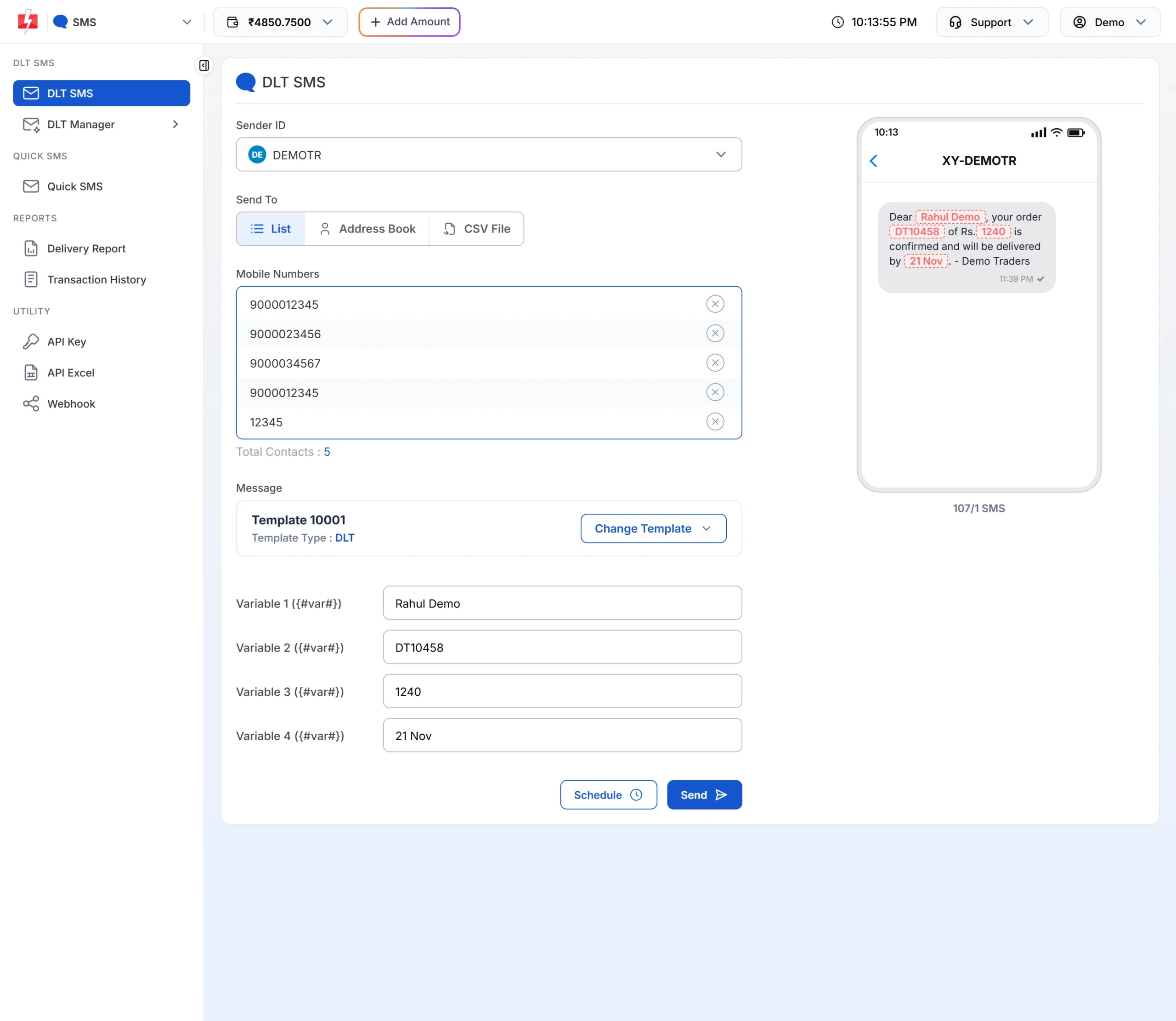
The counter shows how many parts each SMS will use. -
Check the cost, then send or schedule
Click Send. The Message Preview & Confirmation popup shows the cost per SMS, total messages, total, duplicate, valid and invalid numbers, and the total cost. Duplicates and invalid numbers are not charged. Click Confirm & Send, or close it and use Schedule to pick a date and time. Promotional templates go out only between 10 AM and 9 PM. If you send one late at night, Fast2SMS holds it and sends it the next morning.
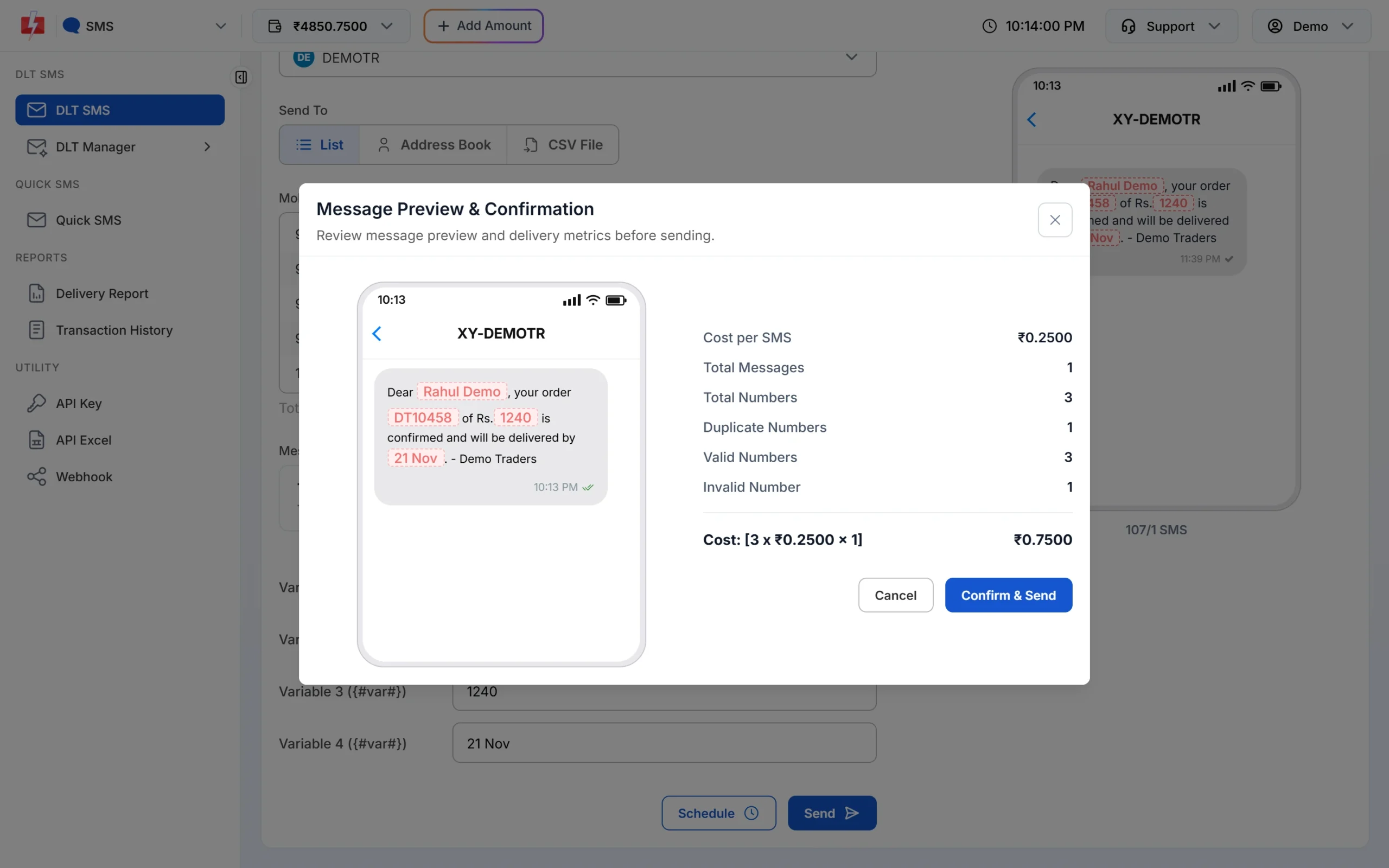
Nothing is sent until you click Confirm & Send.
Each SMS part is charged as one SMS for every valid number, so a template that runs into 2 parts costs twice as much per person as a 1-part template. Keep the text short to save money. See the current rates on the bulk SMS pricing page.
Sending in bulk? For high SMS volumes our team offers discounted rates. Talk to our team or see SMS pricing.
route=dlt and the template’s Message ID.Frequently asked questions
Is an EMI reminder SMS transactional?
No. An EMI due reminder is service information about an existing loan, so register it as Service Implicit. An “EMI received” confirmation right after the payment is Transactional.
Can EMI reminders be sent to customers on DND?
Yes. Service Implicit and Transactional SMS reach DND numbers at any hour.
Can an NBFC or credit society send OTPs as transactional?
Yes. TRAI’s amended rules list OTPs from non-bank businesses as transactional messages too.
Can I put a payment link in an EMI reminder?
Yes, with a {#url#} variable that matches a CTA whitelisted on your DLT portal. Use only your official domain.
Can I send loan offers to all my customers?
Loan offers are promotional. They go only between 10 AM and 9 PM and do not reach numbers on DND unless the customer gave you consent.
Should I mask account numbers in SMS?
Yes. Show only the last 4 digits, such as XX4821, as fixed text plus a {#numeric#} variable.
Can I send EMI reminders in Hindi?
Yes. Register the Hindi template on your DLT portal. Hindi SMS hold 70 characters per part, so keep them short.