
Bulk SMS and WhatsApp for real estate have two sides. Before the sale, builders and brokers send project launches, brochures and site-visit invites to leads; these are promotional and carry the strictest rules. After the sale, buyers get booking receipts, payment schedules and possession updates; these are service messages that reach everyone. This guide covers both sides for builders, developers, brokers and channel partners, with sample templates, RCS and voice ideas, and the setup in Fast2SMS.
Real estate messages and the best channel
| Message | Best channel | Why |
|---|---|---|
| New project launch to opted-in leads | RCS rich card or carousel, WhatsApp marketing | Photos, floor plans and an “Enquire” button in one message. |
| Brochure and price sheet | WhatsApp marketing template with a PDF | The brochure opens in the chat and the lead can reply. |
| Lead asks “2BHK price?” “Is it RERA registered?” | WhatsApp chatbot, auto replies and Live Chat | Instant answers, then a sales person takes over. |
| Enquiry received from a web form | SMS (Service Implicit) and WhatsApp utility | The lead hears from you within seconds of enquiring. |
| Site visit booked and reminder | SMS and WhatsApp utility with a map link | Fewer missed visits. |
| Call campaign to past enquirers | Call Patch voice campaign | Interested people press 1 and talk to your sales team. |
| Booking amount received | SMS (Transactional) | Sent right after payment, with amount and receipt number. |
| Payment milestone due | SMS and WhatsApp utility | Clear dates and amounts; no voice (see below). |
| Construction progress | WhatsApp utility with photos or video | Buyers see their tower, not a generic ad. |
| Possession and registration dates | SMS (Service Implicit) | Important dates must reach every buyer. |
| Buyer portal login | Smart OTP | Priority route with fallback to the other channel. |
The promotional rules every builder and broker should know
- Promotional SMS go only to numbers that are not on DND (for that category) or that gave consent, and only between 10 AM and 9 PM. Fast2SMS holds late-night promotional sends until the next morning. TRAI also requires promotional messages to include a way to opt out.
- Do not mix an offer into a service message. A payment reminder with “refer a friend and get a gold coin” becomes promotional.
- Bought or scraped lists are the fastest way to get complaints. UCC complaints can lead to penalties under TRAI rules, and on WhatsApp, blocks and reports lower your quality rating and can restrict your number.
- Promotional calls under TRAI rules use the 140 number series and do not reach DND numbers. In Fast2SMS, voice campaigns call only non-DND numbers between 10 AM and 9 PM.
Sample DLT SMS templates for real estate
Register these examples on your DLT portal after changing them to your project names and wording.
| Use | DLT category | Sample template (example) |
|---|---|---|
| Enquiry received | Service Implicit | Dear {#var#}, thank you for your enquiry about {#var#}. Our advisor will call you from {#cbn#} shortly. – Demo Realty |
| Site visit booked | Service Implicit | Dear {#var#}, your site visit to {#var#} is booked for {#var#} at {#var#}. Location: {#url#} – Demo Realty |
| Site visit reminder | Service Implicit | Reminder: your visit to {#var#} is today at {#var#}. Your advisor {#var#} can be reached on {#cbn#}. – Demo Realty |
| Booking amount received | Transactional | Received Rs.{#numeric#} towards booking of unit {#alphanumeric#} at {#var#} on {#var#}. Receipt {#alphanumeric#}. – Demo Realty |
| Payment milestone due | Service Implicit | Dear {#var#}, the {#var#} instalment of Rs.{#numeric#} for unit {#alphanumeric#} is due on {#var#}. Details: {#url#} – Demo Realty |
| Possession date | Service Implicit | Dear {#var#}, possession of unit {#alphanumeric#} at {#var#} is scheduled for {#var#}. Our team will contact you. – Demo Realty |
| Project launch | Promotional | Launching {#var#} by Demo Realty: 2 and 3 BHK homes at {#var#}, starting Rs.{#var#}. Book a visit: {#url#} – Demo Realty |
| Open house weekend | Promotional | Open house at {#var#} this {#var#}, 10 AM to 6 PM. Ready-to-move homes. Visit: {#url#} – Demo Realty |
If you advertise a project, also check the advertising rules that apply to registered projects in your state, such as showing the RERA registration number where required. Put it as fixed text in the template, not in a variable.
WhatsApp templates: utility vs marketing
| Template name | Category | Body (example) | Extras |
|---|---|---|---|
| project_brochure | Marketing | Hi {{1}}, thanks for your interest in {{2}}. The brochure with floor plans and prices is attached. | Document header, “Book site visit” button, “Stop promotions” quick reply |
| launch_offer | Marketing | {{1}} is now open for booking. Pre-launch prices till {{2}}. Reply to talk to our advisor. | Image header, Call Phone Number button |
| site_visit_confirm | Utility | Hi {{1}}, your site visit to {{2}} is confirmed for {{3}} at {{4}}. | Visit website “Get directions”, quick reply “Reschedule” |
| payment_due | Utility | Dear {{1}}, the {{2}} instalment of Rs. {{3}} for unit {{4}} is due on {{5}}. | Visit website “Payment details” |
| construction_update | Utility | Dear {{1}}, here is the {{2}} progress update for {{3}}, tower {{4}}. | Image or video header |
Marketing templates on WhatsApp go only to people who opted in, for example by ticking “Send me project updates on WhatsApp” on your enquiry form. A lead who writes to you first opens a 24-hour window in which your team can reply freely.
RCS for project launches
RCS messages arrive in the phone’s normal messages app with your brand name and logo, and can carry a rich card (image, title, text and up to 4 buttons such as “Call now” or “View location”) or a carousel of 2 to 10 cards, one per tower or configuration. To send, you register your brand (website, domain email, GST certificate, Terms and Privacy pages, and an opt-in form on your website). Promotional RCS bots can send from 7 AM to 10 PM, with a limit of 4 promotional RCS per number per month at the time of writing. Numbers whose phones do not support RCS are marked Non-RCS and refunded; no SMS is sent in their place, so plan a separate SMS for them if needed.
Voice calls for real estate
Call Patch is the most useful voice feature for sales: the lead hears a short recording and presses a key to be connected to a free agent in your sales group. If nobody picks up, a recording you choose plays.
Sample Call Patch script: “Namaste, this is Demo Realty. Our new project Demo Heights in Baner has 2 and 3 BHK homes with possession next year. Press 1 to talk to our property advisor now.”
How to get started on Fast2SMS
Before you start: DLT registration with approved headers and templates, PE-TM binding with Fast2SMS, and the records added in DLT Manager. For WhatsApp, a connected business number; for RCS, an approved brand and bot.
-
Pick the right DLT template type for each campaign
On DLT SMS, the Select DLT Template window has Service Implicit and Service Explicit tabs. Use Service Implicit templates for buyers’ updates; launch and open-house templates sit under Service Explicit (promotional) and follow the 10 AM to 9 PM rule.
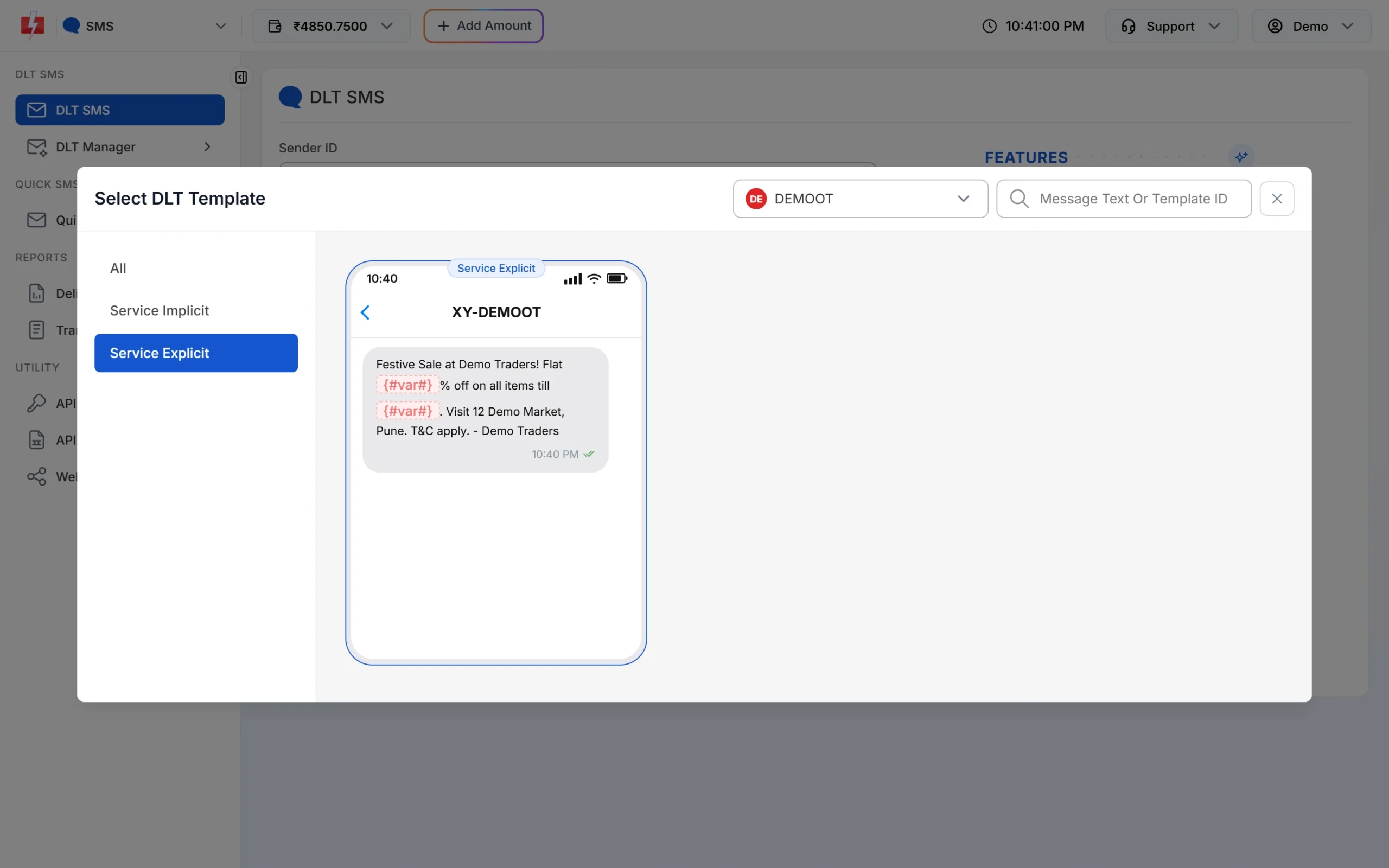
Promotional templates are listed under Service Explicit. -
Send a project launch on RCS
Open RCS > Bulk RCS, choose your promotional bot, add numbers (List, Address Book or CSV File), select Rich as the RCS type and add the title, message, project image and buttons. Click Send or Schedule.
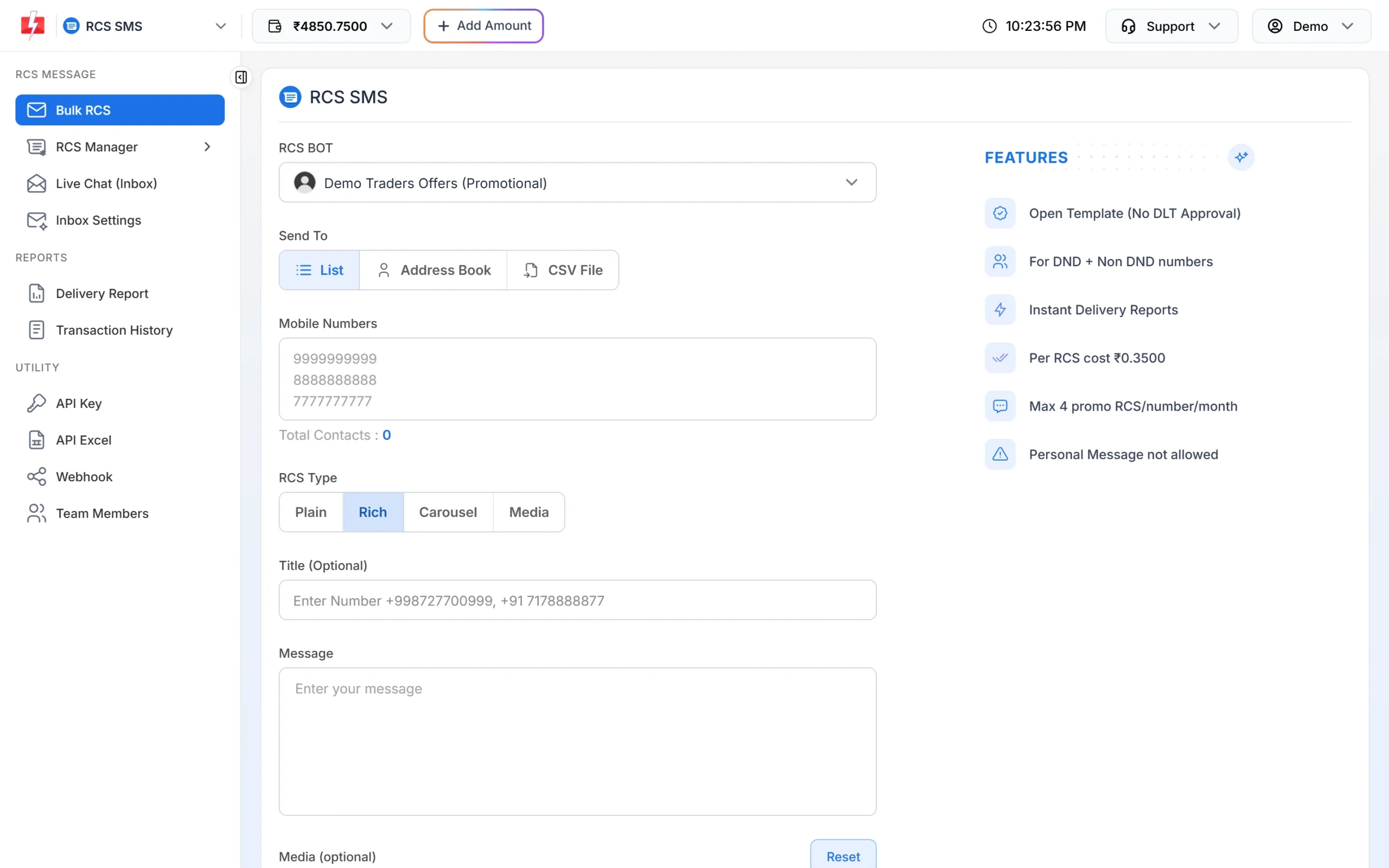
A rich card with image and buttons. -
Send the brochure on WhatsApp and check the cost
In WhatsApp > Bulk WhatsApp, choose your number, add the opted-in leads, select the brochure template and upload the PDF in the header field. Click Send. The Message Preview & Confirmation popup shows the preview, cost per message, valid and duplicate numbers and the total before you confirm.
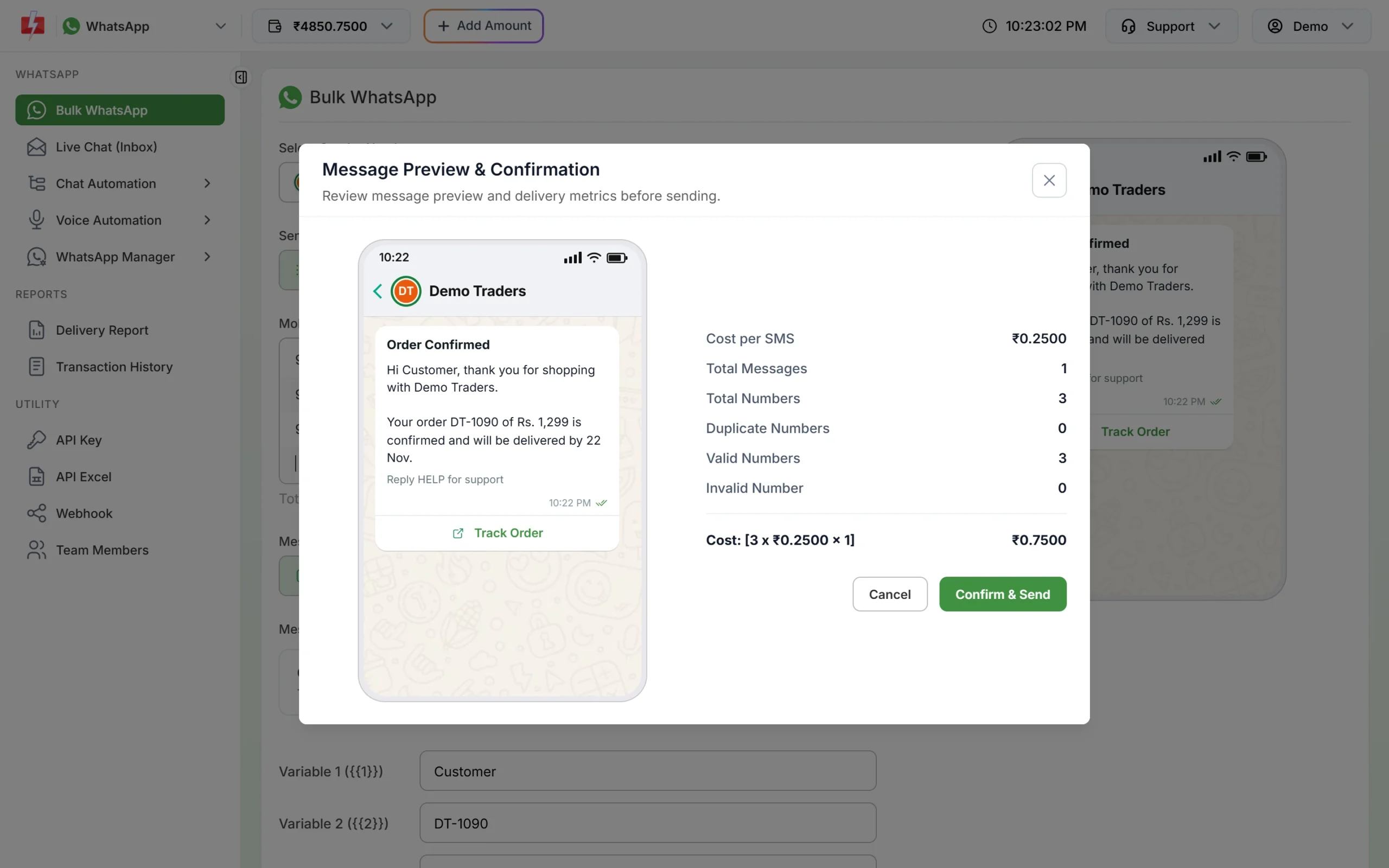
Check the counts and total, then Confirm and Send. -
Create your sales agent group
Open Voice > Agent Groups and click Create Group. Name it, for example “Baner Sales”, and add each advisor’s name and 10-digit mobile number (1 to 50 agents per group).
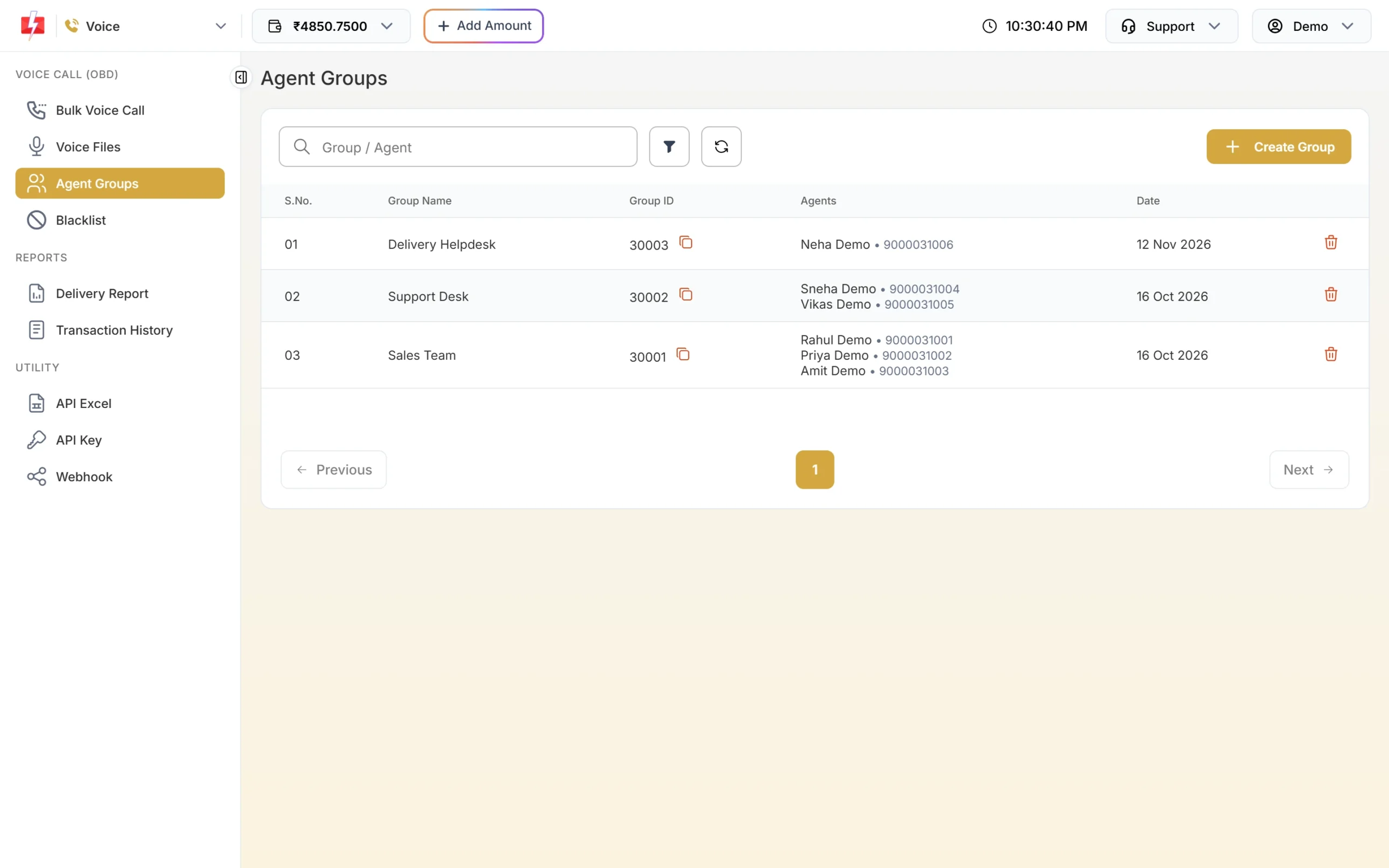
Each group gets a Group ID for campaigns and the API. -
Launch the Call Patch campaign
In Bulk Voice Call, choose Call Patch, pick your approved menu recording, set “Press 1 connect to” your sales group and choose the “no agent” recording. Add numbers and click Send. The confirmation popup lists total, duplicate, invalid, blacklisted and valid numbers, the estimated pulses per call and the cost. That amount is held from your wallet when you confirm, and the part not used is refunded after the campaign.
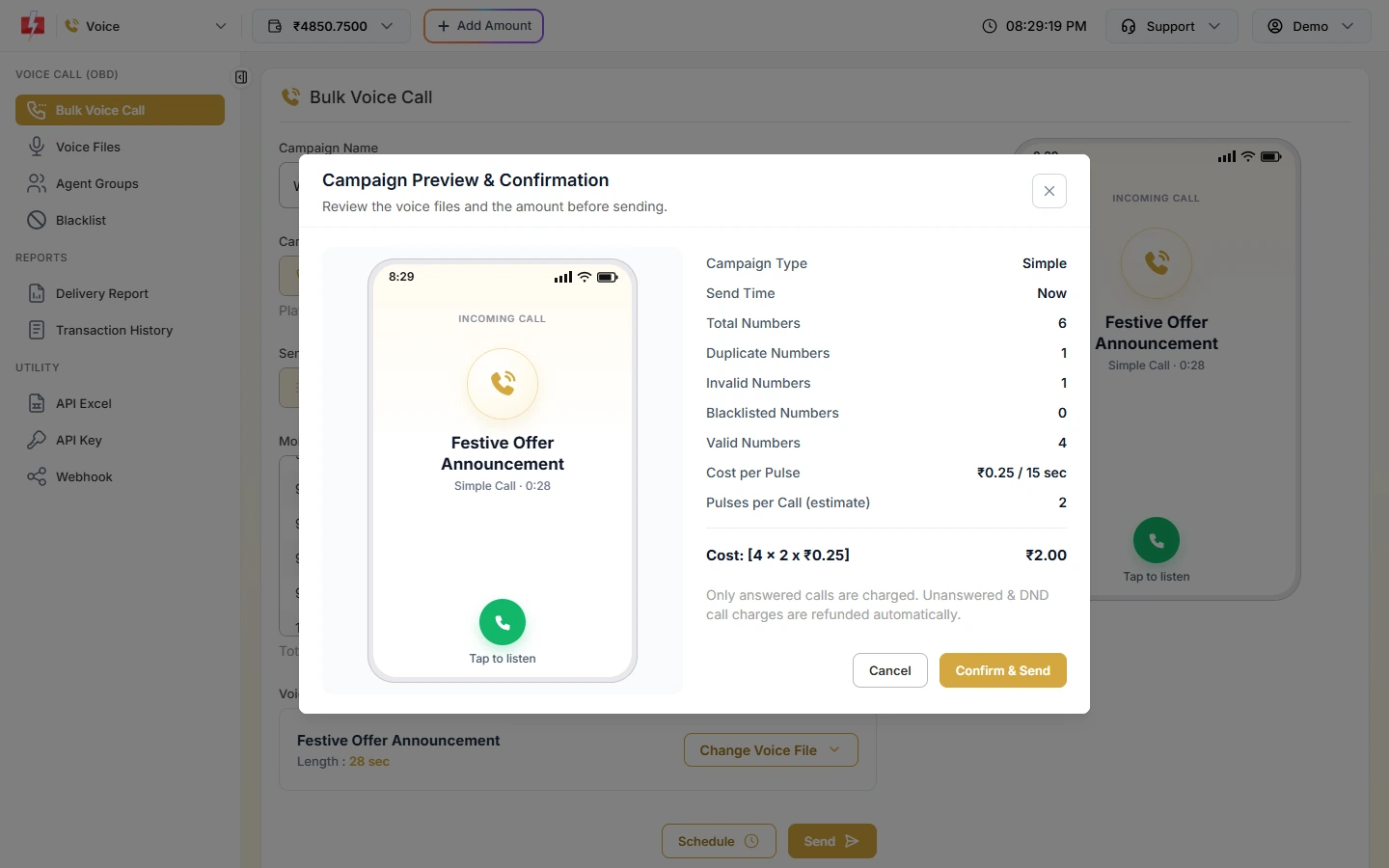
Only answered calls are charged. After the campaign, the Call Patch report shows which agent took each call, the talk time and a recording of the call.
-
Hand WhatsApp leads to your advisors
Add advisors as team members with WhatsApp access. In Live Chat (Inbox), chats can be labelled (for example “Site visit”), assigned and transferred. A welcome message and keyword auto replies from Inbox Settings answer first, and the advisor continues the conversation.
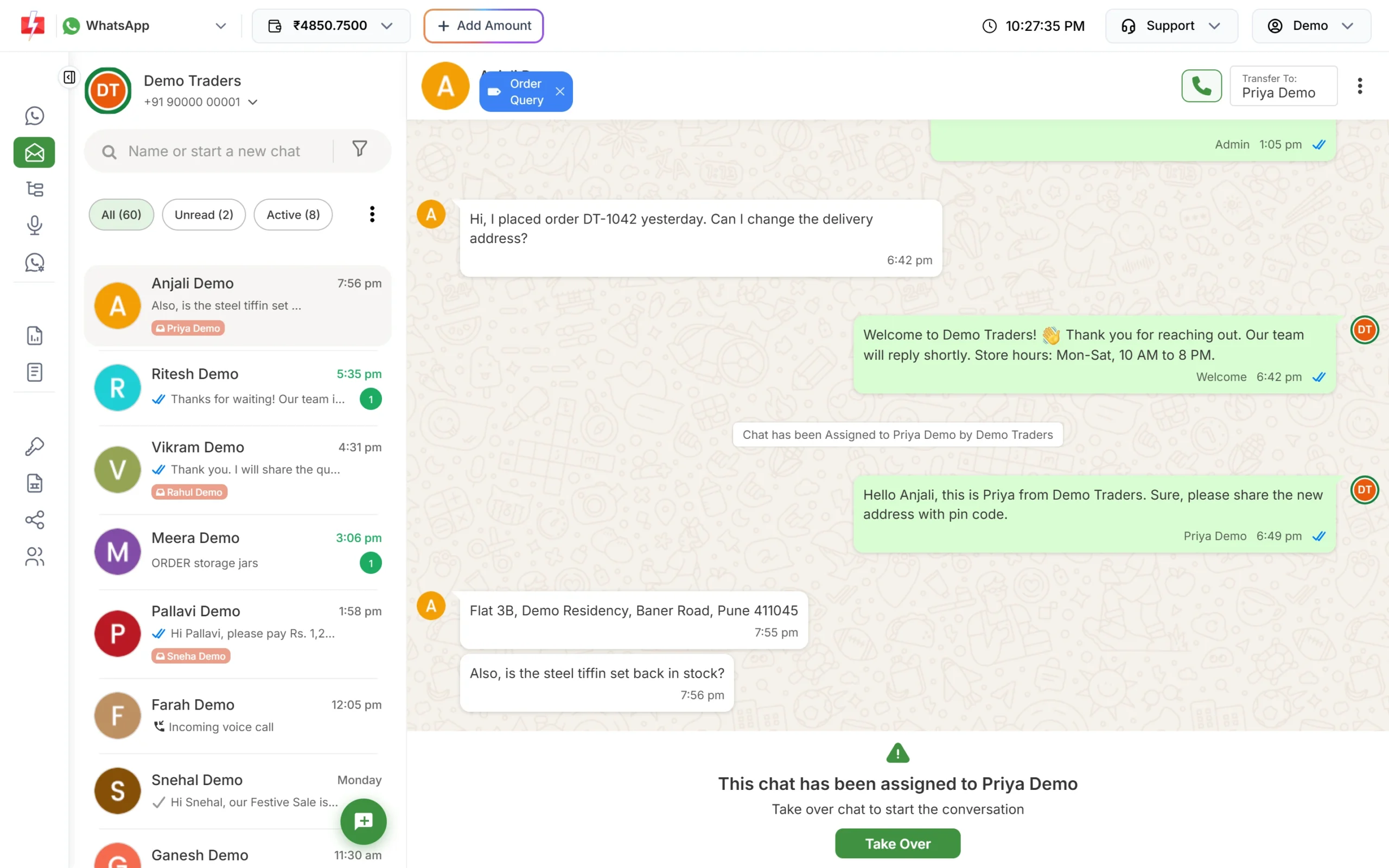
The welcome reply goes first; the assigned advisor follows up.
Automation options
- CRM integrations: the Integrations page lists HubSpot, Pipedrive, Zoho Campaigns, Freshworks, Clevertap and Pabbly Connect, so leads in your CRM can get WhatsApp or SMS automatically.
- Website and landing pages: send the enquiry SMS and WhatsApp through the API the moment a form is submitted.
- Webhooks: push WhatsApp replies and delivery status into your CRM, so advisors see who read the brochure.
- Flow Builder chatbot: a WhatsApp menu for “Projects”, “Prices”, “Book a site visit” and “Talk to an advisor”.
- Scheduling: schedule weekend open-house messages for Friday morning; promotional SMS and RCS times are kept inside the allowed hours.
How to estimate the cost
For campaigns, multiply the number of opted-in leads by the price for the channel. SMS: numbers x SMS parts x your rate (bulk SMS pricing). WhatsApp: numbers x the template category rate, marketing or utility (WhatsApp pricing). RCS: per message by type, with failed and non-RCS numbers refunded (RCS pricing). Voice: per pulse for answered calls; Call Patch counts both the caller’s and the agent’s talk time (voice call pricing).
Frequently asked questions
Can I send property promotions to numbers on DND?
Not by promotional SMS, unless the person gave consent. RCS and WhatsApp follow their own opt-in rules, and voice campaigns call only non-DND numbers.
Which DLT category is a site visit confirmation?
Service Implicit, because the lead asked for the visit. A launch or open-house message is Promotional.
Can buyers get payment reminders by voice call?
No. Payment due reminders on voice are allowed only for banks, NBFCs and their collection partners. Use SMS and WhatsApp utility templates.
Can several advisors share one WhatsApp number?
Yes. Add them as team members (agents) and assign chats in Live Chat.
What happens if a lead’s phone does not support RCS?
The message is marked Non-RCS and refunded. Fast2SMS does not send an SMS in its place, so send a separate SMS if you need to reach those numbers.
Can I see which advisor took each Call Patch call?
Yes. The campaign report shows the agent, talk time, charges and a recording for each connected call.