
SMS fallback in Fast2SMS Campaign means: send on WhatsApp or RCS first, and send an SMS (or a voice call) only to the people that message did not reach. You set it up by joining the Failed and Not delivered outputs of one step to the next channel. This guide shows the most used chains: WhatsApp to SMS, RCS to SMS, RCS to WhatsApp, and SMS to a voice call.
Before you start
- A campaign in the builder with your first channel step set up. See create a campaign journey.
- For the SMS step: an approved DLT sender ID and a DLT template linked to it.
- For WhatsApp: a connected number and an approved template. For RCS: an approved, active RCS bot. For voice: bulk voice calling switched on and approved voice files.
How fallback decides who gets the next channel
Each channel step waits for its result. Failed comes when the operator, WhatsApp or the RCS network reports that the message could not be delivered (for example “Handset does not support RCS”); the next step then goes at the next check, usually within a minute or two. Not delivered comes when no delivery report arrives within the step’s Wait for result time (by default 30 minutes for WhatsApp and RCS, 2 hours for SMS). Contacts with a Delivered or Read result do not get the fallback, so you do not pay twice for them.
How to set up SMS fallback
-
WhatsApp to SMS: join Failed and Not delivered to an SMS step
Under your WhatsApp step, click the + on the Failed dot and add an SMS step. Then drag a line from the Not delivered dot to the same SMS step. Leave Delivered and Read for your next message, or unconnected to end the journey there. For order confirmations and delivery updates, set the WhatsApp step’s Wait for result short (for example 10 minutes) so the SMS goes out soon if WhatsApp does not land, and use a utility WhatsApp template with a service SMS template.
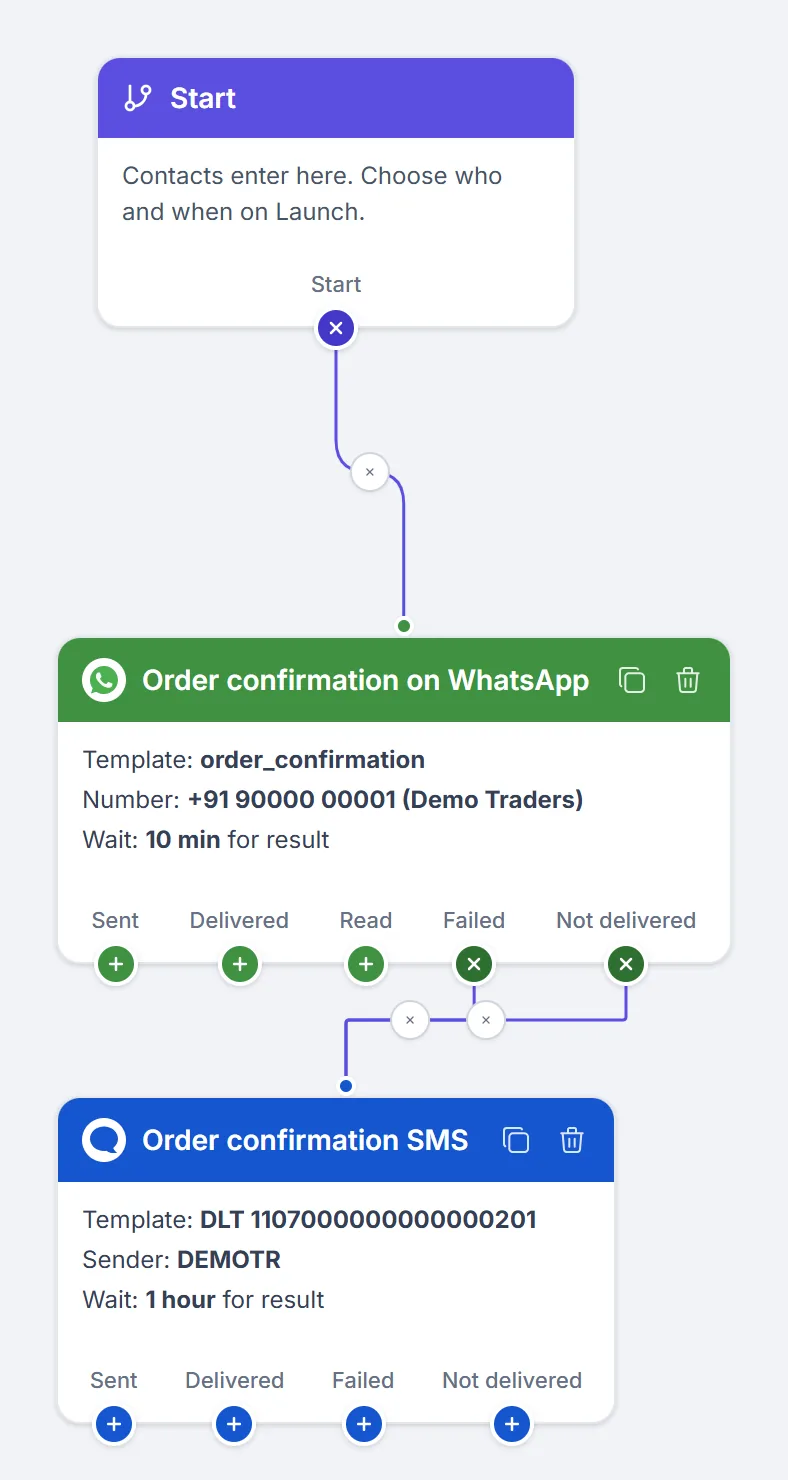
With a 10-minute wait for result, a customer whose WhatsApp shows no delivery gets the SMS about 10 minutes after WhatsApp accepted the message. -
RCS to SMS: catch phones without RCS
Under your RCS step, connect Failed and Not delivered to an SMS step. If the phone does not support RCS, the step ends as Failed with “Handset does not support RCS” and the SMS goes out. There is no separate “non-RCS” output: those numbers come out of Failed.
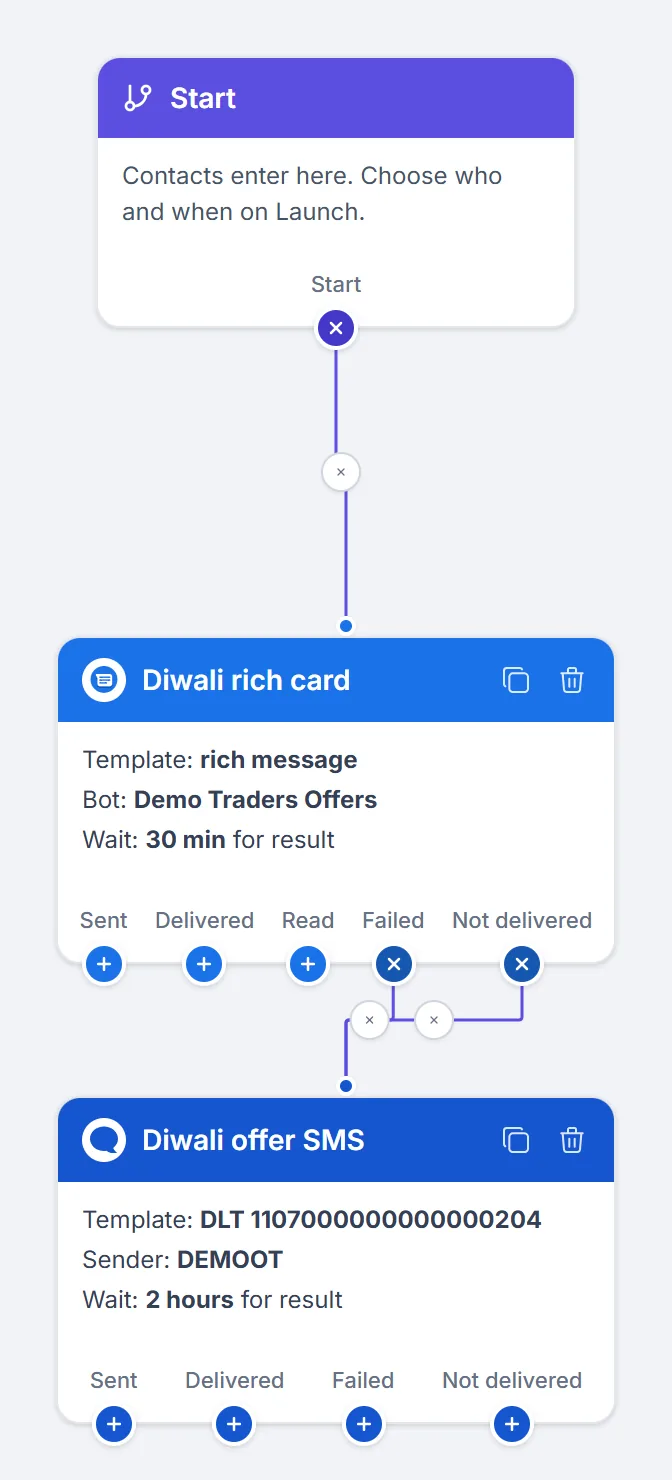
Delivered and Read on the rich card are left free, so customers who saw the card get no SMS. -
Check the wiring in Next Steps
Click the step and open the Next Steps tab. Failed and Not delivered should point to your SMS step. “Next node” means that output is not connected, so those contacts end the journey there.
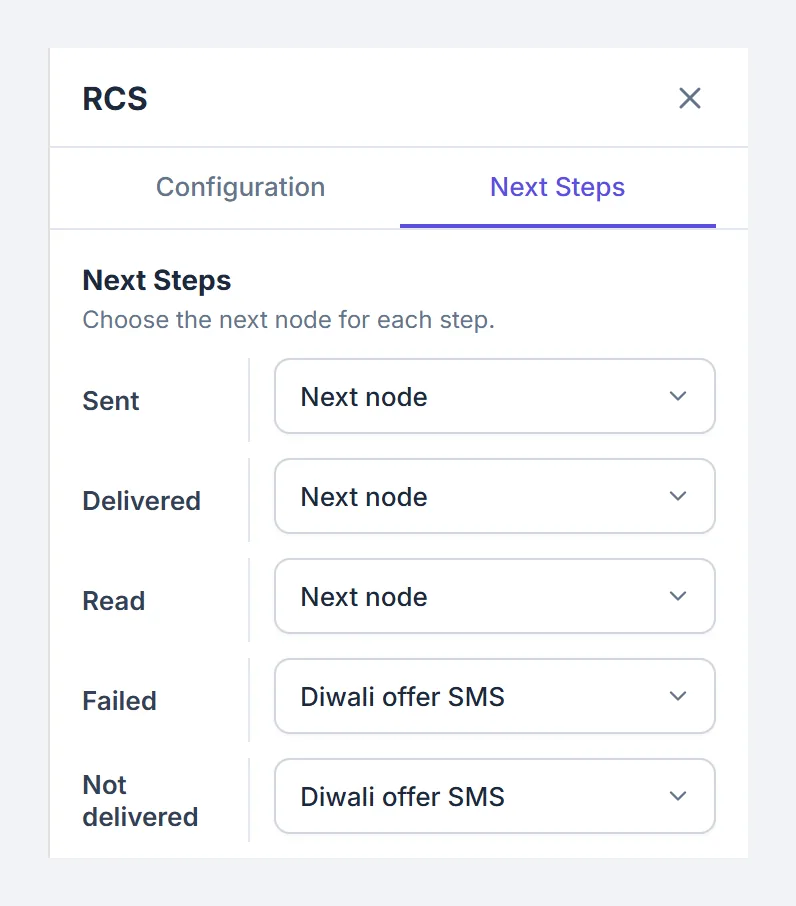
Only the two bottom rows point to the SMS; the three “Next node” rows end the journey after the rich card. -
RCS to WhatsApp, with a gap
For a second rich channel, join the RCS step’s Failed and Not delivered to a Wait (here 30 minutes), then to a WhatsApp step. To add a third channel, join that WhatsApp step’s Failed and Not delivered to an SMS step. Each contact gets the next channel only if the previous one did not reach them.
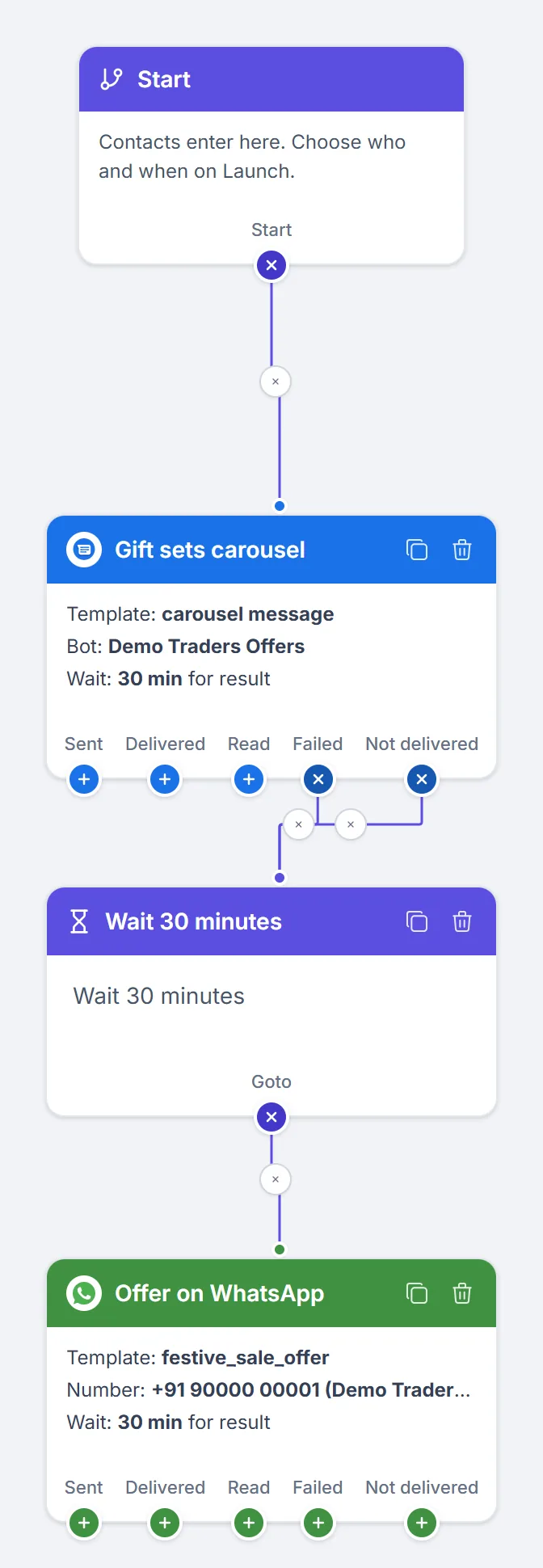
The WhatsApp step has nothing connected yet; join its Failed and Not delivered dots to an SMS step to reach the last group. -
SMS to a voice call
For messages that must reach people without a smartphone, join an SMS step’s Failed and Not delivered to a Voice step (optionally through a Wait of 15 minutes). The ready journey “SMS, then a voice call if not delivered” sets this up for you.
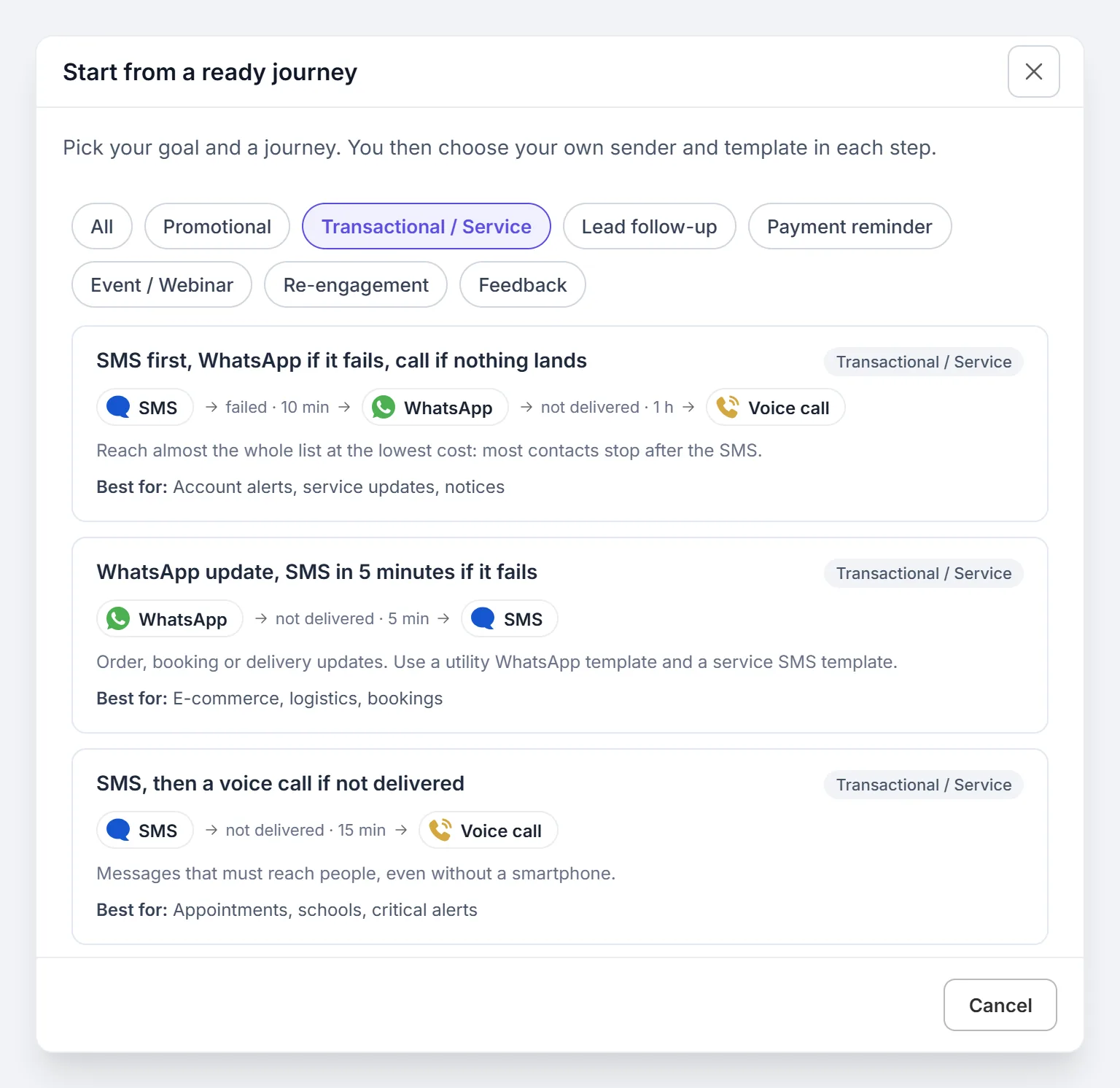
The third card draws the SMS step, a 15-minute wait and the voice call in one click. -
Check the fallback in the report
After a test or a real run, open the report. The Steps card shows how many contacts each step was sent to, the delivered and failed counts, and the top reasons. The fallback step’s “Sent to” number tells you how many people the first channel missed.
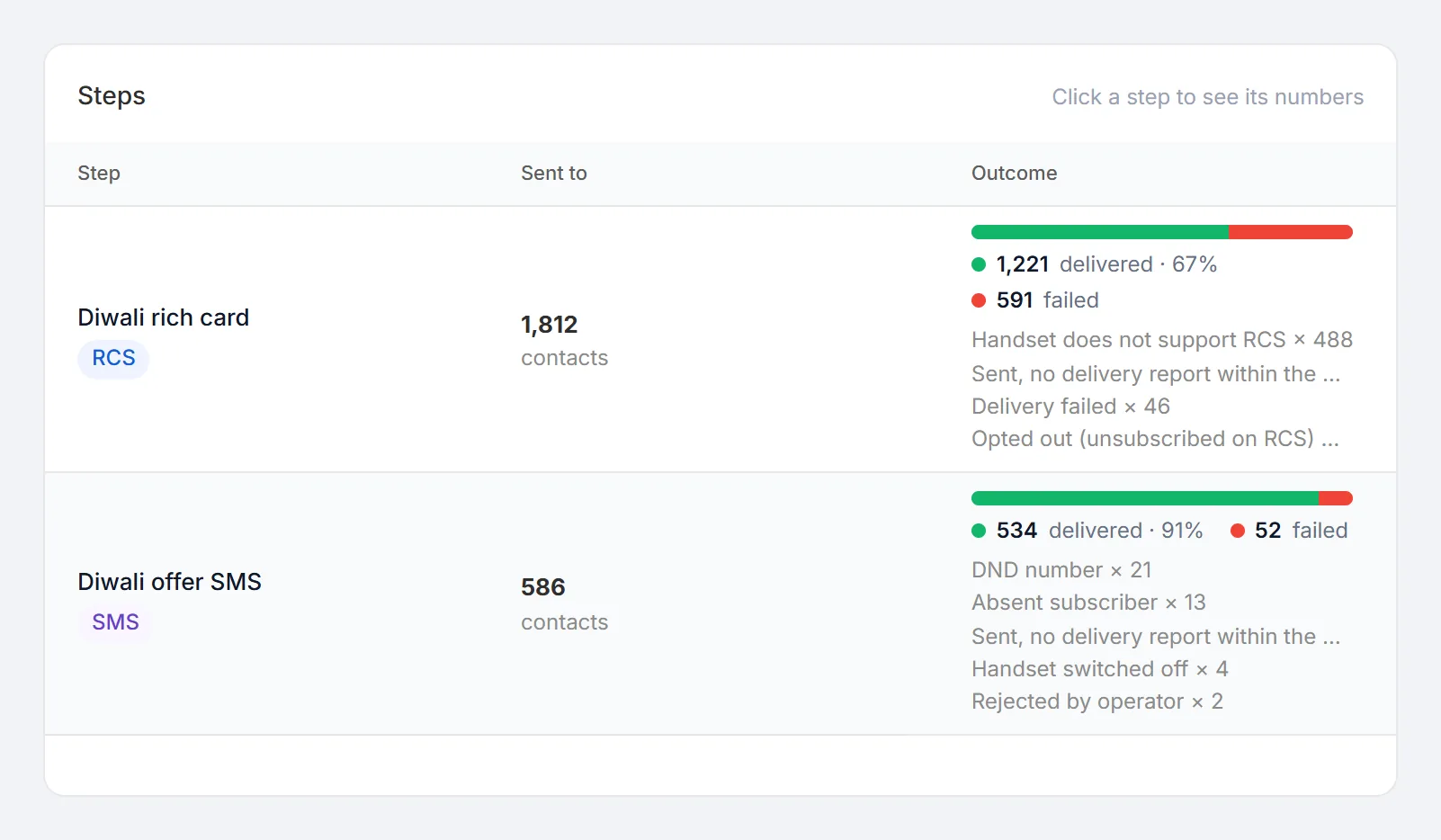
The SMS picked up 534 of the 586 contacts the RCS card missed (5 who unsubscribed on RCS were not sent anything).
Which fallback chain to use
| Use case | Chain | Suggested wait for result |
|---|---|---|
| Order, booking, delivery updates | WhatsApp (utility) then SMS | WhatsApp 5-10 min |
| Festive offer with images | RCS then WhatsApp then SMS | RCS 30 min, WhatsApp 30 min-1 hour |
| Alerts at the lowest cost | SMS then WhatsApp then voice call | SMS 10 min-2 hours |
| Appointments, schools, critical notices | SMS then voice call | SMS 15 min-2 hours |
| Lead follow-up | WhatsApp, no reply, then call | Use a Wait and a “Reply received” Condition |
Charges and rules for fallback
- Each message is charged at its channel’s normal rate. A contact reached on WhatsApp is not sent the SMS, so you do not pay for it. See campaign charges and refunds.
- Failed WhatsApp and RCS messages are refunded in full by the nightly refund job, about 2 days after sending. SMS that fail are refunded only for accounts on “On Delivery” billing. A voice call is charged only for answered pulses.
- Promotional SMS goes out only between 10:01 AM and 8:55 PM. A fallback SMS outside the window waits and sends when it opens.
- If a contact opted out (blocked you on WhatsApp, unsubscribed on RCS, or is in your voice blacklist), the whole journey ends for them. No fallback is sent.
- If a send is interrupted after charging (for example a wallet problem), those contacts are marked failed with “Send interrupted, check the wallet and the channel report” and are not sent down the fallback, because the first message may still have gone out.
- If DLT blocks the entity, template or sender ID, the run stops as Failed without fallback.
Frequently asked questions
Will a customer get both WhatsApp and SMS?
Only if you connect Delivered or Read to the SMS too. With only Failed and Not delivered connected, delivered contacts get WhatsApp alone.
How long before the SMS fallback goes out?
Failed results move on at the next check, usually within a minute or two. Not delivered waits for the step’s Wait for result time. Add a Wait step if you want an extra gap.
What happens to RCS on phones that do not support RCS?
The RCS step returns Failed with “Handset does not support RCS”, and the step joined to Failed (for example your SMS) sends.
Can I fall back from SMS to WhatsApp?
Yes. Any channel can follow any other. Join the SMS step’s Failed and Not delivered to a WhatsApp step.
Do I pay for the fallback message?
Yes, at that channel’s normal rate, but only for contacts who actually get it.
Does “Sent” trigger the fallback?
No. Sent moves on as soon as the message is accepted. Use Failed and Not delivered for fallback.