
This page lists the campaign errors you may see in Fast2SMS, on the Launch page, in the builder, in the run report and from the Campaign API, with the reason and the fix for each one. Most errors are quick to fix: a switch that is off, a missing template, the wrong mobile column or low wallet balance.
Where campaign errors show up
-
On the Launch page
Problems with the time, contacts or variables appear in red under the field when you press Launch. Problems in the journey itself appear in a “Fix these before launching” box. For example, a schedule time that has already passed is refused with “Start time is in the past.”
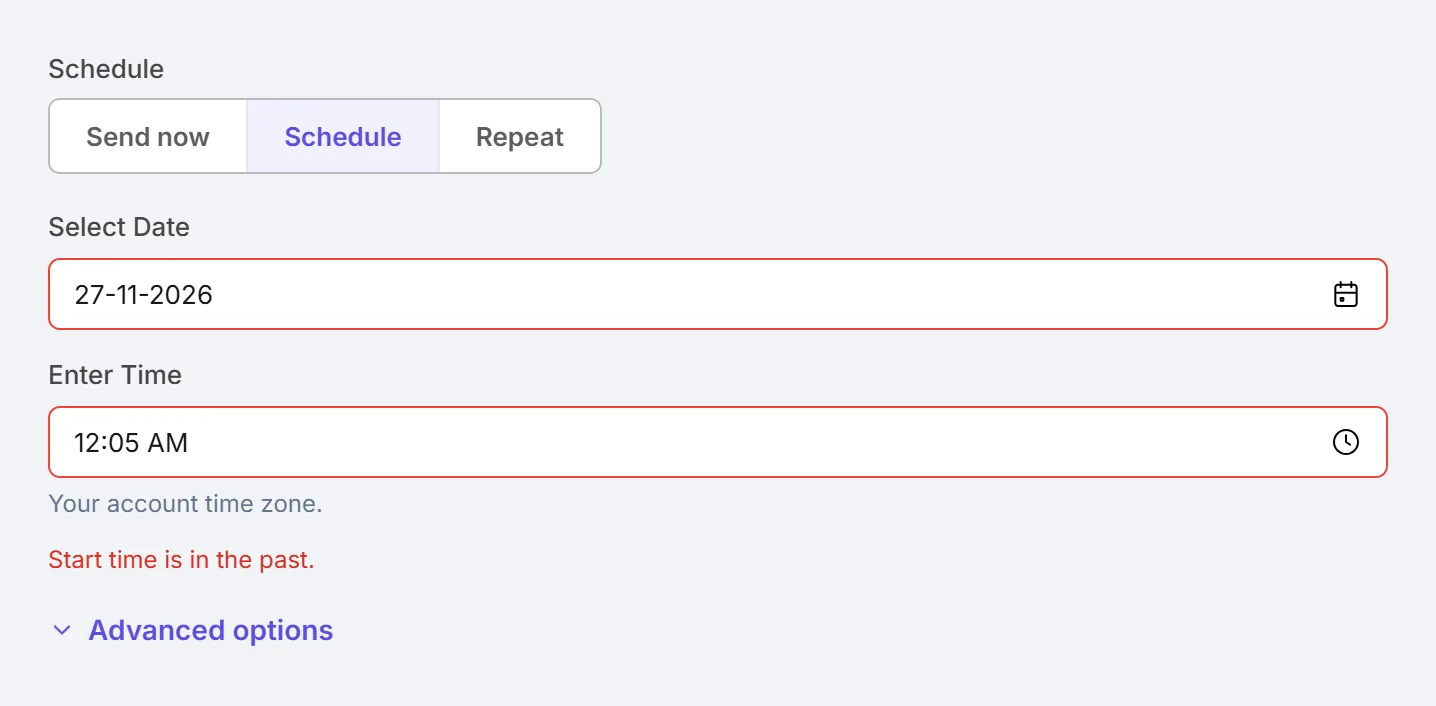
12:05 AM today had already passed, so both fields turn red; pick a later time and press Launch again. -
In the run report
If a run cannot go on, the report shows a red notice under the header, such as “No valid mobile number in the audience.”, and the status becomes Failed (or Stopped).
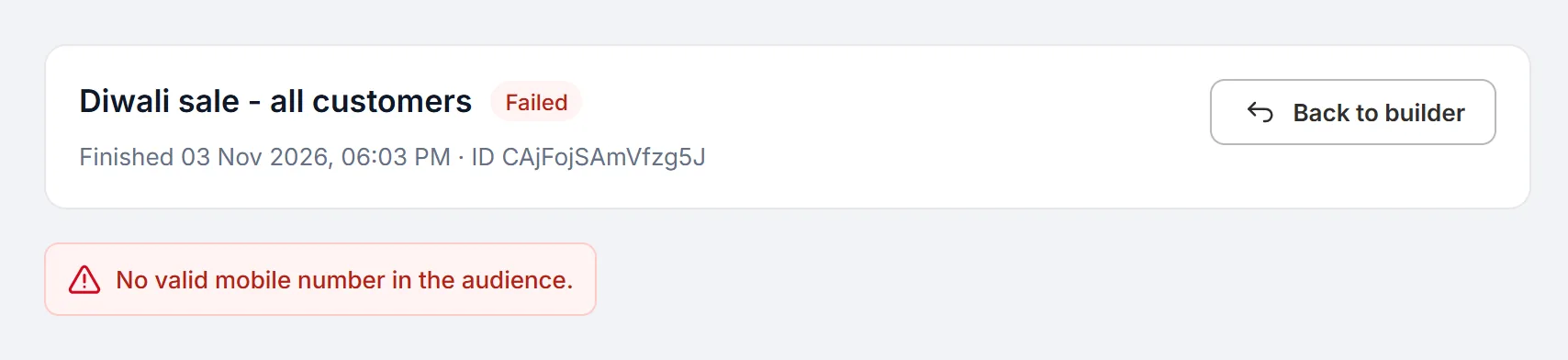
This run failed before it started because the chosen column held no Indian mobile numbers; nothing was sent or charged. -
Fix the mobile column
The most common cause of “No valid mobile number” is the wrong Mobile number column. On the Launch page, check the preview and pick the column that holds the 10-digit numbers, then launch again.
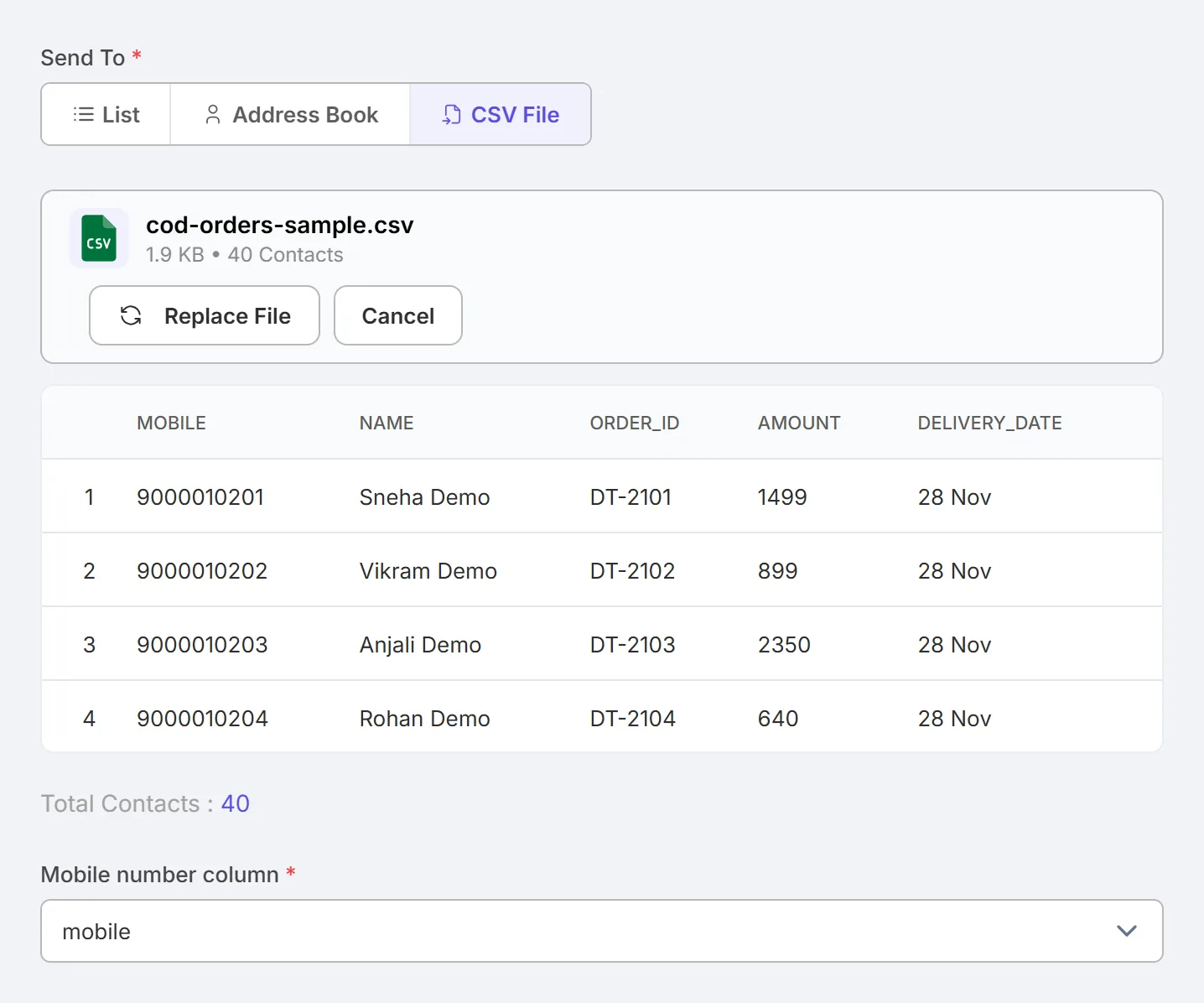
The preview shows which column holds 10-digit numbers starting with 6-9; that one belongs in Mobile number column. -
Per-number reasons in the Numbers table
Reasons for single numbers (for example DND number or Handset does not support RCS) are in the Reason column of the report’s Numbers table. See campaign report explained.
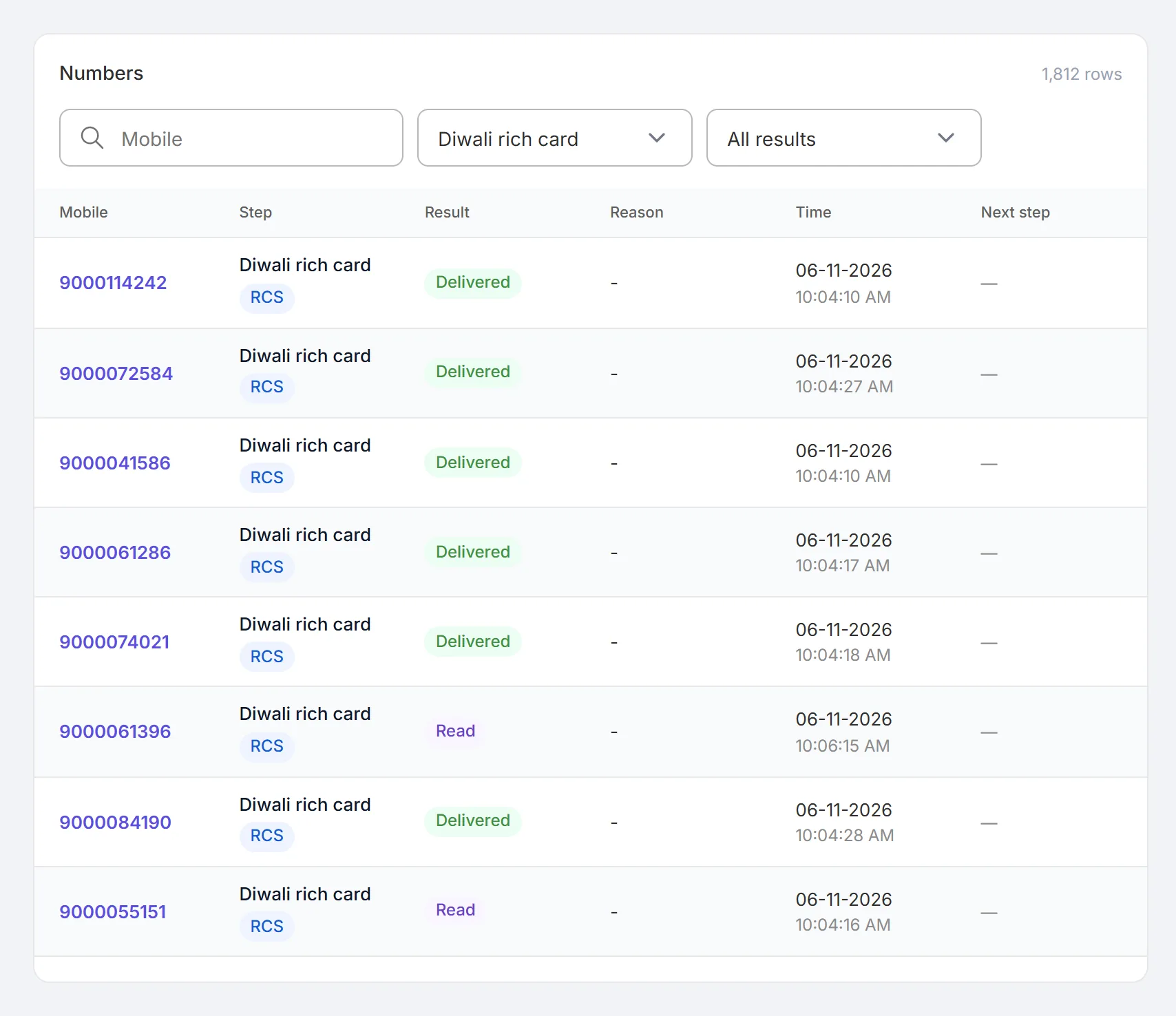
Pick Failed in the result filter to list only the numbers that have a reason.
Launch and schedule errors
| Error | Fix |
|---|---|
| This campaign is switched off. Switch it on in the Campaign List, then launch. | Turn on the Status switch on the Campaign List. |
| This campaign has no sending step yet. Open it in the builder and add SMS, WhatsApp, RCS or Voice. | Add at least one channel step and save. |
| This campaign is already running or scheduled. Stop it before starting it again. | Stop the open run, or duplicate the campaign and launch the copy. |
| Start time is in the past. / Schedule time is in the past. | Pick a future date and time. |
| A campaign can be scheduled up to 90 days ahead. Choose an earlier date. | Schedule within 90 days. |
| Wallet balance ₹X is below the cost of the first step (₹Y for N contacts). Add funds and start again. | Add money or send to fewer contacts. |
| You can keep up to 200 campaigns. Delete campaigns you no longer use, then try again. | Delete old campaigns. |
| Stop the running campaign before deleting it. | Stop the open run, then delete. |
Contact and sheet errors
| Error | Fix |
|---|---|
| No valid 10-digit mobile number found in column “<col>”. Pick the right column. | Choose the correct Mobile number column. |
| The file could not be read. Upload a CSV or Excel sheet with one row per contact. | Save the file again as CSV, XLSX or XLS and upload it. |
| The sheet has more than <N> rows. Split it and upload the parts. | Split sheets over 10 lakh rows. |
| The contact sheet is still being counted. Try again in a moment. | Wait a few seconds for “Counting numbers…” to finish. |
| The uploaded contact list was not found. Upload it again. | Upload the sheet again. |
| No valid mobile number in the audience. | Check the column and that numbers are Indian mobiles starting 6-9. |
| Import stopped making progress. Start the campaign again. | Launch again. Contact support if it repeats. |
| A test run allows up to 10 numbers. / Enter at least one valid 10-digit test number. | Enter 1 to 10 valid numbers in Send test. |
Journey and step errors
| Error | Fix |
|---|---|
| Connect the Start node to the first step. | Draw a line from Start to the first step. |
| <step> is not connected to the flow. | Connect the box or delete it. |
| <step>: output “<x>” points to a missing node. | Reconnect that output in Next Steps. |
| <step>: wait for result must be between 1 minute and 24 hours. | Pick a value from the Wait for result list (5 minutes to 24 hours). |
| Delay must be at least 1. / Delay can be at most 30 days. | Set the Wait between 1 minute and 30 days. |
| Choose an approved DLT sender ID. / Choose an approved DLT template. | Pick an approved header and template in the SMS step. |
| This template is not linked to the selected sender ID. | Link the template to the header on your DLT portal, or pick another template. |
| Variable N of the SMS template has no value. | Map that variable to a column or Fixed text on the Launch page. |
| Direct Send is available only for WhatsApp numbers with a messaging limit of 100K or more. Please use a Template message. | Use Template Message. |
| Messaging will be available 10 minutes after onboarding this number. | Wait 10 minutes after connecting the WhatsApp number. |
| Choose an approved RCS bot. / Enter the RCS message text. / A carousel needs at least 2 cards. | Complete the RCS step. |
| Bulk voice call is not enabled on your account. Please contact support. | Ask support to switch on bulk voice calling. |
| One of the voice files is not approved yet. | Wait for approval. See voice file approval. |
| <Channel> steps are switched off at the moment. Remove this step or try again later. | Remove that step or try later. |
| The campaign is too large (max 200 boxes and 400 connections). | Split the journey into two campaigns. |
Errors during a run
| Message | What it means and what to do |
|---|---|
| Paused: low balance | Add money. The run continues by itself within about 10 minutes. |
| Stopped: wallet balance was too low for 3 days | Add money and launch again. |
| Insufficient wallet balance for this SMS / WhatsApp / RCS step. | Add money; see low balance. |
| Promotional SMS is allowed from <start> to <end>; the step sends then. | Not an error. Promotional SMS waits for 10:01 AM to 8:55 PM. |
| WhatsApp 24-hour messaging limit of this number reached (N). Waiting for the window to free up. | The sends wait. See WhatsApp messaging limits. |
| SMS route is not configured for this account. Contact support. | Contact support. |
| DLT blocked: Entity blocked / Content template blocked / Sender ID blocked | The run stops as Failed without fallback. Check your DLT entity, template and sender ID, and contact support. |
| This message needs a quick check by our team before it can be sent. Please contact support. | Accounts younger than 30 days cannot send some content (for example traffic-fine or challan messages with a link) without a check. Contact support. |
| Variable longer than 30 characters (DLT rule) | That number’s SMS was not sent. Shorten that value in your sheet. |
| Send interrupted, check the wallet and the channel report | Check balance and the channel; these contacts were not sent the fallback. |
Campaign API errors
- Campaign not found. Pass the campaign id or uuid from the Campaign Builder list. Copy the ID from Get API code.
- This campaign is switched off. Turn it on in the Campaign Builder list first. Turn on the Status switch.
- At most 1000 numbers per request. Split the numbers.
- Use POST with your API key. Get ready code from Campaign List > Get API code. start, event, pause, resume and stop are POST only.
- Send the API key in the “authorization” header for this call. Put the key in the header, not in the URL.
- This run is “<status>” and cannot be paused. The run is already finished, stopped or paused.
Full details: campaign API.
Frequently asked questions
Why does my campaign say “already running or scheduled”?
One campaign can have one open run. Stop it in the report or Campaign List, or duplicate the campaign. Today’s API run also counts as open.
Why did my run fail with “No valid mobile number in the audience”?
The wrong mobile column was picked, or the sheet has no Indian 10-digit mobile numbers.
Why did my SMS step not send at night?
Promotional SMS goes out only between 10:01 AM and 8:55 PM. It sends when the window opens.
Why does the campaign say my wallet is too low when I have money?
Your balance must cover the first step for all contacts. Check the Cost box for the amount needed.
My template is approved but the SMS step says it is not linked. Why?
On DLT, the template must be linked to the same sender ID (header) you picked in the step.
Who can help if the error is not listed?
Contact Fast2SMS support with the run ID (starts with C) from the report header.