
Fast2SMS Campaign has 16 ready journeys in 7 goals: Promotional, Transactional / Service, Lead follow-up, Payment reminder, Event / Webinar, Re-engagement and Feedback. Picking one draws all the steps, waits and fallback lines on the canvas for you. You only choose your own sender, template and contacts. This guide lists every ready journey and shows how to start from one.
Before you start
- Main account login (Campaign is on the dashboard).
- The senders and templates the journey needs: DLT sender ID and template for SMS steps, a connected WhatsApp number and approved template, an approved RCS bot, or approved voice files for call steps.
- For journeys that check “paid” or “clicked”: your system must post those events to the campaign event API.
How to start from a ready journey
-
Click Create Campaign and choose Use a ready journey
On the Campaign List, click Create Campaign. In “How do you want to start?”, click Use a ready journey (marked Recommended). The How it works link on the Campaign List banner opens the same list of journeys on a new campaign.
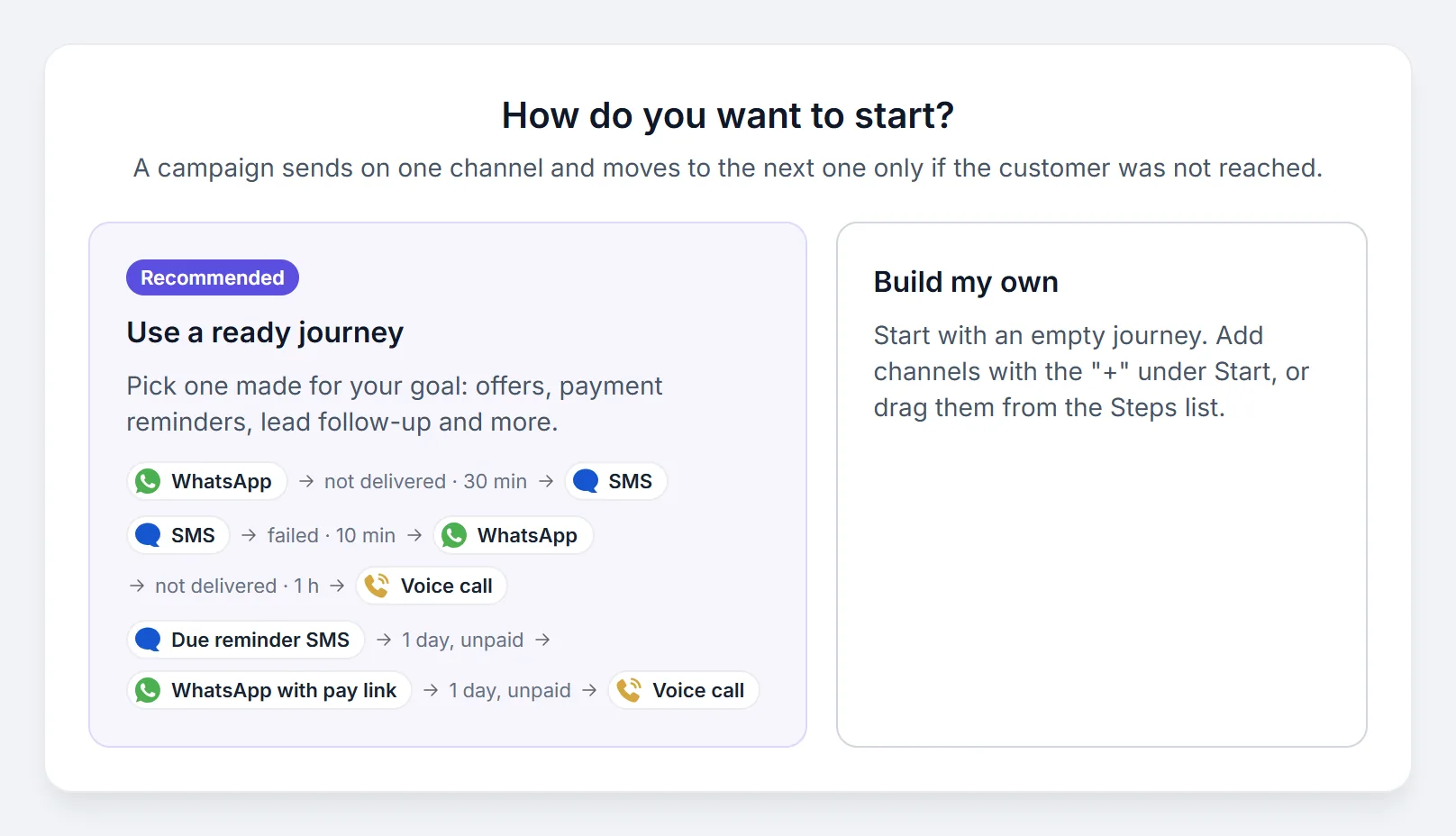
Ready journeys are offered only when you create a new campaign, in this first popup. -
Pick your goal and compare the journeys
The Start from a ready journey dialog opens. Click a goal (All, Promotional, Transactional / Service, Lead follow-up, Payment reminder, Event / Webinar, Re-engagement, Feedback). Each card shows the channel chain, the wait or condition between channels, when to use it and what it is Best for. For example “WhatsApp, not delivered · 5 min, SMS” means WhatsApp first, then an SMS 5 minutes after WhatsApp reports Failed or the step counts as Not delivered (after its own result wait, 30 minutes by default).
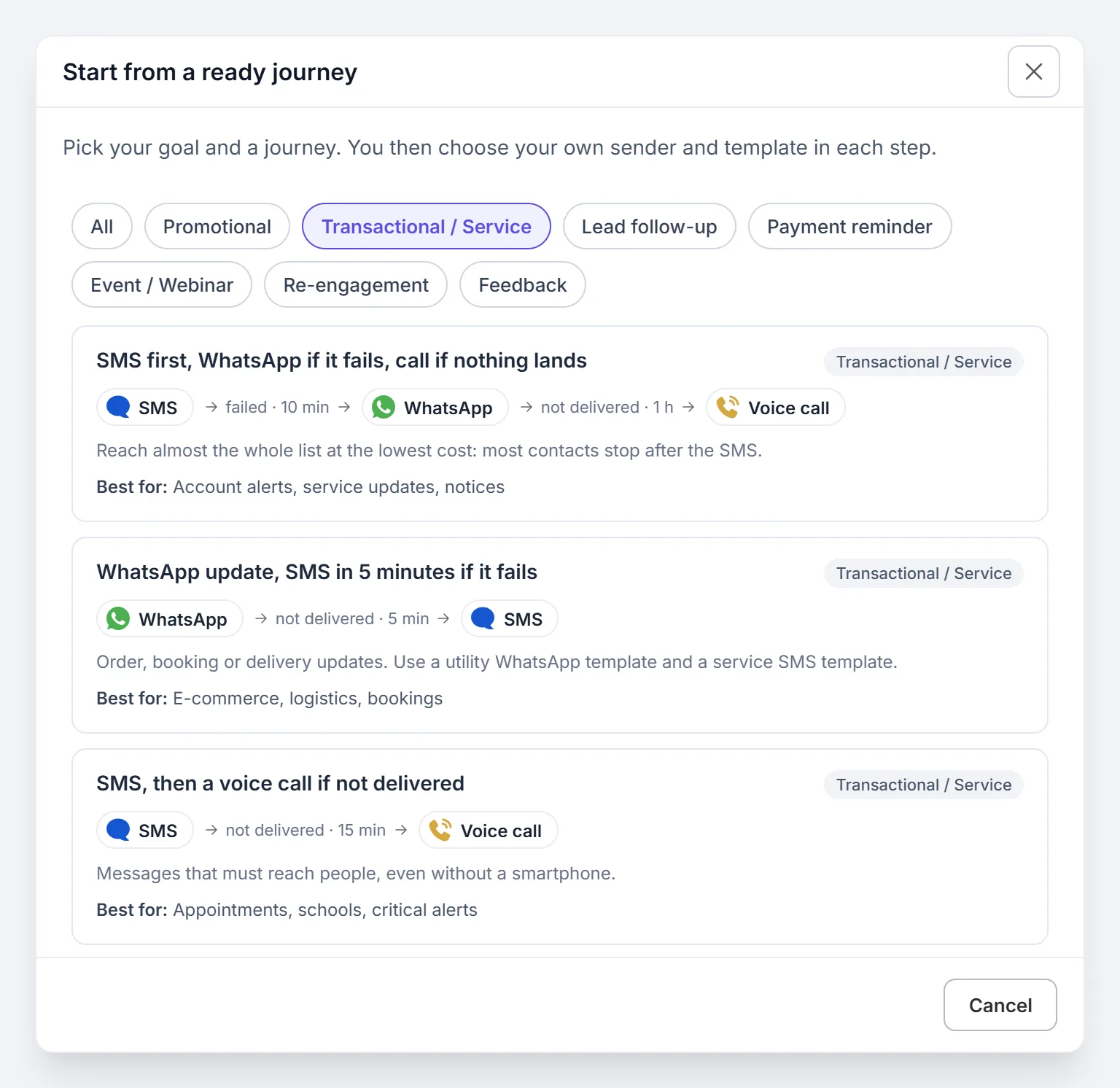
For order, booking and service updates, the three cards differ in which channel goes first and how long each fallback waits. -
Payment journeys stop when the customer pays
The two Payment reminder journeys check “1 day, unpaid” (or “2 days, unpaid”) before the next reminder. They use a Condition on the event
payment_receivedin the last 7 days, so a customer gets no further reminders once your system posts that event for their number.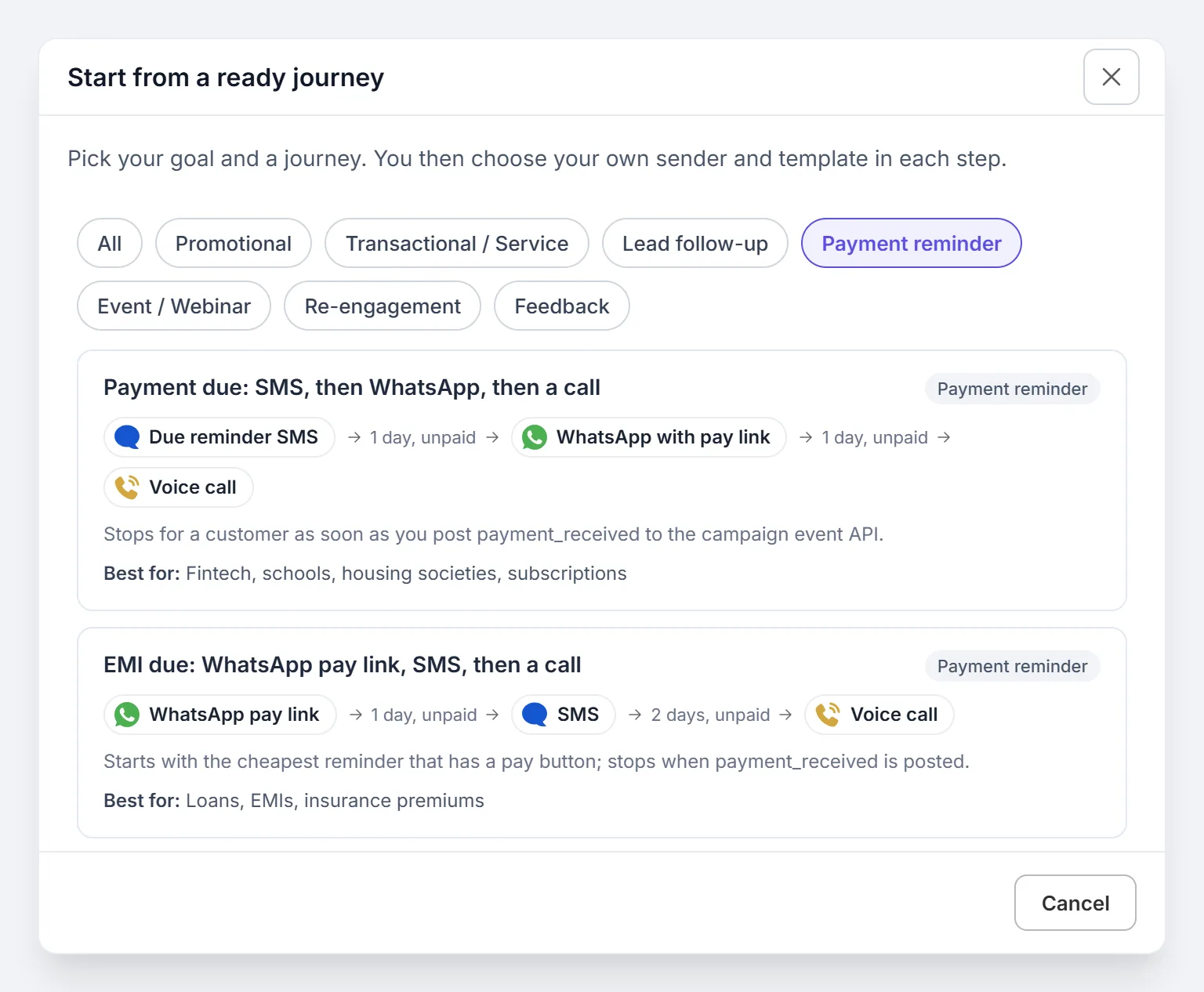
“unpaid” in the chain means the next reminder goes only if payment_received was not posted for that number. -
Click a card and fill in each step
Click the journey you want. The steps and lines are drawn on the canvas and you see “Journey added. Open each step to pick its sender and template, then save.” Each channel box shows “Not selected” until you choose. Click each channel step, pick the sender, template or bot, and click Save in the panel. Change any Wait time or condition if you like.
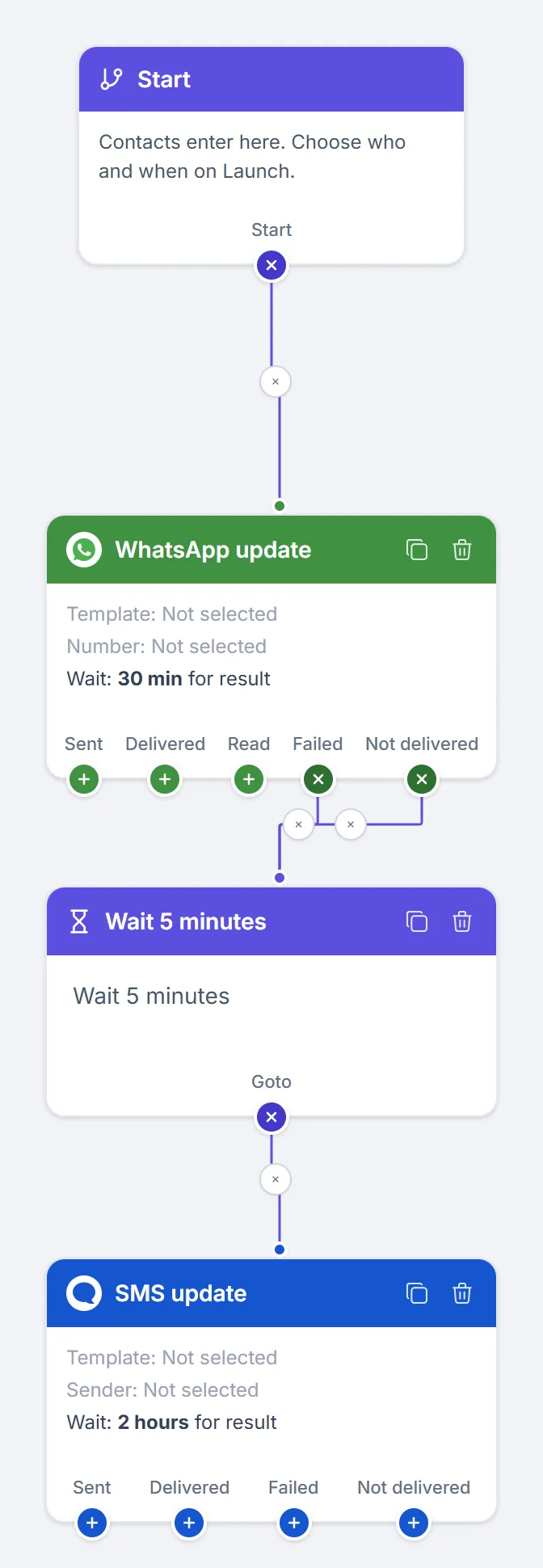
The lines and waits are ready; the grey “Not selected” lines show what you still have to choose in each box. -
Save, test and launch
Click Save campaign, then Launch. On the Launch page, choose contacts and match variables, send a test to your own number, then launch. Nothing is sent when you pick a ready journey. See launch a campaign.
All 16 ready journeys
| Goal | Journey | How it runs | Best for |
|---|---|---|---|
| Promotional | WhatsApp offer, SMS if not delivered | WhatsApp offer; failed or not delivered, wait 30 min, SMS | Retail, D2C brands, festive sales |
| Promotional | Delivered but no click: RCS reminder next day | SMS; delivered, wait 1 day; link not clicked, RCS rich card; RCS failed or not delivered, reminder SMS | Sales, course launches, renewal offers (needs click events by API) |
| Promotional | Rich RCS card first, then WhatsApp, then SMS | RCS; failed or not delivered, wait 30 min, WhatsApp; failed or not delivered, wait 1 hour, SMS | New launches, catalogues, app installs |
| Transactional / Service | SMS first, WhatsApp if it fails, call if nothing lands | SMS; failed or not delivered, wait 10 min, WhatsApp; failed or not delivered, wait 1 hour, voice call | Account alerts, service updates, notices |
| Transactional / Service | WhatsApp update, SMS in 5 minutes if it fails | WhatsApp update; failed or not delivered, wait 5 min, SMS | E-commerce, logistics, bookings |
| Transactional / Service | SMS, then a voice call if not delivered | SMS; failed or not delivered, wait 15 min, voice call | Appointments, schools, critical alerts |
| Lead follow-up | WhatsApp, no reply: call, then an SMS | WhatsApp; delivered or read, wait 1 day; no reply, call; not answered or failed, wait 1 day, SMS | Real estate, education, insurance leads |
| Lead follow-up | Call first, WhatsApp if not answered | Call; not answered or failed, wait 2 hours, WhatsApp; failed or not delivered, wait 1 day, SMS | Demo requests, call-back forms |
| Payment reminder | Payment due: SMS, then WhatsApp, then a call | SMS; wait 1 day; unpaid, WhatsApp with pay link; wait 1 day; unpaid, call | Fintech, schools, housing societies, subscriptions |
| Payment reminder | EMI due: WhatsApp pay link, SMS, then a call | WhatsApp pay link; wait 1 day; unpaid, SMS; wait 2 days; unpaid, call | Loans, EMIs, insurance premiums |
| Event / Webinar | WhatsApp invite, SMS if not delivered, call on the day | WhatsApp invite; failed or not delivered, wait 30 min, SMS invite; contacts whose WhatsApp or SMS invite was delivered get a reminder call 1 day later | Webinars, store events, open days |
| Event / Webinar | RCS invite card, WhatsApp if not supported | RCS invite card; failed or not delivered, wait 30 min, WhatsApp invite | Webinars, product launches |
| Re-engagement | Win back with an RCS card, then WhatsApp | RCS card; failed or not delivered, wait 1 hour, WhatsApp; failed or not delivered, wait 1 hour, SMS | Lapsed customers, cart reminders |
| Re-engagement | WhatsApp offer, RCS card if no click in 3 days | WhatsApp offer; delivered or read, wait 3 days; link not clicked, RCS card | Win-back, loyalty offers (needs click events by API) |
| Feedback | Feedback on WhatsApp, SMS link if no reply | WhatsApp feedback request; delivered or read, wait 1 day; no reply, SMS with link | Clinics, restaurants, service centres |
| Feedback | Feedback call, WhatsApp if not answered | Key-press call (press 1-5); not answered or failed, wait 1 day, WhatsApp | Customers who prefer calls, rural lists |
Tips for choosing a journey
- Cost first: journeys that start with SMS or a utility WhatsApp message keep most contacts on the cheaper channel. See the pricing pages for SMS, WhatsApp, RCS and voice calls.
- Reach first: a voice call at the end reaches people without smartphones.
- Click and paid journeys work only with events from your system. Without them, the condition treats everyone as “not clicked” or “unpaid”.
- You can change any ready journey: add steps, change waits or remove a channel. It becomes your own campaign.
Frequently asked questions
How many ready journeys are there?
16 journeys in 7 goals: Promotional, Transactional / Service, Lead follow-up, Payment reminder, Event / Webinar, Re-engagement and Feedback.
Does picking a ready journey send anything?
No. It only draws the steps. Nothing is sent until you launch.
Do ready journeys come with message templates?
No. You pick your own approved DLT template, WhatsApp template, RCS message or voice file in each step.
Can I edit the waits in a ready journey?
Yes. Click any Wait or Condition box and change it, then save.
Why does the payment journey keep reminding customers who paid?
Your system must post payment_received for their number to the campaign event API. Without it, the condition sees them as unpaid.
Can I add a ready journey to an existing campaign?
No. Ready journeys are offered only when you create a new campaign. Create a new one, or duplicate an existing campaign and edit it.