
Campaign webhooks send each step result and each run change of your Fast2SMS campaigns to your own server. Set one up in Webhook > Campaign, choose the events and the campaign, and enter your URL. This guide lists every campaign webhook event, the payload fields and practical ways to use them in your CRM or app.
Before you start
- A public URL on your server that accepts a POST request and replies quickly with HTTP 200.
- At least one campaign. See what is Fast2SMS Campaign.
- For webhooks on other channels, see webhook setup for delivery reports.
How to add a campaign webhook
-
Open Webhook > Campaign
In the Campaign app, click Webhook in the left menu. The Campaign Webhook page lists your campaign webhooks. Click Add Webhook.
-
Fill in the Create Webhook (Campaign) form
Enter a Webhook Name. Select Service is Campaign and Select Format is Standard Webhook. In Select Event, keep Default All Events or pick one event (On Sent, On Delivered, On Read, On Failed, On Not Delivered, On Answered, On Not Answered, On Started, On Paused, On Finished, On Stopped). In Campaign, keep Default All or pick one campaign. Set Method POST, your URL and Content-Type JSON. The Body tab shows the payload; the Headers tab lets you add your own header, such as a secret token. Keep Webhook Status (Active) on and click CREATE.
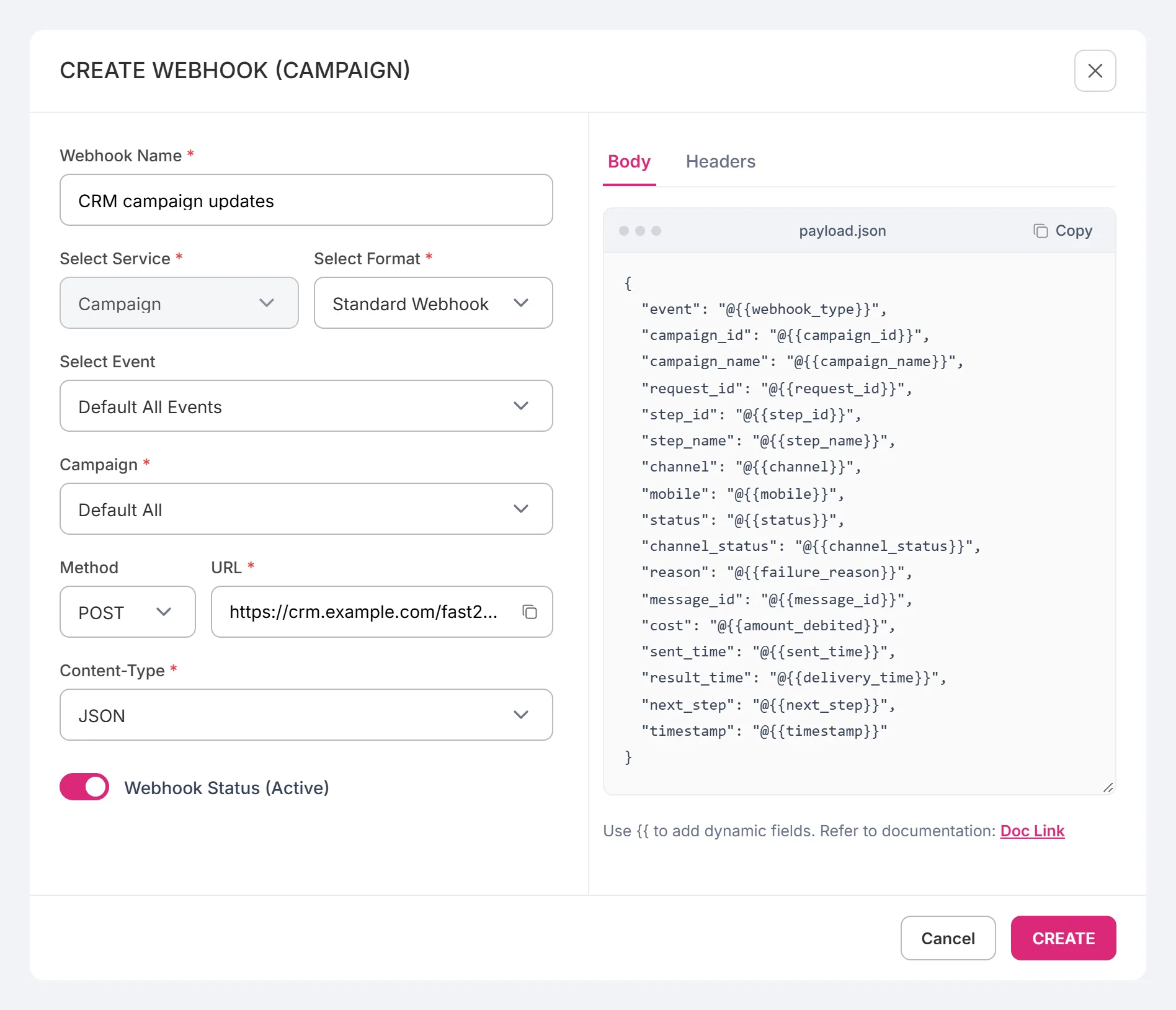
The Body tab shows every field you will receive; the {{…}} parts are filled in for each event. -
Test it with a test run
Open Launch Campaign, pick the campaign and use Send test with your own number. A test run sends real messages (normal charges apply), so your URL receives campaign.started and then a step event for each result. If nothing arrives, check Webhook Logs (channel CAMPAIGN).
Campaign webhook events
| Event | When it is sent |
|---|---|
| campaign.step.sent | A step’s message was accepted by the channel |
| campaign.step.delivered | A step’s message was delivered |
| campaign.step.read | A WhatsApp or RCS message was read before its result was taken |
| campaign.step.failed | A step’s message failed (reason included) |
| campaign.step.not_delivered | No delivery report within the step’s wait for result |
| campaign.step.answered / not_answered | A voice call was answered or not |
| campaign.scheduled | A run was scheduled |
| campaign.started | A run started |
| campaign.paused / campaign.resumed | A run was paused or resumed |
| campaign.paused_balance | A run paused because the wallet balance was too low |
| campaign.stopped | A run was stopped |
| campaign.finished | A run finished |
| campaign.failed | A run failed (for example no valid numbers, or a DLT block) |
Each contact-step sends at most two events: sent (when the channel accepts the message) and then one final result (delivered, read, failed, not delivered, answered or not answered). A read receipt that comes after the step’s result was taken does not send a second event. campaign.scheduled, campaign.paused_balance, campaign.resumed and campaign.failed are not in the Select Event list; they come with Default All Events.
Payload fields
| Field | Meaning |
|---|---|
| event | Event name, for example campaign.step.delivered |
| campaign_id | The campaign’s number in your account (not the Campaign ID from Get API code) |
| campaign_name | The run name, for example “Welcome series – new signups · API” |
| request_id | Run ID (starts with C), the same as in the report, transactions and the API start response |
| step_id, step_name, channel | Which step and channel (sms, whatsapp, rcs, voice) |
| mobile | The contact’s number |
| status, channel_status, reason | Result, the channel’s own status and the failure reason |
| message_id | The channel message ID |
| cost | Amount charged for this message at the time of the event, minus any refund already made (for run events, the run’s net cost) |
| sent_time, result_time | When it was sent and when the result came |
| next_step | The name of the step the contact moves to next (empty if the journey ends there) |
| timestamp | When the webhook was created |
Example step event from a run where the RCS card failed and the SMS fallback came next (shortened):
{"event":"campaign.step.failed","campaign_id":"60004","campaign_name":"Diwali sale - all customers",
 "request_id":"C7xpyLTxCEND36Z","step_id":"dndnode_1","step_name":"Diwali rich card","channel":"rcs",
 "mobile":"9000118712","status":"failed","channel_status":"non_rcs","reason":"Handset does not support RCS",
 "cost":"0.3500","sent_time":"2026-11-06 10:03:17","result_time":"2026-11-06 10:04:36",
 "next_step":"Diwali offer SMS"}
For run events (like campaign.finished) the channel is “campaign”, the status is the event name and the step and mobile fields are empty.
How to use campaign webhooks
- Update your CRM: on campaign.step.delivered or read, mark the lead as contacted; on answered, log the call.
- Build a retry or calling list: collect numbers with failed or not_delivered where next_step is empty (the journey ended without reaching them).
- Match API starts: save the request_id from /dev/campaign/start and match it with webhook events.
- Alert your team: on campaign.paused_balance, send yourself a message to add money. See low balance.
- Close the day: on campaign.finished, pull the final numbers or export.
/dev/webhook/v2/campaign.Common problems and fixes
- No events arrive. Check that the webhook is Active, the Campaign is Default All or the right campaign, and the URL is public. Look in Webhook Logs.
- Only some events arrive. You picked one event in Select Event. Choose Default All Events.
- Too many events. Pick one event (for example On Failed), or ignore events you do not need on your side. Note that On Failed also receives campaign.failed for a whole run.
Frequently asked questions
Can I get a webhook for only one campaign?
Yes. Choose that campaign in the Campaign field instead of Default All.
Will I get one webhook per contact?
You get up to two per step per contact (sent, then the result), plus one for each run change.
Does the cost field include refunds?
Only refunds already made when the event is sent. Failed WhatsApp and RCS messages are refunded later by the nightly refund job, so a failed event usually still shows the full charge.
Are test runs sent to the webhook?
Yes. A test run sends real messages, so its events are sent too.
Can I change the payload?
Yes. Edit the JSON in the Body tab and keep the fields you need.
Where do I see failed webhook calls?
In Webhook > Webhook Logs, under channel CAMPAIGN.