
Wait, Condition and Frequency are the three control steps of a Fast2SMS campaign. Wait pauses a contact before the next step, Condition sends the contact down a Yes or No path (for example “did not reply” or “still unpaid”), and Frequency holds contacts until your chosen days and hours. This guide explains each setting with examples taken from real journeys.
Before you start
- A campaign open in the builder with at least one channel step. See create a campaign journey.
- For “Your event” or “Link clicked” conditions: a developer who can post events from your system to the campaign event API. See campaign API.
How to use Wait, Condition and Frequency
-
Add a Wait step
Click the + on an output dot (for example Delivered of your WhatsApp step) and choose Wait. In the Delay panel, click a preset (10 min, 30 min, 1 hour, 1 day, 3 days) or type a number in Delay for and pick Minutes, Hours or Days in in. The minimum is 1 and the maximum is 30 days; a new Wait starts at 1 hour. Connect its Goto dot to the next step.
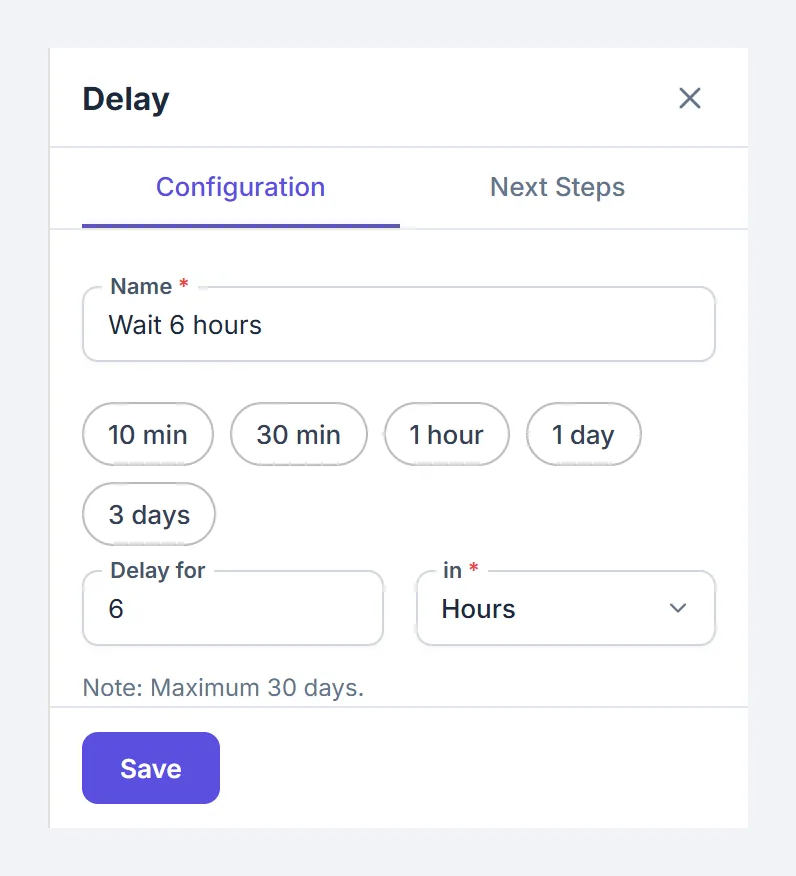
Here the contact waits 6 hours after the welcome message before the next step; a preset fills both fields in one click. -
Put a Condition after the Wait
A Condition is most useful after a Wait: give the customer time to act, then check. In this payment reminder, the SMS goes out, the contact waits 2 days, and the Still unpaid? condition sends a reminder call only on the Yes path. Yes is used when the condition is true, No when it is false. An unconnected No ends the journey for those contacts, so customers who paid get no call.
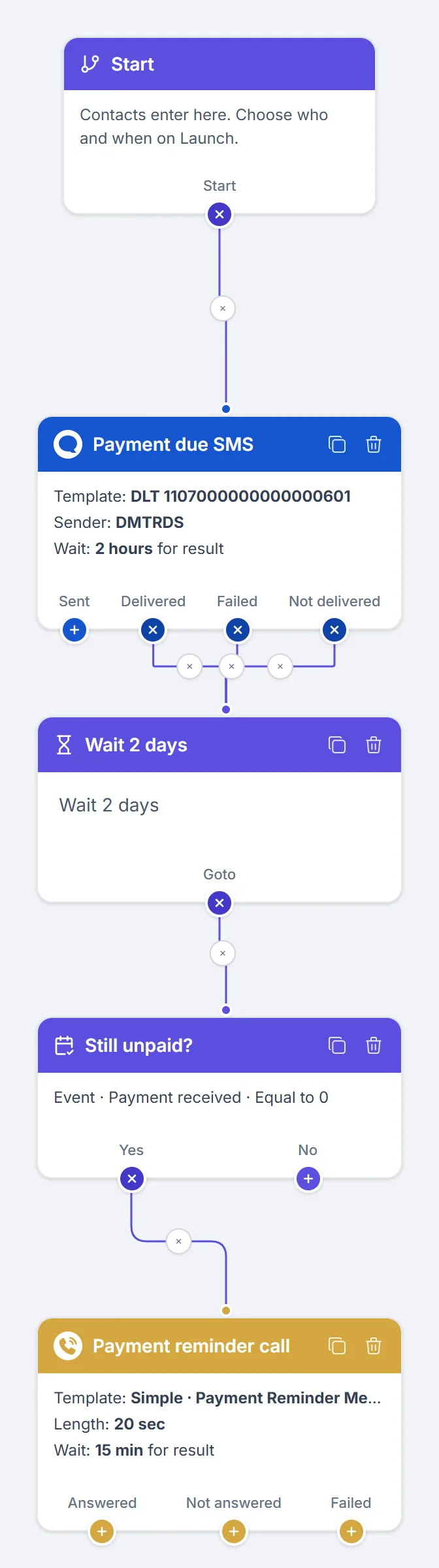
All SMS results lead to the same 2-day wait, so even customers whose SMS failed still get the call if they have not paid. -
Check for a reply
Open the Condition and set What to check to Reply received (WhatsApp / RCS), Result Replied, Operator Equal to, Count 0, Time Window In The Last, Value 1, Unit Days. Yes now means “no reply in the last day”. Any incoming WhatsApp or RCS message from that number counts as a reply, including a tapped quick-reply button; the condition cannot tell which button was tapped. SMS replies are not counted.
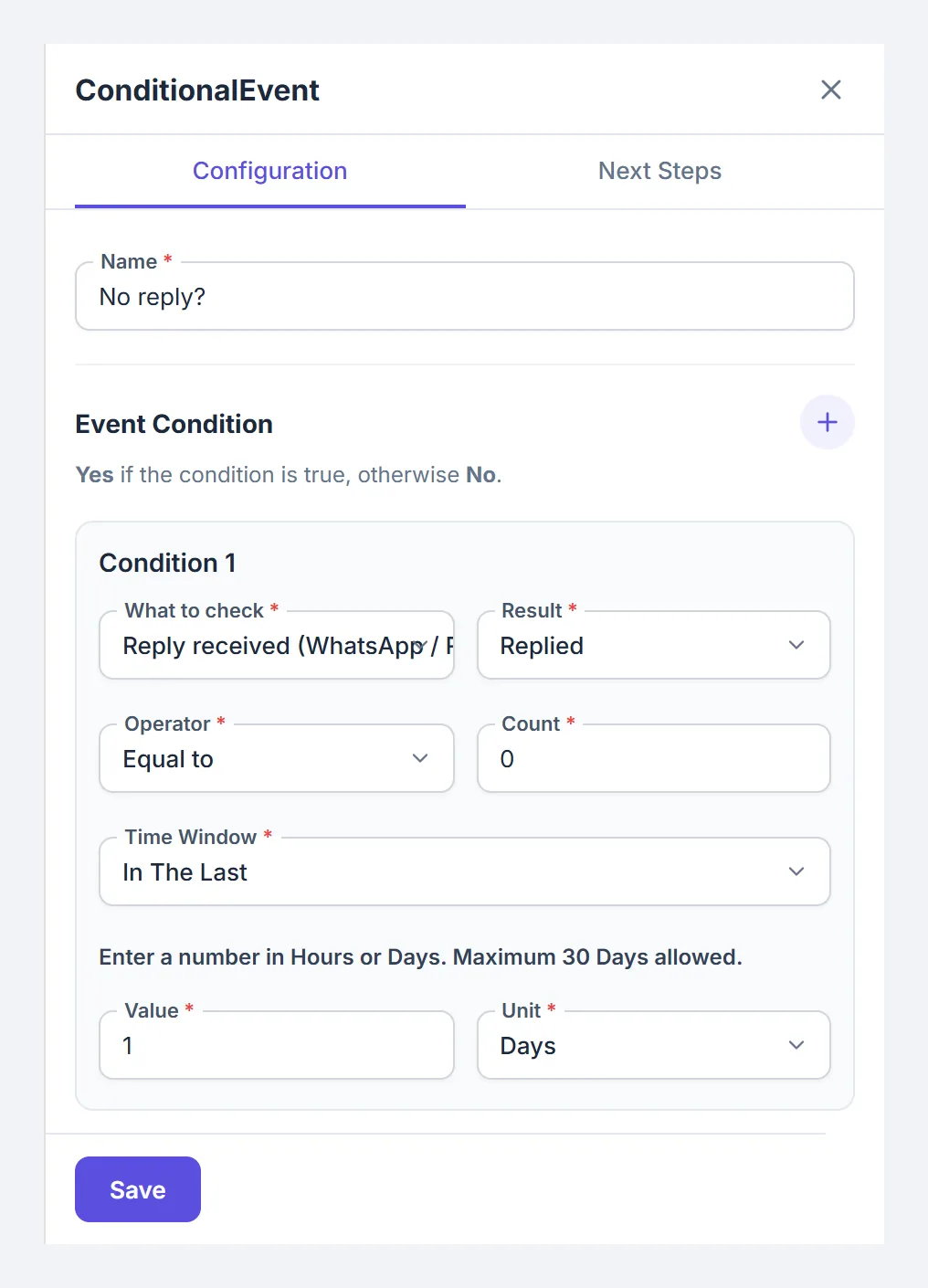
Count 0 with Equal to makes Yes mean “did not reply”; customers who replied in the last day take the No path. -
Check your own event (for example, payment received)
Choose Your event (sent to the API) and type the Event name, such as
payment_received. Your system posts that event for the number todev/campaign/eventwhen the customer pays. With Equal to 0 in the last 2 days, Yes means “still unpaid”, so the call goes only to people who have not paid.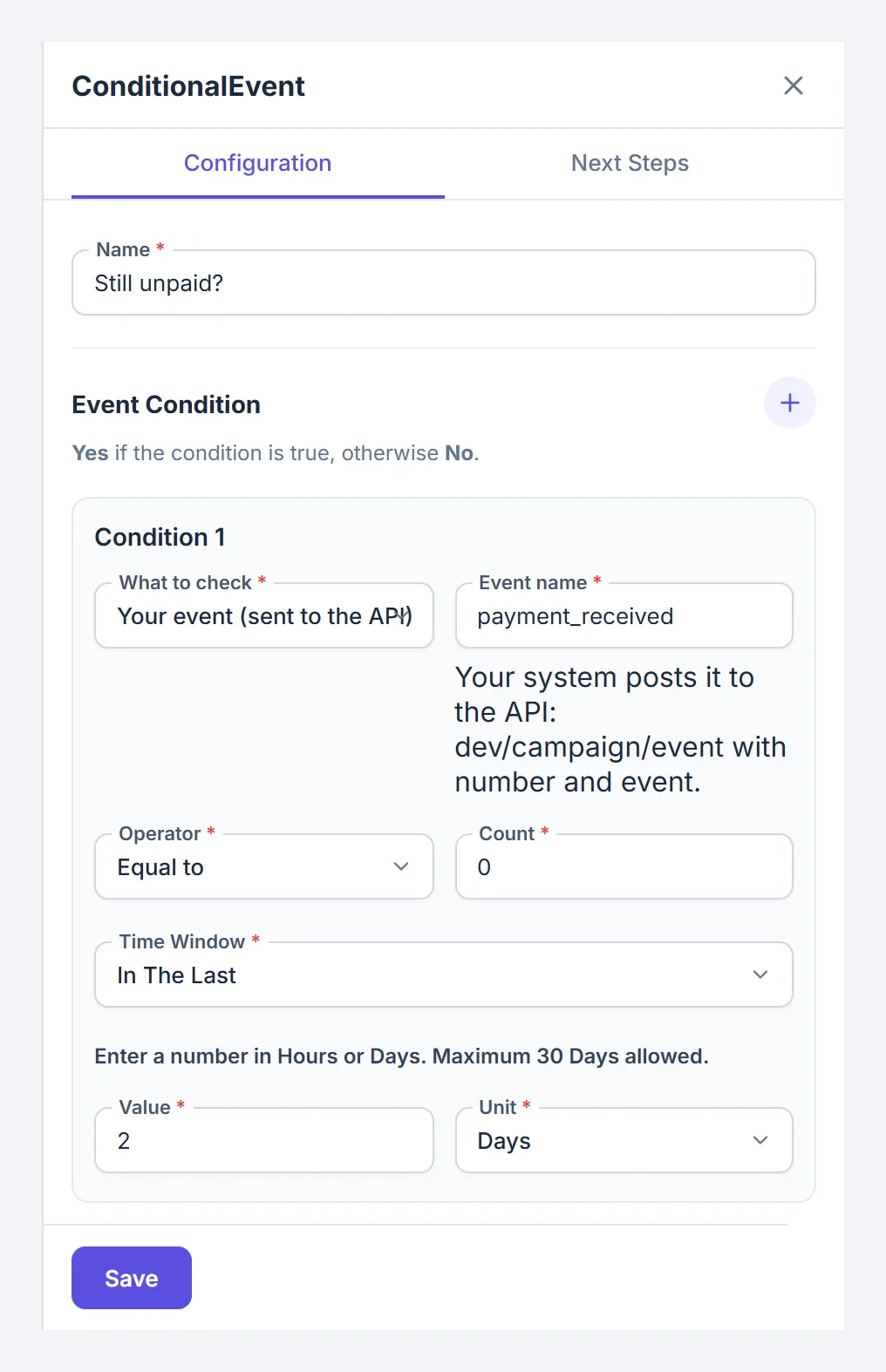
The event name must match exactly what your system posts, here payment_received. -
Check a link click
Choose Link clicked, Result Clicked, Equal to 0. This works only if your website or link service posts a click event for the number to the campaign event API. Fast2SMS does not record clicks by itself, so without those events every contact looks like “not clicked”.
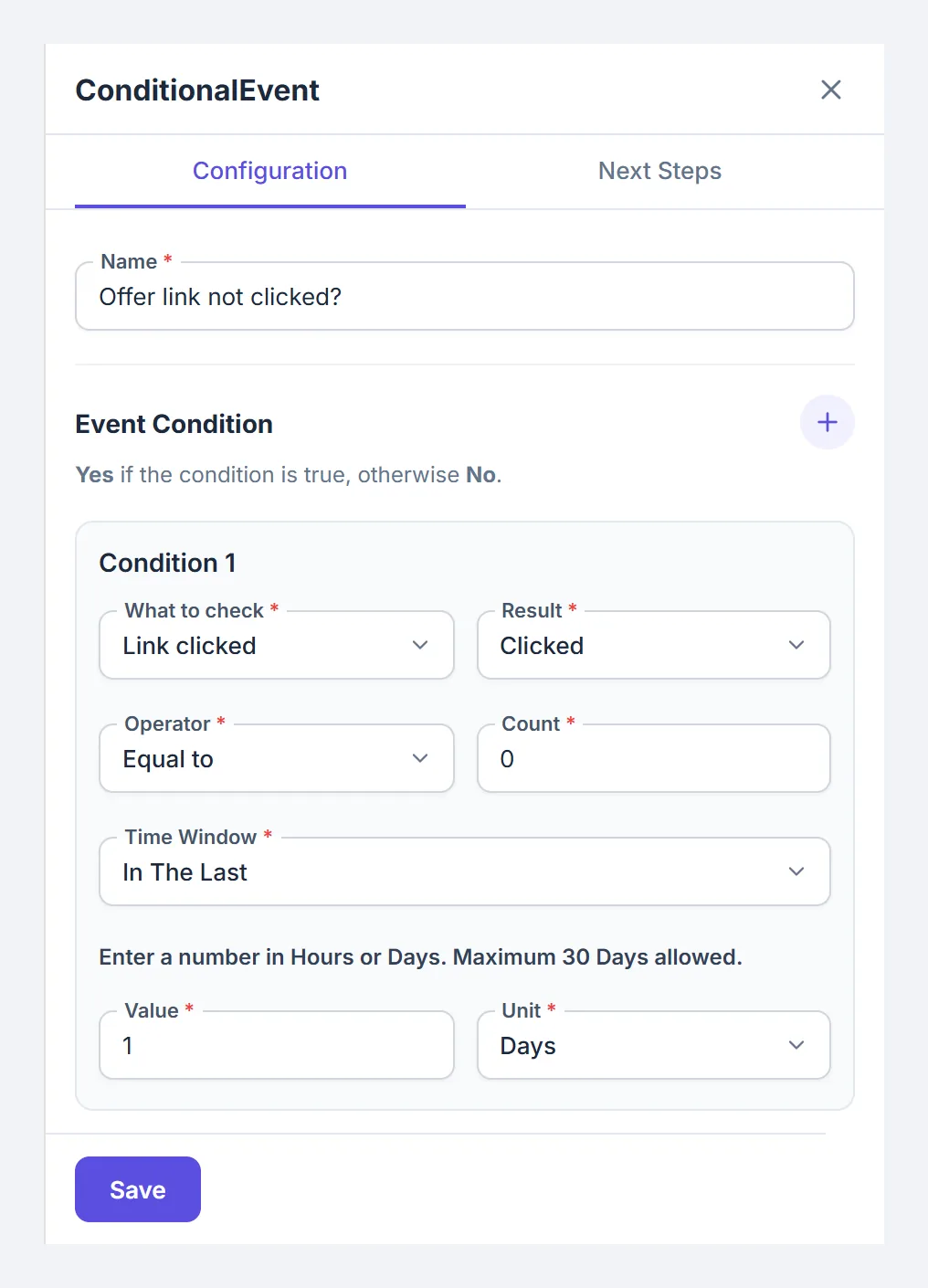
Yes means no click event arrived for this number in the last day, so the reminder goes to everyone your system did not report as clicked. -
Hold contacts for chosen days and hours with Frequency
Add Frequency where messages may go out only on certain days and at certain times. Pick the days (S M T W T F S, or the presets Every day, Weekdays, Weekends) and a From and To time. Contacts who arrive outside the window wait at this box and move to Goto when the next allowed day and time comes. Times are in India time (IST).
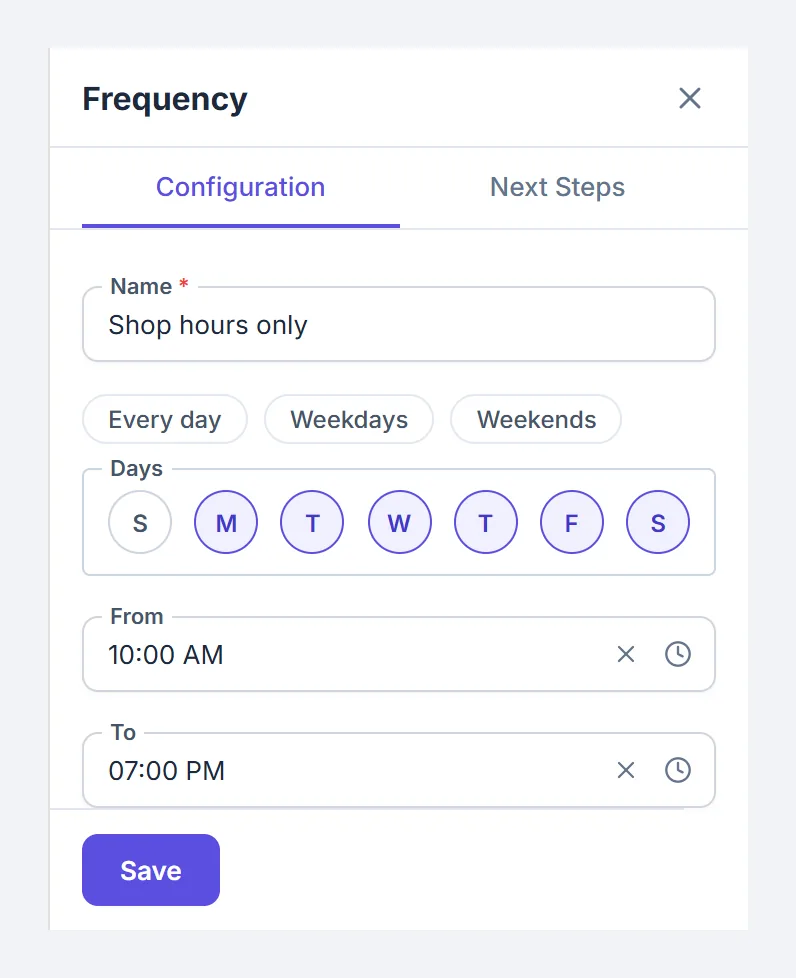
Monday to Saturday are selected and Sunday is not, so a contact who reaches this box on a Sunday waits until Monday. For a night window, set To earlier than From, for example From 09:00 PM and To 07:00 AM: contacts then move on between 9 PM and midnight or between midnight and 7 AM. The selected days are checked for the day it is at that moment, so 2 AM on a Tuesday needs Tuesday selected. Each channel’s own sending hours below still apply.
Condition settings in detail
| Setting | Options |
|---|---|
| What to check | SMS step, WhatsApp step, RCS step or Voice step (a result of an earlier step), Reply received (WhatsApp / RCS), Link clicked, Your event (sent to the API) |
| Result (for step checks) | SMS: Pending, Sent, Delivered, Failed. WhatsApp: Sent, Delivered, Read, Failed, Not delivered. RCS: Pending, Sent, Delivered, Non-RCS, Failed. Voice: Answered, Not answered, Failed. |
| Operator and Count | Equal to, Not equal to, Greater than, At least, Less than, At most, with a number |
| Time Window | In The Last N hours or days, Between (N to M hours or days ago), Before a date, After a date, Between Dates. Up to 30 days. |
| More than one condition | Click + next to Event Condition to add another, then choose AND (all true) or OR (any true) |
Sending hours per channel
Frequency is your own rule. Some channels also have fixed hours that apply anyway:
| Channel | Hours applied by Fast2SMS |
|---|---|
| Promotional SMS | 10:01 AM to 8:55 PM. Outside it the step waits and sends when the window opens, and is not charged until then. |
| Promotional RCS bot | 7 AM to 10 PM |
| Voice | 10 AM to 9 PM |
| Transactional / service SMS, WhatsApp | No fixed window from Campaign. WhatsApp follows your number’s 24-hour messaging limit. |
Common problems and fixes
- “Delay can be at most 30 days.” Use 30 days or less. For a longer gap, start a second campaign later.
- “<step>: connect the delay to the next step.” Join the Goto dot of the Wait to a step.
- “Select at least one day.” / “From and To can’t be the same.” Fix the Frequency days or times.
- Everyone takes the “not clicked” path. No click events reached the campaign. Your system must post them to the event API.
- A customer who replied still got the follow-up. Check the time window: the reply must fall inside it. SMS replies are not counted as replies.
Frequently asked questions
What is the longest wait in a campaign?
30 days in one Wait step. A contact’s whole journey also ends 30 days after the run started.
Can I send a reminder 3 days before each customer’s due date?
Not from a date column. Waits are fixed lengths. Start the journey by API from your system on the right day for each customer.
Does Fast2SMS track link clicks in SMS?
No. A “Link clicked” condition needs click events posted by your system to the campaign event API.
Can I branch on which WhatsApp button the customer tapped?
No. Any reply counts as “Reply received”. The button text is not available in a condition.
Is the Frequency window in IST?
Yes. Frequency and Wait times are in India time (IST).
Can I check that a WhatsApp message was read before calling?
Only partly. A step counts as Read only when the read receipt arrives before the step’s result is taken, which usually happens within a minute or two of delivery. A message read later stays Delivered, so a “Read” check misses many readers. A reply check is more reliable.