
You can start a Fast2SMS campaign journey from your own website, app, CRM or store backend with one call to the Campaign API: POST https://www.fast2sms.com/dev/campaign/start with your campaign ID and the customer’s number. That number then goes through every step of the journey (for example a WhatsApp welcome now, an offer after 6 hours and a reminder the next day) at the normal price of each message. This guide covers Get API code, the start and event calls, variables, limits and code samples in cURL and PHP.
Before you start
- A saved campaign that is switched on in the Campaign List. See create a campaign journey.
- Your Fast2SMS API key (the same key as the Bulk SMS API). See find or reset your API key.
- If you use an IP whitelist, add your server’s IP. See API security and IP whitelist.
- Enough wallet balance for the messages your journey will send. The API does not check the balance before it adds numbers; if the money runs out, the run pauses until you top up.
How to start a journey by API
-
Build the journey you want to trigger
For a welcome series, for example: a WhatsApp welcome (Failed and Not delivered go to a welcome SMS), then Wait 6 hours, a first-order offer, Wait 1 day and a reminder. Save it and switch it on. Give API-triggered journeys their own campaign, separate from campaigns you launch on the panel (see the note on runs below). How to build it: create a campaign journey.
-
Open Get API code
On the Campaign List, click the ⋮ of the campaign and choose Get API code.
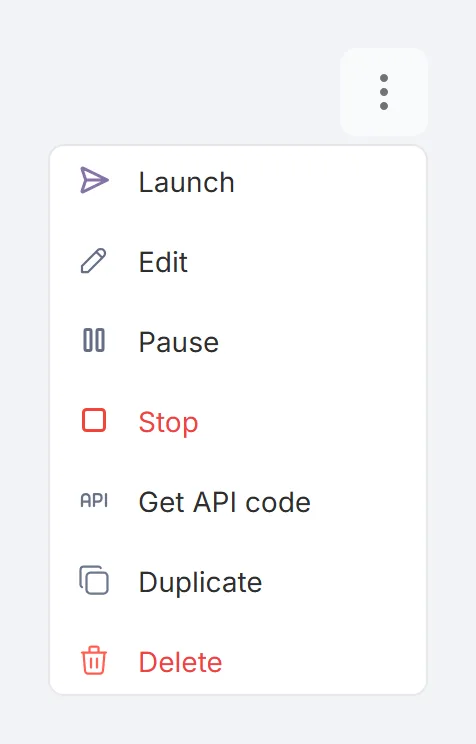
Pause and Stop appear in this menu only while the campaign has an open run; Get API code is always there. -
Copy the campaign ID and the ready code
The Start this campaign by API popup shows the Campaign ID with Copy, a Language choice (cURL, PHP, Node.js or Python), a Numbers box (comma separated, up to 1000 per call), the Variables table and the Code. The table lists each variable your steps need: the name to send it as, an example value and where it is used. Click Copy code.
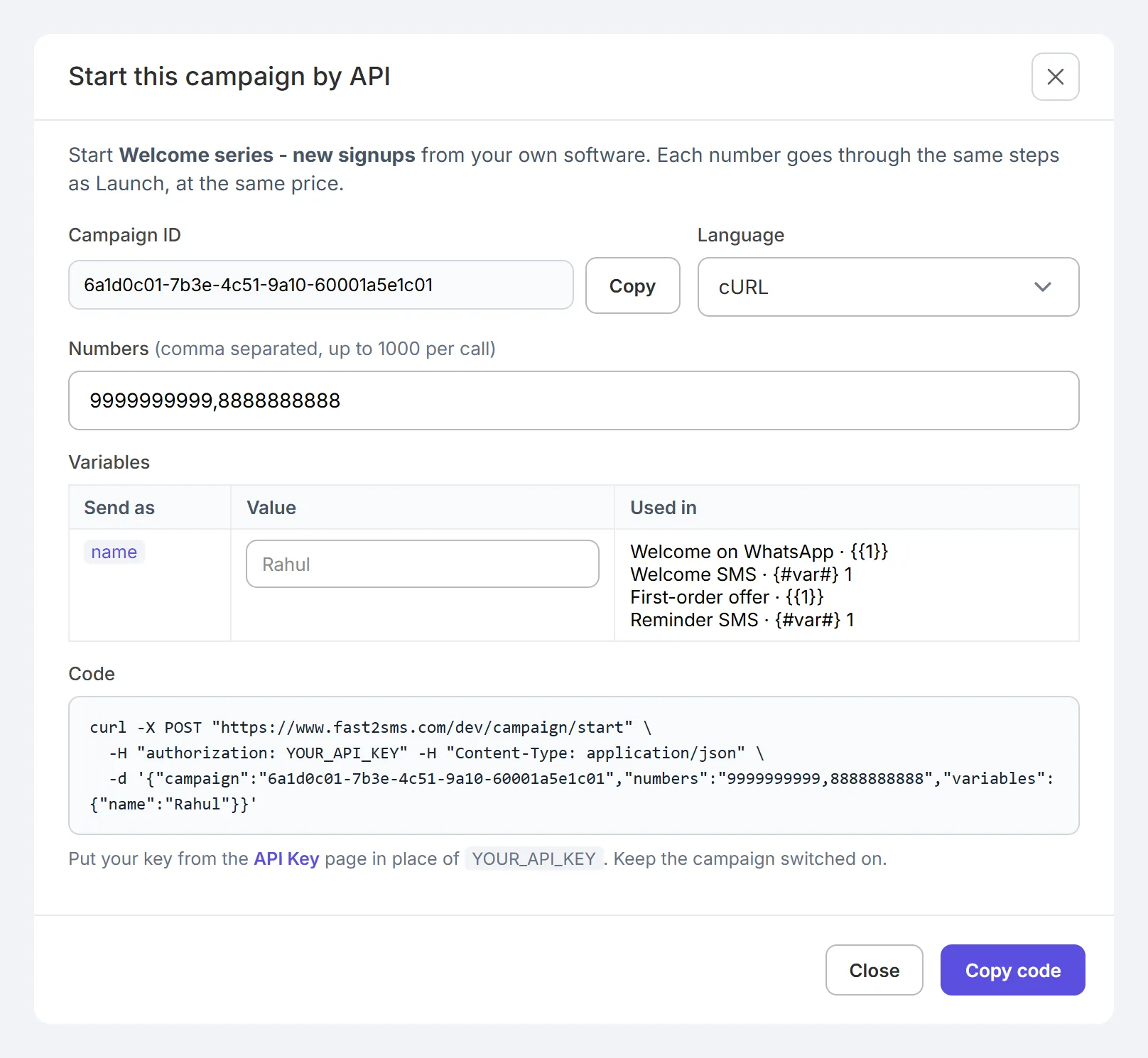
One variable, name, fills four places in this journey, so the code sends it once in “variables”. -
Put in your API key
Replace
YOUR_API_KEYwith your key from the API Key page (click View to see it). Keep the key on your server only, never in website JavaScript or a mobile app. API Access must be on.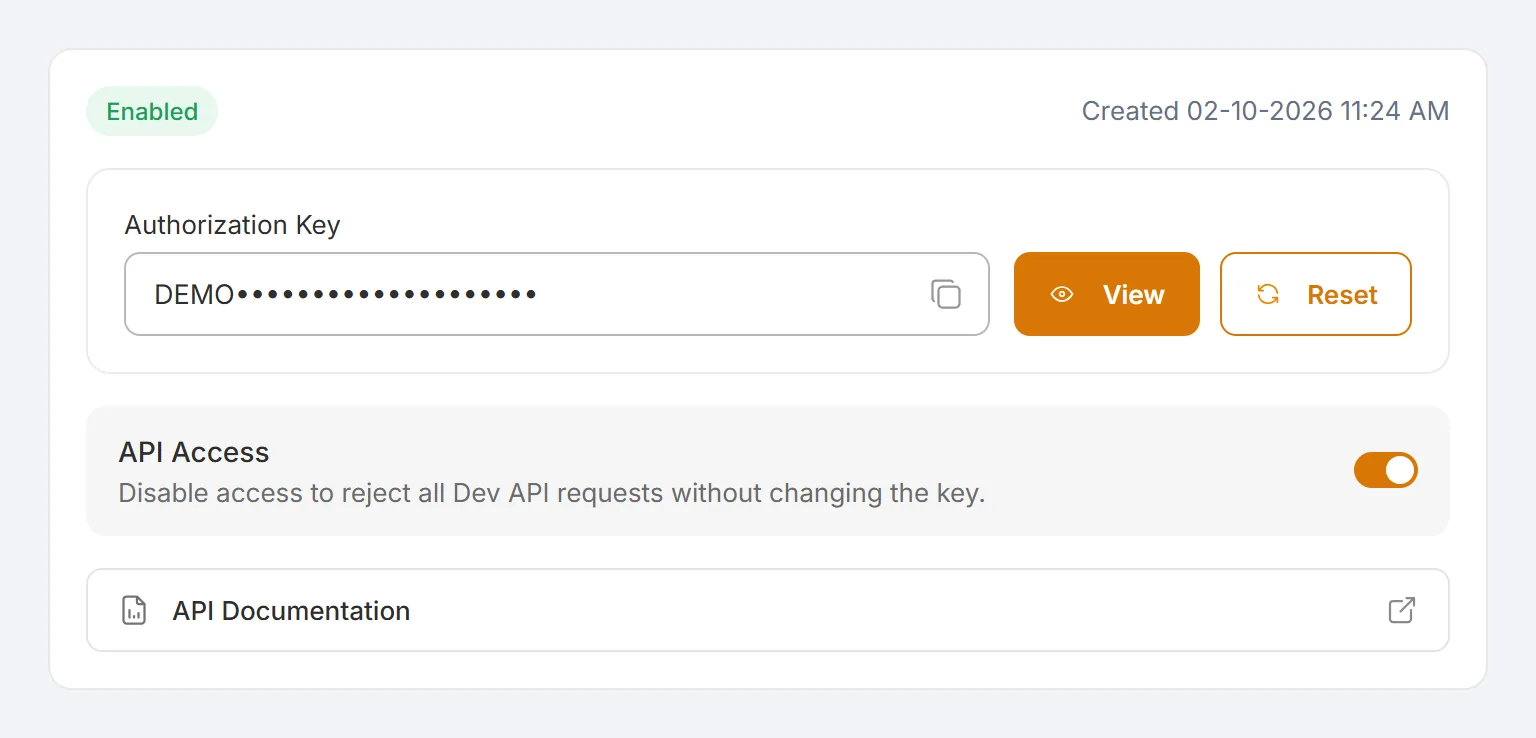
If API Access is switched off, every Campaign API call is refused even with the right key. -
Call start when the event happens
From your server, call
/dev/campaign/startwhen a customer signs up, places an order or books an appointment. The number starts the journey at once. Numbers you send to one campaign on the same day join that day’s open API run, named “<campaign> · API”, so the day’s report is in one place. In Campaign Report you see one such run per day. -
Post events for Condition steps
If your journey has a Condition on “Your event” (for example
payment_received) or “Link clicked”, post that event for the number to/dev/campaign/event. For link clicks, post the eventclicked. The Condition step counts the events when the contact reaches it.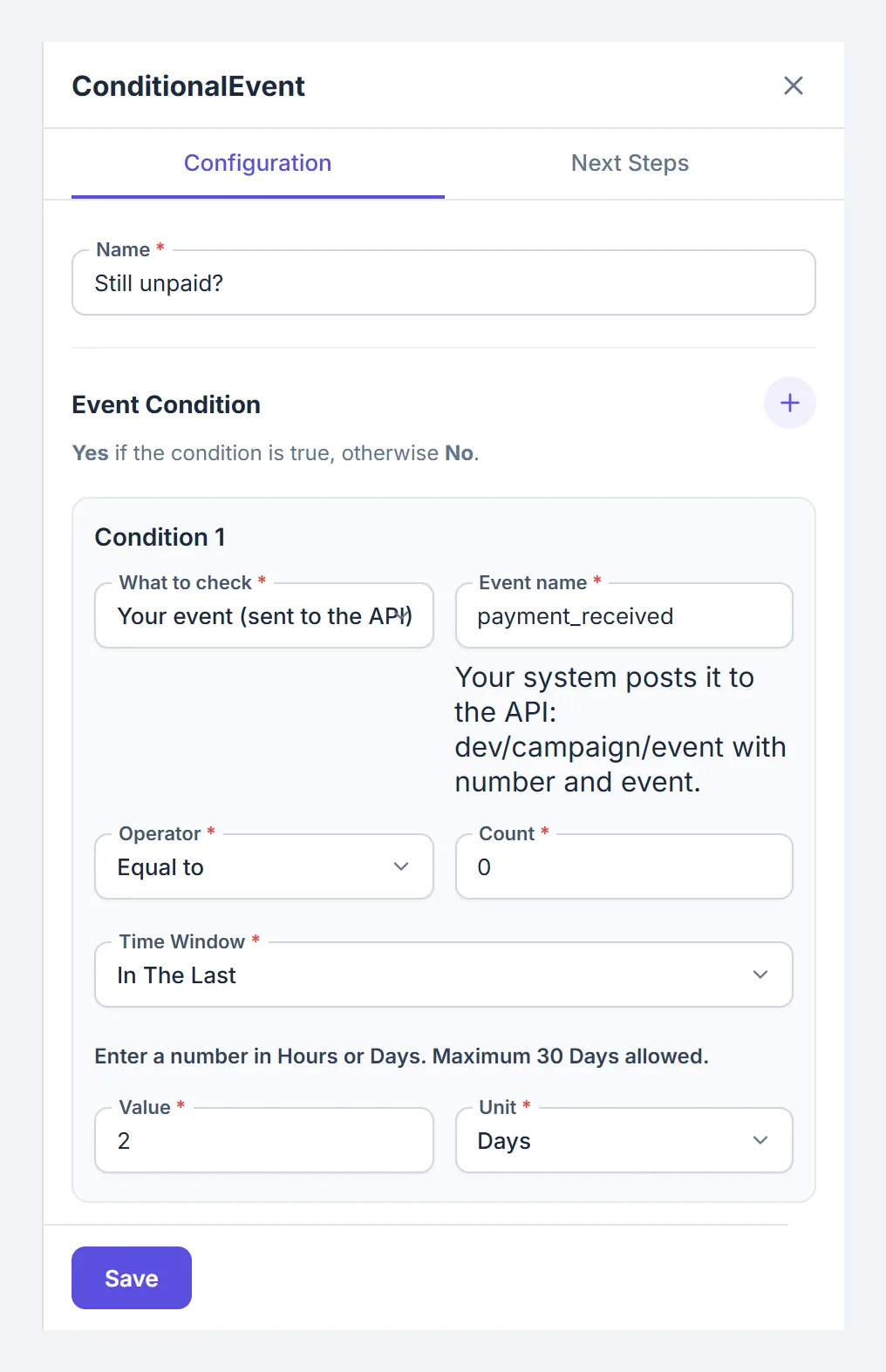
The Event name here must match the “event” your server posts, letter for letter.
Campaign API start call
URL: POST https://www.fast2sms.com/dev/campaign/start
Header: authorization: YOUR_API_KEY and Content-Type: application/json (form fields also work). The key must be in the header for this call.
| Field | What to send |
|---|---|
campaign |
The Campaign ID from Get API code |
numbers |
Comma separated numbers, up to 1,000 per call |
variables |
Optional. One object for all numbers, or one object per number keyed by the number |
recipients |
Instead of numbers: an array like [{"mobile":"9000012345","name":"Rahul"}], up to 1,000 |
groups |
Instead of numbers: Address Book group ids or names for a full run, with optional schedule_time such as “2026-11-20 10:30:00” (IST) |
Up to 50 variables per number, 500 characters each. SMS variables still follow the DLT limit of 30 characters.
cURL example
curl -X POST "https://www.fast2sms.com/dev/campaign/start" \
  -H "authorization: YOUR_API_KEY" -H "Content-Type: application/json" \
  -d '{"campaign":"YOUR_CAMPAIGN_ID","numbers":"9000012345","variables":{"name":"Rahul"}}'
PHP example (call this after a new sign-up)
<?php
$payload = [
    'campaign'  => 'YOUR_CAMPAIGN_ID',
    'numbers'   => '9000012345',
    'variables' => ['name' => 'Rahul'],
];
$ch = curl_init('https://www.fast2sms.com/dev/campaign/start');
curl_setopt_array($ch, [
    CURLOPT_POST           => true,
    CURLOPT_RETURNTRANSFER => true,
    CURLOPT_HTTPHEADER     => ['authorization: YOUR_API_KEY', 'Content-Type: application/json'],
    CURLOPT_POSTFIELDS     => json_encode($payload),
    CURLOPT_TIMEOUT        => 15,
]);
$response = json_decode(curl_exec($ch), true);
curl_close($ch);
// $response['return'] is true on success; save $response['request_id'] if you want to look up the run later
Response
{"return": true, "request_id": "CJFN6tdMBGPEURn", "run_id": 60036,
 "campaign": "Welcome series - new signups", "run": "Welcome series - new signups · API",
 "status": "running", "added": 1, "skipped": 0, "message": "1 number(s) added to the campaign"}
skipped counts numbers that were already in today’s run; the message then ends with “, N already in this run”.
The event call
POST https://www.fast2sms.com/dev/campaign/event with number (one, or up to 1,000 comma separated), event (letters, digits and underscore, for example payment_received or clicked) and an optional value such as an invoice number (up to 500 characters). The reply is {"return": true, "event": "payment_received", "recorded": 1, "message": "Event recorded"}.
curl -X POST "https://www.fast2sms.com/dev/campaign/event" \
  -H "authorization: YOUR_API_KEY" -H "Content-Type: application/json" \
  -d '{"number":"9000012345","event":"payment_received","value":"INV-4821"}'
Other calls
All under https://www.fast2sms.com/dev/campaign/: list, info, groups, runs, report, numbers and journey read your campaigns, runs, results and one number’s journey (GET or POST). pause, resume and stop control a run by its request_id (POST only). To get results pushed to you instead, see campaign webhooks.
Limits and how runs work
| Rule | Value |
|---|---|
| start, event, pause, resume, stop | 30 calls per minute per API key, POST only |
| list, info, groups, runs, report, numbers, journey | 120 calls per minute per API key |
| Numbers per start or event call | 1,000 |
| Same-day calls | Join today’s open API run “<campaign> · API”; a number already in it is skipped. If that run has already finished, the next call starts a new one. |
| Next day | A new API run starts with the first call of the day |
| Start time | Numbers start at once; schedule_time works only with groups |
Common errors
- “Campaign not found. Pass the campaign id or uuid from the Campaign Builder list.” Copy the Campaign ID again from Get API code.
- “This campaign is switched off. Turn it on in the Campaign Builder list first.” Turn on the Status switch.
- “At most 1000 numbers per request.” Split the list.
- “Pass either “numbers” / “recipients” or “groups”, not both.” Use one of them per call.
- 405 “Use POST with your API key. Get ready code from Campaign List > Get API code.” start, event, pause, resume and stop do not work as GET links.
- 401 “Send the API key in the “authorization” header for this call.” Put the key in the header, not in the URL.
- Other 401 or 429. Check the key, API Access and IP whitelist, or slow down. See API error codes.
Frequently asked questions
Can my website start a WhatsApp welcome series automatically?
Yes. Call /dev/campaign/start from your server after each sign-up. The journey sends the welcome, waits and sends the next steps by itself.
Does the API cost extra?
No. Each number goes through the same steps at the same price as a panel launch.
Is there a Shopify or WooCommerce trigger?
Not a built-in one. Trigger the journey from your store backend with one API call when the event happens.
What if the same customer signs up twice in a day?
The second call skips the number because it is already in that day’s run.
Can I send a reminder 3 days before a due date?
Call start from your system on that day for that customer. Campaign waits are fixed lengths, not dates from your data.
Where do I see API runs?
In Campaign Report, as runs named “<campaign> · API”, usually one per day.
Can I stop a journey for one customer who paid?
Post payment_received to the event API and put a Condition before the next reminder.