
To contact Fast2SMS support, open the Support menu at the top of the panel and click Contact Support to send a ticket. The team replies to your registered email within 24 to 48 working hours. You can also email [email protected], book a call with Schedule a Meeting, or send an idea through Feature Request. This page shows each option and the rules that stop a ticket from going through.
Before you start
- Log in to your Fast2SMS account. The ticket form and the feature request form are inside the panel.
- Check that your email in Account Setting > Personal Detail is correct and verified, because the reply goes to your registered email. See how to change your email if it is wrong.
- Keep the details ready: the request ID of the message, the transaction ID of a payment, the template or sender ID name, and the date and time of the problem.
How to raise a support ticket in Fast2SMS
-
Open the Support menu
Click Support in the top bar of any panel page. The menu has Contact Support, FAQ, API Docs, Schedule a Meeting and Feature Request. Below them, a Support Team block shows our support email with a copy button. On a phone, the same links are inside your profile menu.
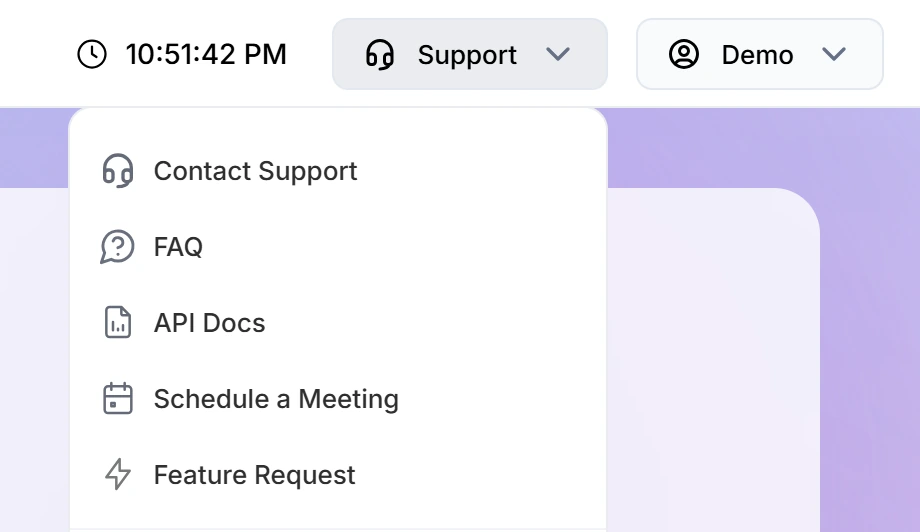
The Support menu in the panel header. -
Click Contact Support and pick a category
The Contact Support page says “Send a ticket to the Fast2SMS team. We reply to your registered email within 24–48 working hours.” Choose the Category closest to your problem:
- Sales Enquiry
- DLT Related
- WhatsApp Issue
- RCS Issue
- Common Error
- Delivery Related
- Reseller
- Others
- Feedback/Suggestion
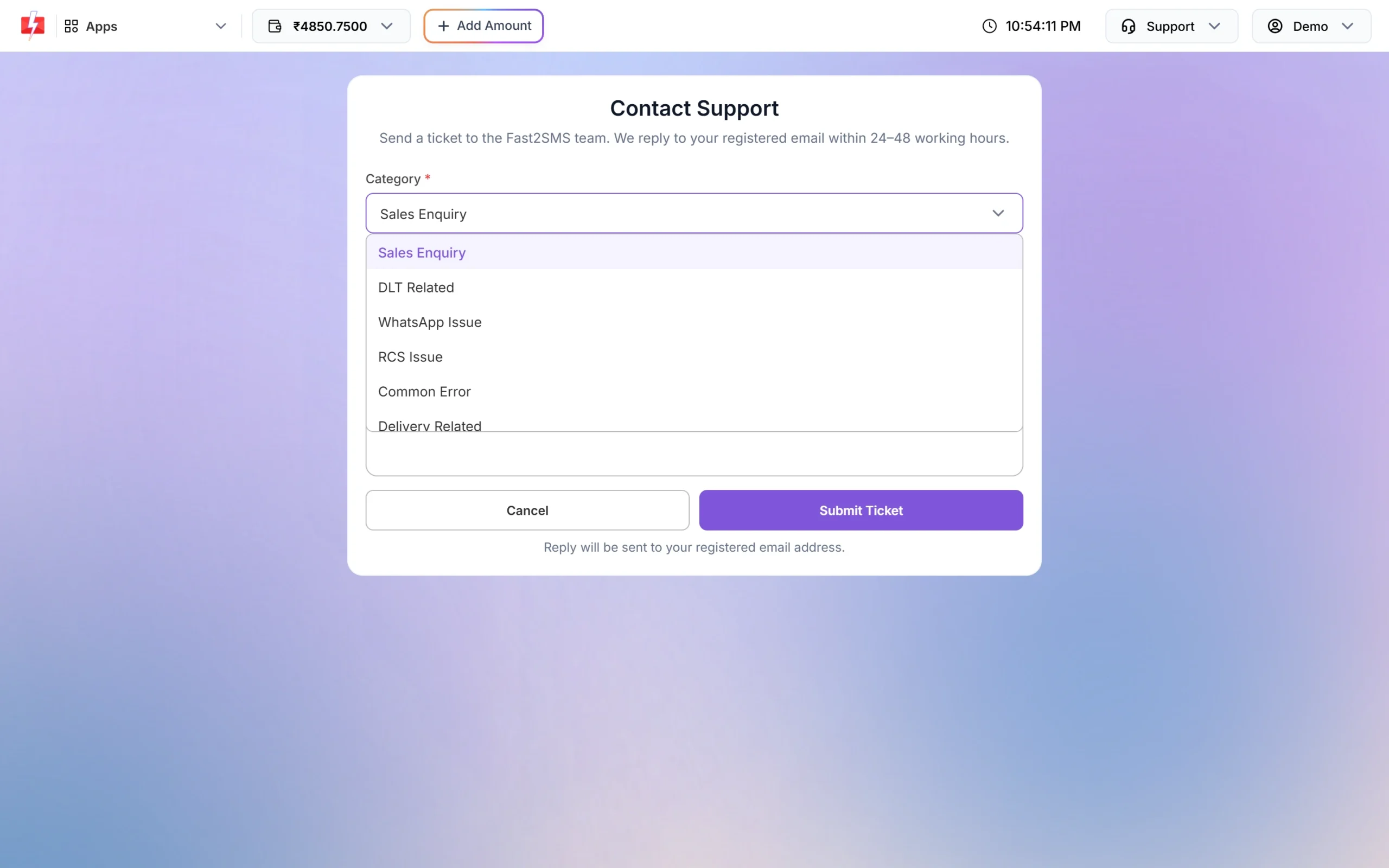
Pick the category that matches your problem. -
Write the subject and message
In Subject, write a short summary of at least 10 characters, for example “DLT template not approved yet”. In Message, describe the problem in at least 20 characters. Add the IDs and times you noted. Do not paste any link: a message that contains a web address (anything with “http”) is not accepted.
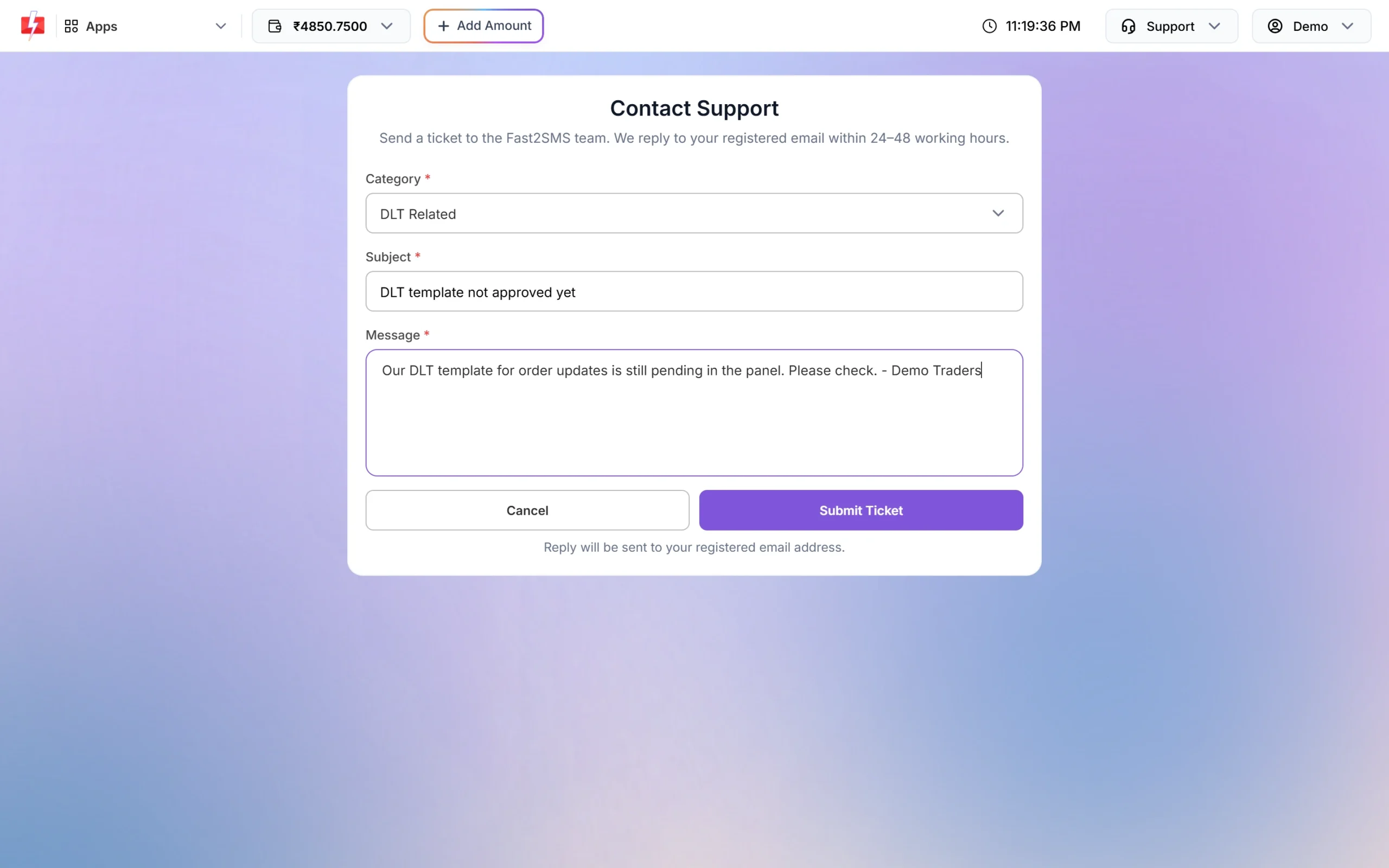
A filled ticket, ready to submit. -
Click Submit Ticket
Click Submit Ticket. When it goes through you see “Your query has been sent to the support team.” The note under the button reminds you: “Reply will be sent to your registered email address.” Check your inbox, and your spam folder, for the reply.
Why a ticket is not sent
| Message | Reason | Fix |
|---|---|---|
| “The Subject must be at least 10 characters.” | The subject is too short. | Write a clear subject of 10 or more characters. |
| “The Message must be at least 20 characters.” | The message is too short. | Explain the problem in a sentence or two, with IDs and dates. |
| “You have exhausted your daily help query limit.” | Up to 3 tickets can be sent per day from the same network. | Wait till the next day, or email [email protected]. Put everything in one ticket instead of several short ones. |
| Ticket not accepted with a link in it | Messages that contain a web address are rejected. | Remove the link. Write the page name or the ID instead. |
Other ways to reach Fast2SMS
| Option | Best for | How |
|---|---|---|
| Questions with screenshots or files, or when you have used up the daily ticket limit | Write to [email protected] from your registered email address. | |
| Schedule a Meeting | Sales, pricing for high volumes, or a walkthrough of setup | Click Schedule a Meeting in the Support menu, or open fast2sms.com/meet. |
| FAQ | Quick answers on DLT, WhatsApp, OTP, API errors and billing | Click FAQ to open the Fast2SMS help center. |
| API Docs | Developers who need endpoints, parameters and error codes | Click API Docs to open docs.fast2sms.com. |
How to send a feature request or feedback
Have an idea for the panel or the API? Use Feature Request instead of a ticket, so it reaches the product team.
-
Open Feature Request
Click Support > Feature Request. The page says “Share a product idea or feedback with the Fast2SMS team.”
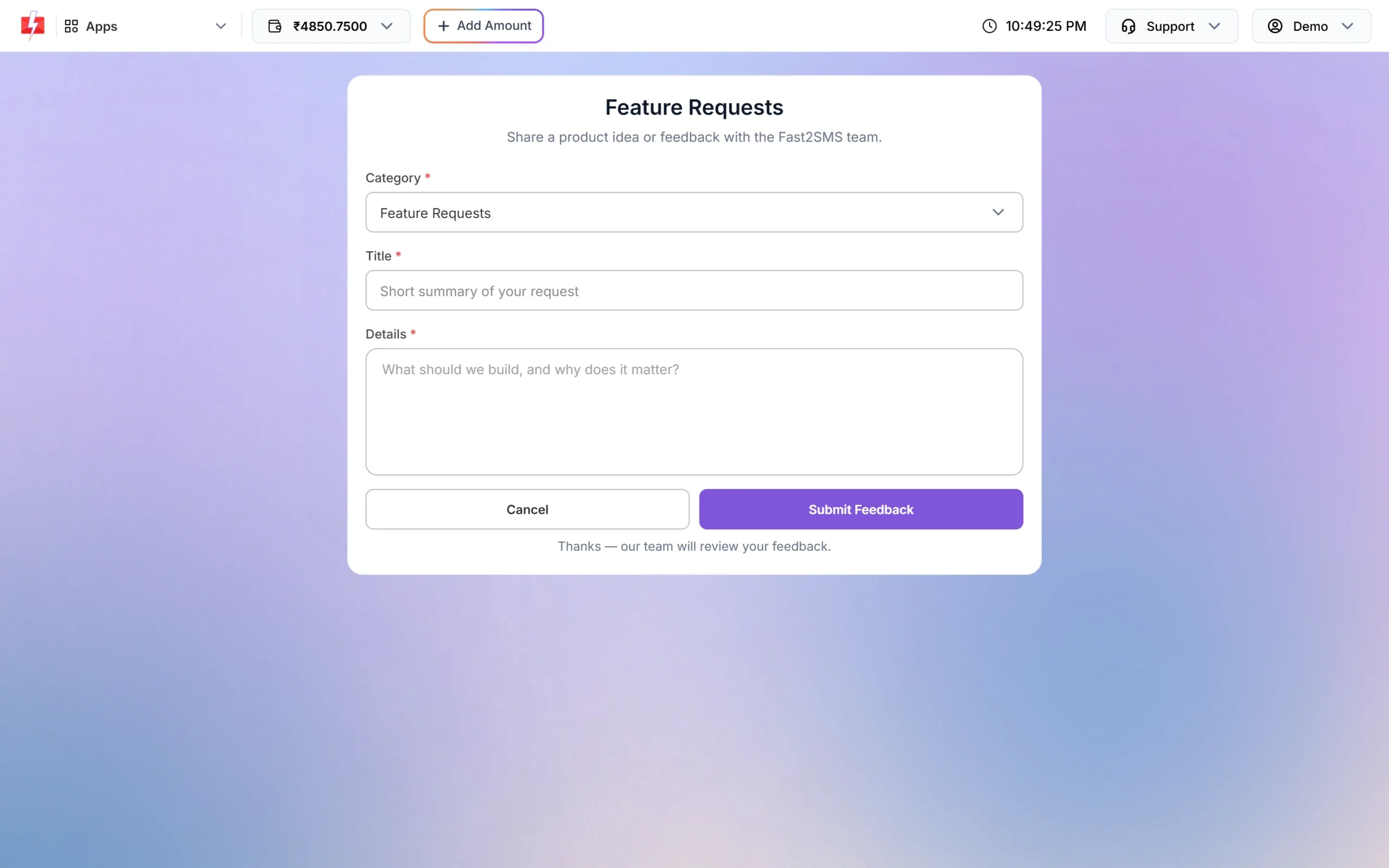
The Feature Requests form. -
Choose a category and describe your idea
Pick Feature Requests, Enhancements or Feedback. Give a Title of at least 5 characters and Details of at least 10 characters: what you want, and why it matters for your business. If the text is too short you see “Please enter a longer title.” or “Please add more details.”
-
Click Submit Feedback
A confirmation tells you the feedback was submitted. Your past requests are not listed in the panel after you send them, so keep your own copy if you want to refer to it later.
Tips for a faster answer
- Use one ticket per problem and choose the right category, so it goes to the right person.
- Add the request ID (from the delivery report or API response), the mobile number that did not get the message, and the time you sent it.
- For payment questions, add the transaction ID and the amount.
- Never send your password, the full API key or an OTP in a ticket or email. The team does not need them.
- Check the help center first. Many errors, such as API error codes and DLT rejections, have a step-by-step fix there.
Frequently asked questions
How long does Fast2SMS support take to reply?
The Contact Support page says the team replies to your registered email within 24 to 48 working hours.
What is the Fast2SMS support email?
It is [email protected]. It is also shown in the Support menu of the panel with a copy button.
How many support tickets can I send in a day?
Up to 3 a day. After that you see “You have exhausted your daily help query limit.” You can still email [email protected].
Why is my ticket not submitting?
Check that the subject has at least 10 characters, the message at least 20, and that the message has no link in it.
Where will I get the reply to my ticket?
On the email address registered in your Fast2SMS account. Make sure it is correct in Account Setting > Personal Detail.
Can I book a call with the Fast2SMS team?
Yes. Click Schedule a Meeting in the Support menu or open fast2sms.com/meet and pick a time.
Can I see the feature requests I sent earlier?
No. Requests are saved for the product team, but past requests are not shown back in the panel.
Can I contact support without logging in?
Yes, by email at [email protected] or through the meeting link. The ticket form itself needs you to be logged in.
Related guides
- Fast2SMS new panel tour: dashboard, apps, wallet rates and where everything moved
- How to change your registered mobile number or email in Fast2SMS
- Fast2SMS API error codes: what each one means and how to fix it
- How long does a refund take in Fast2SMS?
- SMS delivery report in Fast2SMS: every status explained