
When a Fast2SMS API call fails, the reply has "return": false, a status_code such as 412 or 424, and a message that says what went wrong. This page lists every common Fast2SMS API error code for SMS, Smart OTP, WhatsApp and account checks, with the reason and the fix. It also shows how to find the exact request and reply in API Logs, so you can fix the problem without guessing.
What a Fast2SMS API error looks like
Most errors come back as JSON in this shape:
{"return":false,"status_code":424,"message":"Invalid Message ID (or Template, Entity ID)"}returnistruewhen the request was accepted andfalsewhen it was not.status_codeis the Fast2SMS error code from the tables below.messageis the reason in plain words.
The HTTP status is set separately. Most errors use HTTP 400, and key or IP problems use HTTP 401. A low-balance error can come back with HTTP 200, so always check the return field in your code, not only the HTTP status.
A successful SMS send looks like this. Note that message is a list:
{"return":true,"request_id":"Sa1B2c3D4e5F6g7","message":["SMS sent successfully."]}How to find the error in API Logs
-
Open API Logs
Go to Account Setting and click API Logs under UTILITY. Each row shows the API name (for example OTP/SEND or BULKV2), the method, the endpoint, the time taken, the HTTP code, the IP, the reply and a Success or Failed label. Logs are kept for 7 days.
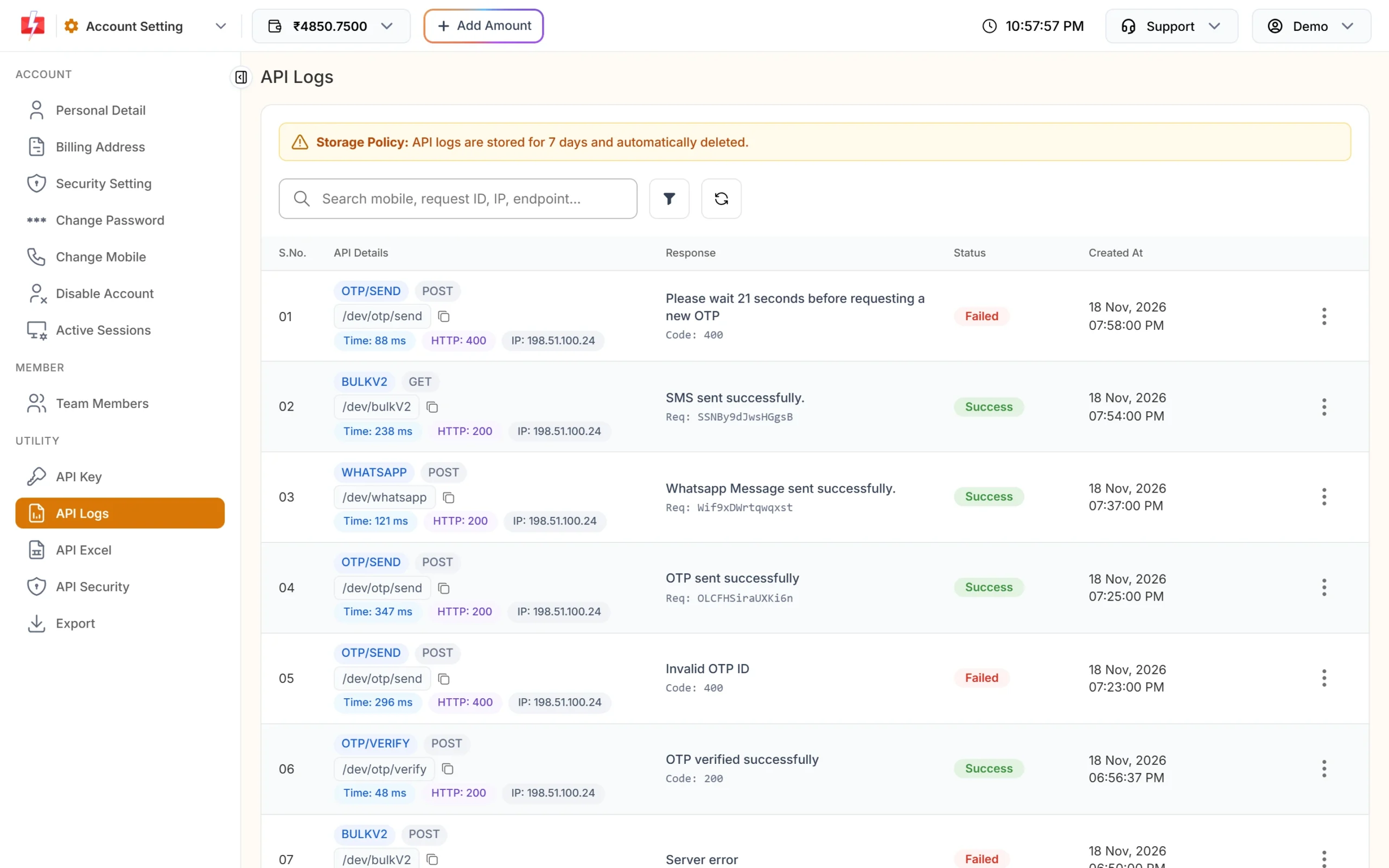
API Logs with failed and successful calls. -
Search or filter
Search by mobile number, request ID, IP or endpoint. Use the filter to show only Failed calls, a date range, an HTTP code group such as 4xx, or slow calls.
-
Open View Details
Click the three dots on a row and choose View Details. The Request Data tab shows the query parameters, headers and body you sent. The Response Data tab shows our reply and the error message. Your API key is hidden in the saved headers.
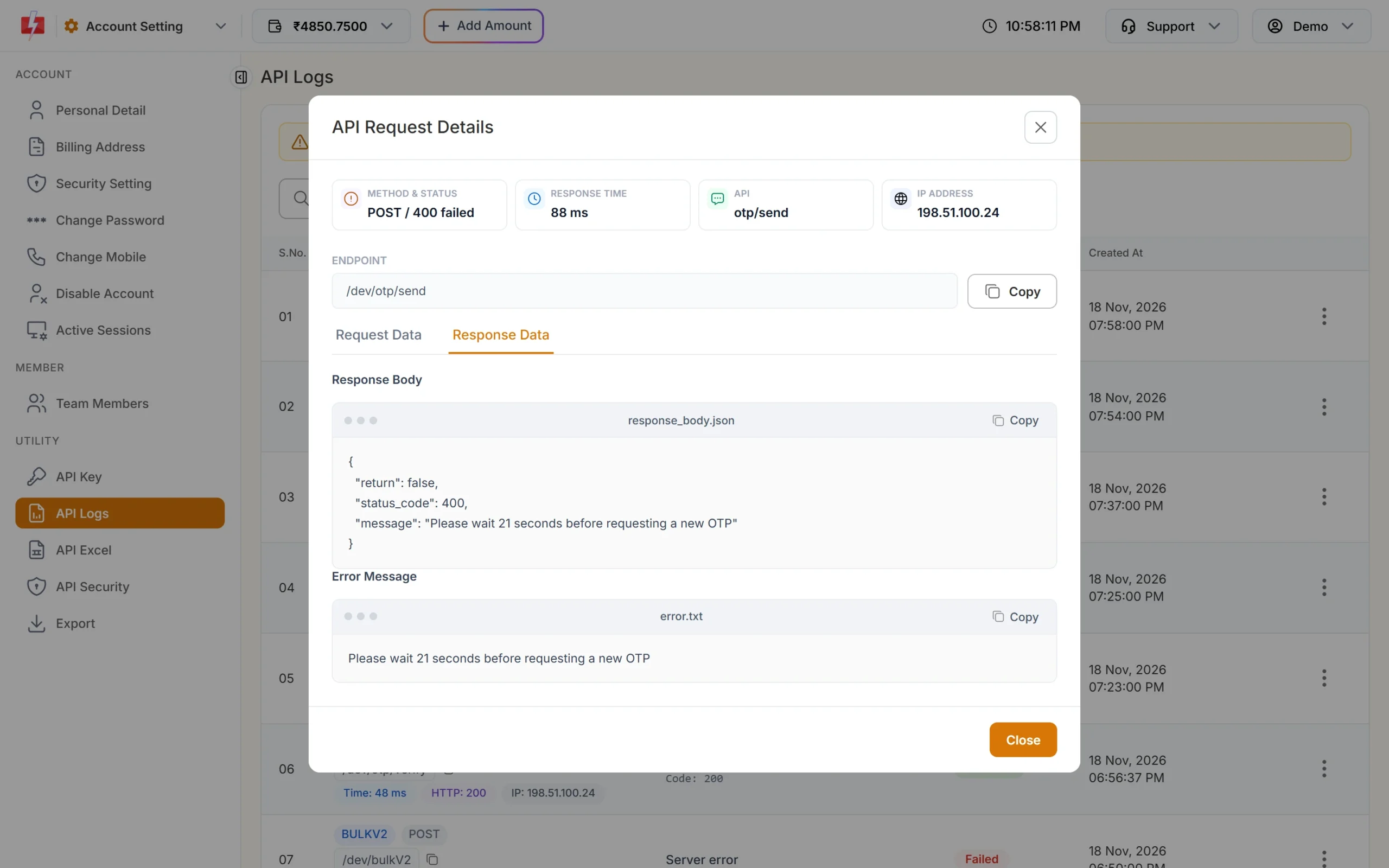
The full reply for a failed Smart OTP send.
Calls with a wrong or missing API key are not saved in API Logs, because they cannot be linked to your account. If you see nothing in the logs, check your key first.
API key and account errors (all APIs)
| Code | Message | Fix |
|---|---|---|
| 412 | Invalid Authentication, Check Authorization Key | Copy the current key from Account Setting, API Key and send it in the authorization header with no quotes or spaces. If the key was reset, update it everywhere. |
| 413 | Invalid Authentication, Authorization Key Disabled | The API Access switch is off. Turn it on from the API Key page. |
| 414 | IP is blacklisted from Dev API section | API Security is on and this IP is not whitelisted. Add your server IP in API Security. |
| 415 | Account Disabled | The account is disabled. Contact support. |
| 428 | Quick API Access is disabled. | Turn on Quick API Access on the API Key page (API Access must be on first). |
SMS API errors (bulkV2)
These come from /dev/bulkV2, used for DLT SMS (route=dlt), DLT Manual (route=dlt_manual) and Quick SMS (route=q).
| Code | Message | Why it happens and the fix |
|---|---|---|
| 405 | Numbers Missing | The numbers field is empty. Send at least one number. |
| 406 | Invalid Sender ID | For dlt: the sender is not your approved sender, or the case is different (FSTSMS is not FstSms). For dlt_manual: the sender is not 3 to 6 characters. Copy it exactly from DLT Manager. |
| 408 | Invalid Route | The route value is wrong. Use dlt, dlt_manual or q. |
| 404 | Language Missing | The text language could not be detected. Send the message text in UTF-8. |
| 411 | Invalid Numbers | Every number was invalid. Send 10-digit Indian mobile numbers starting with 6 to 9. If only some are invalid, those are dropped and the rest are sent. |
| 416 | You don’t have sufficient wallet balance | Recharge your wallet. This can arrive with HTTP 200, so check return. |
| 424 | Invalid Message ID (or Template, Entity ID) | For dlt: message must be the Message ID from DLT Manager, not the 19-digit DLT template ID, and the template must be linked to that sender. For dlt_manual: entity or template ID is missing. |
| 424 | Invalid Schedule Date & Time. The selected time is not greater than the current time. | Use a future time in DD-MM-YYYY-HH-MM (IST) or a Unix timestamp. |
| 425 | Invalid Template | The template is not approved. Check its status in DLT Manager. |
| 426 | Invalid link used in variables | A variable has a Fast2SMS short link that is not your approved link. Use your approved tracked link or an approved plain URL. |
| 427 | Number blocked in Fast2SMS DND list | All numbers are on the Fast2SMS block list. Remove them. |
| 429 | Invalid characters … The text is not valid UTF-8 | Save and send the text as UTF-8, and URL-encode values in GET requests. Nothing was sent or charged. |
| 500 | Entity blocked / Content template blocked / Sender id blocked | The entity, template or sender is on the DLT block list. Contact support. |
| 500 | Add template in panel before using this api without template_id | DLT Manual without template_id: your text matched no template. Send entity_id and template_id, or add the template in DLT Manager. |
| 990 | You’re hitting old API. Refer updated documentation here: docs.fast2sms.com | You are using an old route (v3, t, p or s). Move to dlt or q. |
| 998 | Route is blocked in your account, use DLT SMS route. | Your account can send only DLT SMS. Use route=dlt. |
| 999 | You need to complete one transaction of 100 INR or more before using API route. | Quick SMS needs at least one recharge of ₹100 or more. DLT routes are not affected. |
Codes 401, 402, 403, 407, 409, 410 and 417 are listed in older docs but are rarely returned today. Codes 995, 996 and 997 belong to the old OTP SMS route, which is discontinued. For OTPs, use Smart OTP or your own DLT OTP template with route=dlt.
Smart OTP API errors
These come from /dev/otp/send, /dev/otp/verify and /dev/otp/resend.
| Message | HTTP | Why it happens and the fix |
|---|---|---|
| Authorization key required / Invalid authorization key | 401 | Send the bare API key in the authorization header, without “Bearer”. |
| Invalid OTP ID | 400 | The OTP ID is wrong, deleted, or belongs to another account. Copy it from OTP Template List. |
| Template is not approved | 400 | The DLT or WhatsApp template behind this OTP ID is not approved. |
| Please wait N seconds before requesting a new OTP | 400 | The resend wait set in OTP Settings has not passed for this number. Show a countdown in your app. |
| Insufficient wallet balance. You need at least ₹… | 400 | Recharge your wallet. |
| WhatsApp Business Number is not active or connected | 400 | Reconnect the WhatsApp number used by this OTP template. |
| OTP not found or already verified | 404 | Verify checks only the latest unverified OTP for the number. A newer send cancels older OTPs, and a used OTP cannot be verified again. |
| OTP expired | 400 | The OTP is older than otp_expiry (15 minutes by default). Send a new one. |
| Invalid OTP | 400 | The code typed does not match. Let the user try again. |
| Maximum verification attempts reached. OTP is no longer valid. | 400 | Too many wrong tries (set in OTP Settings). Send a new OTP. |
| OTP resend window (10 minutes) has expired. Please request a new OTP. | 400 | Resend works only within 10 minutes of the first send. Call send again. |
| Maximum resend limit (5 times) reached. Please try again later. | 400 | One OTP can be sent at most 5 times in 10 minutes, counting the first send. |
| No previous OTP request found for this mobile | 404 | Call send before resend. |
WhatsApp, report and other API errors
| API | Message | Fix |
|---|---|---|
| WhatsApp Template ID (message_id) is invalid or not approved. | Use the template’s ID from the panel and make sure it is approved. | |
| WhatsApp Phone Number ID is invalid or not connected. | Check the number in WhatsApp Manager and its connection status. | |
| Media URL is not reachable. Please use a public link. | Host the image, video or PDF on a public URL that opens without login. | |
| SMS delivery report | No DLR found for the given request_id or only invalid numbers were present. | The request ID is wrong, older than 7 days, or had only invalid numbers. |
| SMS logs | You can fetch only 3 days of analytics at a time. | Ask for 3 days or less per call. |
| DLT Manager | Rate limit exceeded. (HTTP 429) | Too many add requests from one IP. Wait and try again. |
Tips to avoid API errors
- Check
returnin every reply and save therequest_id. It helps you and our support team trace the message. - Copy Sender IDs and Message IDs from DLT Manager, or download them with API Excel in Account Setting.
- Keep enough balance. Turn on Low Balance Notification in API Security to get SMS and email alerts.
- Send your API key only from your server, in the
authorizationheader.
Frequently asked questions
Why does my API return HTTP 200 but no SMS is sent?
Check the return field. A low-balance reply (code 416) can come with HTTP 200 and "return": false.
What does error 412 mean in Fast2SMS?
Your API key is missing, wrong or was reset. Copy the current key from the API Key page and send it in the authorization header.
What does error 424 mean?
Most often the message value is the 19-digit DLT template ID instead of the Message ID shown in DLT Manager, or the template is not linked to the sender you used.
Where can I see the full error for an API call?
Account Setting, API Logs, then View Details on the row. Logs are kept for 7 days.
Am I charged when the API returns an error?
No message is sent when the request is rejected, so nothing is charged for it. Charges apply only to messages that are accepted and sent.
Why are some numbers missing from my send but no error was shown?
Invalid numbers are dropped quietly and the rest are sent. You get error 411 only when every number is invalid.