
The Fast2SMS DLT Manual API sends the full SMS text you write, with your DLT Entity ID and Content Template ID, from your approved sender ID. You call /dev/bulkV2 with route=dlt_manual. It suits software that already stores the DLT IDs for each message, such as ERP, billing or CRM tools, and setups where you do not want to look up a Message ID first. This guide covers the parameters, code in cURL, PHP, Python, Node.js, Java, C# and Go, the reply, the errors, and the one rule that matters most: your text must match the DLT template exactly.
Before you start
- Approved DLT records: your entity, sender ID (header) and content template are approved on your DLT portal, and the template is linked to the sender.
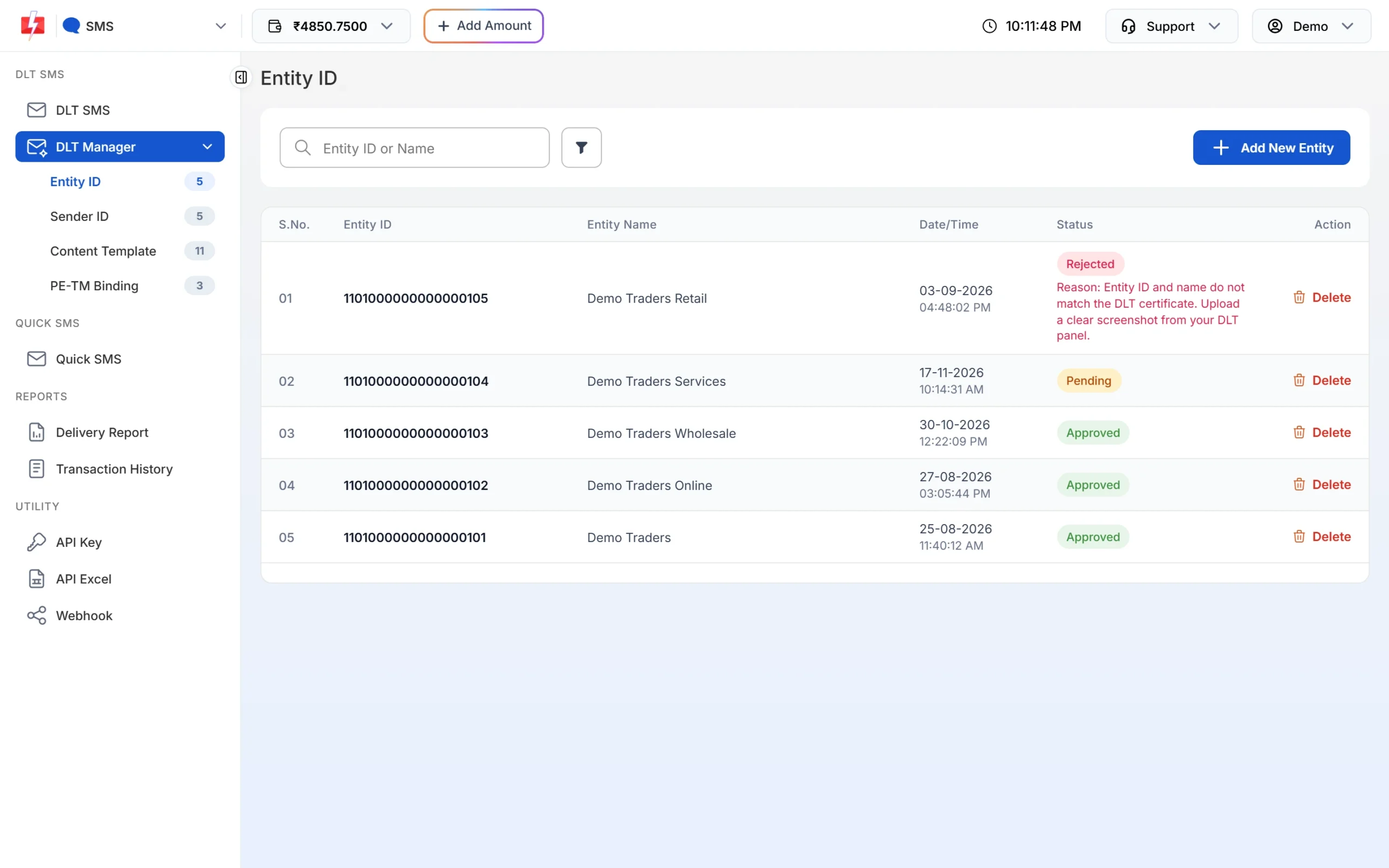
- Your DLT IDs: the Principal Entity ID and the Content Template ID of each message. You find both on your DLT portal. The Entity ID is also listed in DLT Manager > Entity ID.
- API key: from API Key, with API Access on.
- Wallet balance: enough for the SMS. There is no first-recharge rule on this route.
DLT Manual vs DLT SMS in one line
On the DLT SMS route (route=dlt) you send a Message ID and Fast2SMS builds the text from the approved template. On the DLT Manual route you send the final text yourself, and Fast2SMS passes it on with the IDs you give. Fast2SMS does not check that your text matches the template. If it does not match, the operator rejects the SMS.
Endpoint and authentication
| URL | https://www.fast2sms.com/dev/bulkV2 |
| Method | POST (JSON, form-urlencoded or multipart) or GET |
| Header | authorization: YOUR_API_KEY |
| Route | route=dlt_manual |
Parameters
| Parameter | Required | Rules |
|---|---|---|
route |
Yes | dlt_manual |
sender_id |
Yes | Your DLT-approved sender ID, 3 to 6 characters. On this route it is not checked against DLT Manager, so send it exactly as approved at DLT. |
message |
Yes | The full SMS text exactly as approved, with every {#var#} replaced by the real value. |
entity_id |
Yes, unless the template is in DLT Manager | Your DLT Principal Entity ID, digits only. |
template_id |
Yes, unless the template is in DLT Manager | The DLT Content Template ID (19 digits), digits only. |
numbers |
Yes | 10-digit Indian mobile numbers, separated by commas. |
schedule_time |
No | A future time as DD-MM-YYYY-HH-MM (IST) or a Unix timestamp. |
sms_details |
No | 1 adds character count, parts, rate and numbers to the reply. |
udf1, udf2, udf3 |
No | Your own reference text, returned in webhooks. |
The language is detected from the text. Any Hindi or other non-English character makes the whole SMS Unicode.
Can I leave out entity_id and template_id?
Yes, but only if the template is saved in your DLT Manager. Fast2SMS then compares your text with your saved templates and fills in the IDs from the one that matches. If nothing matches, you get “Add template in panel before using this api without template_id”. When you send both IDs, they are used as they are and no matching runs. Sending both IDs is the safer choice.
Send your first DLT Manual SMS
-
Copy the approved text from DLT
Open your DLT portal and copy the approved template text and its Content Template ID. Note your Entity ID.
-
Fill the variables in your code
Replace each
{#var#}with the real value. Do not change anything else: spaces, full stops, capital letters and the brand name must stay as approved. -
Copy your API key
Open API Key, click View, enter the OTP and copy the key.
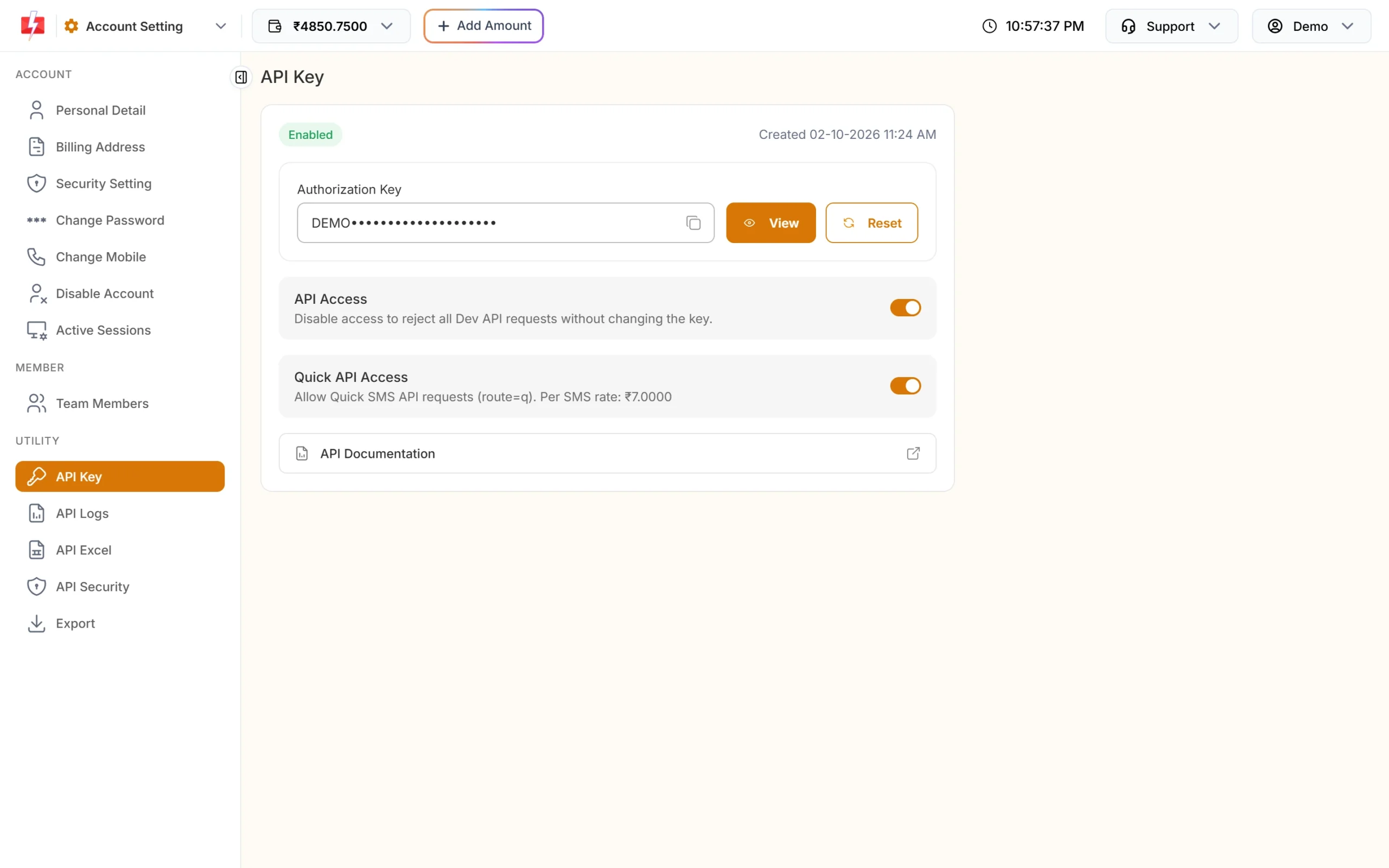
API Access must be on for every Dev API call. -
Send to your own number and check delivery
Use a code sample below. Then open Delivery Report and check the SMS reached Delivered. If it failed, the text or IDs most likely do not match DLT.
Code examples
The examples send “Dear Rahul, your order DT10458 of Rs.1240 is confirmed and will be delivered by 21 Nov. – Demo Traders” from sender DEMOTR. Use your own approved text and IDs.
cURL (POST JSON)
curl -X POST "https://www.fast2sms.com/dev/bulkV2" \
  -H "authorization: YOUR_API_KEY" \
  -H "Content-Type: application/json" \
  -d '{"route":"dlt_manual","sender_id":"DEMOTR","message":"Dear Rahul, your order DT10458 of Rs.1240 is confirmed and will be delivered by 21 Nov. - Demo Traders","entity_id":"YOUR_ENTITY_ID","template_id":"YOUR_TEMPLATE_ID","numbers":"9999999999"}'
cURL (GET)
curl -G "https://www.fast2sms.com/dev/bulkV2" \
  -H "authorization: YOUR_API_KEY" \
  --data-urlencode "route=dlt_manual" \
  --data-urlencode "sender_id=DEMOTR" \
  --data-urlencode "message=Dear Rahul, your order DT10458 of Rs.1240 is confirmed and will be delivered by 21 Nov. - Demo Traders" \
  --data-urlencode "entity_id=YOUR_ENTITY_ID" \
  --data-urlencode "template_id=YOUR_TEMPLATE_ID" \
  --data-urlencode "numbers=9999999999"
On GET, always URL-encode the text. The server decodes it once, so an unencoded &, # or % would break or change your SMS.
PHP
<?php
$text = sprintf(
    'Dear %s, your order %s of Rs.%s is confirmed and will be delivered by %s. - Demo Traders',
    'Rahul', 'DT10458', '1240', '21 Nov'
);

$ch = curl_init('https://www.fast2sms.com/dev/bulkV2');
curl_setopt_array($ch, [
    CURLOPT_POST           => true,
    CURLOPT_RETURNTRANSFER => true,
    CURLOPT_TIMEOUT        => 20,
    CURLOPT_HTTPHEADER     => ['authorization: YOUR_API_KEY', 'Content-Type: application/json'],
    CURLOPT_POSTFIELDS     => json_encode([
        'route'       => 'dlt_manual',
        'sender_id'   => 'DEMOTR',
        'message'     => $text,
        'entity_id'   => 'YOUR_ENTITY_ID',
        'template_id' => 'YOUR_TEMPLATE_ID',
        'numbers'     => '9999999999',
    ]),
]);
$res = json_decode(curl_exec($ch), true);
curl_close($ch);

echo !empty($res['return']) ? 'Sent: ' . $res['request_id'] : 'Failed: ' . json_encode($res);
Python
import requests

TEMPLATE = "Dear {}, your order {} of Rs.{} is confirmed and will be delivered by {}. - Demo Traders"
text = TEMPLATE.format("Rahul", "DT10458", "1240", "21 Nov")

r = requests.post(
    "https://www.fast2sms.com/dev/bulkV2",
    headers={"authorization": "YOUR_API_KEY"},
    json={
        "route": "dlt_manual",
        "sender_id": "DEMOTR",
        "message": text,
        "entity_id": "YOUR_ENTITY_ID",
        "template_id": "YOUR_TEMPLATE_ID",
        "numbers": "9999999999",
    },
    timeout=20,
)
data = r.json()
print(data["request_id"] if data.get("return") else data)
Node.js
const text = `Dear ${"Rahul"}, your order ${"DT10458"} of Rs.${"1240"} is confirmed and will be delivered by ${"21 Nov"}. - Demo Traders`;

const res = await fetch("https://www.fast2sms.com/dev/bulkV2", {
  method: "POST",
  headers: { authorization: "YOUR_API_KEY", "Content-Type": "application/json" },
  body: JSON.stringify({
    route: "dlt_manual",
    sender_id: "DEMOTR",
    message: text,
    entity_id: "YOUR_ENTITY_ID",
    template_id: "YOUR_TEMPLATE_ID",
    numbers: "9999999999",
  }),
});
console.log(await res.json());
Java
import java.net.URI;
import java.net.http.HttpClient;
import java.net.http.HttpRequest;
import java.net.http.HttpResponse;

public class SendDltManual {
    public static void main(String[] args) throws Exception {
        String text = String.format(
            "Dear %s, your order %s of Rs.%s is confirmed and will be delivered by %s. - Demo Traders",
            "Rahul", "DT10458", "1240", "21 Nov");
        String json = "{\"route\":\"dlt_manual\",\"sender_id\":\"DEMOTR\",\"message\":\"" + text + "\","
                    + "\"entity_id\":\"YOUR_ENTITY_ID\",\"template_id\":\"YOUR_TEMPLATE_ID\","
                    + "\"numbers\":\"9999999999\"}";

        HttpRequest request = HttpRequest.newBuilder()
                .uri(URI.create("https://www.fast2sms.com/dev/bulkV2"))
                .header("authorization", "YOUR_API_KEY")
                .header("Content-Type", "application/json")
                .POST(HttpRequest.BodyPublishers.ofString(json))
                .build();

        HttpResponse<String> response = HttpClient.newHttpClient()
                .send(request, HttpResponse.BodyHandlers.ofString());
        System.out.println(response.body());
    }
}
C# (.NET)
using System;
using System.Net.Http;
using System.Net.Http.Json;

var client = new HttpClient();
var text = $"Dear {"Rahul"}, your order {"DT10458"} of Rs.{"1240"} is confirmed and will be delivered by {"21 Nov"}. - Demo Traders";

var request = new HttpRequestMessage(HttpMethod.Post, "https://www.fast2sms.com/dev/bulkV2");
request.Headers.TryAddWithoutValidation("authorization", "YOUR_API_KEY");
request.Content = JsonContent.Create(new {
    route = "dlt_manual", sender_id = "DEMOTR", message = text,
    entity_id = "YOUR_ENTITY_ID", template_id = "YOUR_TEMPLATE_ID", numbers = "9999999999"
});

var response = await client.SendAsync(request);
Console.WriteLine(await response.Content.ReadAsStringAsync());
Go
package main

import (
	"bytes"
	"encoding/json"
	"fmt"
	"io"
	"net/http"
)

func main() {
	text := fmt.Sprintf("Dear %s, your order %s of Rs.%s is confirmed and will be delivered by %s. - Demo Traders",
		"Rahul", "DT10458", "1240", "21 Nov")
	payload, _ := json.Marshal(map[string]string{
		"route": "dlt_manual", "sender_id": "DEMOTR", "message": text,
		"entity_id": "YOUR_ENTITY_ID", "template_id": "YOUR_TEMPLATE_ID", "numbers": "9999999999",
	})

	req, _ := http.NewRequest("POST", "https://www.fast2sms.com/dev/bulkV2", bytes.NewReader(payload))
	req.Header.Set("authorization", "YOUR_API_KEY")
	req.Header.Set("Content-Type", "application/json")

	resp, err := http.DefaultClient.Do(req)
	if err != nil {
		panic(err)
	}
	defer resp.Body.Close()
	body, _ := io.ReadAll(resp.Body)
	fmt.Println(string(body))
}Reply
{"return": true, "request_id": "Sa1B2c3D4e5F6g7", "message": ["SMS sent successfully."]}This means the SMS was accepted and queued, not yet delivered. Always read return: a low balance can come back with HTTP 200 and "return": false. Scheduled sends reply ["SMS scheduled successfully."].
Errors and fixes
| status_code | message | Fix |
|---|---|---|
| 406 | Invalid Sender ID | The sender is shorter than 3 or longer than 6 characters. |
| 424 | Invalid Message ID (or Template, Entity ID) | The Entity ID or Template ID is missing and could not be found from DLT Manager. Send both. |
| 500 | Add template in panel before using this api without template_id | You left out an ID and the text matches no template in DLT Manager. Send both IDs, or add the template in DLT Manager. |
| 500 | message is required | Send the SMS text in message. |
| 500 | Entity blocked / Content template blocked / Sender id blocked | The DLT record is on the block list. Contact support. |
| 404 | Language Missing | The language could not be detected. Send the text in UTF-8. |
| 411 | Invalid Numbers | Every number was invalid. |
| 416 | You don’t have sufficient wallet balance | Add money to your wallet. |
| 429 | Invalid characters in … not valid UTF-8 | Fix the text encoding. Nothing was sent or charged. |
Why a DLT Manual SMS fails after “SMS sent successfully”
The API only checks the format. The operator checks the content against DLT. These cause failures that are not refunded:
- Text changed from the approved version: a missing full stop, a different word, extra spaces or a changed brand name.
- A variable value that does not fit, for example letters where DLT expects a number.
- The wrong Template ID for this text, or a template that belongs to another entity.
- A sender that is not linked to the template at DLT.
Before you go live, send one SMS per template to your own number and check it reaches Delivered in Delivery Report.
Frequently asked questions
Do I need to add templates in DLT Manager to use DLT Manual?
No, if you send both entity_id and template_id. You only need DLT Manager templates if you want to leave the IDs out.
Does Fast2SMS check my text against the template?
No. On this route the text goes out as you send it. If it does not match DLT, the operator rejects it.
Are failed DLT Manual SMS refunded?
No. Failures caused by wrong text or wrong IDs are not refunded. Test each template first.
What format are the Entity ID and Template ID?
Digits only, exactly as shown on your DLT portal. Do not add spaces, letters or quotes inside the number.
Can I send Hindi SMS with DLT Manual?
Yes. Send the approved Hindi text in UTF-8. Any non-English character makes the SMS Unicode, which allows 70 characters in one part.
Is the cost the same as DLT SMS?
Yes. It is your plan rate x valid numbers x SMS parts, charged when the queued SMS is processed. See the pricing page.
Can I send many different DLT Manual messages in one call?
Yes, with POST /dev/custom and route=dlt_manual. There, entity_id and template_id are required in every item.