
DLT scrubbing is the automatic check every Indian mobile operator runs on a business SMS before it reaches the phone. The operator compares your message with what you registered on the DLT portal: your entity, your header (sender ID), your content template, your links, your PE-TM chain and the customer’s preferences. If everything matches, the SMS is delivered. If one thing does not match, the SMS is rejected, usually within a second.
This guide explains what DLT scrubbing checks, how to see a scrubbing failure in Fast2SMS, and how to fix the most common causes.
What is DLT scrubbing in simple words?
Think of scrubbing as a gate at the operator. Every SMS that a business sends in India goes through it. The gate has a copy of everything you registered on DLT (Distributed Ledger Technology), the blockchain system that TRAI asked all operators to use. When your SMS arrives, the operator reads the entity ID, the header and the template ID that came with it and checks them against the ledger.
Scrubbing is done by the operator, not by your SMS provider. Fast2SMS cannot switch it off or skip it for any customer. What we can do is check the most common problems before you send, so fewer messages fail at the gate.
What does DLT scrubbing check?
Each operator runs its own scrubbing, but the checks follow the same TRAI rules. These are the checks that decide most results:
| Check | What the operator looks for | Typical reason it fails |
|---|---|---|
| Entity | Your Entity ID (PE ID) is registered and active on DLT. | Wrong entity ID sent, or the entity registration is not active. |
| Header | The sender ID is active and belongs to your entity. | Header inactive, suspended, or registered under another entity. |
| Template | The template ID exists, is linked to that header, and the message text matches the registered text word for word. | A changed word, extra space, different punctuation, or a variable value that is too long. |
| Category | The template category fits the message and the header type. | Promotional text sent on a transactional or service template. |
| Links and call-back numbers | Every URL, app link or call-back number in the message is whitelisted (CTA whitelisting). | A link or short link whose domain is not whitelisted. |
| PE-TM chain | The chain from your entity to the telemarketer that delivers the SMS is declared on DLT. | No chain with Fast2SMS, or the chain is not approved on your side. |
| Customer preference and consent | For promotional and service explicit messages, whether the customer has blocked that category (DND) or has a valid consent. | The number is on DND for that category, or consent is missing. |
| Time of day | Promotional messages are sent only in the allowed hours. | Promotional SMS sent late at night. |
Transactional and service implicit messages, such as OTPs, order updates and payment alerts, are not stopped by DND. They still go through the entity, header, template, link and chain checks.
What Fast2SMS checks before your SMS reaches the operator
When you click Send on the DLT SMS page or call the API, Fast2SMS first checks your request. Nothing is sent if one of these fails, and you see the message in the panel or in the API reply:
- “Sender ID is not valid.” The sender ID is not approved in your account, or the capital and small letters do not match.
- “Message is not valid.” The template is not approved, or it is not linked to the sender ID you picked.
- “Entity blocked”, “Sender ID blocked” or “Content template blocked”. That record is on the block list. Contact support with the ID.
- Language mismatch. Hindi or other Unicode text on an English template (or the other way round) is refused.
- Insufficient wallet balance. The message tells you how much you need.
These checks catch problems early, but they cannot see everything the operator sees. For example, Fast2SMS cannot know if your header was suspended on the DLT portal yesterday. That is why your records in Fast2SMS must stay the same as on your DLT portal.
How to find SMS that failed scrubbing in Fast2SMS
-
Open the SMS delivery report
Go to Delivery Report > SMS Report. Click the filter button and open Delivery Status. Tick Failed, Blocked and DND, then click Apply Filters.
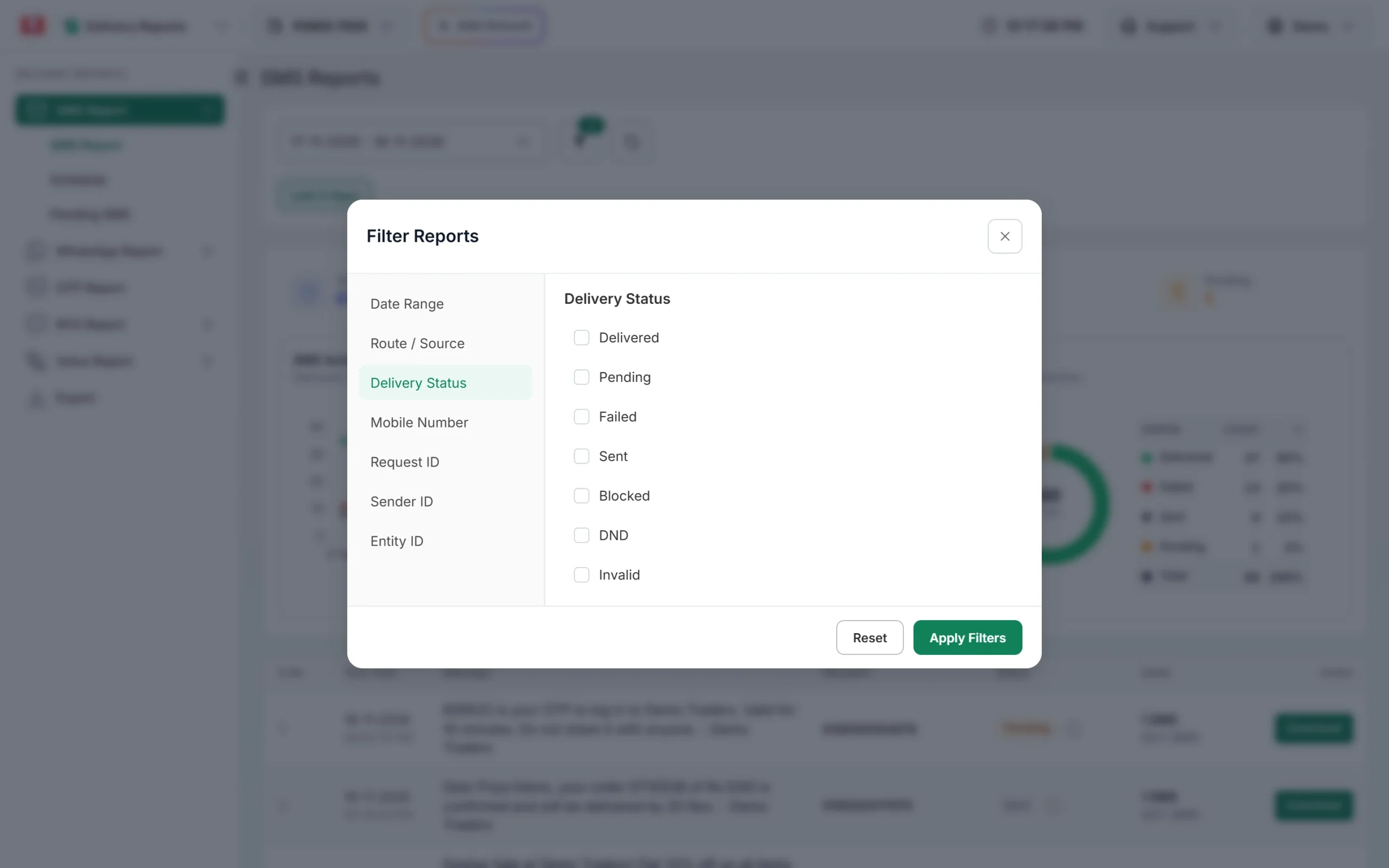
Filter the report to see only failed, blocked and DND numbers. -
Open the campaign and read the description
Click the message text in any row. The Delivery Details window opens. In the Receivers table, the Status and Description columns tell you what happened to each number. “DND activated” means the customer’s preference stopped a promotional message. Operator reasons such as “Operator rejected” point to a mismatch with your DLT records.
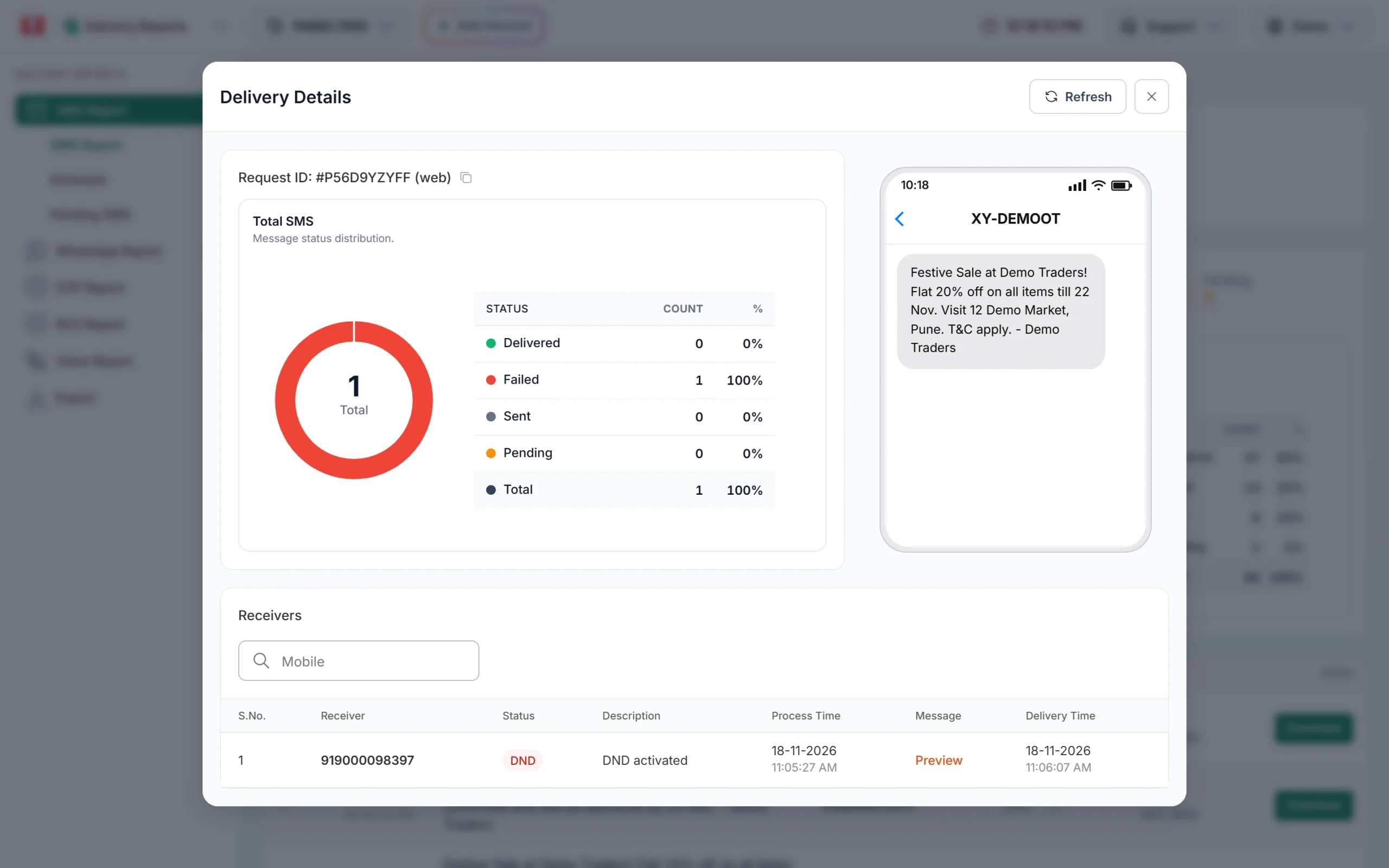
A promotional SMS stopped because the number is on DND. -
Compare the message with your DLT template
Go to DLT Manager > Content Template and find the template by its Template ID or text. Check the status badge, the category (Service or Promo) and the exact text. A rejected template shows its Reason on the card.
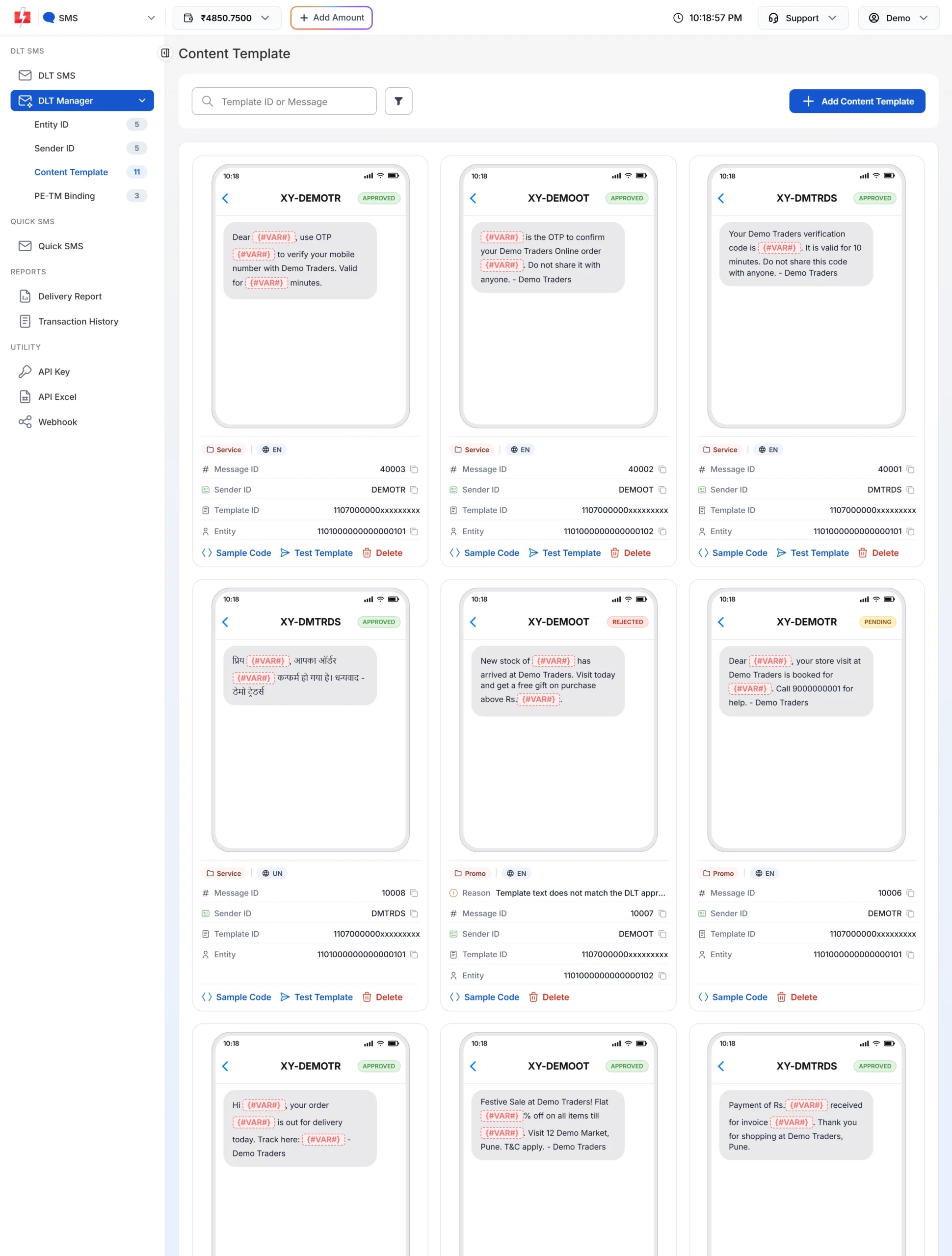
Template cards show status, category, language and any rejection reason.
How to fix the most common scrubbing failures
| Problem | How to fix it |
|---|---|
| Text does not match the template | Copy the approved text from your DLT portal again. Put values only where the template has {#var#}. Keep fixed words, spaces and punctuation exactly the same. |
| Variable value too long | Shorten the value. Each variable type has a character limit on DLT. Long names, long links and long amounts are the usual cause. |
| Header not active on DLT | Log in to your DLT portal and check the header status. If it is inactive or suspended, reactivate it there first. |
| Template linked to another header | On the DLT portal, link the template to the header you send from. In Fast2SMS, pick the same sender ID when you send. |
| Link not whitelisted | Whitelist the full domain of every link in the CTA section of your DLT portal. Use short links only from your own whitelisted domain. |
| PE-TM chain missing | Complete the chain to Fast2SMS on your DLT portal and on the PE-TM Binding page. Both approvals must show Approved. |
| Promotional SMS to DND numbers | This cannot be bypassed. Send promotional offers only to people who have not blocked that category, or use a transactional template for genuine transactional messages only. |
| Promotional SMS sent at night | Send promotional campaigns between 10 AM and 9 PM. Fast2SMS holds promotional SMS sent at night and sends them the next morning. |
What does “preference not matched” mean in DLT?
“Preference not matched” is a scrubbing result some operators return when the customer’s DND preference does not allow the message. For example, the customer has blocked all promotional messages, or has blocked the category your message belongs to, such as real estate or banking offers. It only applies to promotional and service explicit messages.
In the Fast2SMS report these numbers show as DND with the description “DND activated”. You cannot fix it from your side by changing the message. The customer has to change their own preference, or give you consent in the way TRAI allows.
Common problems and fixes
My test SMS was delivered but the campaign failed. The campaign probably used different variable values. One long value is enough to break the match. Test with your longest real values.
Only some numbers failed. If the failures are on DND numbers, the template is promotional or service explicit. If they are spread across all operators, check the template text and links. If they are only on one operator, your records on that operator may be out of date.
Everything failed after it worked yesterday. Check your header and template status on the DLT portal and your PE-TM chain. A suspended header or a broken chain stops all messages at once.
Frequently asked questions
Who does DLT scrubbing, Fast2SMS or the operator?
The operator does it. Jio, Airtel, Vi and BSNL each scrub messages that go to their customers. Fast2SMS checks your sender ID and template before sending, but the final decision is the operator’s.
How long does DLT scrubbing take?
It takes a fraction of a second. That is why a scrubbing failure usually shows up in your report almost right away, while a normal delivery report can take longer.
Can Fast2SMS skip scrubbing for my account?
No. Scrubbing is a TRAI rule that every operator applies to every business SMS in India. No provider can skip it.
Do OTP and transactional SMS go through scrubbing?
Yes. They are checked for entity, header, template, links and PE-TM chain. They are not blocked by DND, because DND applies to promotional messages.
Am I charged for SMS that fail scrubbing?
DLT SMS are charged when you send the campaign, for every valid number and every SMS part. Duplicate and invalid numbers are removed before charging. Failed numbers are not refunded automatically, so fix the cause before you send large campaigns.
Why does the report say “Sent” and not “Delivered”?
“Sent” means the operator accepted the message but has not sent the final delivery report yet. A scrubbing rejection shows as Failed, Blocked or DND, not as Sent.
Does scrubbing check the variable values?
Yes. The operator checks that the value fits the variable type and its length limit. A link inside a plain variable, or a value that is too long, can make the whole message fail.