
In the Fast2SMS DLT SMS API, variables_values fills the {#var#} places in your approved DLT template. You send one value per variable, in the same order as in the template, separated by the pipe sign |. This page shows how to pass variables_values correctly, with examples for GET and POST, the 40-character limit, links in variables, and the mistakes that change or break your SMS text.
Before you start
- An approved content template in DLT Manager, linked to your sender ID.
- The template’s Message ID (on the template card).
- Your API key from API Key, with API Access on.
How variables_values works
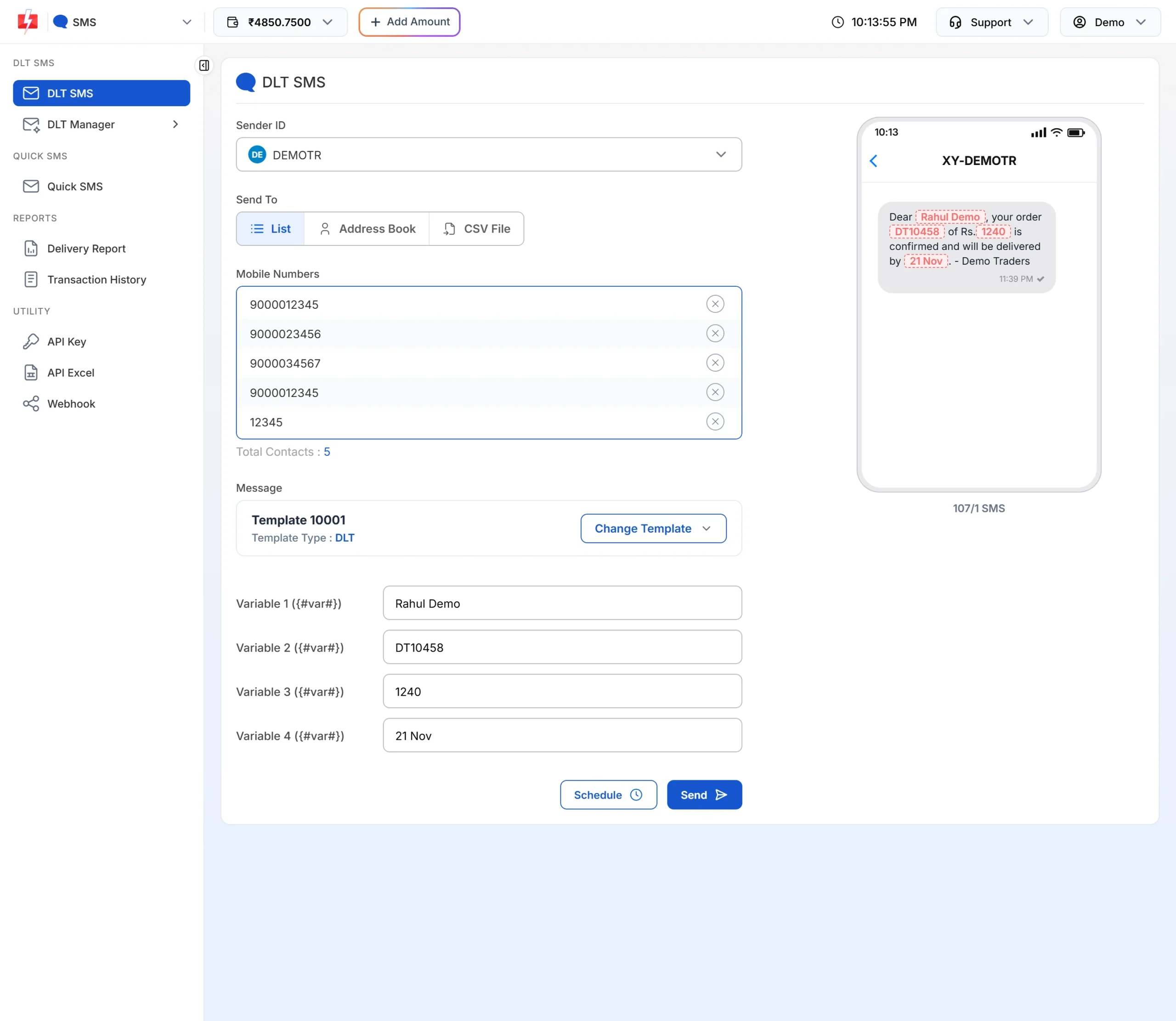
Take this approved template on sender DEMOTR, Message ID 10001:
Dear {#var#}, your order {#var#} of Rs.{#var#} is confirmed and will be delivered by {#var#}. – Demo Traders
It has 4 variables. Send 4 values in order:
variables_values = Rahul|DT10458|1240|21 NovThe customer gets:
Dear Rahul, your order DT10458 of Rs.1240 is confirmed and will be delivered by 21 Nov. – Demo Traders
| Position | Variable in template | Value sent |
|---|---|---|
| 1 | Dear {#var#} | Rahul |
| 2 | your order {#var#} | DT10458 |
| 3 | Rs.{#var#} | 1240 |
| 4 | delivered by {#var#} | 21 Nov |
The order is the order in which the variables appear in the template text, left to right. It is the same as Variable 1, Variable 2 and so on in the panel’s DLT SMS form.
Rules for each value
| Rule | What it means for you |
|---|---|
One value per {#var#}, in order |
Count the variables on the template card (or var_count in the DLT Manager API) and send exactly that many values. |
Separated by | |
Do not put a | inside a value. It would be read as the start of the next value. |
| Each value is cut to 40 characters | Anything after the 40th character is dropped. Keep names, addresses and links short. |
| Empty values are allowed | Rahul||1240|21 Nov leaves the second variable empty. The SMS still has to match DLT, so avoid empty values where the operator expects text. |
| Links must be allowed | A value that starts with your Fast2SMS short-link domain must be one of your approved tracked links, or you get error 426. |
| Only needed when the template has variables | For a template with no {#var#}, leave variables_values out. |
Send variables in code
-
Check the template and count the variables
Open DLT Manager > Content Template. The card preview marks each variable in red. Note the Message ID and the linked Sender ID.
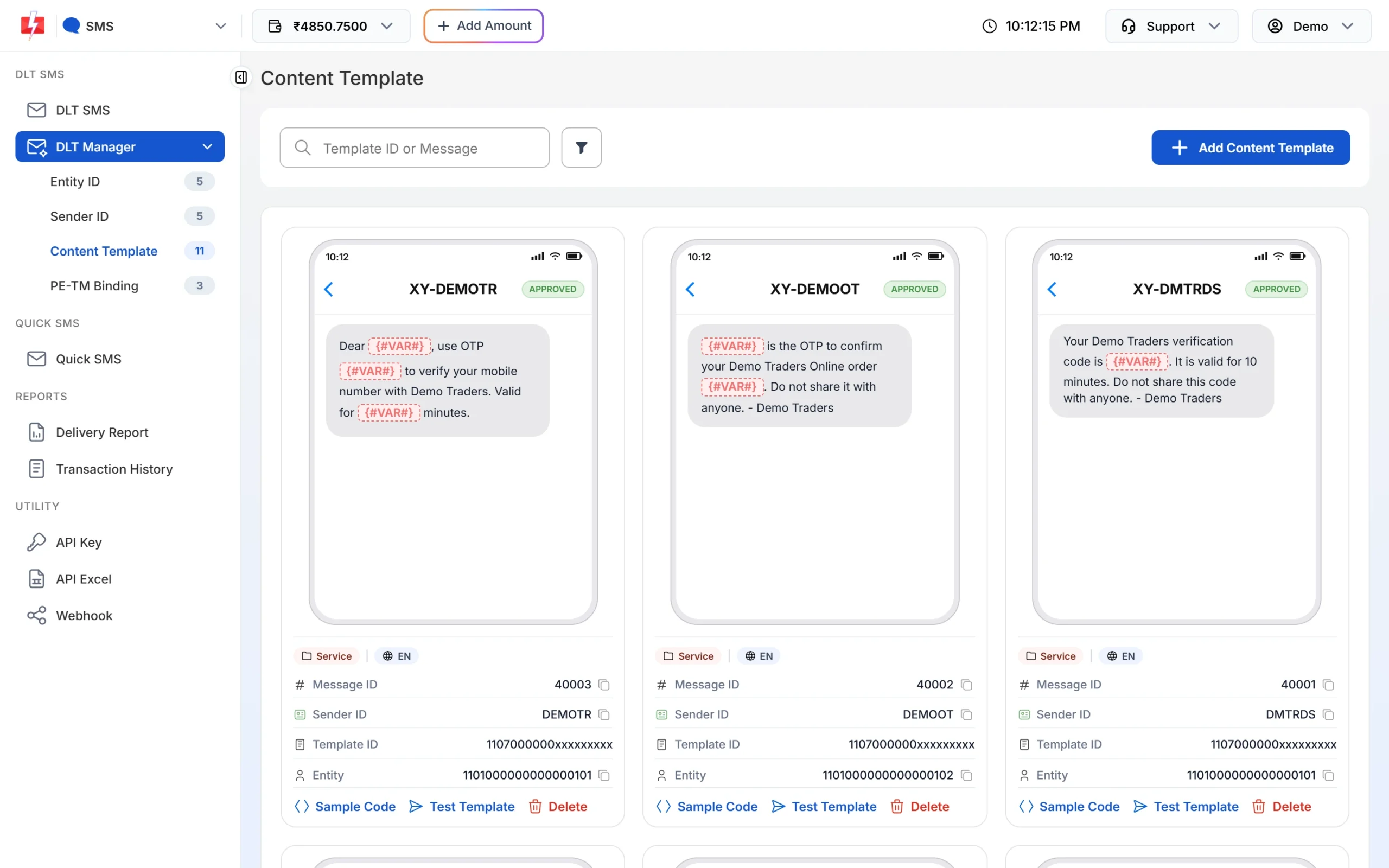
Each red {#VAR#} needs one value in variables_values. -
Join your values with |
Build the string in your code from your own data, in template order. Most languages have a join function, as shown below.
-
Send it and check the text
Send to your own number first. Add
"sms_details": 1to see the character count and SMS parts in the reply, then check the SMS on your phone.
cURL (POST JSON)
curl -X POST "https://www.fast2sms.com/dev/bulkV2" \
  -H "authorization: YOUR_API_KEY" \
  -H "Content-Type: application/json" \
  -d '{"route":"dlt","sender_id":"DEMOTR","message":"10001","variables_values":"Rahul|DT10458|1240|21 Nov","numbers":"9999999999","sms_details":1}'
cURL (GET)
In a GET URL the space and the | must be URL-encoded. --data-urlencode does it for you. Written by hand, the value becomes Rahul%7CDT10458%7C1240%7C21%20Nov.
curl -G "https://www.fast2sms.com/dev/bulkV2" \
  -H "authorization: YOUR_API_KEY" \
  --data-urlencode "route=dlt" \
  --data-urlencode "sender_id=DEMOTR" \
  --data-urlencode "message=10001" \
  --data-urlencode "variables_values=Rahul|DT10458|1240|21 Nov" \
  --data-urlencode "numbers=9999999999"
PHP
<?php
$order = ['name' => 'Rahul', 'id' => 'DT10458', 'amount' => 1240, 'date' => '21 Nov'];

// Same order as the {#var#} places in the template. Remove | and cut to 40 characters.
$clean = fn($v) => mb_substr(str_replace('|', ' ', (string) $v), 0, 40);
$vars  = implode('|', array_map($clean, [$order['name'], $order['id'], $order['amount'], $order['date']]));

$ch = curl_init('https://www.fast2sms.com/dev/bulkV2');
curl_setopt_array($ch, [
    CURLOPT_POST           => true,
    CURLOPT_RETURNTRANSFER => true,
    CURLOPT_HTTPHEADER     => ['authorization: YOUR_API_KEY', 'Content-Type: application/json'],
    CURLOPT_POSTFIELDS     => json_encode([
        'route' => 'dlt', 'sender_id' => 'DEMOTR', 'message' => '10001',
        'variables_values' => $vars, 'numbers' => '9999999999',
    ]),
]);
echo curl_exec($ch);
curl_close($ch);
Python
import requests

def clean(v):
    return str(v).replace("|", " ")[:40]

values = ["Rahul", "DT10458", 1240, "21 Nov"]  # template order
variables_values = "|".join(clean(v) for v in values)

r = requests.post(
    "https://www.fast2sms.com/dev/bulkV2",
    headers={"authorization": "YOUR_API_KEY"},
    json={"route": "dlt", "sender_id": "DEMOTR", "message": "10001",
          "variables_values": variables_values, "numbers": "9999999999"},
    timeout=20,
)
print(r.json())
Node.js
const clean = (v) => String(v).replaceAll("|", " ").slice(0, 40);
const values = ["Rahul", "DT10458", 1240, "21 Nov"]; // template order

const res = await fetch("https://www.fast2sms.com/dev/bulkV2", {
  method: "POST",
  headers: { authorization: "YOUR_API_KEY", "Content-Type": "application/json" },
  body: JSON.stringify({
    route: "dlt",
    sender_id: "DEMOTR",
    message: "10001",
    variables_values: values.map(clean).join("|"),
    numbers: "9999999999",
  }),
});
console.log(await res.json());
Java
String vars = String.join("|", "Rahul", "DT10458", "1240", "21 Nov");
String json = "{\"route\":\"dlt\",\"sender_id\":\"DEMOTR\",\"message\":\"10001\","
            + "\"variables_values\":\"" + vars + "\",\"numbers\":\"9999999999\"}";
// Send json with HttpClient as a POST to https://www.fast2sms.com/dev/bulkV2
// with the headers authorization: YOUR_API_KEY and Content-Type: application/json.
// Use a JSON library if your values can contain quotes.Common problems and fixes
| Problem | Cause | Fix |
|---|---|---|
| Values appear in the wrong places | Values sent in a different order than the template | Follow the template text left to right. |
| A name or link is cut off | The value is longer than 40 characters | Shorten it. For links, use a short URL that is allowed in your DLT template. |
| Text after a value moves to the next variable | The value contains | |
Replace | in your data before joining. |
| Error 426 “Invalid link used in variables” | A value starts with a Fast2SMS short link that is not your approved tracked link | Use your own approved tracked link, or a plain URL approved in DLT. |
| Error 429 “Invalid characters…” | Text is not valid UTF-8, often from a GET URL that was not encoded | Send UTF-8 and URL-encode GET values. Nothing was sent or charged. |
| SMS accepted by the API but failed at the operator | The filled text breaks the DLT template, for example letters in a numeric variable | Send values that fit the template. Failed DLT SMS are not refunded automatically. |
Frequently asked questions
What is the maximum length of one variable?
Each value is cut to 40 characters by the API. Your DLT approval may set its own limit for the variable as well.
Can I use var1, var2 instead of variables_values?
On the DLT SMS route, use variables_values with the pipe sign. That is the format the API documents for DLT SMS.
Do I send variables_values for a template without variables?
No. Leave it out. Fast2SMS sends the approved text as it is.
Can I send Hindi text in a variable?
The SMS language comes from the approved template. If your template is in Hindi, send Hindi values in UTF-8. The SMS is then counted as Unicode, which allows fewer characters per part.
How do I send different values to different numbers?
One bulkV2 call sends the same values to every number in it. For different values per number in one call, use the /dev/custom endpoint with one item per message.
Does a long variable cost more?
It can. The final SMS length decides the number of parts. English text above 160 characters becomes 2 parts, and each part is charged.