
An “Entity ID not found” error means the operator could not find the Entity ID (your PE ID, the ID of your business on DLT) that came with the SMS, or found it inactive. A “PE not registered” or “not allowed for telemarketer” error means your entity is not chained to the telemarketer that delivered the SMS. Either way the operator stops the message during DLT scrubbing.
Below are the exact error texts from Airtel, Jio and SmartPing and how to check your Entity ID and PE-TM chain in Fast2SMS.
Entity ID not found: the exact error texts
| Error text | Operator and code | What it means |
|---|---|---|
| ENTITY_NOT_FOUND, Entity ID not found in DLT | Jio 609, SmartPing 7003 | No entity with this ID exists on DLT. |
| ENTITY_INACTIVE, Entity inactive at operator, EntityID Inactive/Not registered | Jio 601, SmartPing 7005, Airtel 802 | The entity is not registered, or not active. |
| INVALID_ENTITY_ID, Invalid Entity ID format, Entity ID Blank, The required tag of PE id is missing, TLV_PEID_NOT_FOUND | Jio 604 and 698, SmartPing 604 and 7004, Airtel 9026 | The Entity ID was badly formed or did not reach the operator. |
| Entity ID not Matching, Entity_ID_Not_Matched, TEMPLATE_NOT_REGISTERED_TO_ENTITY, Entity not registered for the submitted template | SmartPing 7001, 5205 and 638, Jio 647 | The header or template is registered under a different Entity ID. |
| ENTITY_ID_NOT_ALLOWED_FOR_TM, PE_TM_CHAIN_NOT_REGISTERED, PE_TM_CHAIN_INACTIVE | Jio 605, SmartPing 605 and 614 to 616, Airtel 811 to 813 | Your entity has no active PE-TM chain to the telemarketer. |
For other codes, see the full lists for Jio, Airtel and SmartPing.
Why it happens
- A wrong digit in the Entity ID saved in Fast2SMS or sent in your API request.
- The entity is not active. DLT registration is renewed every year. If the renewal is due, the entity can show as inactive. See DLT fees and validity.
- PE-TM chain missing. Your entity has not completed the chain to Fast2SMS as telemarketer, or the final approval from your side is pending.
- Bad value in the DLT Manual API. Send
entity_idas digits only, with no spaces or letters. A value that is not a number is not used as your Entity ID.
How to fix an Entity ID not found error
-
Check the Entity ID in DLT Manager
Go to DLT Manager > Entity ID and compare each Entity ID with your DLT certificate, digit by digit. A rejected entity shows the reason in red.
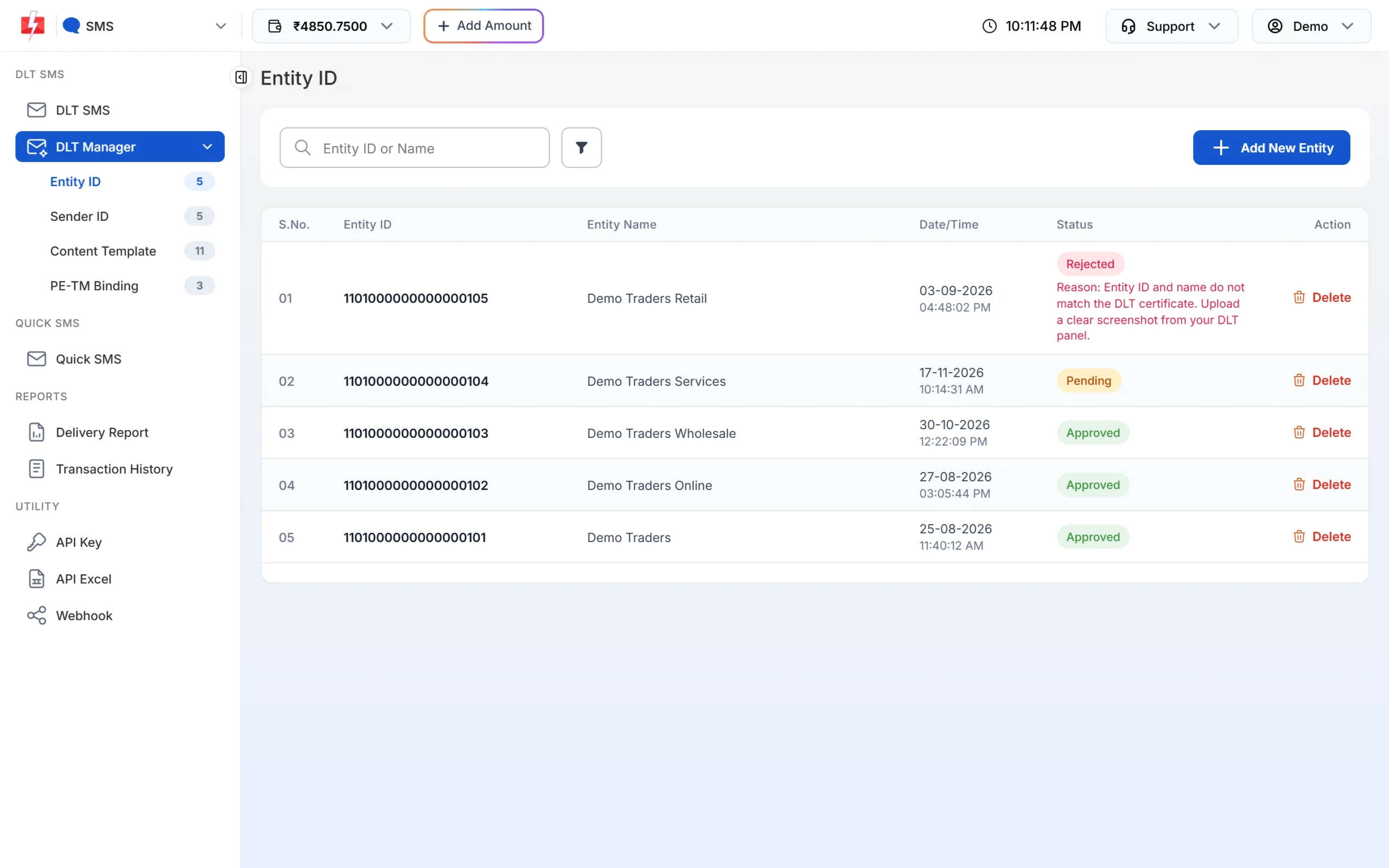
Your entities with their status. -
Check the entity on your DLT portal
Check that the entity is active, the renewal is not due, and your headers and templates sit under this same Entity ID. Fast2SMS shows its own record, so the portal is where the live status is.
-
Add the correct Entity ID
If the ID in Fast2SMS is wrong, click Add New Entity and type the Entity ID and name. When the ID is found on DLT, it is approved straight away. If it cannot be verified, you see “Invalid Entity ID” and need to upload a screenshot from your DLT portal, and the entity waits as Pending.
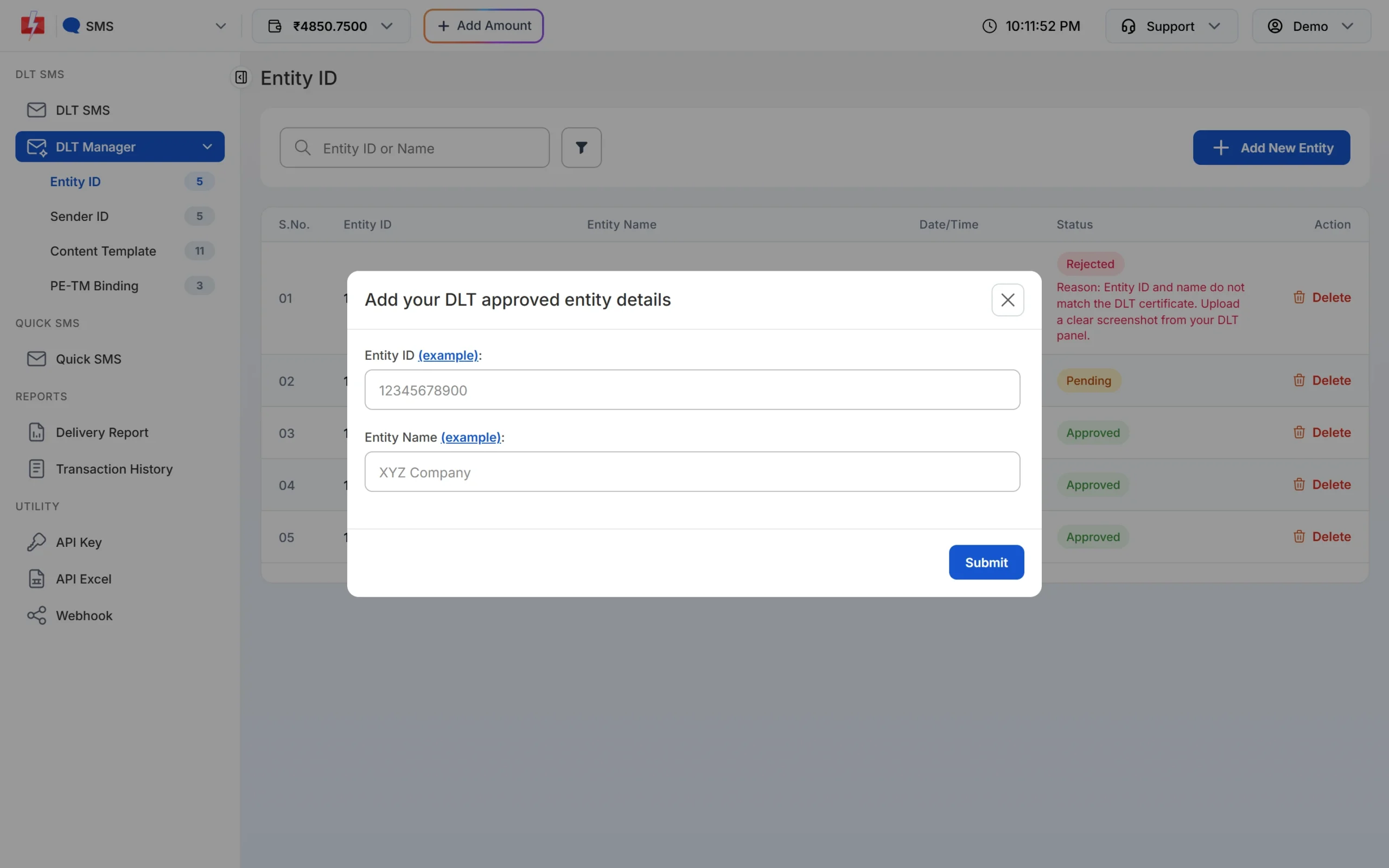
Add your Entity ID exactly as it is on your DLT certificate. -
Check your PE-TM chain
Open DLT Manager > PE-TM Binding. In Your bindings, both TM Approval and Final PE Confirmation should show Approved. If you see “Approve again from DLT Panel”, finish the approval on your portal. The full steps are in PE-TM binding in Fast2SMS.
Frequently asked questions
What does Entity ID not found mean?
The operator could not find the Entity ID sent with your SMS on DLT. Check the ID against your DLT certificate and correct it in DLT Manager or in your API request.
What does “Entity blocked” mean in Fast2SMS?
The entity is on the Fast2SMS block list, so nothing is sent. See error 500: Entity blocked.
What does PE not registered mean?
It usually means the PE-TM chain from your entity to the telemarketer is missing or not active. Complete it on your DLT portal and on the PE-TM Binding page.
Do I need a separate Entity ID for each operator?
No. One DLT registration works for all operators, and the PE-TM chain is set up on the portal where your business registered.
Am I charged for SMS that fail with an entity error?
Yes. DLT SMS are charged when the campaign is sent, for every valid number, and numbers that later fail at the operator are not refunded automatically.