
The Fast2SMS errors “Entity blocked”, “Content template blocked” and “Sender id blocked” (status code 500) mean the DLT entity, template or sender ID in your request is on the Fast2SMS DLT block list. While it is there, Fast2SMS will not send SMS with it. You cannot clear this from your own code. Check the item at your DLT portal and contact Fast2SMS support.
The exact error
The SMS API (/dev/bulkV2) answers with one of these:
{"return":false,"status_code":500,"message":"Entity blocked"}
{"return":false,"status_code":500,"message":"Content template blocked"}
{"return":false,"status_code":500,"message":"Sender id blocked"}
Sometimes the message is a specific reason text instead. The public docs describe this error as “Template/Sender id blacklisted at DLT”.
| Where | How it shows |
|---|---|
| DLT SMS and DLT Manual API | status_code 500 with the message above |
| Smart OTP Send API (SMS) | HTTP 400 with “Entity blocked”, “Content template blocked”, “Sender ID blocked” or the reason |
Many messages in one call (/dev/custom) |
status_code 500 with the reason and the item number, for example “(requests.2)” |
| Panel, when adding a sender | “Sender ID blocked, contact Fast2SMS support.” |
Why it happens
Fast2SMS keeps a block list of DLT entities, sender IDs (headers) and content templates. An item is put on it when it should not be used for sending, for example when the header or template is blacklisted or not active at DLT. The message tells you which part is blocked: the entity, the template or the sender.
Nothing is sent and nothing is charged for a blocked request.
How to fix it
-
Note the exact message and request
Go to Account Setting, then API Logs, and open View Details on the failed row. Note the message, the sender ID and the template you sent.
-
Check the item in DLT Manager
Go to SMS, then DLT Manager. Look at the entity in Entity ID, the sender in Sender ID and the template in Content Template. A rejected item shows its reason in red.
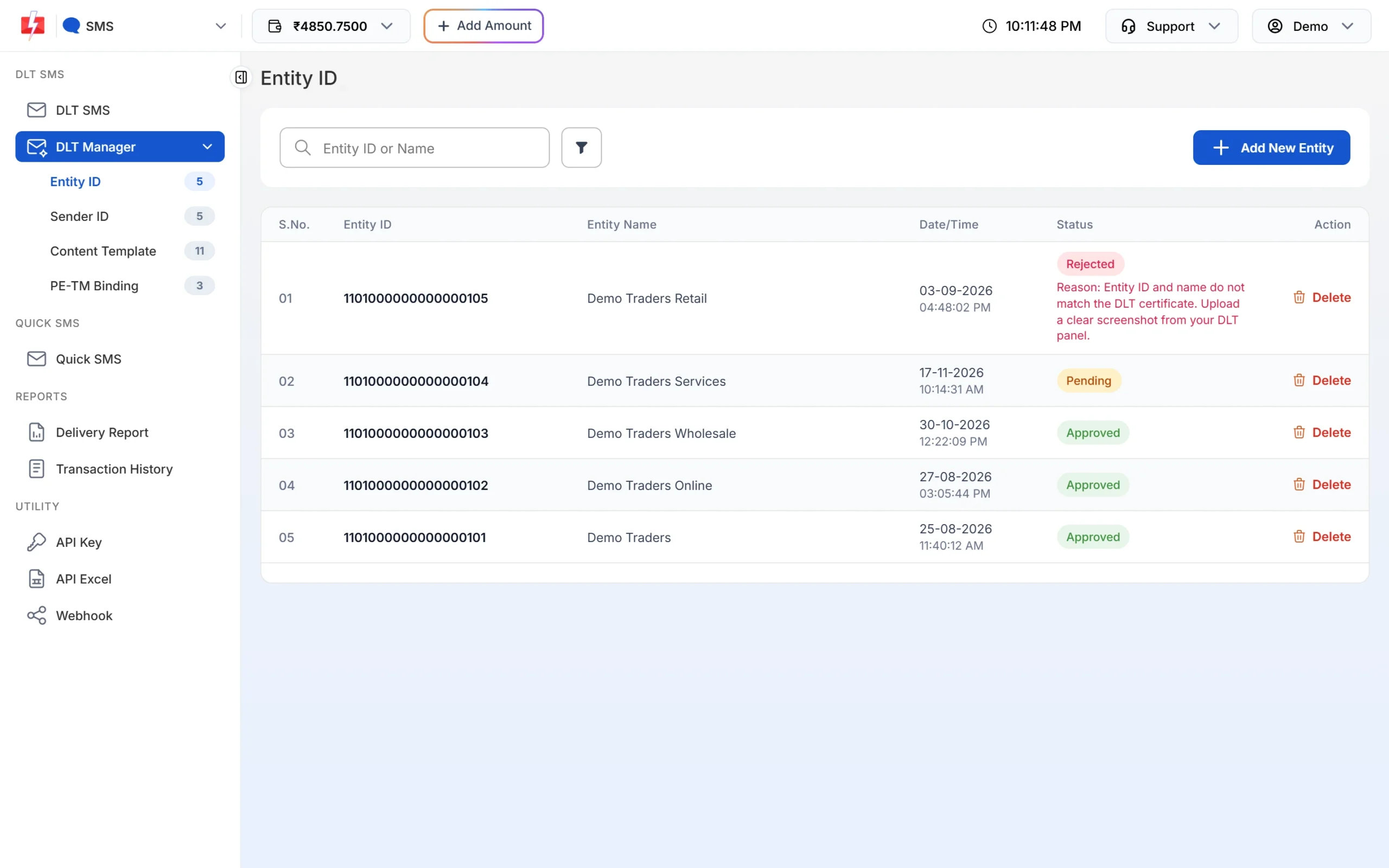
DLT Manager shows the status of each entity, sender and template. -
Check the status at your DLT portal
Log in to the DLT portal where you registered (Jio, Airtel, Vi, BSNL and others) and check whether the header or template is active. If it was suspended or blacklisted there, follow the portal’s steps to reactivate it.
-
Contact Fast2SMS support
Share the exact error, the sender ID and the DLT template ID. If the item is active at DLT, support can check why it is on the block list.
-
Use another approved sender or template meanwhile
If you have another approved sender and template for the same message, switch to them while the block is checked.
Code check
A block is not a temporary error. Stop retrying and raise an alert with the details:
data = resp.json()
msg = str(data.get("message", ""))
if data.get("status_code") == 500 and "blocked" in msg.lower():
    alert_team(f"Fast2SMS DLT block: {msg} sender={payload['sender_id']} msg={payload['message']}")
# do not retry the same sender/templateHow to avoid it
- Send only the kind of message each template is registered for.
- Respect promotional timing and opt-out rules, so your header does not collect complaints.
- Keep your DLT headers and templates active. Check the portal if you have not used one for a long time.
- Register a second approved header and template for critical traffic such as OTPs.
Frequently asked questions
What does “Sender id blocked” mean in Fast2SMS?
The sender ID is on the Fast2SMS DLT block list, so no SMS can be sent with it. Check it at DLT and contact support.
Can I unblock it myself?
No. You can fix the cause at your DLT portal, but the block list is managed by Fast2SMS. Contact support.
Am I charged for a blocked request?
No. The request is refused before sending.
Does this also stop my OTPs?
Yes, if your Smart OTP SMS template uses the blocked entity, sender or template. A WhatsApp OTP template is not affected.
My header is active at DLT. Why is it blocked?
Contact Fast2SMS support with the sender ID and template ID. They can check the reason with you.