
Fast2SMS API error 424, “Invalid Message ID (or Template, Entity ID)”, is the most common DLT SMS API error. For route=dlt it means the message value is not an approved template of yours that is linked to the sender ID you used. Most often the 19-digit DLT template ID was sent instead of the short Message ID from DLT Manager. This page shows how to find the right value.
The exact error
The SMS API (/dev/bulkV2) answers with HTTP 400:
{"return":false,"status_code":424,"message":"Invalid Message ID (or Template, Entity ID)"}The public docs list it as “Invalid Message ID”. It is the same error.
Why it happens
With route=dlt
- You sent the DLT template ID. The
messagefield needs the Message ID shown on the template card in DLT Manager (for example40001), not the 19-digit Content Template ID from your DLT portal. - The template is not approved yet. Pending and rejected templates cannot be used.
- The template is not linked to this sender. Each template is linked to one or more sender IDs. Using it with a different sender gives 424.
- The template is in another account, or it was deleted.
With route=dlt_manual
The entity_id or template_id is missing and could not be filled in from your DLT Manager templates. Send both IDs with each request.
How to fix error 424
-
Open your content templates
Go to SMS, open DLT Manager and click Content Template. Each card shows the status (APPROVED, PENDING or REJECTED), the Message ID, the Sender ID it is linked to, and the half-masked Template ID.
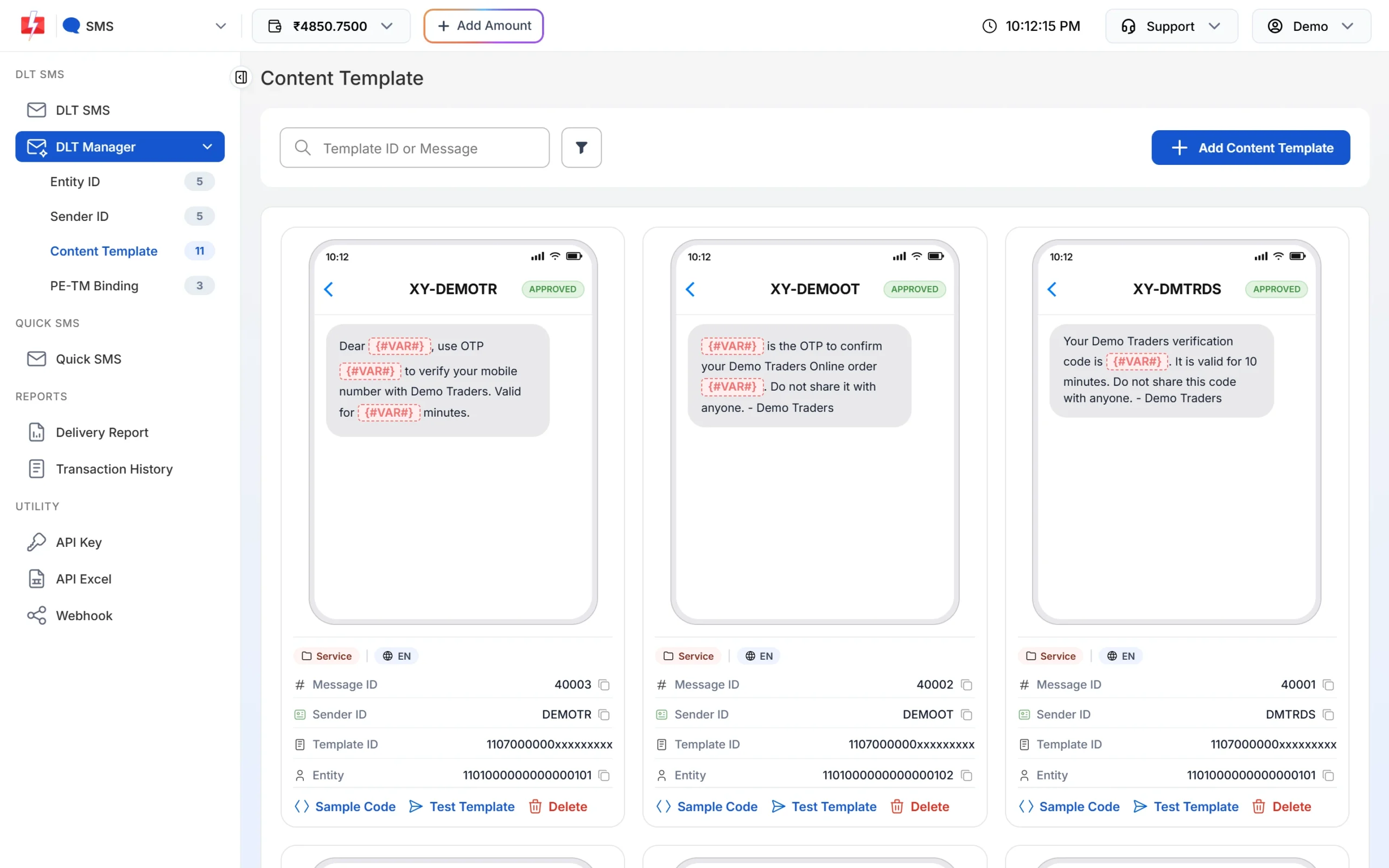
Use the Message ID, not the Template ID. -
Match the Message ID with its sender
In your request, set
messageto the Message ID andsender_idto a sender shown on that same card. Make sure the badge says APPROVED. -
Copy the ready code
Click Sample Code on the card. The snippet already has the right sender ID, Message ID and
route=dlt. Pick cURL, PHP, Node.js or Python and click Copy.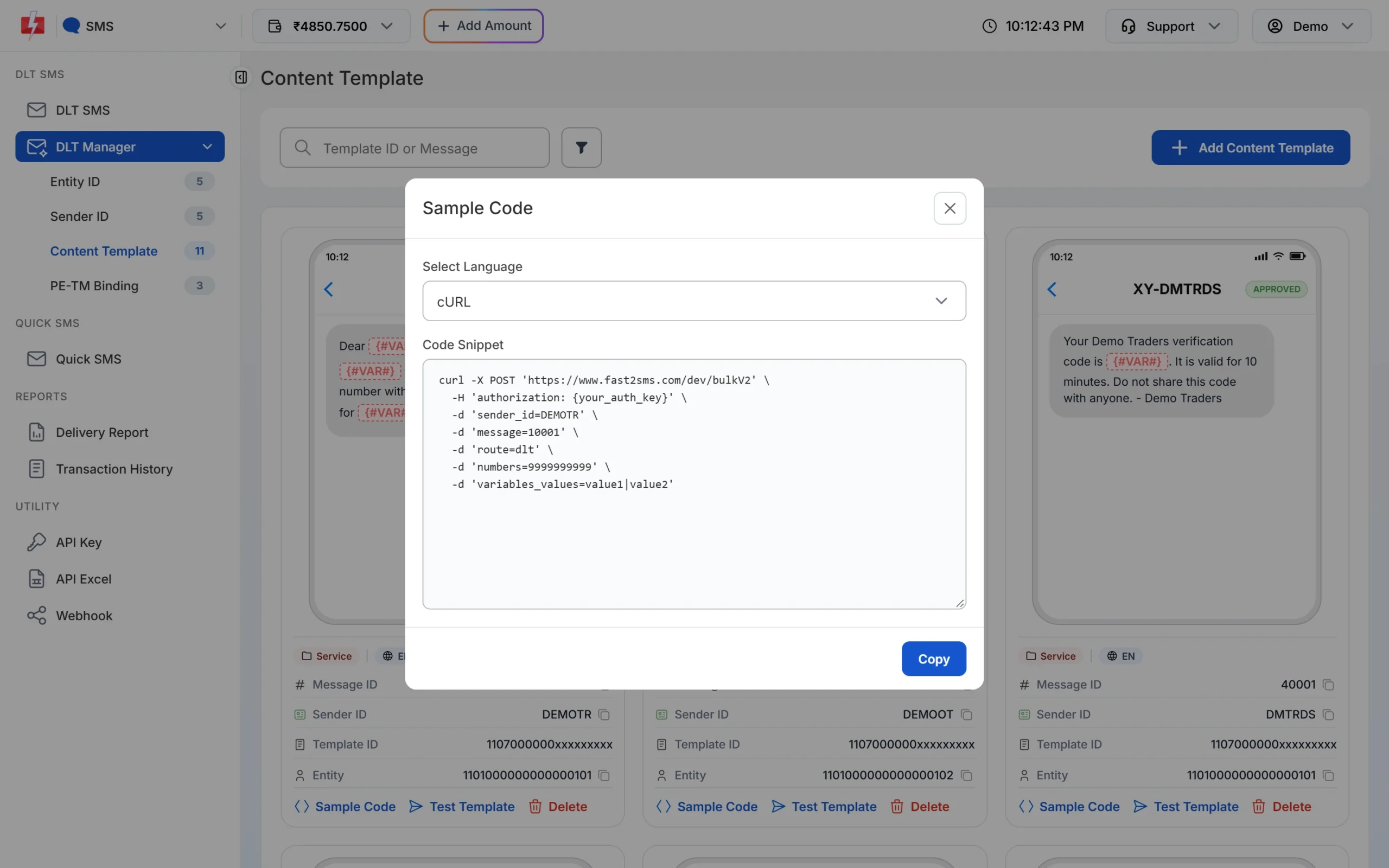
Sample Code fills in the Message ID for you.
Code check
Fetch your Message IDs by API and check the pair before you send:
curl "https://www.fast2sms.com/dev/dlt_manager?type=template" -H "authorization: YOUR_API_KEY"
# each sender has templates[] with "message_id" and "status":"Approved"
curl -X POST "https://www.fast2sms.com/dev/bulkV2" \
-H "authorization: YOUR_API_KEY" -H "Content-Type: application/json" \
-d '{"route":"dlt","sender_id":"DMTRDS","message":"40001","variables_values":"4821","numbers":"9999999999"}'A 19-digit number in message is a sure sign of this error. Also make sure route is set to dlt.
Related error: 425 Invalid Template
{"status_code":425,"message":"Invalid Template"} means the template could not be found as approved when the SMS text was built. The fix is the same: use an approved template’s Message ID and check its status in DLT Manager.
How to avoid it
- Save the Message ID and its sender ID together in your config.
- When you add a template in DLT Manager, tick every sender ID you plan to use with it.
- Wait for the APPROVED badge before you put a new Message ID live.
- Download API Excel for SMS to get all approved templates with sample requests.
Frequently asked questions
What is the Message ID in Fast2SMS?
It is the short ID Fast2SMS gives each content template in DLT Manager. You pass it as message in the DLT SMS API.
Can I use my 19-digit DLT template ID in the API?
Not with route=dlt. Use the Message ID. The 19-digit ID is used with route=dlt_manual as template_id.
My template is approved but I still get 424. Why?
The template is probably not linked to the sender ID you sent. Check the Sender ID line on the template card.
Is error 424 charged?
No. The request is refused before sending, so nothing is debited.
Is there another 424 error?
Yes. “Invalid Schedule Date & Time” also uses code 424. It is about schedule_time, not the template.