
The Fast2SMS Verify OTP API returns “OTP not found or already verified” when there is no open OTP for that mobile number. Either the code was already used, no OTP was sent to that number, or the last OTP was closed earlier. The fix is to send a new OTP and make sure your app verifies each code only once.
The exact error
The Verify API (/dev/otp/verify) answers with HTTP 404:
{"return":false,"status_code":404,"message":"OTP not found or already verified"}How Verify finds the OTP
Verify takes only mobile and otp. It does not need an OTP ID. It looks for the latest unverified OTP sent to that mobile number, whatever OTP ID it was sent with. If there is none, you get this 404.
Why it happens
- The OTP was already verified. A code works once. A second verify call for the same code, for example from a double click or an automatic retry, gets this error.
- No OTP was sent to this number. The Send call failed (for example with “Please wait N seconds” or a balance error), or your app sent the OTP to a different number than the one it verifies.
- The last OTP is already closed. An OTP that ran past its expiry or was locked after too many wrong tries is no longer open, so later verify calls may find nothing.
Sending a new OTP to a mobile cancels all older unverified OTPs for that number, even ones sent with another OTP ID. If the user types an older code after a new one was sent, Verify checks it against the newest OTP and answers “Invalid OTP”.
How to fix it
-
Check the send and verify calls in API Logs
Go to Account Setting, then API Logs. Search by the mobile number. Look for an OTP/SEND row with “OTP sent successfully” before the OTP/VERIFY row. If the send failed, fix that error first. If there are two verify rows, the first one already used the code.
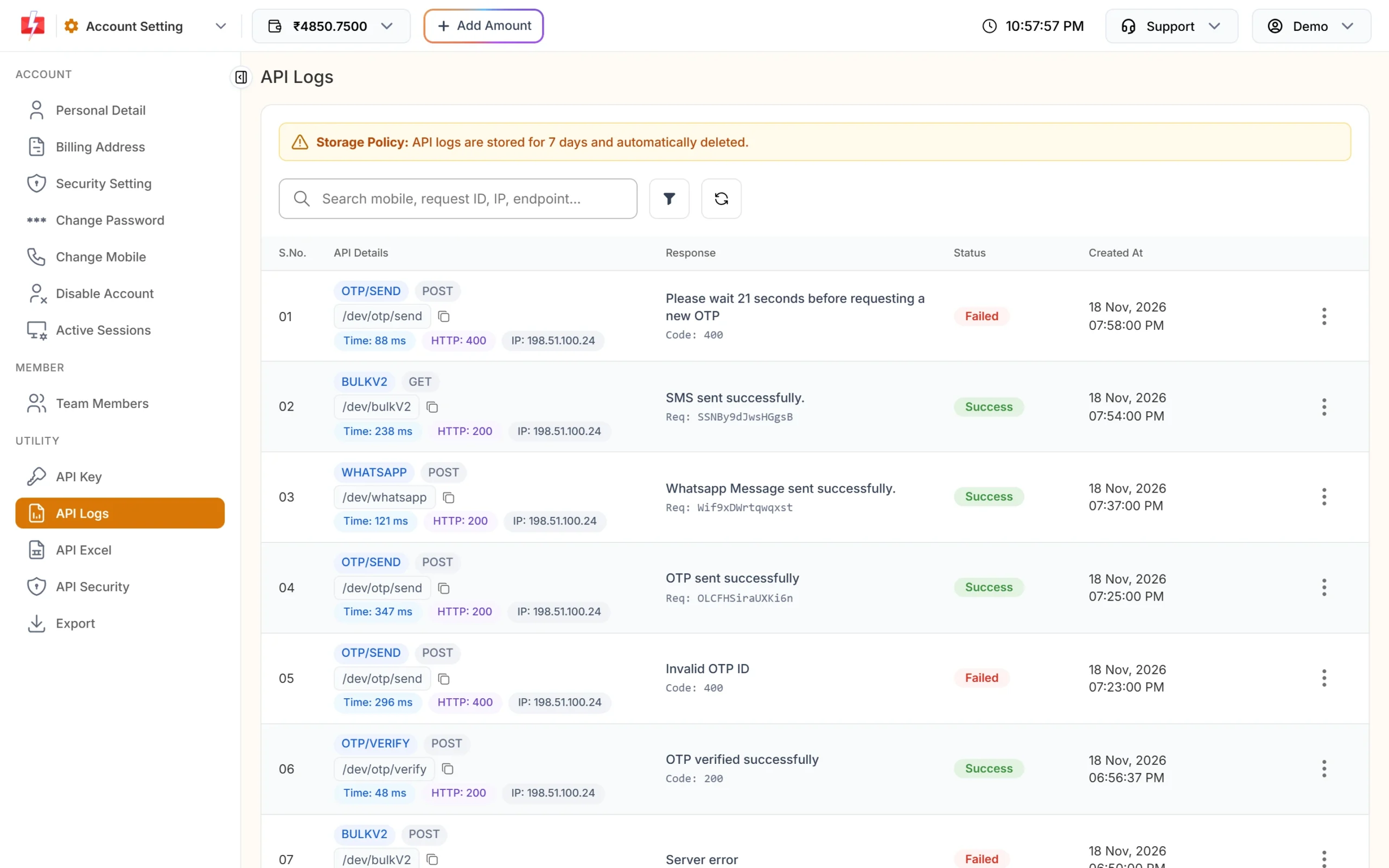
Match each verify call with an earlier successful send. -
Compare the mobile numbers
Both calls must use the same 10-digit number. Fast2SMS removes spaces, symbols and a leading 91, so
+91 99999 99999and9999999999are the same number. A different number is not. -
Send a new OTP
Call
/dev/otp/sendagain and ask the user to enter the new code. Do not call Resend after a code was verified. Resend answers “OTP already verified. Please request a new OTP.” -
Check verification results in the OTP export
To see which OTPs were verified, open Delivery Reports, then Export, choose OTP and a date range, and click Submit. The file has Verified (Yes / No / Expired) and Verified At columns.
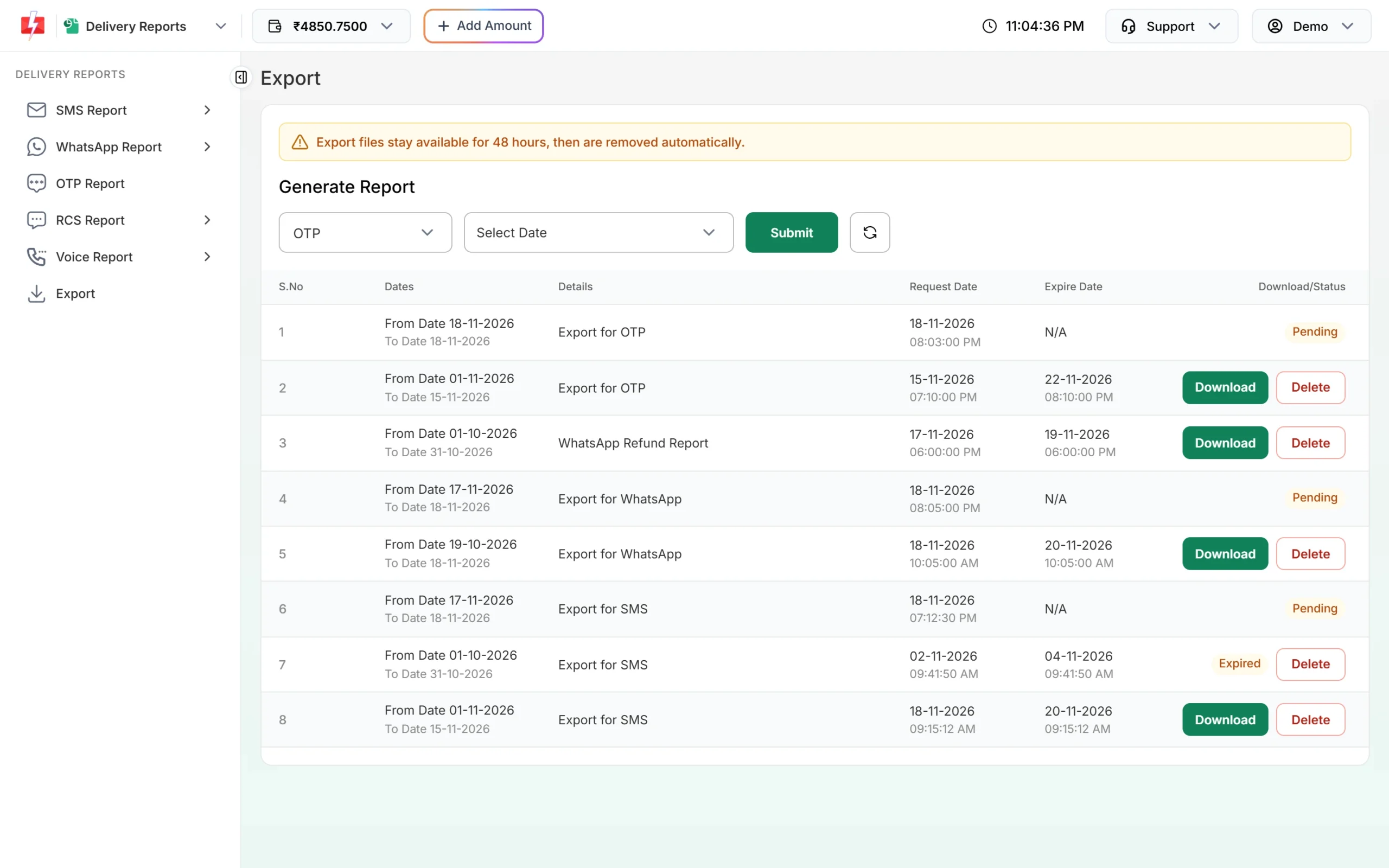
The OTP export shows which codes were verified.
Code check
Treat a 200 reply as final and stop sending the same code again:
const r = await fetch("https://www.fast2sms.com/dev/otp/verify", {
  method: "POST",
  headers: { "authorization": process.env.F2S_KEY, "Content-Type": "application/json" },
  body: JSON.stringify({ mobile: "9999999999", otp: codeFromUser })
});
const data = await r.json();
if (r.status === 200 && data.return) {
  // log the user in, mark the session verified
} else if (r.status === 404) {
  // show: "This code is no longer valid. Tap Send code to get a new one."
}
Disable the submit button while the request runs, so a double click cannot send the same code twice.
How to avoid it
- Verify each code once. Save the result in your session instead of calling Verify again.
- Do not send a new OTP in the background while the user is typing the old one.
- Check
returnon every Send reply. Only show the code screen when the send succeeded. - Use the same number cleaning in your send and verify code.
Frequently asked questions
Why does verify say “not found” when the user just got the SMS?
Most often the code was already verified once, or a newer OTP was sent and the user typed the old code. Check the calls for that number in API Logs.
Do I need to send otp_id to the Verify API?
No. Verify uses the mobile number and the code only. It checks the latest unverified OTP for that number.
Can a verified OTP be verified again?
No. After a successful verify, the code is used. Send a new OTP for the next login.
Is a failed verify charged?
Verify calls are not messages, so nothing is sent. Charges apply to the OTP sends and resends.
Where can I see if a user verified the OTP?
In the OTP report export file. It has Verified and Verified At columns.