
When a user says “OTP not received”, the cause is almost always one of six things: the phone, the number format, the DLT template, a block on the number, a limit in your own settings, or a low wallet. This checklist helps you find which one in a few minutes, using the OTP report and API Logs in Fast2SMS, and shows how a WhatsApp fallback catches most of the misses.
The quick checklist
| Check | What you see | What to do |
|---|---|---|
| Did the request reach Fast2SMS? | No row in the OTP report, or a Failed row in API Logs | Read the error in API Logs (wrong OTP ID, wait time, wallet, key) |
| Number format | A validation error in API Logs, or an Invalid status | Send a 10-digit Indian mobile number. +91 or 91 in front is removed for you. |
| Phone off or no signal | Failed with “Number switch off or low signal” | Ask the user to check signal, or let a WhatsApp fallback deliver it |
| Resend tapped too soon | “Please wait N seconds before requesting a new OTP” | Show a countdown on the resend button that matches your OTP Settings |
| DLT template problem | Failed with a template or sender reason | Check the text, template ID and sender link on your DLT portal |
| Number blocked | Blocked or DND status | The number has a block on it. See the DND section below. |
| Wallet | “Insufficient wallet balance” | Recharge and turn on Low Balance Notification |
Find the OTP in your reports
-
Open the OTP Report
In Smart OTP, click Delivery Report. You land on OTP Reports for the last 2 days, with Total, Delivered, Read, Failed, Sent and Pending counts. Use the filter button to search by Mobile Number or Request ID.
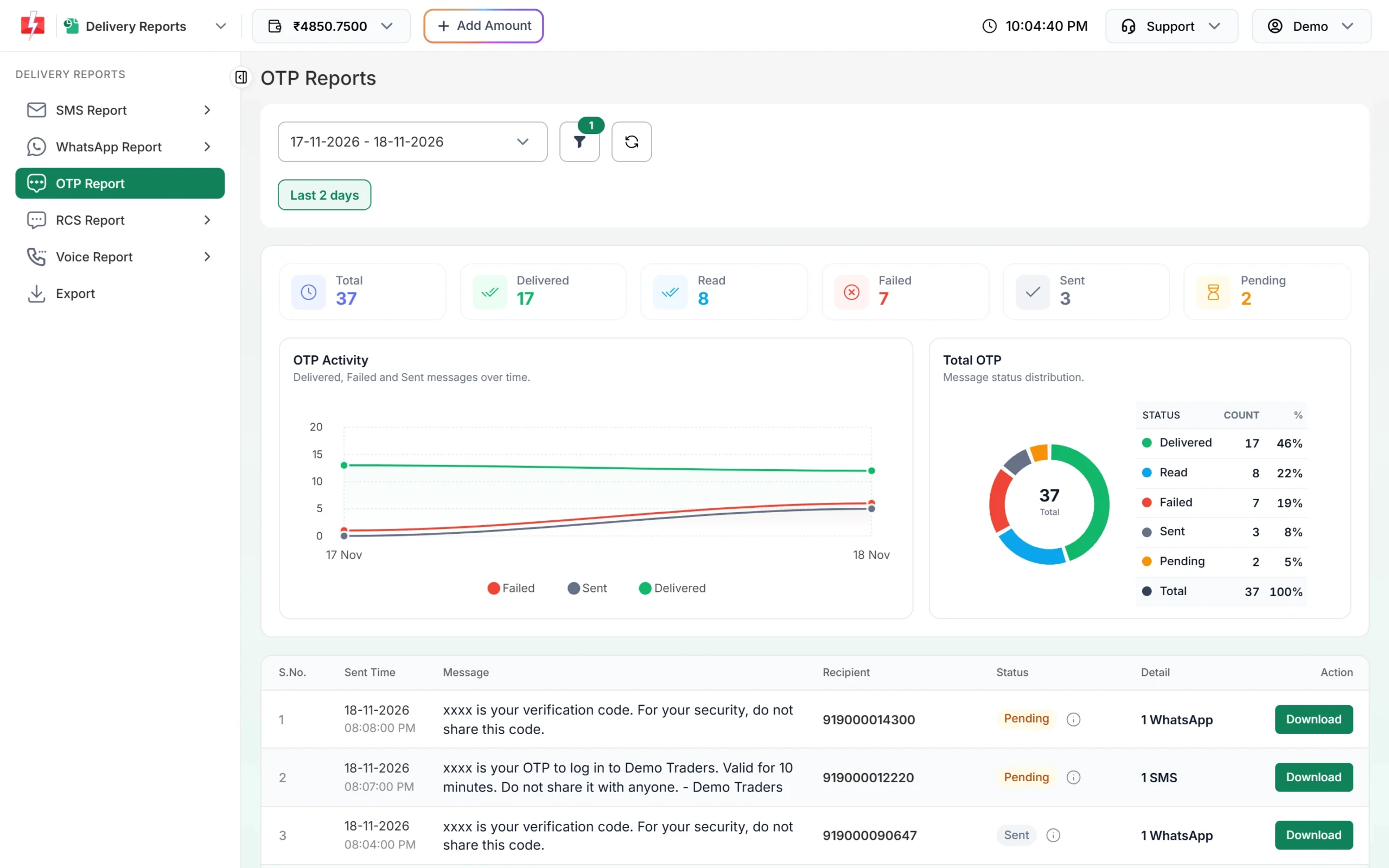
Every OTP request appears here with its channel and status. -
Open the row and read the Description
Click the row. Delivery Details shows each attempt with its status, channel badge and a Description from the operator or WhatsApp, such as “Number switch off or low signal”. That line usually tells you the cause.
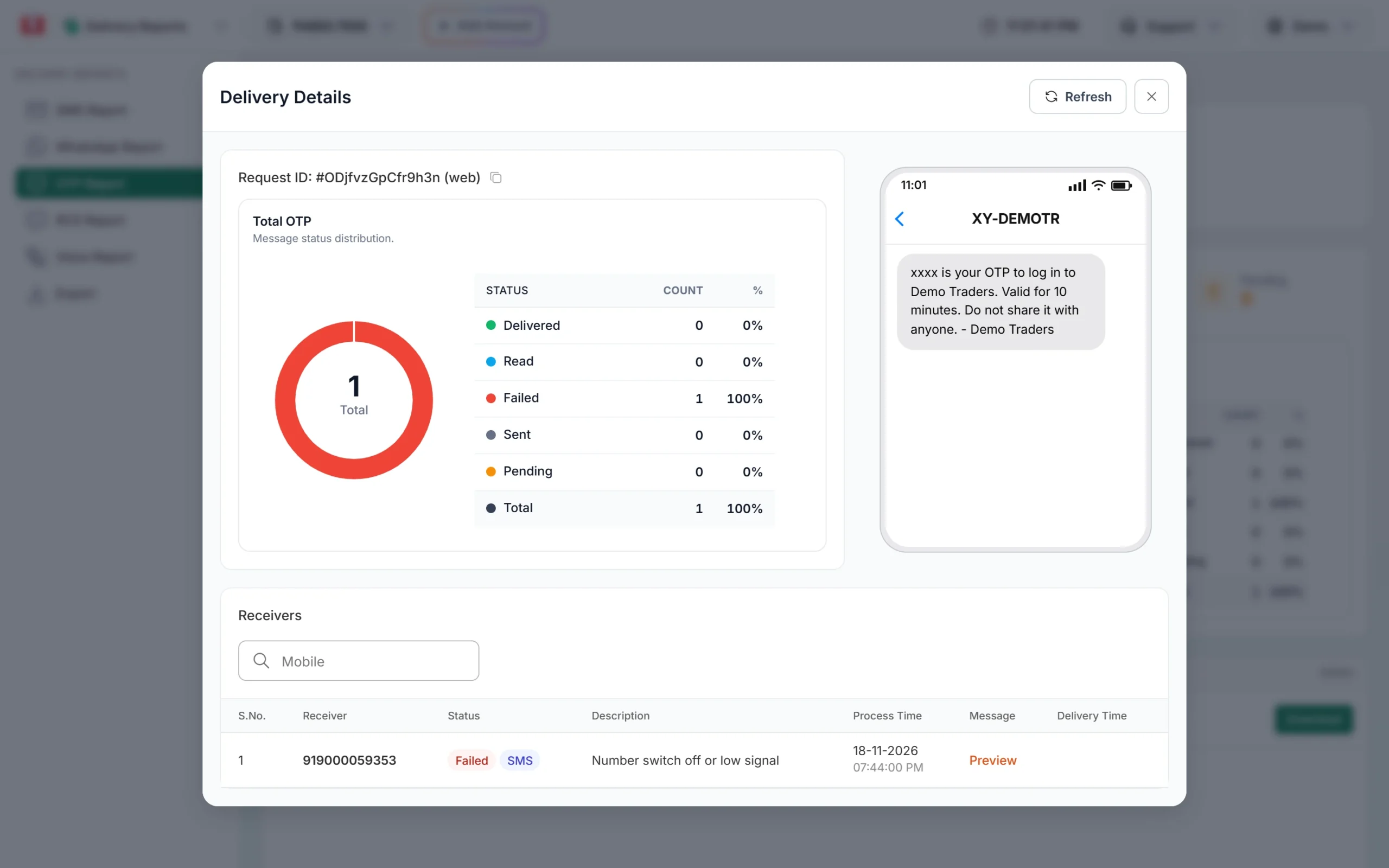
A failed SMS OTP. The Description gives the reason. -
No row? Check API Logs
If the number is not in the report, the OTP was never accepted. Open Account Settings, then API Logs, and look for OTP/SEND rows marked Failed. The Response column shows the reason, for example “Invalid OTP ID” or “Please wait 21 seconds before requesting a new OTP”. API Logs keep 7 days of calls.
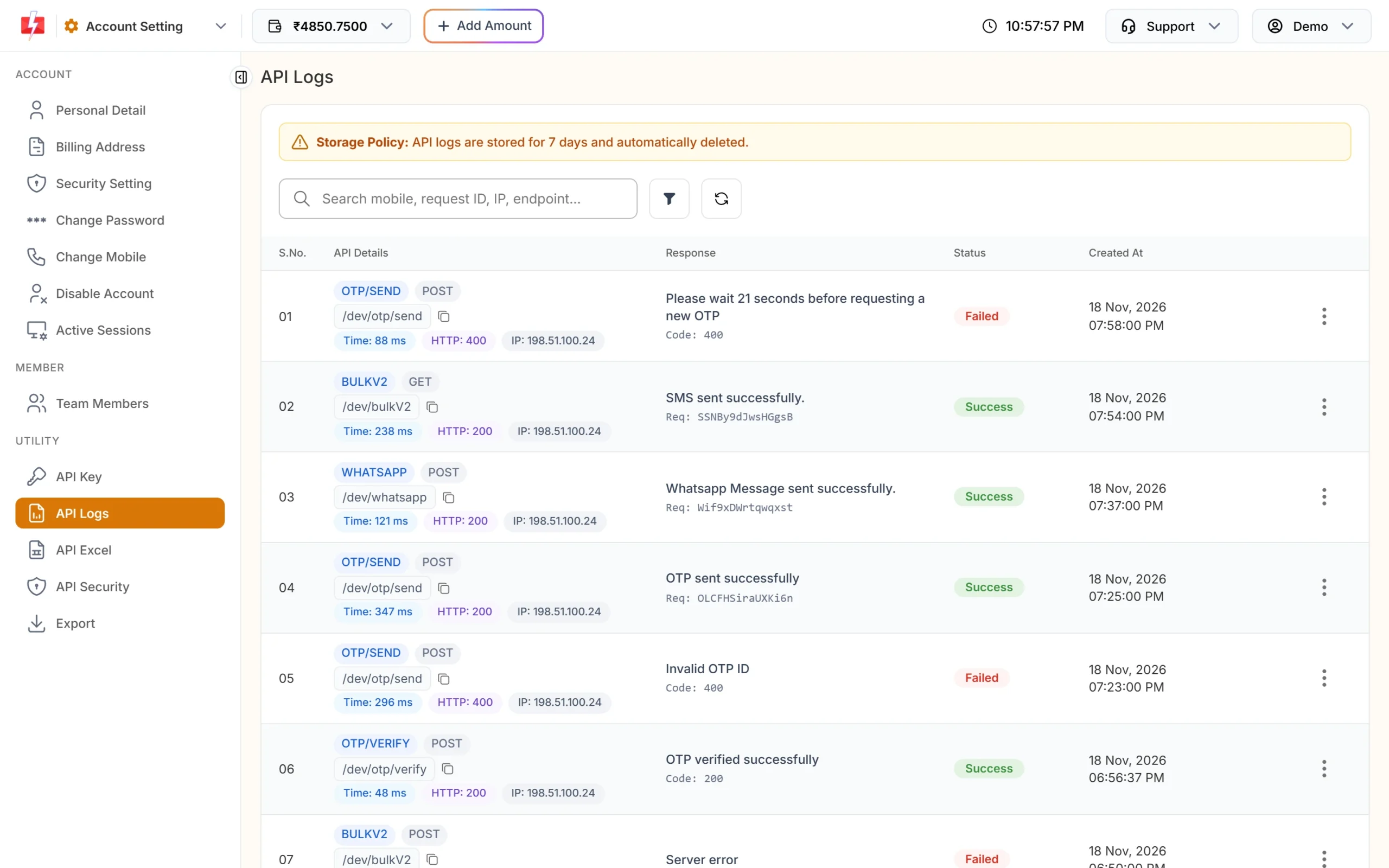
Failed OTP/SEND calls never reach the phone. The Response column says why.
DND does not block OTP
TRAI’s DND (Do Not Disturb) setting stops promotional SMS. It does not stop OTPs sent with a DLT template registered as Transactional. Transactional OTP SMS reach DND and non-DND numbers at any time of day. If your OTP template was registered as promotional by mistake, it will not reach DND numbers and will be held at night, so register a new Transactional template.
A Blocked or DND status in the report means the number itself is blocked from receiving these messages. A person who blocked messages from Fast2SMS users can check and remove the block at fast2sms.com/dnd.
DLT template issues
- The text in Fast2SMS must match the approved text on your DLT portal, word for word.
- The template must be linked to the sender ID you send with, on the DLT portal.
- The code must fit the variable. Letters in a numeric variable fail.
- An entity, sender or template blocked on DLT gives “Entity blocked”, “Sender ID blocked” or “Content template blocked” straight away.
Let Smart OTP fallback catch the misses
Phones that are switched off or out of coverage are the biggest cause of failed OTP SMS. If the user has WhatsApp on that number, a fallback reaches them as soon as the phone gets data. In Smart OTP, open your template, click Fallback, tick SET FALLBACK TEMPLATE and pick a WhatsApp number and template.
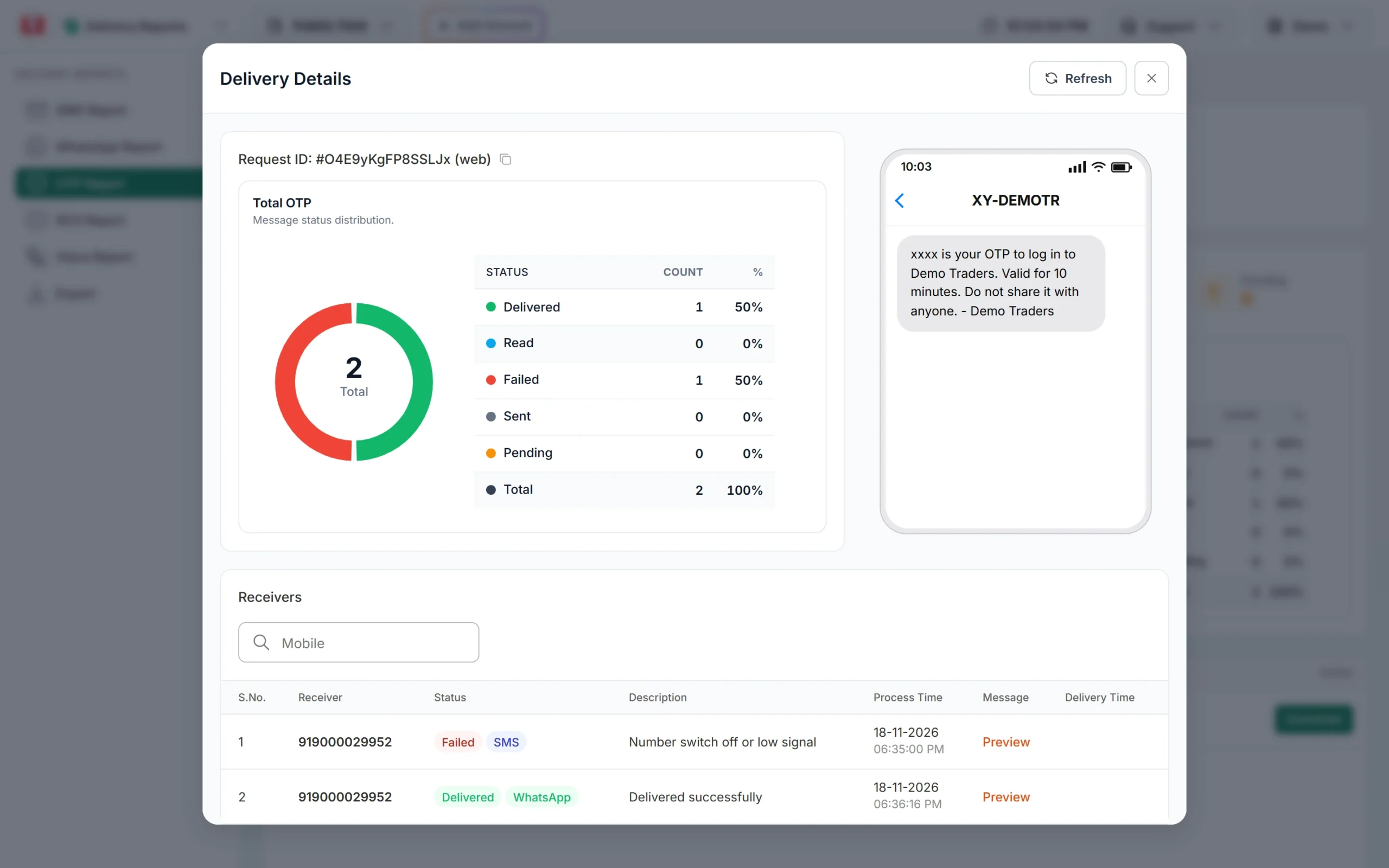
The fallback goes out only when the first attempt is reported as failed within 120 seconds of sending. It is sent once, with the same code, and it is charged as its own message.
What to ask your user
- Is the number typed correctly, and is the SIM in this phone?
- Is there signal? Try turning airplane mode on and off.
- Check the phone’s spam or blocked messages folder.
- Is the phone’s message storage full?
- Did you tap resend? Only the newest code works, because each new OTP cancels the older ones.
Frequently asked questions
Why is my OTP not received on a DND number?
DND does not block transactional OTPs. Check that your DLT template is Transactional and look at the status in the OTP report. A Blocked or DND status means the number has a block on it.
The OTP shows Sent but the user did not get it. Why?
Sent means the operator took the message but has not yet returned a delivery report. This is common when the phone is off. The status changes once the report arrives.
The user received the OTP but it says invalid. Why?
Each new send cancels older codes for that number, so an older code fails. The code may also have expired or used up its verify attempts.
Can I test whether OTPs reach a number?
Yes. Click Test OTP on the template card, enter the number and send. It is a real send and is charged like an API send.
Does a fallback cost extra?
Yes. The fallback message is charged at the rate of its channel, and you see it as a separate line in transaction history.
Why does a resend give “Please wait N seconds”?
That is the resend wait set in OTP Settings. It is 10 seconds if you never saved the settings.
Sending in bulk? For high OTP volumes our team offers discounted rates. Talk to our team or see OTP pricing.