
Every promotional SMS in India must now give the customer a way to opt out, inside the same message. This comes from TRAI’s TCCCPR (Second Amendment) Regulations, 2025, notified on 12 February 2025. A DLT SMS has to match its registered template, so the opt-out line must be part of your approved promotional template. You cannot add it at the time of sending.
This page explains what the promotional SMS opt-out rule says, how to add a working opt-out to your offers, and what to do when a customer opts out.
What the TRAI opt-out rule for promotional SMS says
The 2025 amendment rewrote the definition of a promotional message in TCCCPR 2018. These are the points that matter to a business:
- Opt-out in the same message. The sender must give the recipient an opt-out mechanism in the promotional message itself, in the manner TRAI specifies.
- Mixed messages are promotional. If promotional content is mixed into a transactional or service message, the whole message is treated as promotional.
- 90 days before you ask again. After a customer opts out or revokes consent, you can try to get their consent again only after 90 days. The customer can opt back in on their own at any time.
- Promotional messages only. The opt-out requirement is part of the promotional message definition. OTPs, transactional alerts and service messages are defined separately and do not carry it, as long as they contain nothing promotional.
How customers can block promotions on their own
Besides the opt-out in your message, every customer can block promotions through their operator by calling or texting 1909. The amended regulation lists these options:
| What the customer wants | SMS to 1909 | Call 1909 and press | USSD |
|---|---|---|---|
| Block all promotional messages | BLOCK PROMO | 50 | *1909*50# |
| Fully block (promotions and service messages that need explicit consent) | FULLY BLOCK | 0 | *1909*0# |
| Block one category, for example real estate | BLOCK 2 | 2 | *1909*2# |
The eight categories are: 1 banking, insurance, financial products and credit cards; 2 real estate; 3 education; 4 health; 5 consumer goods and automobiles; 6 communication, broadcasting, entertainment and IT; 7 tourism and leisure; 8 food and beverages.
None of these options blocks transactional messages, service messages sent with inferred consent, or government messages. A customer who has given you explicit digital consent recorded on DLT still gets the promotions that consent covers, whatever their 1909 preference. See the DLT consent template guide for how that consent is linked to your templates.
How to add an opt-out to your promotional SMS
-
Pick an opt-out method customers can use
Customers cannot reply to a bulk SMS sent from a header, so “Reply STOP” does not work. Use something they can act on from the SMS itself: a short link to an opt-out page on your own domain, or a call-back number that records the request. Whitelist the domain or number on your DLT portal as part of CTA whitelisting. Links and numbers that are not whitelisted are blocked during scrubbing.
-
Put the opt-out line in the fixed text of the template
Write the opt-out as fixed text at the end of the message, so it goes out in every SMS. For example:
“Festive sale at Demo Traders: flat {#var#}% off till {#var#}. Visit 12 Demo Market, Pune. To stop offers visit yourdomain.com/stop – Demo Traders”
Register it on your DLT portal as a promotional content template, linked to your consent template where the portal asks for one.
-
Add the approved template in Fast2SMS
Open DLT Manager > Content Template and click Add Content Template. Select your entity and sender ID, enter the Content Template ID and choose Service Explicit or Promotional as the Template Type (the form starts on Service Implicit). Paste the approved text exactly, opt-out line included, upload the DLT approval screenshot and click Submit.
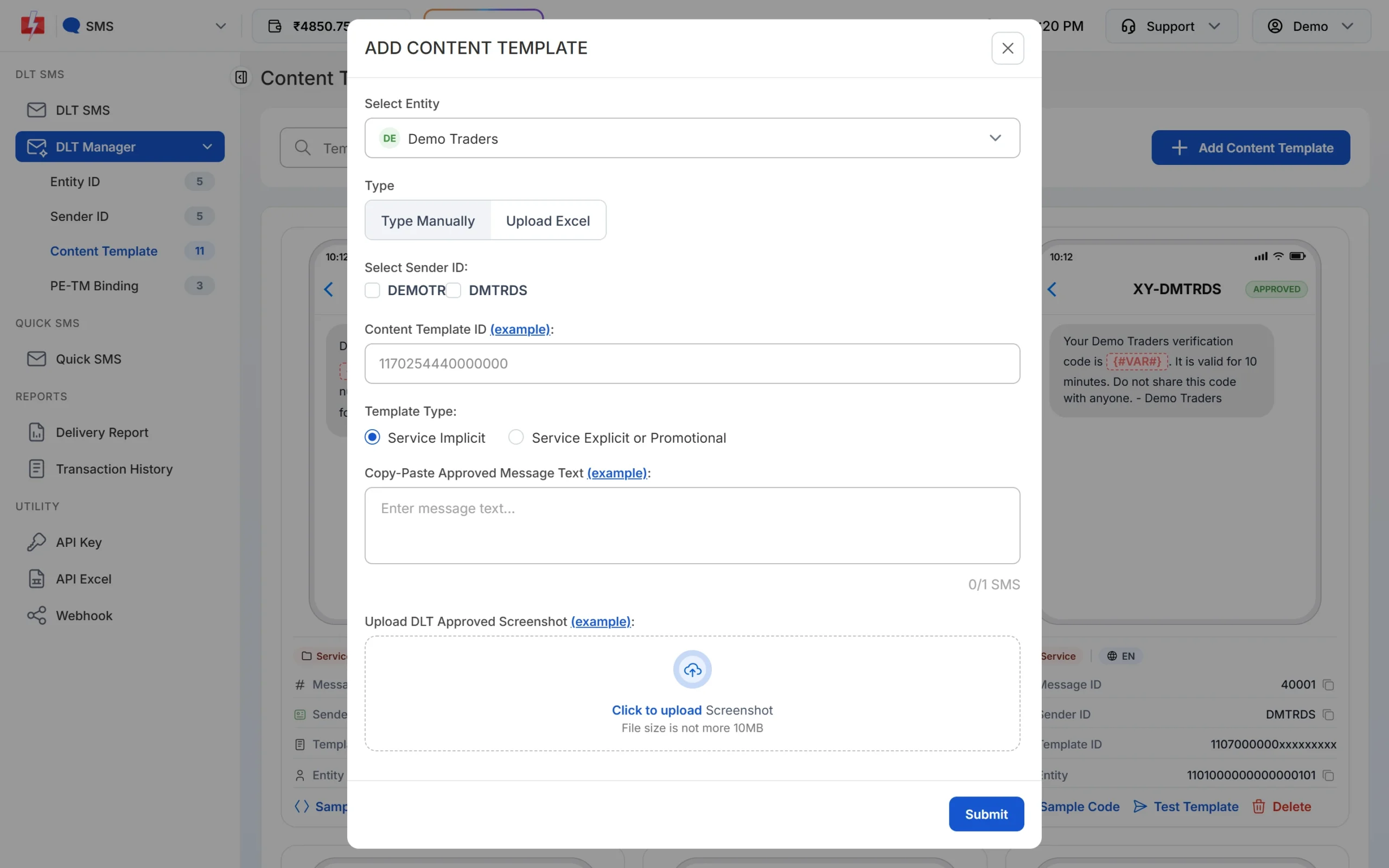
Choose Service Explicit or Promotional for offer templates. -
Test it, then send within promotional hours
When the template is approved, click Test Template on its card and send one SMS to your own number. Open the link or call the number to check the opt-out really works. Then send your campaign from DLT SMS between 10 AM and 9 PM. Fast2SMS holds promotional DLT SMS sent late in the evening or at night and sends them after 10 AM the next day.
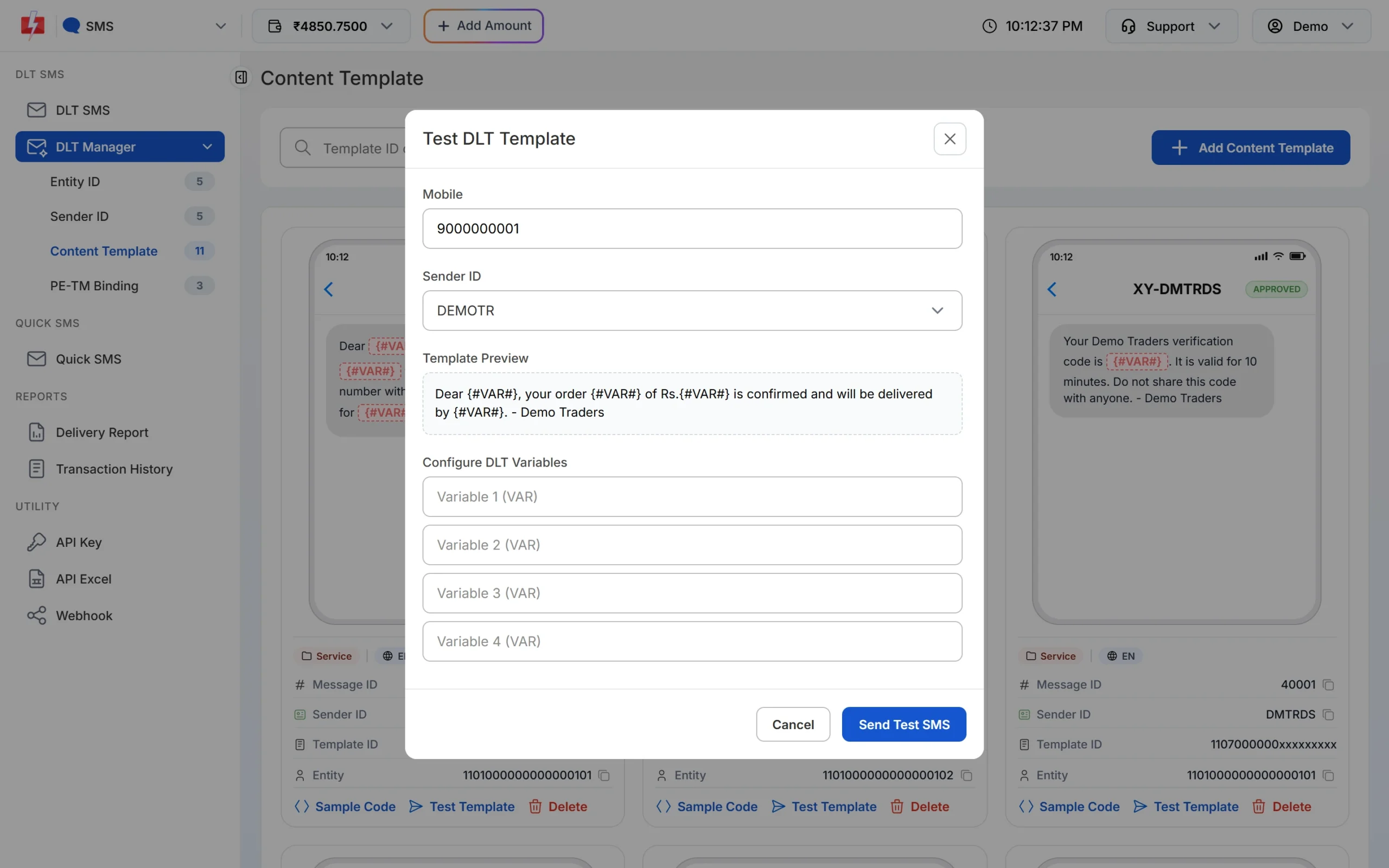
Send one test SMS to yourself before the full campaign.
How to handle opt-out requests
The opt-out page or number in your SMS belongs to you, so collecting the requests is your job. A simple routine works for most businesses:
- Keep one opt-out list. Save the mobile number and the date of every request.
- Clean every promotional list before sending. Remove opted-out numbers from your Address Book groups and from the CSV files you upload in DLT SMS. Fast2SMS sends to the numbers you give it, so the list you pick decides who gets the offer.
- Do not ask for consent again for 90 days. Count from the date of the opt-out. If the customer opts in again on their own, you can message them again.
- Keep sending the messages they need. An opt-out from promotions does not stop OTPs, order updates or payment receipts sent on Service Implicit templates. Keep those free of offers, or they count as promotional.
- Treat complaints seriously. Customers can complain to their operator within 7 days of getting a message. See UCC complaints and DLT penalties for what can happen to a sender.
Common mistakes and fixes
| Mistake | What happens | Fix |
|---|---|---|
| Opt-out line typed only at sending time | The SMS no longer matches the registered template and fails scrubbing | Register a template with the opt-out in its fixed text |
| Opt-out link on a public shortener or an unwhitelisted domain | The SMS is blocked | Use your own whitelisted domain (see short links in DLT SMS) |
| “Reply STOP” in the message | Customers cannot reply to a header, so nobody can opt out | Use a link or call-back number |
| Offer added to a service template | The message counts as promotional, and a template registered in the wrong category can be blacklisted after a complaint | Keep offers in promotional templates only |
| Opted-out numbers left in a group | Complaints against your header | Remove them before every campaign |
Frequently asked questions
Is an opt-out mandatory in promotional SMS in India?
Yes. Under TRAI’s 2025 amendment to TCCCPR, every promotional message must give the recipient a way to opt out in the same message.
Do OTP and transactional SMS need an opt-out line?
No. The rule applies to promotional messages. OTPs, transactional alerts and service updates do not need it, as long as they carry no promotional content.
Can customers reply STOP to a promotional SMS?
No. Business SMS come from a header, not a phone number, so there is nothing to reply to. Give a link or a call-back number instead.
What opt-out wording should I use?
Keep it short and clear, for example “To stop offers visit yourdomain.com/stop”. Follow any format your DLT portal asks for, since TRAI can specify how the opt-out must work.
When can I send offers again to someone who opted out?
Only if they opt in again. You may ask for their consent again only after 90 days from the opt-out.
Does Fast2SMS add the opt-out line for me?
No. Fast2SMS sends the text of your approved DLT template, so the opt-out has to be in that template.
What happens if a customer blocks promotions through 1909?
Your promotional SMS are not delivered to them, unless they gave you explicit digital consent recorded on DLT. They still get transactional and service messages.
Do I need to change my old promotional templates?
If an approved promotional template has no opt-out line, register a new version with one, add it in DLT Manager and stop using the old one.