
A good RCS rich card has one clear image, a short title, two or three lines of text and one or two buttons that tell the customer what to do next. This guide lists the RCS rich card and carousel limits in Fast2SMS (text length, buttons, media size), adds Google’s own RCS limits, and gives practical design tips so your cards look right on the phone.
Use it while you write a Rich, Carousel or Media message in Bulk RCS, or when you build the same message with the RCS API.
RCS message types at a glance
| Type | Best for | What the customer sees |
|---|---|---|
| Plain | Order, payment and service updates | A text bubble from your brand, with buttons if you add them |
| Rich | One offer, one product, one event | A card with an image or video, a bold title, text and buttons |
| Carousel | Several products or choices | 2 to 10 cards side by side that the customer swipes |
| Media | Sending files such as a brochure, video or audio | Up to 10 files, no buttons |
RCS rich card and carousel limits
These are the limits in the Fast2SMS panel and API at the time of writing. Google’s RCS platform has its own limits, shown in the last column. Your message must fit both.
| Item | Fast2SMS limit | Google RCS limit |
|---|---|---|
| Message text (Plain, Rich) | Under 3,000 characters | 3,072 characters of text |
| Rich card title | Up to 100 characters | Up to 200 characters |
| Carousel cards | 2 to 10 | 2 to 10 |
| Carousel card description | Up to 2,000 characters | Up to 2,000 characters |
| Buttons | Up to 4 per message or per card | Up to 4 per card |
| Button text | Up to 25 characters | Up to 25 characters |
| Media file size | 10 MB per file in the panel | 100 MiB per file |
| Media type message | Up to 10 files, no buttons | – |
| Media formats | Image, video, audio or PDF upload | JPEG, PNG and GIF images; MP4, WebM and other common video formats |
Audio and PDF: Google’s documentation says audio files do not work inside rich cards, and PDF in a rich card works with Google Messages in India. To send an audio clip, use the Media type instead of a Rich card.
How to build a rich card or carousel in Fast2SMS
-
Choose Rich and add the title and text
In Bulk RCS, pick your bot and click Rich under RCS Type. Fill Title (Optional) and Message. The title shows in bold above the text, so keep it to a few words, such as “Weekend Mega Sale”.
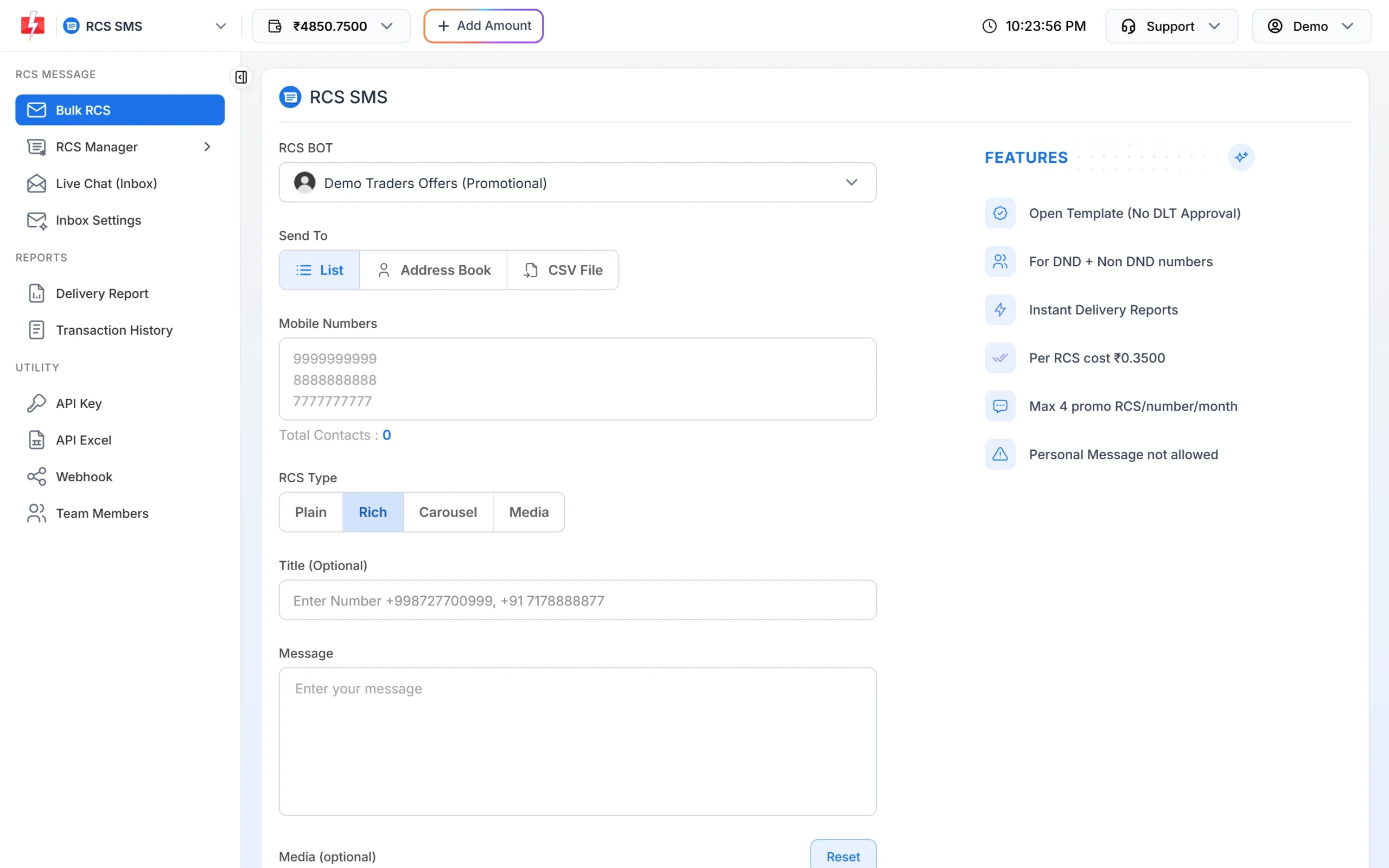
A Rich message starts with a title and the message text. -
Upload one image or video
Under Media (optional), click Click to upload and choose an image, video, audio or PDF of up to 10 MB. For a rich card, an image or a short video works best. Buttons appear only after you add media to a Rich message.
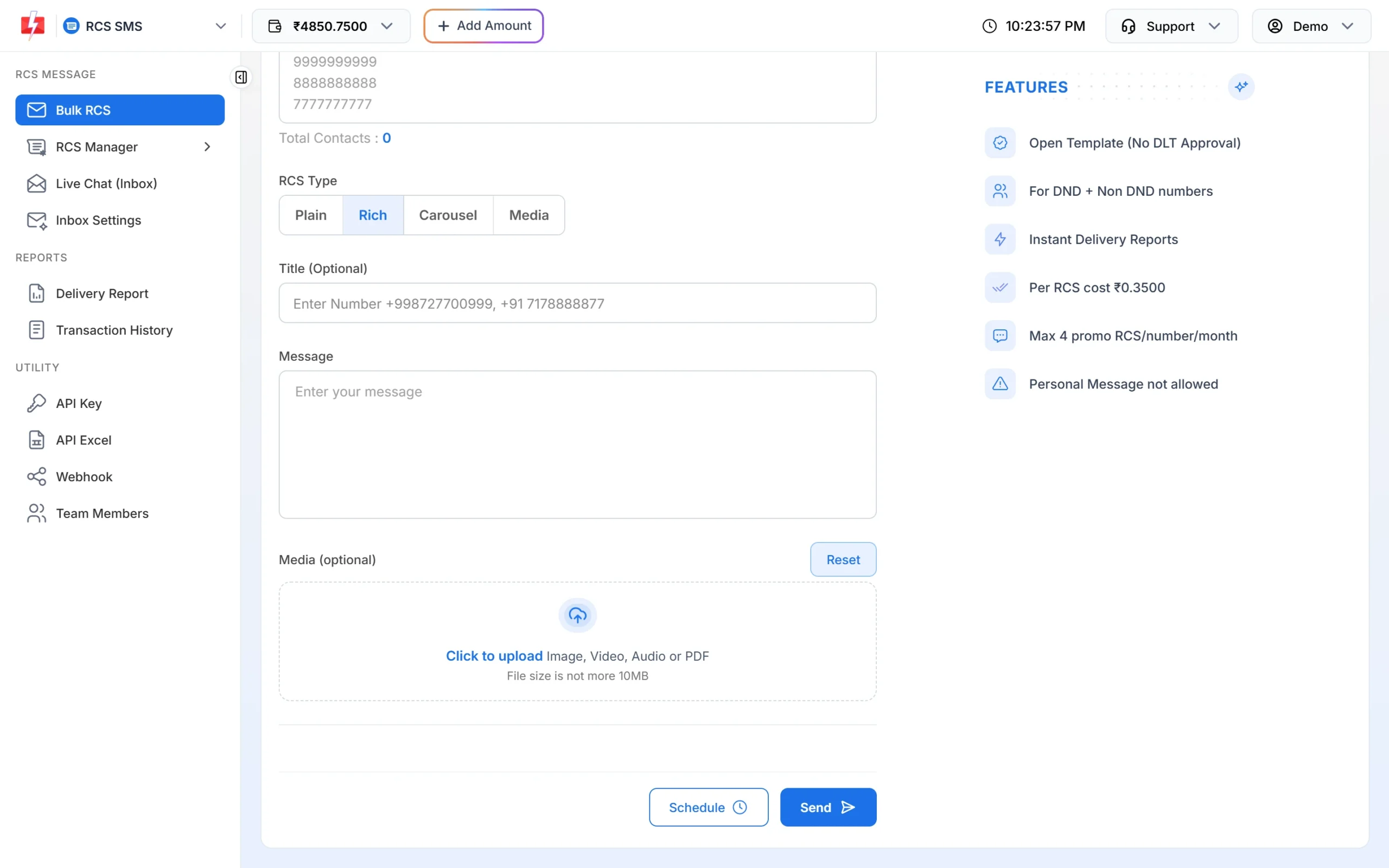
Add media to turn the message into a rich card. -
For a carousel, fill each card
Click Carousel. Each card has a Card Title, Card Description, Card Media and its own Suggestions (Optional). Click Add Card for the next card. You need at least 2 cards and can add up to 10.
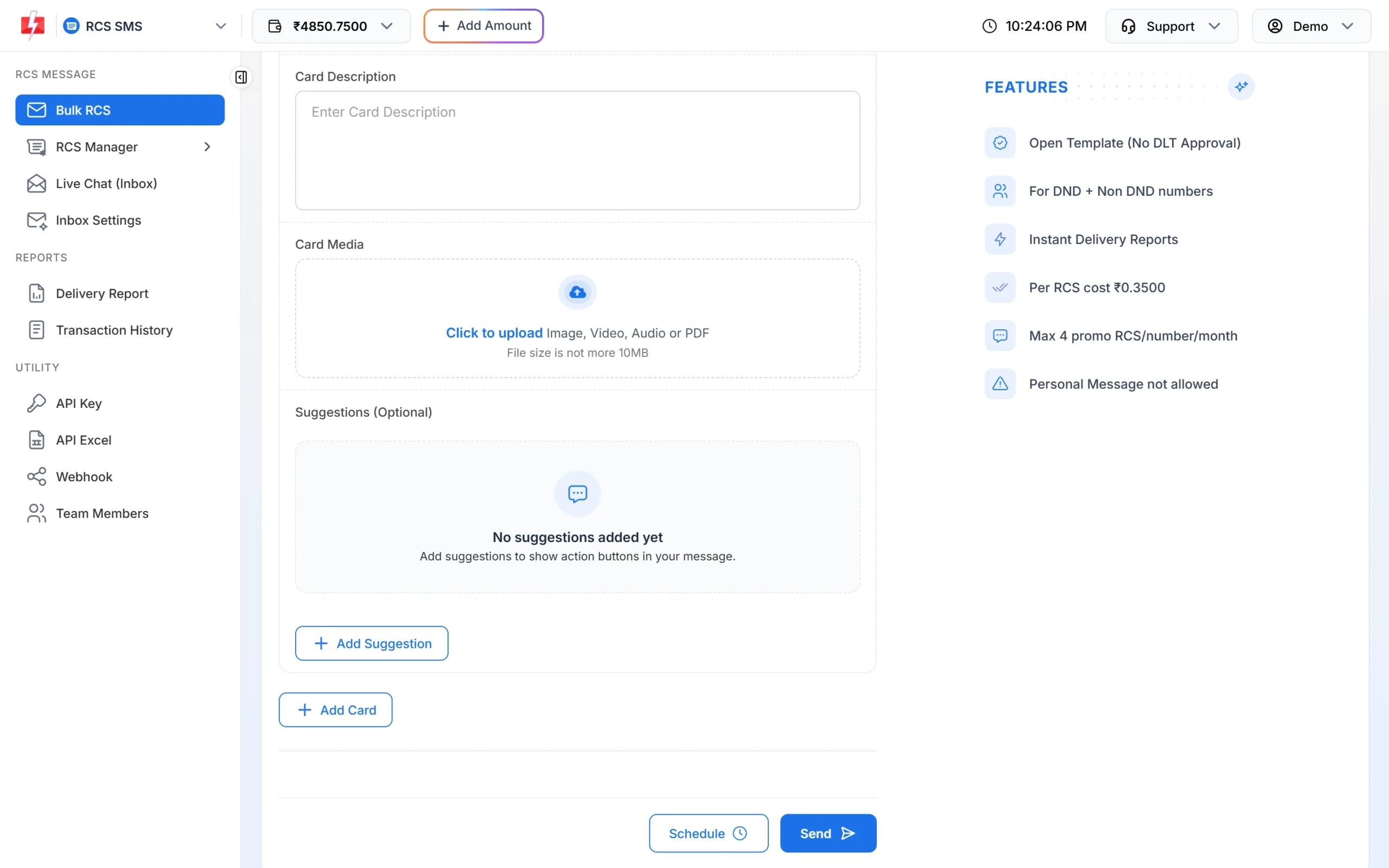
Each carousel card has its own media and buttons. -
Add buttons
Click Add Suggestion, pick the Action Type and type the button text. There are three actions:
- Open URL: opens a web page, such as your product page or order tracking page.
- Dial a Number: starts a phone call to the number you enter. +91 is added for you.
- View Location: opens a map pin, such as your shop location.
-
Check the finished card
After you send, the card is saved under RCS Manager > Previous Template as a phone preview. This is a good place to check how your title, text and buttons look together before you reuse the design.
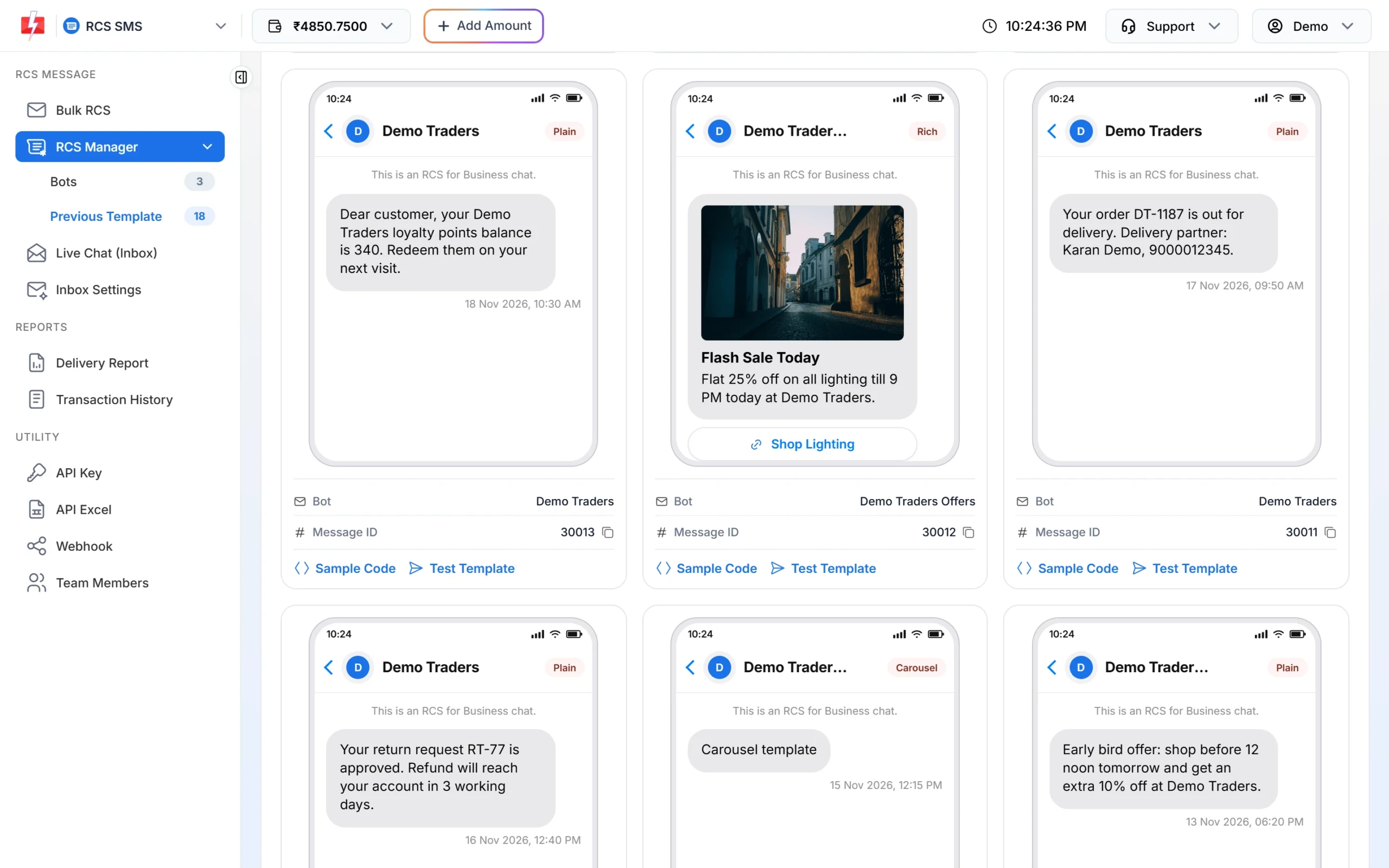
A finished rich card: image, short title, two lines of text and one button.
Design tips for RCS rich cards
Images
- One message per image. Show the product or the offer, not a collage. Big text inside the image is hard to read on a small screen, so put the offer in the title instead.
- Keep the main subject in the centre. Google says media that does not fit the card is zoomed and cropped, so edges may be cut off.
- Keep files light. The panel allows up to 10 MB, but smaller files load faster on mobile data. A compressed JPEG is usually enough for a photo.
- Same size for every carousel card. Cards sit side by side, so images of the same shape make the row look neat.
- Do not stretch or squash pictures. Google’s guidance for brand images says the same.
Title and text
- Put the main point in the title: “Flat 25% off lighting”, not “Big news from our store”.
- Keep the description to two or three short lines. Long text pushes the buttons down.
- Use digits for numbers and dates (“Sat, 10 AM”), and sentence case rather than ALL CAPS.
- Do not add a customer’s name or other personal detail. Bulk RCS sends the same content to everyone, and the page shows “Personal Message not allowed”.
Buttons
- Start the button text with an action: “Shop now”, “Call store”, “Get directions”, “Track order”.
- Stay well under 25 characters so the text is not cut short.
- One or two buttons are often enough. Each button should match the card it sits on.
- Open URL links should go to your own website, the same brand customers see on the card.
Carousels
- Fewer, stronger cards are easier to browse than ten similar ones. Pick the products that matter most.
- Put your best seller or the main offer on the first card.
- Give every card its own button to the right product page.
Does a rich card cost more than plain text?
At the time of writing, the RCS pricing page lists one rate of ₹0.35 per message for plain text, rich cards, carousels and media, and buttons cost nothing extra. A Plain message longer than 160 bytes is billed at the rich rate, which is the same amount at this flat rate. Numbers that fail or cannot receive RCS are refunded automatically within 48 hours.
Sending in bulk? For high RCS volumes our team offers discounted rates. Talk to our team or see RCS pricing.
Common problems and fixes
| Problem | Fix |
|---|---|
| I cannot add buttons to a Rich message | Upload media first. Buttons appear on a Rich message after media is added. |
| No button option on a Media message | The Media type has no buttons. Use Rich or Carousel if you need buttons. |
| File will not upload | Keep each file at 10 MB or less and use a common image or video format. |
| “Message length should be less than 3000 characters.” | Shorten the text. A rich card works best with a few short lines anyway. |
| Carousel will not send | Add at least 2 cards, each with a title and description. |
Frequently asked questions
What is the image size for an RCS rich card?
Fast2SMS accepts image files up to 10 MB in the panel. The phone fits the image to the card and may crop the edges, so keep the main subject in the centre.
How many cards can an RCS carousel have?
Between 2 and 10 cards. Each card can have its own title, description, media and up to 4 buttons.
How many buttons can an RCS message have?
Up to 4 per message, or 4 per carousel card. Button text can be up to 25 characters.
Can I send a video in an RCS message?
Yes. Upload a video as the media of a Rich card, a carousel card or a Media message. The panel limit is 10 MB per file.
Can I send a PDF by RCS?
Yes. The panel accepts PDF files. Google notes that PDF in a rich card works on Google Messages in India.
Are quick reply buttons available?
The Fast2SMS panel offers three action buttons: Open URL, Dial a Number and View Location. Customers can still type a reply, which reaches your Live Chat.
Does a rich card cost more than a plain RCS message?
Not at the time of writing. The pricing page shows the same rate for plain, rich, carousel and media messages.