
To send an RCS message with the Fast2SMS API, POST to https://www.fast2sms.com/dev/rcs with your API key, your Bot ID, the mobile number and a type: plain, rich, media or carousel. This guide shows where to find the Bot ID, every field, a ready example for each message type with a button, code in PHP, Python and Node.js, and how RCS charges and refunds work.
Before you start
- An approved RCS brand with an Active bot. See RCS brand registration and approval.
- Your API key from API Key under UTILITY.
- Wallet balance for the messages you plan to send.
- For images and videos, a public https link to each file.
Send your first RCS message by API
-
Copy your Bot ID
Open RCS Manager and click Bots. Each bot shows its name, Bot ID with a copy button, its category (transactional, promotional or OTP), today’s usage and its status. Use the Bot ID of an Active bot.
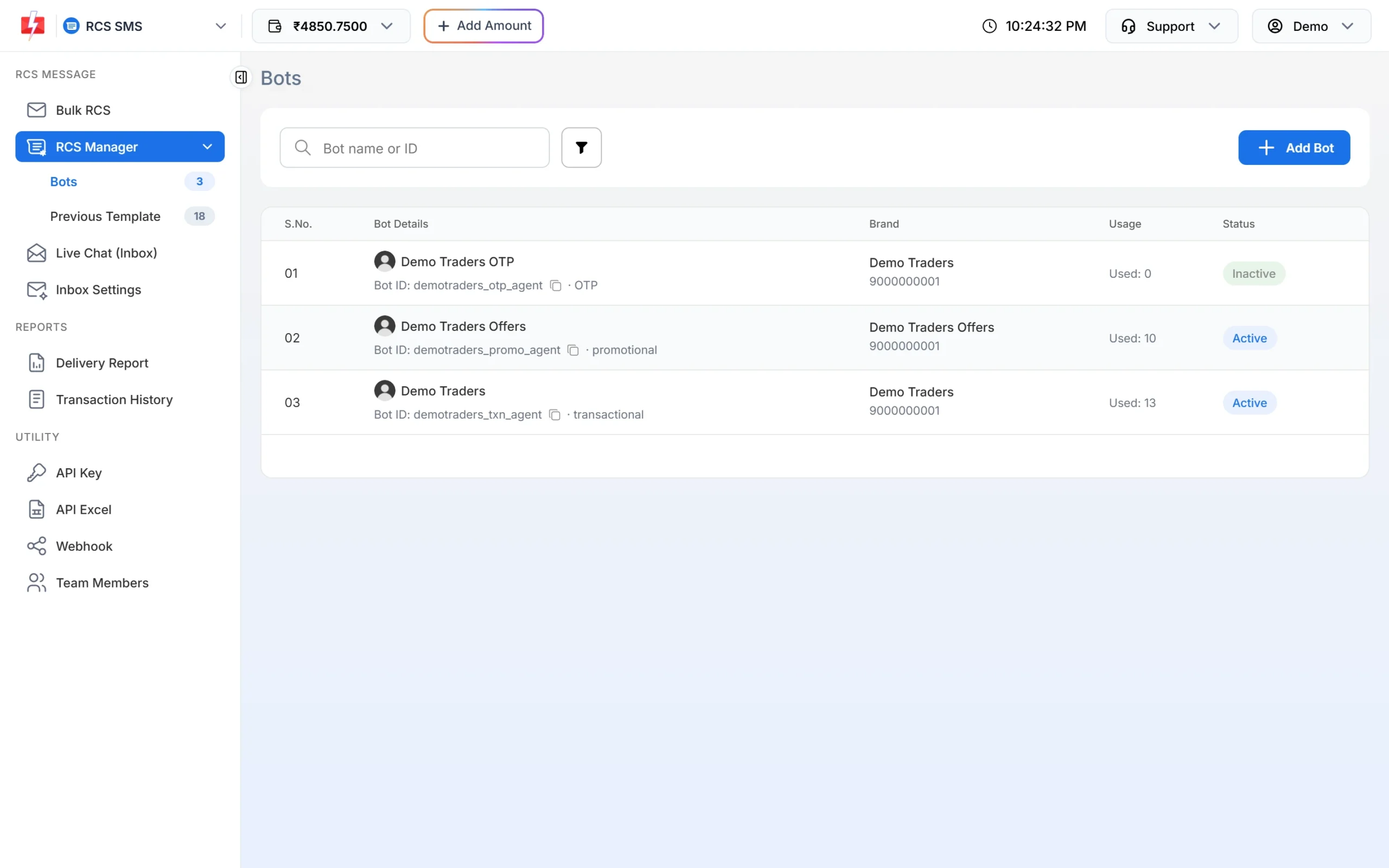
The Bot ID is the value you send as bot_id. -
Download the RCS API Excel (optional)
Go to Account Setting, API Excel, pick RCS and click Download Excel. It has ready API URLs for each of your approved bots, one row per scenario, with the parameters and notes.
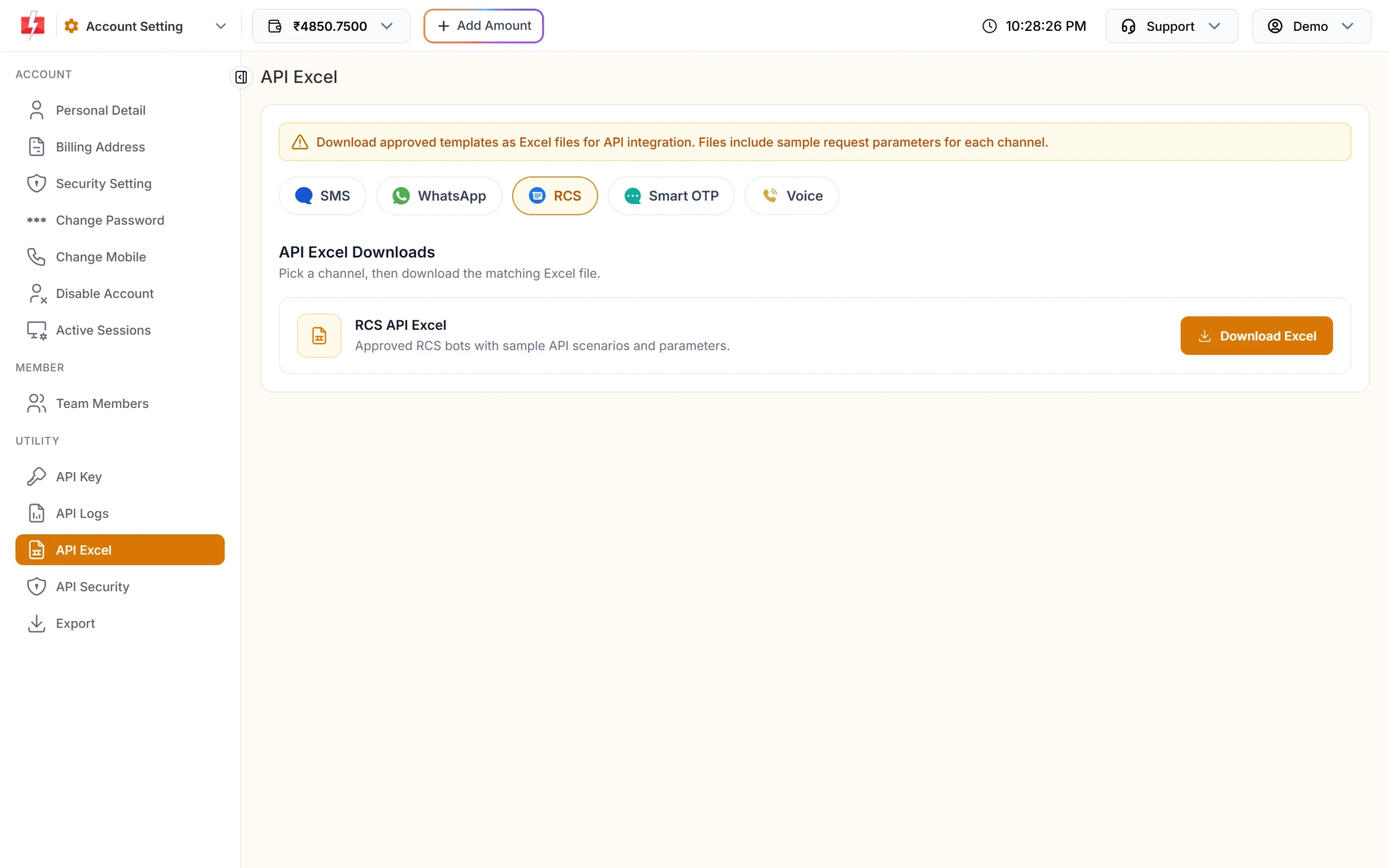
The RCS API Excel lists sample requests for your bots. -
Send a plain message
curl -X POST "https://www.fast2sms.com/dev/rcs" \ -H "authorization: YOUR_API_KEY" \ -H "Content-Type: application/json" \ -d '{"bot_id":"demotraders_txn_agent","to":"9999999999","type":"plain", "message":"Hi Rahul, your order DT-1042 has been shipped."}' -
Save the request_id
Success looks like this:
{"return":true,"request_id":"R4Yhz6HA8kATqft","message":["RCS Message will be sent."]}The ID starts with R. Use it to find the message in Delivery Report under RCS and to match webhook updates.
All fields
| Field | Needed for | Rules |
|---|---|---|
bot_id |
All | Your Bot ID from RCS Manager. The bot must be yours, approved and active |
to |
All | One Indian mobile number, 10 digits starting 6 to 9; +91 or 91 in front is fine |
type |
All | plain, rich, media or carousel |
message |
plain, rich | The text, up to 3,000 characters |
title |
rich (optional) | Up to 100 characters |
media_url |
media (required), rich (optional) | Public link to the image or file |
suggestion_type |
Optional button | openUrl, dial or viewLocation |
suggestion_text |
With a button | Button label, up to 25 characters |
suggestion_url |
openUrl | The link the button opens |
suggestion_phone |
dial | The number the button calls |
latitude, longitude, location_label |
viewLocation | Map point; label up to 100 characters |
cards |
carousel | 2 to 10 cards, each with title (up to 255), description (up to 2,000), optional media_url and the same button fields |
udf1 to udf3 |
Optional | Your own tracking values, returned in webhooks |
Through the API each message, and each carousel card, takes one button. The Bulk RCS page in the panel allows up to 4 buttons per message.
Examples for each message type
Plain text with a website button
curl -X POST "https://www.fast2sms.com/dev/rcs" \
  -H "authorization: YOUR_API_KEY" -H "Content-Type: application/json" \
  -d '{"bot_id":"demotraders_txn_agent","to":"9999999999","type":"plain",
       "message":"Your order DT-1042 is out for delivery today.",
       "suggestion_type":"openUrl","suggestion_text":"Track order",
       "suggestion_url":"https://example.com/track/DT-1042"}'
Rich card: image, title, text and a call button
curl -X POST "https://www.fast2sms.com/dev/rcs" \
  -H "authorization: YOUR_API_KEY" -H "Content-Type: application/json" \
  -d '{"bot_id":"demotraders_promo_agent","to":"9999999999","type":"rich",
       "title":"Festive Sale at Demo Traders",
       "message":"Flat 20% off on kitchenware till 25 Nov. Visit 12 Demo Market, Pune.",
       "media_url":"https://example.com/offers/festive-sale.jpg",
       "suggestion_type":"dial","suggestion_text":"Call store","suggestion_phone":"9999999999"}'
Media only (image, video or PDF)
curl -X POST "https://www.fast2sms.com/dev/rcs" \
  -H "authorization: YOUR_API_KEY" -H "Content-Type: application/json" \
  -d '{"bot_id":"demotraders_txn_agent","to":"9999999999","type":"media",
       "media_url":"https://example.com/invoices/INV-1042.pdf"}'
Carousel with two cards
curl -X POST "https://www.fast2sms.com/dev/rcs" \
  -H "authorization: YOUR_API_KEY" -H "Content-Type: application/json" \
  -d '{"bot_id":"demotraders_promo_agent","to":"9999999999","type":"carousel",
       "cards":[
         {"title":"Steel storage jars","description":"Set of 3, now Rs 499",
          "media_url":"https://example.com/p/jars.jpg",
          "suggestion_type":"openUrl","suggestion_text":"Buy now","suggestion_url":"https://example.com/p/jars"},
         {"title":"Non-stick tawa","description":"28 cm, now Rs 799",
          "media_url":"https://example.com/p/tawa.jpg",
          "suggestion_type":"openUrl","suggestion_text":"Buy now","suggestion_url":"https://example.com/p/tawa"}]}'
Send carousels with POST and a JSON body. Plain, rich and media messages also work with GET, but POST is easier to read and keeps your text out of URLs.
Store location button
curl -X POST "https://www.fast2sms.com/dev/rcs" \
  -H "authorization: YOUR_API_KEY" -H "Content-Type: application/json" \
  -d '{"bot_id":"demotraders_txn_agent","to":"9999999999","type":"plain",
       "message":"Your parcel is ready for pickup at our store.",
       "suggestion_type":"viewLocation","suggestion_text":"Open map",
"latitude":18.5204,"longitude":73.8567,"location_label":"Demo Traders, Pune"}'Code examples
PHP
<?php
$msg = [
    "bot_id"          => "demotraders_txn_agent",
    "to"              => "9999999999",
    "type"            => "plain",
    "message"         => "Your order DT-1042 is out for delivery today.",
    "suggestion_type" => "openUrl",
    "suggestion_text" => "Track order",
    "suggestion_url"  => "https://example.com/track/DT-1042",
];
$ch = curl_init("https://www.fast2sms.com/dev/rcs");
curl_setopt_array($ch, [
    CURLOPT_POST           => true,
    CURLOPT_RETURNTRANSFER => true,
    CURLOPT_HTTPHEADER     => ["authorization: YOUR_API_KEY", "Content-Type: application/json"],
    CURLOPT_POSTFIELDS     => json_encode($msg),
    CURLOPT_TIMEOUT        => 30,
]);
$data = json_decode(curl_exec($ch), true);
curl_close($ch);
echo ($data["return"] ?? false) === true ? $data["request_id"] : json_encode($data["errors"] ?? $data);
Python
import requests

msg = {
    "bot_id": "demotraders_txn_agent",
    "to": "9999999999",
    "type": "plain",
    "message": "Your order DT-1042 is out for delivery today.",
    "suggestion_type": "openUrl",
    "suggestion_text": "Track order",
    "suggestion_url": "https://example.com/track/DT-1042",
}
r = requests.post("https://www.fast2sms.com/dev/rcs",
                  headers={"authorization": "YOUR_API_KEY"}, json=msg, timeout=30)
data = r.json()
print(data["request_id"] if data.get("return") else data.get("errors"))
Node.js
const res = await fetch("https://www.fast2sms.com/dev/rcs", {
  method: "POST",
  headers: { authorization: process.env.FAST2SMS_API_KEY, "Content-Type": "application/json" },
  body: JSON.stringify({
    bot_id: "demotraders_txn_agent",
    to: "9999999999",
    type: "plain",
    message: "Your order DT-1042 is out for delivery today.",
    suggestion_type: "openUrl",
    suggestion_text: "Track order",
    suggestion_url: "https://example.com/track/DT-1042",
  }),
});
const data = await res.json();
console.log(data.return === true ? data.request_id : data.errors);
The API takes one number per request. To send to a list, loop over the numbers in your code, or upload the list on the Bulk RCS page. See send bulk RCS messages.
Charges, refunds and delivery
- Price by type: plain, rich, media and carousel each have a rate. A plain message longer than 160 bytes is charged at the rich rate. See current rates on the RCS pricing page.
- When you pay: the amount comes off your wallet when the message is sent.
- Refunds: messages that fail, and numbers that turn out not to support RCS (shown as Non-RCS), are refunded automatically within 48 hours. A message that stays at Sent is not refunded.
- No SMS fallback: if the phone does not support RCS, no SMS is sent in its place.
- Expiry: a message not delivered within 6 hours expires and is marked failed, “Not Reachable”.
- Promotional bots: at the time of writing, promotional RCS is limited to 4 messages per number per month and to sending hours of 7:00 AM to 10:00 PM. Transactional bots are for informative messages only.
Details are in RCS delivery report, statuses and refunds and RCS promotional vs transactional rules.
Get delivery status and replies
Create an RCS webhook from Webhook, RCS to get sent, delivered, read and failed updates and incoming replies on your URL. Choose your Bot ID as the identity to limit it to one bot. Webhooks fire for messages sent by API. See webhooks in Fast2SMS.
Common problems and fixes
“Invalid or inactive RCS bot”
The Bot ID is wrong, belongs to another account, or the bot is Inactive or not approved. Copy it again from RCS Manager, Bots, and use an Active bot.
“Mobile Number format is invalid.”
Send one 10-digit Indian mobile number starting with 6 to 9. Lists are not accepted in to.
Validation errors for message, cards or buttons
Check the limits: message up to 3,000 characters, title up to 100, button text up to 25, a carousel needs 2 to 10 cards with a title and description each, and openUrl needs suggestion_url.
Insufficient wallet balance
Recharge and send again.
Status is Non-RCS
The phone or network does not support RCS. The charge is refunded. See which phones support RCS messages.
Frequently asked questions
Where do I find my RCS Bot ID?
In RCS Manager, Bots. Each bot has a Bot ID with a copy button.
Do I need a DLT template for RCS?
No. RCS messages are sent from your approved bot without DLT templates. See is DLT needed for WhatsApp, RCS and voice.
Can I send RCS to many numbers in one API call?
No. The API takes one number per call. Loop in your code, or use Bulk RCS in the panel for a list.
Can I add more than one button?
The API takes one button per message or carousel card. For up to 4 buttons, use the Bulk RCS page.
What happens if the customer’s phone has no RCS?
The message is marked Non-RCS and the charge is refunded. No SMS is sent automatically.
Is RCS delivered on iPhone?
RCS support depends on the phone, its messaging app and the network. Check which phones support RCS.