
To send a WhatsApp message without saving the number, open https://wa.me/91XXXXXXXXXX in your phone or computer browser, with 91 and the 10-digit mobile number in place of the X’s. WhatsApp opens a chat with that number straight away, and nothing is added to your contacts. This guide shows the click-to-chat link step by step, how to add a ready message, and how a business can message many customers without saving any number, using the Fast2SMS Live Chat and the WhatsApp Business API.
Method 1: the wa.me click-to-chat link (for one chat)
WhatsApp’s click-to-chat feature lets you open a chat with any WhatsApp number from a link. It works on Android, iPhone, WhatsApp Desktop and WhatsApp Web.
-
Write the number in international format
Take the country code and the mobile number together, with no plus sign, no leading zero, no spaces, brackets or dashes. For an Indian number 98765 43210, write 919876543210.
-
Add it after wa.me/
Type https://wa.me/919876543210 in the address bar of Chrome, Safari or any browser. On a computer it opens WhatsApp Desktop or WhatsApp Web.
-
Open the chat and send
The browser hands over to WhatsApp and the chat opens. Type your message and send it. The number is not saved in your phone contacts unless you choose to save it.
Add a ready-made message to the link
Add ?text= and your message after the number. Replace each space with %20 (this is called URL encoding). For example:
https://wa.me/919876543210?text=Hi%20I%20want%20to%20know%20today's%20offersWhen the chat opens, the text is already typed in the message box. The person only taps send. Businesses put this kind of link on their website, Instagram bio or SMS so that customers can message them in one tap.
| Link | What it does |
|---|---|
| https://wa.me/919876543210 | Opens a chat with that number |
| https://wa.me/919876543210?text=Hello | Opens the chat with “Hello” already typed |
| https://wa.me/?text=Hello | No number: WhatsApp asks you to pick a contact and fills in “Hello” |
Common mistakes with wa.me links
- Writing +91 or 0: wa.me/+919876543210 or wa.me/09876543210 will not work. Use 919876543210.
- Leaving out the country code: wa.me/9876543210 is read as a different country’s number.
- Spaces in the message: use %20 for spaces in the text part.
Method 2: start a new chat from Fast2SMS Live Chat (for businesses)
If your business number is connected to Fast2SMS, your team can message any customer from the shared inbox without saving the number on any phone.
-
Open New chat
Go to Live Chat (Inbox) and click the round New chat button at the bottom of the chat list. The New chat drawer opens with a “Search name or number” box and your Address Book contacts.
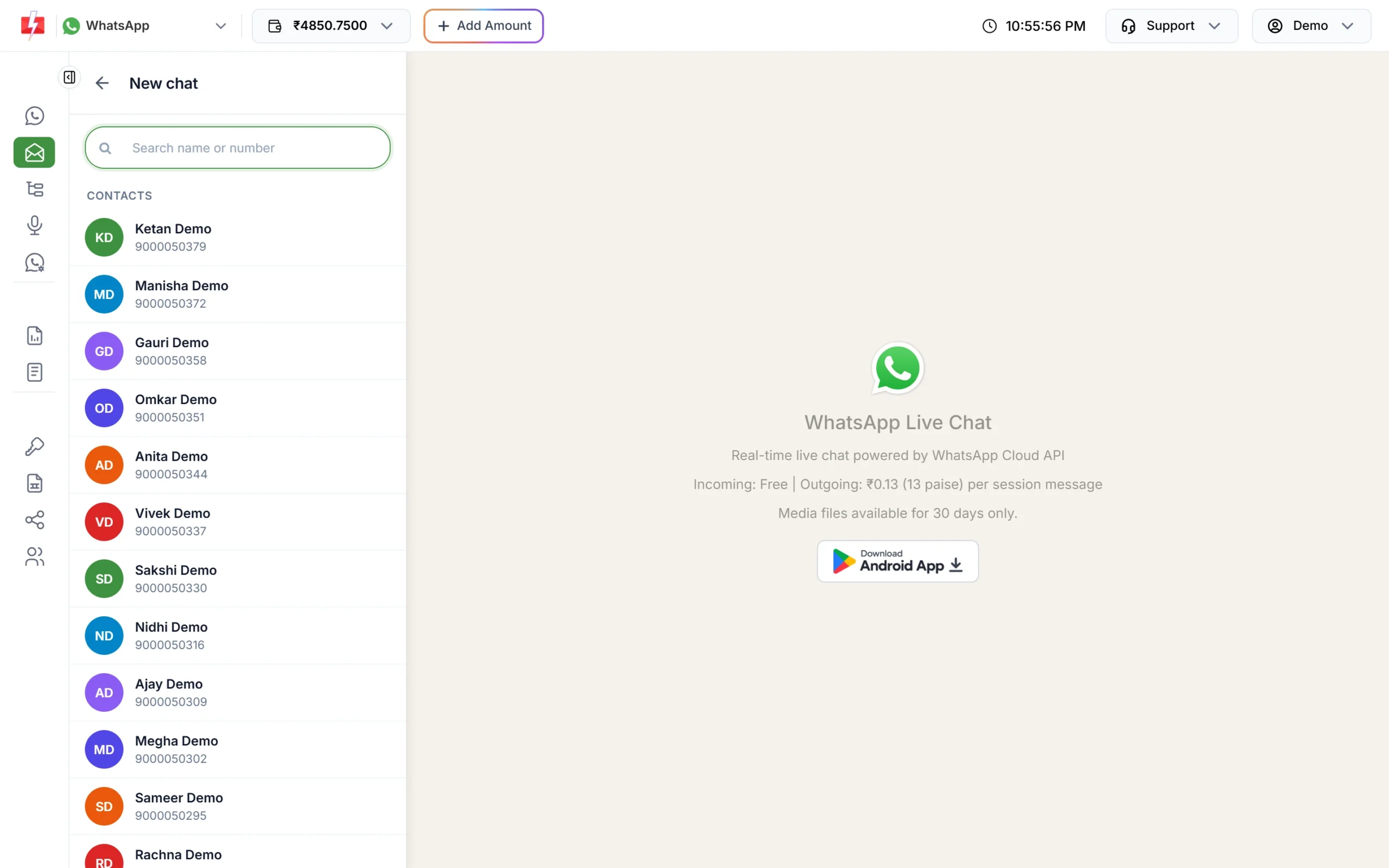
Search a contact or type any mobile number. -
Type the number
Type the mobile number. Once you have typed 7 or more digits, the panel offers Chat with + followed by the number. A 10-digit number is treated as an Indian (+91) number. If a chat with that number already exists, the panel opens it instead of making a new one.
-
Send an approved template first
The customer has not written to you yet, so WhatsApp allows only an approved template as the first message. The bottom bar shows “Customer not messaged you in last 24 hours” with a Send Template button. Pick a template, fill its variables and confirm.
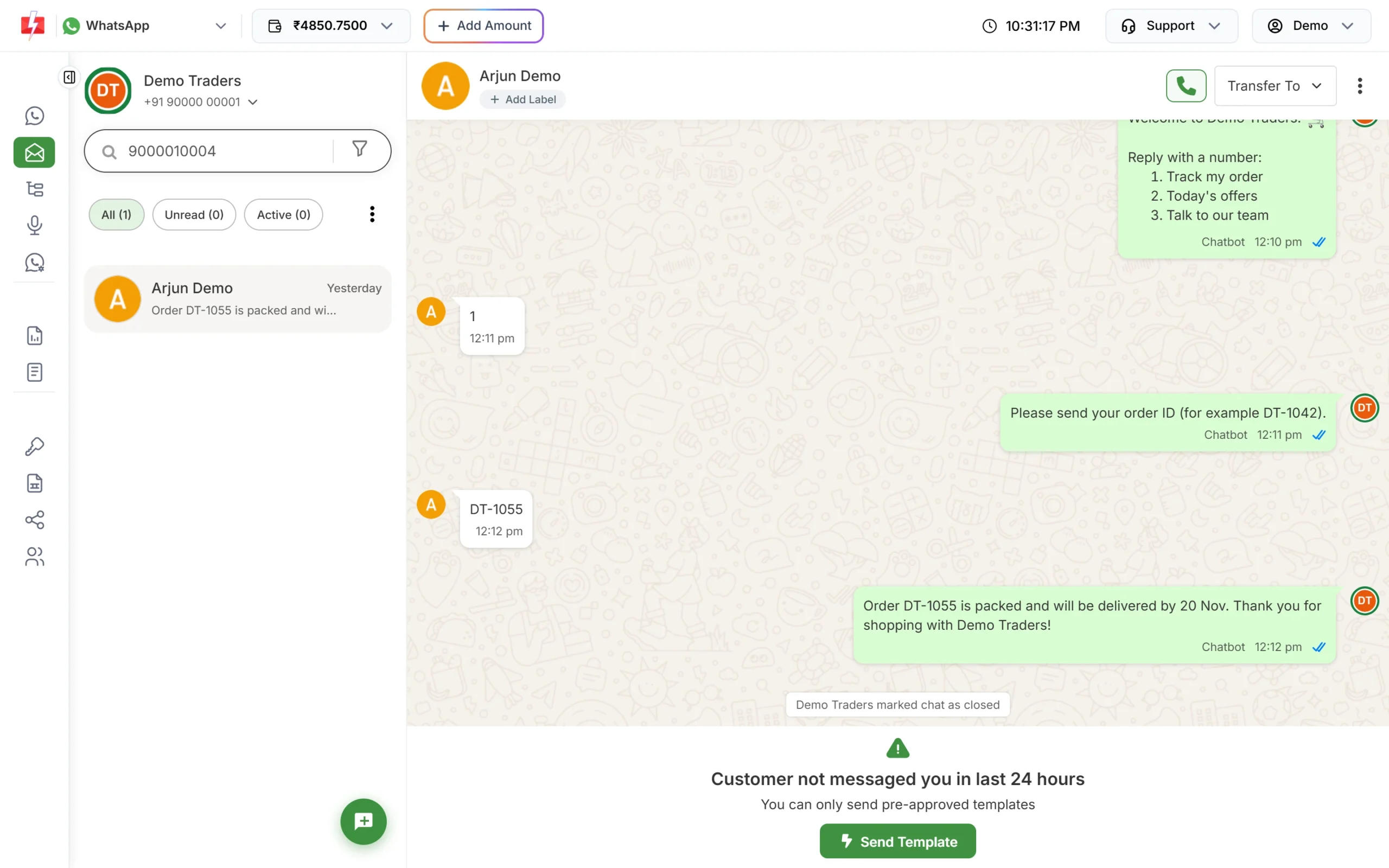
Outside the 24-hour window, only templates can be sent. -
Chat freely after the customer replies
When the customer replies, a 24-hour window opens and your team can type normal messages, send files and voice notes. Each reply costs one session message.
Method 3: message many numbers at once without saving them
For more than a handful of customers, saving numbers one by one is not practical, and sending in bulk from the normal WhatsApp app can get your number banned. With the WhatsApp Business API you only need a list of numbers.
- Bulk WhatsApp in the panel: paste numbers in List, pick an Address Book group, or upload an Excel or CSV file. Then choose an approved template and send.
- From your website or software: call the Fast2SMS WhatsApp API with the template’s Message ID and the customer’s number. Your system never needs to save contacts on a phone.
curl -X POST "https://www.fast2sms.com/dev/whatsapp" \
  -H "authorization: YOUR_API_KEY" \
  -H "Content-Type: application/json" \
  -d '{"message_id":"20005","numbers":"9999999999","variables_values":"1499"}'
Replace YOUR_API_KEY with the key from API Key in the panel and 20005 with the Message ID shown on your template card in WhatsApp Manager > Templates.
What it costs
A wa.me link and the WhatsApp app are free. On the WhatsApp Business API through Fast2SMS you pay per message, with no setup or monthly fee. At the time of writing: Marketing templates ₹0.95, Utility and Authentication templates ₹0.25, and session replies in Live Chat ₹0.13 per message. Incoming messages are free. See the WhatsApp pricing page for current rates.
Sending in bulk? For high WhatsApp volumes our team offers discounted rates. Talk to our team or see WhatsApp pricing.
Frequently asked questions
Can I send a WhatsApp message without saving the number on Android?
Yes. Open https://wa.me/ followed by the country code and number (for example https://wa.me/919876543210) in Chrome. WhatsApp opens the chat and the number is not saved.
Does this work on iPhone?
Yes. Type the same wa.me link in Safari and it opens the chat in WhatsApp.
Will the other person know I did not save their number?
They see your message like any other. Saving or not saving a number only changes your own contact list.
Why does the wa.me link not open the chat?
Usually the format is wrong (a +, a 0 or a missing country code) or the number does not use WhatsApp. Write it as 91 followed by the 10-digit number.
Can I send messages to many people without saving their numbers?
Not safely from the normal app. Use the WhatsApp Business API, where you upload a number list and send an approved template. Fast2SMS Bulk WhatsApp does this from the panel.
Can a business send a normal text to a new number?
Only after the customer messages you. The first message to someone who has not written to you in the last 24 hours must be an approved template.
Can I add a ready message to a WhatsApp link?
Yes. Add ?text= and your message after the number, with %20 in place of each space.