
You can send OTPs on WhatsApp with Fast2SMS Smart OTP using the same API you use for SMS OTPs. You need a connected WhatsApp Business number and an approved Authentication template. This guide explains the three WhatsApp OTP button types (copy code, one-tap and zero-tap), how to set up a WhatsApp OTP in the panel, how to add an SMS fallback for users who are not on WhatsApp, and how to fix common problems.
Why send OTP on WhatsApp
- No DLT needed for WhatsApp. DLT rules are for SMS. A WhatsApp OTP needs an approved WhatsApp template instead.
- The code is easy to use. WhatsApp shows a Copy code or Autofill button, so the user does not have to read and type six digits.
- You can see when it is read. WhatsApp OTPs can show Read in the OTP report, not only Delivered.
- SMS can cover the rest. Not every user has WhatsApp on that number. Add an SMS fallback and a failed WhatsApp OTP is sent again by SMS.
Copy code vs one-tap vs zero-tap
WhatsApp Authentication templates come with one of three ways to deliver the code to your app. You pick it when you create the template in WhatsApp Manager.
| Copy code | One-tap auto-fill | Zero-tap auto-fill | |
|---|---|---|---|
| What the user does | Taps Copy code and pastes it into your site or app | Taps Autofill, and your Android app opens with the code filled in | Nothing. Your Android app reads the code on its own |
| Works for | Websites and all apps, on any phone | Your Android app | Your Android app |
| What you need | Nothing extra | Your app’s package name and 11-character signature hash. Your app must start a handshake with WhatsApp before you send. | Package name, signature hash, and code in your app to receive the code. You must tick the consent box. |
| If it cannot work | Not applicable | WhatsApp shows a Copy code button instead | WhatsApp falls back to auto-fill or copy code |
Pick Copy code for website logins and checkout. Pick one-tap only if you have an Android app and your developer has added the WhatsApp handshake. On iPhones, WhatsApp shows the copy code button. According to WhatsApp’s developer docs at the time of writing, iOS 26 and later can also suggest the code on the keyboard from the notification.
Before you start
- A WhatsApp Business number connected in WhatsApp Manager, with the status connected.
- Wallet balance. Each WhatsApp OTP is charged at the WhatsApp rate for the template category. See the WhatsApp pricing page.
- For an SMS fallback: an approved DLT entity, sender and OTP template in DLT Manager.
Set up WhatsApp OTP step by step
-
Create an Authentication template
Open the WhatsApp app, then WhatsApp Manager, then Templates, and create a template. Choose Authentication as the type, give it a name and pick the language. Under CODE DELIVERY SETUP choose Zero-tap auto-fill, One-tap auto-fill or Copy code. For the two auto-fill types, fill Package name and App signature hash under APP SETUP. You can add up to 5 apps.
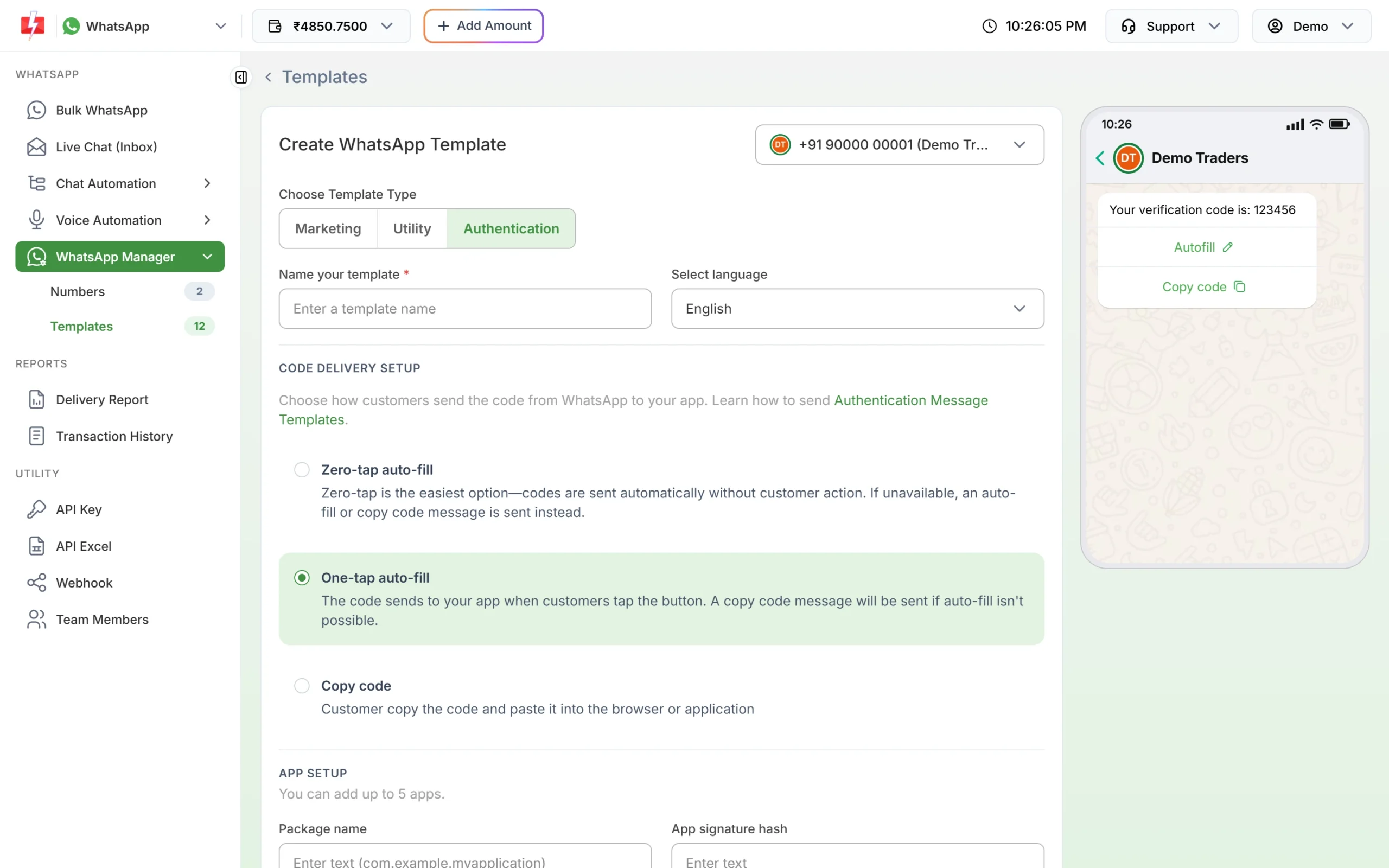
Authentication templates have fixed text. You choose how the code reaches the user. WhatsApp sets the message text of an Authentication template, for example “123456 is your verification code.” You cannot write your own text. You can tick Add security recommendation and Add expiry time for the code (1 to 15 minutes in the panel). You can also set a message validity period from 30 seconds to 15 minutes, so an old OTP is not delivered late.
-
Wait for approval
Submit the template and wait until its card shows APPROVED. Only approved templates can be used for Smart OTP.
-
Create the Smart OTP template on WhatsApp
Switch to Smart OTP, open OTP Template List and click Add OTP Template. Click the WhatsApp Channel tab. Choose your number in Select WhatsApp Business Number, then your template in Select WhatsApp Template (Authentication/Utility). Only approved Authentication and Utility templates on that number are listed. Marketing templates never appear.
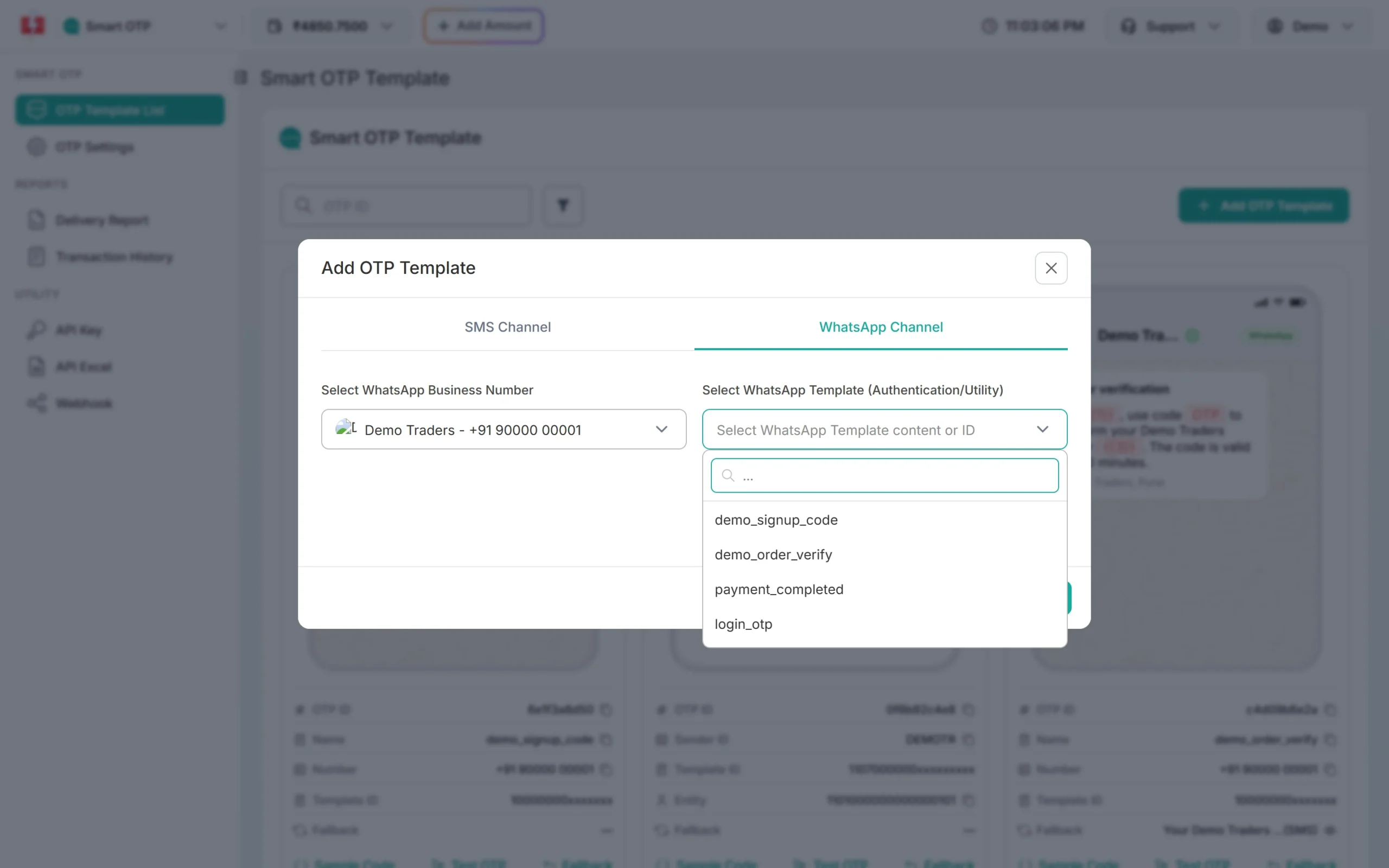
Pick the approved template that carries the code. -
Choose the OTP variable and add an SMS fallback
Check the preview and click the variable button that holds the code. Then tick SET FALLBACK TEMPLATE. The fallback channel is SMS: choose Select Fallback Entity, Select Fallback Sender, the DLT template and its OTP variable. Click Assign OTP Template. You see “WhatsApp OTP Template created successfully” and get a new OTP ID.
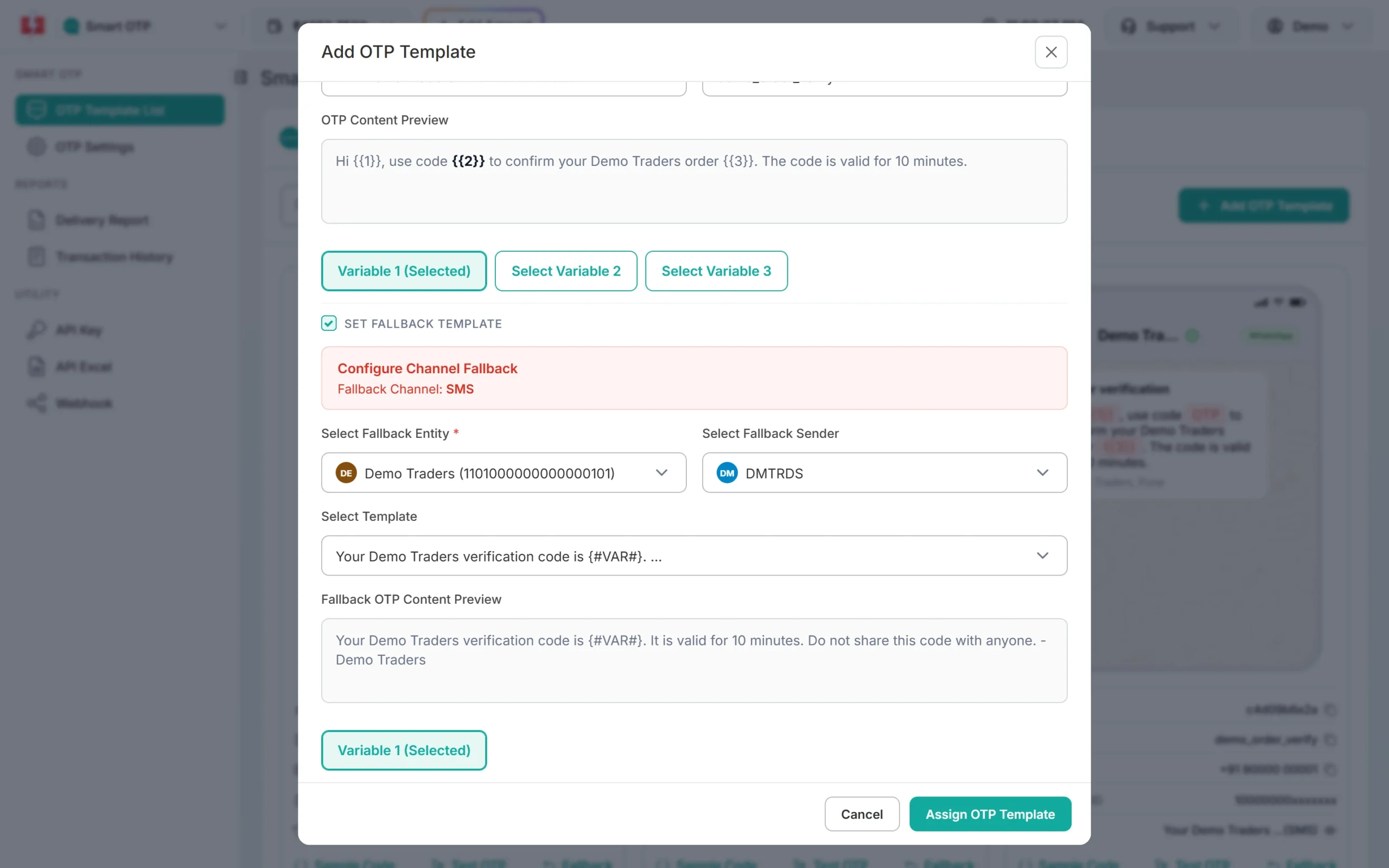
A WhatsApp OTP with an SMS fallback. -
Send the OTP with the API
Use the same Send OTP call as for SMS. Only the OTP ID decides the channel.
curl -X POST "https://www.fast2sms.com/dev/otp/send" \
  -H "authorization: YOUR_API_KEY" \
  -H "Content-Type: application/json" \
  -d '{"mobile":"9999999999","otp_id":"YOUR_WHATSAPP_OTP_ID","otp_expiry":10}'
Send the 10-digit Indian number. Verify works the same way: call
/dev/otp/verifywith the mobile number and the code. -
Check delivery in the OTP report
Open Delivery Report in Smart OTP. WhatsApp rows have a WhatsApp badge and can show Sent, Delivered, Read or Failed. Click a row to see the message preview with the code hidden as xxxx.
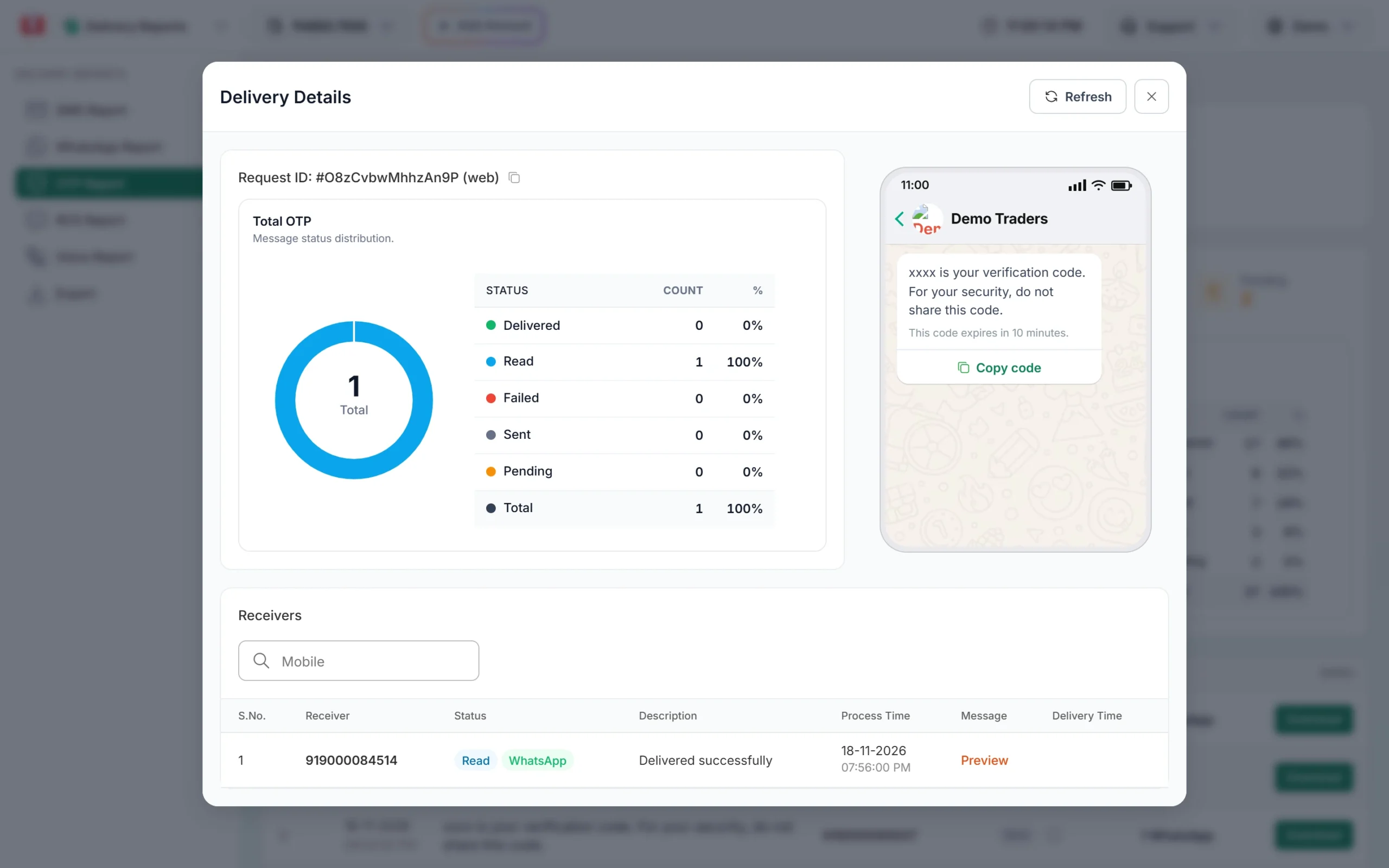
A WhatsApp OTP that the user has read.
How the SMS fallback works
If the WhatsApp OTP is reported as failed within 120 seconds of sending, Fast2SMS sends the same code once by SMS. The user can type either message’s code, because it is the same code. The fallback SMS is charged as its own message, and it is skipped if your wallet balance is too low. In the OTP report you see two receiver rows under one request ID, one with a WhatsApp badge and one with an SMS badge.
It also works the other way round. An SMS OTP template can have a WhatsApp fallback.
Common problems and fixes
The user is not on WhatsApp
The WhatsApp message fails. The report shows the reason from WhatsApp, for example “Message Undeliverable (Error: 131026)”. This also happens when the user has an old WhatsApp version or has not accepted WhatsApp’s latest terms. Add an SMS fallback so these users still get the code.
My template does not appear in the Smart OTP list
It must be APPROVED, in the Authentication or Utility category, and on the WhatsApp number you chose. Marketing templates are never listed.
“WhatsApp Business Number is not active or connected”
The number is not connected. Open WhatsApp Manager, check Numbers and reconnect it. A WhatsApp fallback is also skipped while the number is not connected.
“WhatsApp template not found for this OTP template”
The WhatsApp template was deleted after you made the Smart OTP template. Create a new template, get it approved and make a new Smart OTP template.
The code shows on the phone but not on WhatsApp Web
WhatsApp sends authentication messages only to the user’s main phone. Linked devices such as WhatsApp Web get a masked notice instead. Ask the user to check WhatsApp on the phone.
Autofill does not work
One-tap and zero-tap need your Android app’s correct package name and signature hash in the template, and your app must start the handshake with WhatsApp shortly before you send. If not, the user sees a Copy code button instead.
Frequently asked questions
Do I need DLT registration for WhatsApp OTP?
No. DLT is for SMS. You need an approved WhatsApp template and a connected number. You need DLT only if you add an SMS fallback.
Can I use a Utility template for OTP?
Smart OTP lists both Authentication and Utility templates. For login and signup codes, use Authentication, the category WhatsApp made for one-time codes. A Utility template suits codes tied to an order, such as an order confirmation code.
Which is better, copy code or one-tap?
For websites, copy code. For an Android app, one-tap gives a smoother login, but it needs work in your app. Many businesses start with copy code.
How much does a WhatsApp OTP cost?
It is charged at your WhatsApp Authentication or Utility rate, depending on the template. See current rates on the WhatsApp pricing page. The SMS fallback, when used, is charged separately.
Can I write my own text in a WhatsApp OTP?
Not in an Authentication template. WhatsApp fixes the text. You can only add the security line and the expiry line.
Can I send WhatsApp OTPs to numbers outside India?
The Smart OTP API takes 10-digit Indian mobile numbers.
Is the Verify OTP call different for WhatsApp?
No. Verify needs only the mobile number and the code, whatever channel delivered it.